
Choosing the best heavy equipment scanner is more complicated than picking the tool with the longest feature list. Construction machinery, agricultural equipment, diesel trucks, and mixed fleets can use different connectors, communication protocols, and manufacturer-specific functions, so compatibility matters as much as code-reading ability.
My first choice is ANCEL HD3600 Heavy Equipment Diagnostic Tool. Its support for Caterpillar, John Deere, Komatsu, Volvo, Bobcat, Yanmar, Case, and other equipment makes it a strong fit for owners who work across several brands.
My second choice is ANCEL NEW HD3600 Heavy Equipment Diagnostic Tool Heavy Duty Truck. It can scan multiple systems, display live data, and support selected forced-regeneration functions while remaining practical for shops, farms, and fleet work.
My third choice is ANCEL HD430 Heavy Duty Truck Scanner DPF Reset. ANCEL HD430 Heavy Duty Truck Scanner DPF Reset earns third place because it offers strong truck coverage, multiple diesel connectors, and a more established customer-feedback record. Its Cummins and Caterpillar DPF support is especially useful, although its regeneration coverage is narrower than the first two options.
This guide compares all five scanners by compatibility, diagnostic depth, DPF capability, connectors, update policy, and practical ownership considerations. You will also learn how to verify machine coverage, avoid common setup mistakes, and choose a tool that fits the equipment actually in your yard or fleet.
Best Heavy Equipment Scanner
I selected these products based on their relevance to heavy equipment and diesel diagnostics, the usefulness of their stated functions, connector and protocol coverage, available customer-feedback evidence, and brand variety where practical. The ranking favors tools that can do more than clear a basic engine code, while still recognizing important limits such as supported-model restrictions and uneven update or warranty details.
| # | Image | Product | Price on Amazon |
|---|---|---|---|
| 1 |  |
ANCEL HD3600 Heavy Equipment Diagnostic Tool | Check Price |
| 2 |  |
ANCEL NEW HD3600 Heavy Equipment Diagnostic Tool Heavy Duty Truck | Check Price |
| 3 | 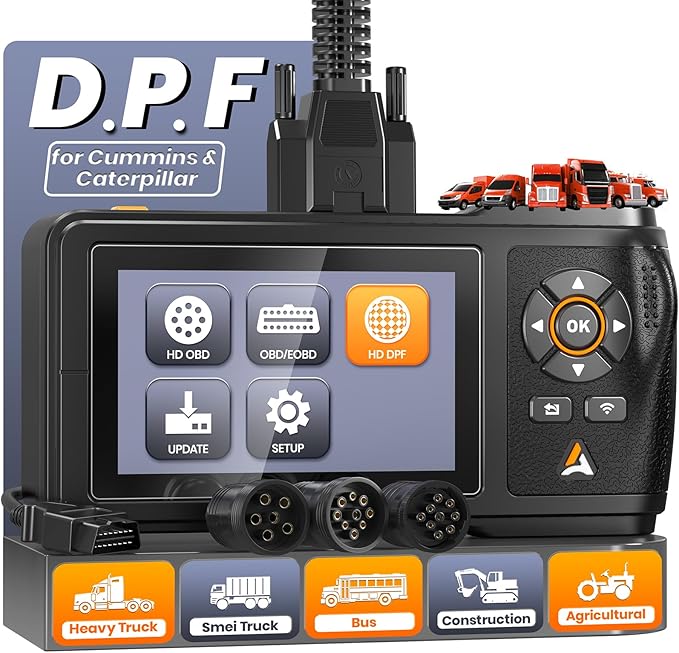 |
ANCEL HD430 Heavy Duty Truck Scanner DPF Reset | Check Price |
| 4 | 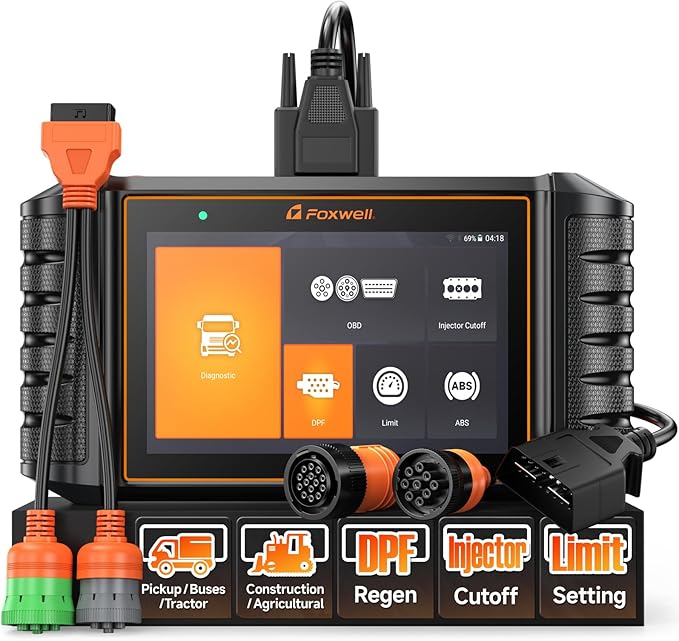 |
FOXWELL HD500 Heavy Duty Truck Scanner Diesel Scanner | Check Price |
| 5 |  |
LAUNCH X431 PRO3S+ Smartlink HD Heavy Duty Truck Scanner | Check Price |
ANCEL HD3600 Heavy Equipment Diagnostic Tool
The ANCEL HD3600 stands out as the most balanced choice for construction and agricultural machinery. It supports standard and manufacturer-specific diesel protocols and works with major equipment brands including Caterpillar, Komatsu, John Deere, Volvo, Hitachi, Bobcat, Yanmar, and Case. That breadth matters when one scanner must serve several machines rather than a single truck.
Its full-system capability goes beyond engine fault codes. The tool can read vehicle information, retrieve and clear diagnostic trouble codes, and display live data on equipment using SAE J1939, SAE J1708, and ISO 27145-4. It also supports standard OBDII and some passenger-vehicle protocols, giving mixed-use owners more flexibility.
DPF support is a major reason it ranks first. On selected Caterpillar, John Deere, Volvo, Komatsu, and Bobcat equipment, the scanner can perform DPF resets and forced regeneration, along with soot-ratio and ash-ratio resets. These functions can help reduce unnecessary downtime, but compatibility should be confirmed by exact make, model, and year before purchase.
The 5-inch Android tablet offers one-click activation, voltage checking, screenshots, feedback, and printable reports. Lifetime updates without ongoing update charges are also attractive for a fleet or repair shop. The one-year warranty and older Android 5.1 platform are less impressive than some newer hardware, so this is strongest as a practical diagnostic device rather than a premium tablet.
Pros
- Broad construction and agricultural equipment coverage.
- Full-system scans, live data, and manufacturer-specific diagnostics.
- Useful DPF regeneration and reset functions on supported brands.
- Lifetime updates with no stated recurring update cost.
- Report creation and printing support.
Cons
- DPF functions vary by make, model, and year.
- Uses an older Android 5.1 tablet platform.
- Only a one-year warranty is stated in the supplied information.
My Opinion
The HD3600 is the strongest all-around pick when construction machinery coverage is more important than advanced OEM programming. Verify the exact machine before ordering, keep the software updated every one or two months as suggested, and treat the DPF functions as model-dependent rather than universal.
ANCEL NEW HD3600 Heavy Equipment Diagnostic Tool Heavy Duty Truck
The newer ANCEL HD3600 takes a similar broad-use approach but adds a particularly helpful visual feature: topology mapping. Instead of viewing a complicated machine as a long list of modules, the operator can see how control units connect. That can make it easier to decide where to begin when several systems report faults at once.
This scanner is aimed at a wide audience, including mechanics, fleet teams, owner-operators, farmers, and construction-equipment owners. It can scan engine, transmission, ABS, brake, fuel, and other supported systems, while live data helps users watch operating values instead of relying only on stored fault codes.
Selected models also support DPF forced regeneration and resets. The supplied information specifically notes that Cummins DPF functions apply only to heavy machinery, so buyers should not assume the same functions work on every Cummins truck or vehicle. The broad compatibility language covering Caterpillar, John Deere, Komatsu, Volvo, Bobcat, and other brands is useful, but exact machine verification remains essential.
Free lifetime Wi-Fi updates and offline diagnostic operation are practical advantages at a jobsite or farm where connectivity may be unreliable. Vehicle power can keep the tool running in difficult conditions. The main drawback is that this listing has only one customer rating in the supplied data, so there is much less feedback evidence than for the HD430 or FOXWELL HD500.
Pros
- Topology mapping can simplify multi-module troubleshooting.
- Full-system scans and live data for supported equipment.
- Free updates for life and offline diagnostic operation.
- Broad construction and agricultural machinery coverage.
- Useful for shops, farms, fleets, and owner-operators.
Cons
- Very limited customer-feedback history in the supplied data.
- DPF functions are restricted to selected models.
- Cummins DPF capability is specifically limited to heavy machinery.
My Opinion
This is an appealing alternative to the first-place model for users who value a clearer diagnostic workflow. Buy it when topology mapping and offline use matter, but confirm compatibility in writing for the exact machine and do not use its single available rating as strong proof of long-term ownership performance.
ANCEL HD430 Heavy Duty Truck Scanner DPF Reset
The ANCEL HD430 is a truck-focused scanner with useful coverage for both 12V and 24V systems. Its included CAT-9, diesel six-pin, diesel nine-pin, and OBDII 16-pin connections make it easier to approach common truck and equipment configurations without immediately buying extra adapters.
It supports major protocols such as SAE J1939, SAE J1708, SAE J1850, ISO 14230-4, ISO 9141-2, ISO 15765-4, and ISO 27145-4. For a diesel truck owner, that combination provides a solid foundation for engine, transmission, ABS, fuel-system, and other supported-system diagnostics. Complete scans, faster scans, live data, ECU information, freeze-frame data, I/M readiness, and onboard monitor tests add useful depth for mixed vehicle ownership.
DPF regeneration and reset functions are specifically provided for Cummins and Caterpillar engines. That focus makes the HD430 a reasonable match for fleets built around those powerplants, but it is not the broadest machinery-specific DPF choice in this comparison. The product also supports Detroit and Paccar engines for diesel diagnostics, though buyers should distinguish general code coverage from every available service function.
A 4.3-inch display, 8 GB memory, 8 GB TF storage, and 2.4 GHz Wi-Fi keep the tool compact and practical. Lifetime free updates, technical support, a 30-day return or exchange period, and a three-year warranty are notable ownership advantages in the supplied information. The smaller display may be less comfortable for dense live-data screens than a larger tablet.
Pros
- Works with 12V and 24V truck systems.
- Includes several useful diesel and OBDII connectors.
- Strong Cummins and Caterpillar DPF focus.
- Supports multiple systems, live data, and freeze-frame information.
- Lifetime updates and a stated three-year warranty.
Cons
- DPF regeneration coverage is narrower than the HD3600 models.
- Smaller 4.3-inch screen may be less convenient for detailed data.
- Exact function availability still depends on engine and vehicle coverage.
My Opinion
The HD430 is a sensible truck-centered choice for buyers who want broad protocol support and dependable basic service functions without moving to a larger tablet platform. It is particularly compelling for Cummins and Caterpillar applications, provided the included connectors match the vehicles in the fleet.
FOXWELL HD500 Heavy Duty Truck Scanner Diesel Scanner
The FOXWELL HD500 brings several specialized functions that can be valuable when a basic code reader does not narrow down a problem. Along with all-system diagnostics and live data, it supports DPF regeneration, injector cutoff, speed-limit settings, and ABS bleeding on compatible vehicles. That collection makes it relevant to truck owners, fleets, repair shops, and some tractor or construction-equipment operators.
Injector cutoff is especially practical for investigating rough running, misfires, or suspected cylinder imbalance. By disabling injectors individually and comparing RPM response, a technician may be able to identify a weak cylinder more efficiently. It is a diagnostic aid, not a guarantee of a failed injector, and should only be used where the vehicle and engine support the function.
Live-data coverage includes values such as RPM, coolant temperature, fuel pressure, boost, DPF pressure, and NOx on supported systems. Speed-limit settings can be useful for fleet policies or used trucks with existing limits, but the supplied information warns that speed-limit reset is not available on all engines.
Coverage includes Cummins, Detroit, Caterpillar, PACCAR, International, Hino, and more. The package includes six-pin, nine-pin, CAT nine-pin, CAT 14-pin, and 16-pin adapters, which is a meaningful advantage for mixed diesel applications. Its lifetime updates are attractive, although every advanced function remains dependent on the exact vehicle, ECU, and software support.
Pros
- Injector cutoff can help isolate a weak cylinder.
- Supports DPF regeneration and related data on compatible vehicles.
- Includes several heavy-duty adapters.
- Offers live data across many important engine and aftertreatment values.
- Lifetime updates and broad diesel-brand coverage.
Cons
- Advanced service functions are vehicle-dependent.
- Speed-limit adjustment is not available on every engine.
- Its emphasis is more truck-oriented than construction-machinery-specific.
My Opinion
The HD500 is a strong choice when troubleshooting depth matters more than a simple equipment-code workflow. It suits a diesel shop or fleet that can take advantage of injector cutoff and multiple adapters, but a construction-only buyer should confirm machinery coverage before choosing it over the ANCEL HD3600.
LAUNCH X431 PRO3S+ Smartlink HD Heavy Duty Truck Scanner
The LAUNCH X431 PRO3S+ Smartlink HD is the most technology-heavy option in this group. It covers both 12V passenger vehicles and 24V heavy-duty vehicles, including trucks, buses, trailers, excavators, diesel engines, and pickups. That makes it attractive to a shop or owner who wants one platform for automotive and commercial work rather than a machine-only scanner.
Its strongest distinction is Smartlink C with J2534 protocol support. On compatible vehicles and with the appropriate online access, J2534 can help with direct data access, ECU software replacement, ECU coding, and software-controlled problems. Those capabilities are more advanced than ordinary code reading, but they also demand greater technical care and should not be treated as universal programming coverage.
The scanner supports all-system diagnostics, topology display, bidirectional functions, ECU coding, and more than 60 service resets. Listed examples include SAS, EPB, TPMS, DPF, oil, brake, ABS bleeding, and injector coding. CAN FD and DoIP support, along with 24 languages, further broaden its potential use in a professional environment.
This flexibility comes with a steeper learning curve and greater need to verify online requirements, vehicle coverage, and the limits of each service function. It may be excessive for a farm owner who mainly needs engine codes and basic DPF maintenance. For a mixed shop, however, its combined car, truck, and heavy-equipment scope is compelling.
Pros
- Supports both 12V vehicles and 24V heavy-duty applications.
- J2534 and Smartlink C add advanced ECU access potential.
- More than 60 listed service-reset functions.
- All-system diagnostics, topology display, and bidirectional controls.
- Supports CAN FD, DoIP, and 24 languages.
Cons
- Advanced programming functions may require online access and careful verification.
- Potentially more complex than necessary for basic equipment diagnosis.
- Exact coverage varies by vehicle and supported software functions.
My Opinion
The LAUNCH is the best fit for a professional or mixed-vehicle operation that can use ECU coding, bidirectional controls, and broad service coverage. It ranks fifth here because its advanced scope may be unnecessary for a machinery owner seeking straightforward diagnostics, not because it lacks capability.
How I Selected the Best Heavy Equipment Scanner Options
The selection starts with the real job a heavy-equipment scanner must perform: communicate with commercial or off-road control modules, identify faults, provide useful live data, and offer service functions when the machine supports them. A tool that only reads generic OBD codes is less useful for a fleet containing construction equipment, agricultural machinery, or 24V diesel trucks.
I gave extra weight to manufacturer and protocol coverage. SAE J1939 and J1708 support are important for many heavy-duty applications, while CAT, diesel six-pin, diesel nine-pin, CAT 14-pin, and OBDII connectors affect whether the tool can physically connect to the machine. Broader coverage does not guarantee every function, so the ranking also considers how clearly the supplied information describes model-dependent limits.
DPF regeneration, DPF resets, live data, full-system scanning, topology views, injector cutoff, and ECU-related functions were treated as different levels of usefulness rather than interchangeable claims. Customer-feedback volume also influenced confidence: the HD430 and HD500 have substantially more supplied ratings than the newer HD3600 listing, while the second-place HD3600 has only one rating and therefore carries more uncertainty.
Compatibility should be judged by the exact machine, engine, model year, connector, and required function—not simply by the equipment brand printed on the listing.
A scanner that reads a fault code can point toward a problem, but it does not prove that a sensor, injector, DPF, wiring harness, or control module is the final cause.
How to Choose a Heavy Equipment Diagnostic Scanner
Start with the machines you actually need to service. Write down each make, model, year, engine family, voltage, connector type, and the functions you need, such as code reading, live data, DPF regeneration, ABS diagnostics, injector testing, or ECU coding. Then compare that list with the scanner’s supported coverage rather than relying on a broad phrase such as “works with heavy equipment.”
- Match the scanner to exact equipment and engine applications.
- Confirm 12V or 24V operation and the required adapters.
- Separate basic code reading from advanced resets or programming.
- Check update terms, warranty length, return coverage, and support.
- Choose a display and workflow your operators can use comfortably.
Match the Connector Before Comparing Features
A scanner cannot help if it cannot physically connect to the diagnostic port. Heavy trucks and machinery may use six-pin, nine-pin, CAT-specific, 14-pin, or OBDII connections. Some packages include several adapters, while others may require additional accessories. Inspecting the machine’s port before ordering can prevent a frustrating return.
Understand Protocol Compatibility
J1939 and J1708 are common considerations in heavy-duty diagnostics, but protocol support alone does not promise access to every module. Manufacturer-specific data and service functions are controlled by software coverage. A scanner may communicate with an engine while lacking access to a transmission, ABS controller, aftertreatment module, or proprietary reset.
Decide Which Service Functions Matter
DPF regeneration is useful when soot loading or a derate condition is involved, but it should not replace inspection for failed sensors, exhaust leaks, wiring problems, or an engine issue that caused excessive soot. Injector cutoff can help compare cylinder response, while ECU coding and J2534 functions are better suited to users who understand programming risks and online procedures.
Consider the Work Environment
A jobsite scanner should be easy to power, navigate, and read in imperfect conditions. Offline operation can help where Wi-Fi is weak. A larger tablet may make topology diagrams and live-data lists easier to view, while a smaller handheld unit may be easier to carry between vehicles. Neither format is automatically better; the right choice depends on how often the tool moves from shop to machine.
Verify Compatibility Before Buying
Use the machine identification plate, engine label, and diagnostic-port location to gather accurate information. Include the brand, complete model, production year if known, engine manufacturer, voltage, and the exact task you want to perform. Sending those details to the seller or manufacturer is especially worthwhile when DPF regeneration, ash reset, or manufacturer-specific functions are essential.
Do not assume that two machines with the same engine share all diagnostic functions. Different chassis controllers, model years, emissions systems, and software versions can change what the scanner can access. A tool may read and clear codes on one machine but provide live data or forced regeneration on another.
A Simple Compatibility Checklist
- Record the equipment brand and complete model number.
- Identify the engine make and engine family.
- Confirm whether the system is 12V or 24V.
- Photograph or identify the diagnostic connector.
- List the required systems: engine, transmission, ABS, DPF, fuel, or others.
- Ask whether the desired reset or test is supported on that exact application.
Setting Up a Scanner for the First Time
Begin in a safe, well-ventilated location with the machine parked, secured, and prepared according to the equipment owner’s instructions. Read the scanner’s connection guidance before plugging it in. A stable vehicle battery is important because interrupted communication or low voltage can produce confusing results.
After connecting, enter the vehicle or equipment information carefully rather than selecting a similar model at random. Allow the scanner to identify the vehicle when automatic identification is available, then compare the displayed information with the machine in front of you. Run a preliminary scan before clearing anything so the original fault information remains available.
Update the software over Wi-Fi when appropriate, especially before diagnosing a newer model. If the tool supports report creation, save screenshots or reports with the machine number, date, and operating hours. Organized records make recurring faults easier to identify and can help a repair professional understand what happened before parts were replaced.
How to Use Live Data More Effectively
Live data is most useful when interpreted in context. A single value that appears unusual may be normal during startup, regeneration, a cold engine, or a loaded work cycle. Compare readings with engine temperature, operating conditions, fault codes, and the machine’s symptoms rather than treating one number as a final diagnosis.
Choose a small group of relevant parameters instead of displaying every available value. For an engine concern, RPM, coolant temperature, fuel pressure, boost, and related sensor readings may be more useful than a crowded screen. During an aftertreatment concern, DPF pressure, NOx information, soot-related data, and regeneration status may provide a clearer direction when supported.
Record the conditions under which the data was captured. Note whether the machine was idling, moving, under load, warming up, or attempting a regeneration. That context can prevent a normal temporary reading from being mistaken for a component failure.
Using DPF Regeneration Functions Carefully
Forced regeneration is not a routine substitute for maintenance. It raises exhaust temperatures and should only be performed when the machine, location, fuel level, and operating conditions meet the manufacturer’s requirements. Keep people, dry vegetation, and combustible materials away from the exhaust area, and follow the equipment manual’s safety instructions.
Before starting a regeneration, check for related fault codes and inspect for obvious exhaust, temperature-sensor, pressure-sensor, or wiring problems. If the underlying issue remains, a forced regeneration may fail or temporarily mask the symptom. Some scanners support DPF reset, soot-ratio reset, or ash-ratio reset only on selected brands and models, so never choose a nearby menu item simply because it appears available.
When a Regeneration Should Not Be the First Step
- The machine has an active sensor, temperature, or pressure fault.
- The DPF or exhaust system has visible damage.
- The machine is in an unsafe or poorly ventilated location.
- The manufacturer’s required temperature or fuel conditions are not met.
- The soot load is beyond the scanner’s supported service range.
Keeping Diagnostic Equipment Reliable
Store the scanner, cables, and adapters in a clean, dry case when they are not in use. Heavy-equipment work exposes connectors to dust, oil, moisture, and vibration, so inspect the cable ends before every connection. A damaged pin or loose adapter can cause communication failures that look like software problems.
Clean the exterior with a soft, slightly damp cloth rather than spraying liquid onto the device. Keep fluids away from ports and buttons. Do not pull the scanner by its cable, and avoid leaving the tablet or handheld unit in extreme heat inside a machine cab for extended periods.
Install software updates according to the product’s instructions and keep important diagnostic reports backed up. If a scanner offers offline use, that does not eliminate the value of periodic Wi-Fi updates because newer software may improve coverage or correct communication issues.
Troubleshooting Connection Problems
If the scanner cannot communicate, start with the simple checks. Confirm that the ignition or machine power state is correct, the connector is fully seated, and the adapter matches the port. Inspect for bent pins, corrosion, damaged insulation, or a blown diagnostic-port fuse.
Next, verify voltage and select the correct equipment category. A truck, excavator, and agricultural machine may require different menus even when they use related protocols. If automatic identification fails, manually enter the make and model when that option is available.
Repeated communication failure may indicate low battery voltage, a wiring issue, a controller problem, unsupported software, or an incorrect adapter. Save the error message and machine details before contacting technical support. Avoid repeatedly cycling functions such as coding or regeneration when the connection is unstable.
Common Mistakes to Avoid
Many scanner problems come from incorrect expectations rather than defective hardware. Buyers often confuse a broad brand list with complete system coverage, or clear codes before recording them. A careful process protects useful evidence and reduces unnecessary parts replacement.
- Do not buy based only on the equipment brand; verify the exact model and year.
- Do not assume every listed DPF function works on every engine.
- Do not clear codes before saving the original code and freeze-frame information.
- Do not perform forced regeneration in an unsafe location.
- Do not treat a code as proof that the named component has failed.
- Do not disconnect a scanner during ECU coding, updates, or other sensitive procedures.
- Do not use an adapter with damaged pins or signs of corrosion.
When a function is labeled “supported,” read that as supported on specified applications. Confirm the application before relying on it for a repair decision.
Who Should Choose Each Scanner?
The first ANCEL HD3600 is the best general fit for construction and agricultural equipment owners who need broad brand coverage and manufacturer-specific DPF functions. It makes the most sense for a mixed machinery yard where full-system data matters.
The newer ANCEL HD3600 is better for buyers who value topology mapping, offline work, and a modern troubleshooting flow. Its limited supplied customer-feedback history means cautious buyers should verify fit before committing.
The ANCEL HD430 suits truck-focused users, especially those working with Cummins and Caterpillar engines. It offers useful connectors, broad protocols, and a stronger supplied feedback base.
The FOXWELL HD500 is a good match for diesel shops and fleets that can use injector cutoff, multiple adapters, and detailed aftertreatment data. The LAUNCH X431 PRO3S+ is aimed at mixed professional operations that may need 12V and 24V coverage, ECU coding, bidirectional controls, and J2534-related capability.
FAQS About Best Heavy Equipment Scanner
What is the most important feature in a heavy-equipment scanner?
Exact compatibility is the most important feature. A scanner should support the equipment’s model, engine, voltage, connector, communication protocol, and required diagnostic function. Broad brand coverage is helpful, but it does not guarantee access to every system or reset.
Can these scanners perform DPF regeneration on any diesel machine?
No. DPF regeneration and reset functions are application-dependent. The supplied products identify specific coverage, such as Cummins and Caterpillar for the HD430 or selected construction brands for the HD3600. Confirm the exact machine before purchasing.
Is a 24V scanner required for heavy equipment?
Not every machine uses 24V, but many heavy trucks and equipment applications do. A scanner that supports both 12V and 24V systems provides more flexibility. Always confirm the machine’s electrical system and follow the scanner’s connection instructions.
Do heavy-equipment scanners read ABS and transmission faults?
Several products in this comparison support full-system diagnostics that can include ABS, transmission, brake, fuel, and other modules. Access varies by vehicle and software coverage, so engine code support should not be mistaken for guaranteed access to every controller.
Are lifetime updates really important?
They can be valuable when equipment changes frequently or newer software coverage is needed. Lifetime updates also reduce the risk of recurring subscription expenses, but buyers should still check how updates are delivered and whether the specific machine is covered after an update.
Can a scanner diagnose a failed injector by itself?
A scanner can provide codes, live data, and on supported vehicles an injector-cutoff test that helps compare cylinder response. It cannot replace electrical, fuel-system, compression, wiring, and mechanical checks needed to confirm the actual cause.
Final Thoughts
The best heavy equipment scanner for most mixed construction and agricultural applications is the ANCEL HD3600 Heavy Equipment Diagnostic Tool because of its broad coverage, full-system data, and selected DPF functions. The ANCEL NEW HD3600 Heavy Equipment Diagnostic Tool Heavy Duty Truck is my alternative for topology mapping and offline use, while the ANCEL HD430 Heavy Duty Truck Scanner DPF Reset remains a strong truck-focused choice for Cummins and Caterpillar applications.