Choosing the best tpms programming tool can be surprisingly difficult because TPMS service involves more than reading tire pressure. The right device must match your vehicle, sensor frequency, relearn method, and preferred replacement sensors without making a simple tire job unnecessarily complicated.
My first choice is Autel Maxitpms TS408 TPMS Programming Tool. It can program up to 16 Autel MX-Sensors at once, while its sensor data screen shows useful information such as ID, pressure, temperature, battery status, position, frequency, and OE part number.
My second choice is XTOOL TP150 TPMS Programming Tool. It supports OEM and universal sensors, four relearn modes, TPMS diagnostics, and XTOOL TS100 sensor programming, making it particularly practical for mixed DIY and professional use.
My third choice is ATEQ VT37 TPMS Sensor Activation and Programming Tool. ATEQ VT37 TPMS Sensor Activation and Programming Tool takes third place as a focused option with stated coverage for diagnosing and activating TPMS sensors, programming support for more than 20 aftermarket sensor brands, and relearn procedure guidance for domestic and European vehicles.
This guide compares all five tools by capability, compatibility, convenience, and limitations. You will also find buying criteria, setup advice, maintenance tips, common mistakes to avoid, and focused answers to questions that matter before purchasing a TPMS programmer.
Best Tpms Programming Tool
I selected these products based on how closely their stated functions match real TPMS programming and relearn needs, including sensor activation, frequency coverage, diagnostic information, and vehicle-specific procedures. Product details, available customer-feedback evidence, brand diversity, and clearly stated limitations also influenced the ranking, without claiming hands-on testing.
| # | Image | Product | Price on Amazon |
|---|---|---|---|
| 1 |  |
Autel Maxitpms TS408 TPMS Programming Tool | Check Price |
| 2 |  |
XTOOL TP150 TPMS Programming Tool | Check Price |
| 3 |  |
ATEQ VT37 TPMS Sensor Activation and Programming Tool | Check Price |
| 4 |  |
apex Tool Group GEARWRENCH Universal TPMS Programming Diagnostic Tool GWTPMS | Check Price |
| 5 | 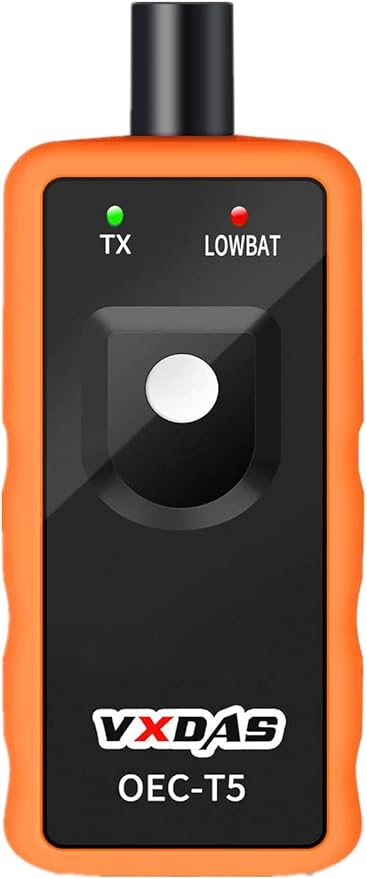 |
VXDAS TPMS Relearn | Check Price |
Autel Maxitpms TS408 TPMS Programming Tool
The Autel MaxiTPMS TS408 earns the top position by covering the main tasks a buyer usually expects from a dedicated TPMS device. It can activate OE and universal TPMS sensors and display sensor ID, tire pressure, temperature, battery status, wheel position, frequency, and OE part number. That information helps separate a dead sensor from a tire-pressure problem before parts are replaced.
For shops or serious DIY owners using Autel hardware, the three MX-Sensor programming methods are especially useful. Copy by Activation, Manual Create, and Auto Create let the user program up to 16 Autel MX-Sensors at one time. This can reduce repetitive data entry when several wheels are being serviced, although the important limitation is that the TS408 supports Autel MX-Sensors only.
The built-in stationary and automatic relearn procedures cover thousands of supported vehicles and make the process easier to follow. However, this model does not support OBD programming or OBD relearn, so buyers should confirm the exact vehicle procedure before ordering. Vehicle coverage and available functions vary by make, model, and year.
Lifetime free software updates are another meaningful ownership advantage. They help keep coverage current without subscription or update fees, while the listed technical support can help with registration, compatibility, startup, and updates.
Pros
- Activates OE and universal sensors and displays detailed sensor data.
- Programs up to 16 Autel MX-Sensors using three methods.
- Includes stationary and automatic relearn guidance.
- Lifetime free software updates are included.
Cons
- Programs Autel MX-Sensors only.
- Does not support OBD programming or OBD relearn.
- Compatibility varies by vehicle year, make, and model.
My Opinion
The TS408 is the best-balanced choice here for buyers who want a capable dedicated tool and are comfortable committing to the Autel MX-Sensor ecosystem. Confirming vehicle coverage and the absence of OBD functions is essential, but its information display, guided procedures, update policy, and batch programming make it the most complete pick in this group.
XTOOL TP150 TPMS Programming Tool
The XTOOL TP150 stands out when relearn flexibility matters more than a narrowly focused sensor workflow. It supports OEM and universal TPMS sensors and offers automatic, OBD, stationary, and copy-sensor relearn modes. That variety gives the buyer more ways to complete service after tire replacement, rotation, or sensor installation, though the correct mode still depends on the vehicle.
Its dual-frequency coverage of 315 and 433 MHz is intended to cover approximately 99% of US domestic, Asian, and European vehicle makes and models. That is useful for a household or small garage handling different vehicles. Still, a broad coverage statement is not a substitute for checking the exact year and trim before purchase, especially when a vehicle requires a particular relearn route.
The TP150 also activates compatible pre-programmed OEM and universal sensors and reports ID, pressure, temperature, battery status, and frequency. Its TPMS diagnostic functions can read and clear related trouble codes and reset the warning light, helping the owner identify whether the issue is low pressure, a weak sensor, or a communication problem.
Programming is tied to XTOOL TS100 sensors, and the listing specifically notes that the tool can only program certain supported sensors. Buyers should therefore distinguish between sensor activation, sensor relearning, and actually creating sensor data. Those are different tasks, and the TP150’s compatibility should be confirmed for the sensor brand being installed.
Pros
- Supports four relearn modes, including OBD relearn.
- Works with OEM and universal sensors.
- Reads sensor condition and TPMS-related diagnostic information.
- Supports 315 and 433 MHz sensor frequencies.
Cons
- Programming compatibility is tied to supported XTOOL TS100 sensors.
- Vehicle and sensor coverage must still be checked before purchase.
- More functions may mean a slightly steeper learning curve for beginners.
My Opinion
The TP150 is the better alternative for buyers who want a universal-leaning tool with OBD relearn available. Its four relearn choices are a real advantage, but do not assume that compatibility with an OEM sensor automatically means the device can program every aftermarket sensor.
ATEQ VT37 TPMS Sensor Activation and Programming Tool
The ATEQ VT37 takes a more specialized approach. It is stated to provide full vehicle coverage for diagnosing and activating TPMS sensors, while also programming more than 20 leading aftermarket sensor brands. That makes it attractive to independent service providers or vehicle owners who do not want to be locked into one replacement-sensor family.
Another strength is its role as a standalone reset tool for domestic and European vehicles with manual or automatic relearn procedures. The VT37 displays the relearn procedure needed to reset a TPMS system, which can be valuable for a beginner who knows the sensor is functioning but is unsure what the vehicle expects next.
Import vehicles may require a different setup. The supplied information says the VT37 can pair with a bi-directional scan tool to reset import vehicles, so it should not be treated as a complete replacement for every scan-tool function. That distinction matters for a buyer who expects one handheld device to perform every vehicle-side reset.
With a 4.5 rating from 219 customer responses in the supplied data, the VT37 has the highest listed rating among the five products, although its customer-feedback sample is smaller than the VXDAS or Autel totals. The product’s strongest fit is someone who values aftermarket sensor-brand coverage and clear relearn support more than batch programming or extensive standalone diagnostics.
Pros
- Stated full coverage for diagnosing and activating TPMS sensors.
- Programs more than 20 leading aftermarket sensor brands.
- Supports manual and automatic relearn for domestic and European vehicles.
- Displays the required relearn procedure.
Cons
- Import vehicles may need a separate bi-directional scan tool.
- Less information is supplied about batch programming and update policy.
- Exact vehicle and sensor compatibility should be confirmed first.
My Opinion
The VT37 is a sensible third choice for buyers who prioritize aftermarket sensor-brand flexibility and guided relearn information. Its limitation is important: import-vehicle resets may require another tool, so it fits best as a focused TPMS solution rather than an all-purpose diagnostic platform.
apex Tool Group GEARWRENCH Universal TPMS Programming Diagnostic Tool GWTPMS
The GEARWRENCH GWTPMS focuses on efficient sensor service and straightforward diagnostics. It works with both 315 MHz and 433 MHz sensors, giving it useful coverage across many common applications. It can also read and clear TPMS codes while displaying sensor ID, position, pressure, temperature, and battery status.
For a tire shop or a buyer replacing multiple sensors in one session, the ability to program up to eight sensors simultaneously can save time. The tool seamlessly programs GEARWRENCH-branded TPMS sensors, so its best value depends partly on whether those sensors are the ones the buyer intends to install.
The product is also positioned as a quick way to clear TPMS warning lights on nearly any vehicle. That broad wording should be treated carefully: a warning light may be caused by a sensor, incorrect pressure, a relearn requirement, or another system fault. A device that clears a code does not eliminate the underlying problem, and the correct vehicle procedure still matters.
Compared with the first three products, the supplied details provide less information about relearn modes, aftermarket sensor-brand breadth, or software updates. That does not make the GWTPMS unsuitable, but it makes pre-purchase compatibility checking more important for buyers working on several makes or using sensors outside the GEARWRENCH range.
Pros
- Supports both 315 MHz and 433 MHz sensors.
- Programs up to eight sensors simultaneously.
- Reads codes and useful sensor condition data.
- Works smoothly with GEARWRENCH-branded TPMS sensors.
Cons
- Best programming fit may be GEARWRENCH-branded sensors.
- Fewer relearn details are supplied than for some competing tools.
- Broad vehicle claims still require model-specific confirmation.
My Opinion
The GWTPMS makes the most sense for buyers already using GEARWRENCH sensors or needing a compact shop-oriented programmer with batch capacity. It is less compelling for someone seeking clearly documented multi-brand sensor programming and multiple relearn methods.
VXDAS TPMS Relearn
The VXDAS OEC-T5-2025 Edition is the simplest and most specialized tool in this comparison. It is intended for most GM vehicles from 2006 through 2024, including Chevrolet, Buick, GMC, Opel, and Cadillac models equipped with 315 or 433 MHz systems. Its narrow focus can be an advantage because a GM owner may not need the programming and diagnostic breadth of a professional multi-brand scanner.
Operation is straightforward: place the vehicle into TPMS Learn Mode, hold the tool near the tire sidewall and valve stem, then press the Learn button. The supplied information says activation generally takes one to two minutes, making it a convenient option for sensor replacement, tire changes, or removing a TPMS alert without visiting a dealer.
Compatibility limits are unusually important here. The tool is for original OEM sensors and is not suitable for heavy trucks with more than four tires or vehicles with an external TPMS system. It should also not be selected for a non-GM household simply because it supports two frequencies. Frequency alone does not establish vehicle compatibility.
The product has 23,434 customer responses in the supplied data and a 4.2 rating, giving it substantial customer-feedback volume. Its sensitive sensor chip and immersion-gold circuit-board process are presented as durability features, but buyers should still store it carefully and avoid treating a relearn tool as a general sensor programmer.
Pros
- Simple button-based operation for compatible GM vehicles.
- Supports 315 and 433 MHz original sensors.
- Broad stated GM application range from 2006 through 2024.
- Very large customer-feedback sample in the supplied data.
Cons
- Limited to compatible GM vehicles and original OEM sensors.
- Not suitable for heavy trucks with more than four tires.
- Does not provide the broader diagnostic and programming functions of the other tools.
My Opinion
The VXDAS is the value-oriented specialist pick for a compatible GM owner who only needs sensor relearning. It is not a substitute for a universal TPMS programmer, but its narrow purpose and simple procedure can be exactly right when the vehicle and sensor restrictions match.
How I Selected These Best Tpms Programming Tool Options
I gave the highest priority to practical TPMS tasks: activating sensors, programming supported replacements, completing vehicle relearns, reading sensor condition, and handling both common frequencies. I also separated genuine programming capability from simple relearn activation, because those terms are often confused when shoppers compare tools.
The ranking considers the supplied customer-feedback counts and ratings, but those numbers are only one part of the decision. A tool with a large customer base may be ideal for one vehicle group and wrong for another. Compatibility boundaries, sensor-brand restrictions, update policies, relearn methods, and the need for an additional scan tool all affect ownership value.
Before buying, match three things: the vehicle’s year and model, the replacement sensor brand, and the relearn method required by that vehicle. A high feature count cannot compensate for a compatibility mismatch.
Brand diversity was also intentional. Autel, XTOOL, ATEQ, GEARWRENCH, and VXDAS represent different ownership approaches, from broad professional-style tools to a GM-specific reset device. This gives shoppers a more useful range than five nearly identical programmers.
Sensor activation, sensor programming, and vehicle relearning are separate steps. Always confirm which of those steps your intended tool and replacement sensor actually support.
How to Choose the Best Tpms Programming Tool for Your Vehicle
Start with compatibility rather than the feature list. The right tool is the one that supports your vehicle’s year, make, model, frequency, sensor type, and required relearn procedure. Once those basics are confirmed, compare programming flexibility, diagnostic information, update costs, and ease of use.
- Confirm exact vehicle coverage instead of relying only on a general percentage.
- Check whether the tool programs your intended sensor brand or only activates it.
- Look for the relearn modes your vehicle requires, including OBD when applicable.
- Consider whether free updates or subscriptions affect long-term ownership cost.
- Choose a specialist tool only when its vehicle restrictions match your needs.
Vehicle and frequency compatibility
TPMS tools commonly work around 315 MHz and 433 MHz systems, but frequency is only one part of compatibility. Vehicle software, sensor protocol, model year, trim, and relearn design can all change the result. Use the manufacturer’s compatibility information or technical support before purchasing, especially for a newer vehicle or a mixed fleet.
Programming versus relearning
Programming creates or copies sensor data into a compatible programmable sensor. Relearning teaches the vehicle which sensor belongs at each wheel. Activation wakes the sensor and reads its information. Some tools handle all three tasks, while others mainly trigger original sensors and help the vehicle recognize them. If you are buying blank aftermarket sensors, prioritize confirmed programming support rather than a product described only as a reset tool.
Sensor ecosystem and replacement cost
A tool may be excellent but still restrictive if it programs only one brand of replacement sensor. The TS408, for example, is specifically tied to Autel MX-Sensors, while the VXDAS tool is intended for original OEM sensors on compatible GM vehicles. A multi-brand shop should examine sensor ecosystem limits before choosing a device that appears inexpensive at first.
Update policy and support
Vehicle coverage changes over time, so software updates can matter even when the tool works correctly today. Lifetime free updates are a notable benefit where supplied. Also consider the support path for registration, compatibility questions, and failed updates. A clear support option can save more time than a small difference in initial purchase cost.
How to Set Up a TPMS Programming Tool
Begin by identifying the vehicle and reading the tool’s instructions before touching a sensor. Check tire pressures against the vehicle’s door-jamb specification, ensure the tool has adequate battery power, and verify that the sensors being used are compatible with the selected make, model, and year.
- Turn on the tool and install any required software updates.
- Select the exact vehicle information rather than a similar model.
- Trigger each sensor near the valve stem and record the displayed data.
- Program or copy the replacement sensor only when the tool confirms support.
- Follow the displayed vehicle relearn procedure in the correct wheel order.
- Clear the warning only after the sensors communicate and pressures are correct.
Do not assume that a successful sensor trigger means the vehicle has learned it. The tool may have read the sensor perfectly while the car still needs stationary, automatic, or OBD relearning.
How to Use Sensor Data Effectively
Pressure, temperature, battery status, sensor ID, position, and frequency can help narrow down a fault. Compare readings across all wheels instead of reacting to one number in isolation. A missing ID may indicate a dead battery, an incompatible sensor, poor placement, or an incomplete activation attempt.
When a warning remains after the relearn, check actual tire pressure first. Then verify that every sensor transmitted, that the wheel positions were entered correctly if required, and that the installed sensors match the vehicle protocol. Clearing a diagnostic code without correcting the cause may only make the warning return.
TPMS Compatibility Checks Before Purchase
Write down the vehicle identification details and the replacement sensor information before selecting a tool. For a professional garage, make a list of the makes, years, sensor brands, and frequencies handled most often. For a single vehicle, the calculation is simpler: find a tool that explicitly supports that car and the exact sensor being installed.
- Vehicle make, model, year, and trim
- 315 MHz or 433 MHz operating frequency
- OEM, universal, or programmable aftermarket sensor
- Manual, automatic, stationary, or OBD relearn requirement
- Whether a separate bi-directional scan tool is needed
Maintaining and Storing a TPMS Tool
Keep the device away from moisture, excessive heat, and loose tools that could damage its screen or buttons. Wipe the exterior with a soft, slightly damp cloth rather than spraying cleaner directly onto the unit. Store cables and accessories together so the tool is ready when a sensor fault appears.
Install software updates according to the manufacturer’s instructions and keep the battery charged without leaving the device in an extreme-temperature vehicle. If the tool begins producing inconsistent results, first check vehicle selection, sensor position, battery level, and software status before assuming the sensor itself has failed.
Common TPMS Programming Mistakes to Avoid
Most failed relearns come from a mismatch between the selected vehicle, the sensor, and the procedure—not from a completely defective tool. Slow down at the identification stage and treat the warning light as a symptom that still needs diagnosis.
- Buying a GM-only relearn tool for a non-GM vehicle.
- Confusing sensor activation with programming a blank sensor.
- Assuming 315 or 433 MHz alone guarantees compatibility.
- Skipping the required tire-pressure adjustment before relearning.
- Choosing the wrong model year or trim in the tool menu.
- Using a sensor brand outside the programmer’s supported ecosystem.
- Clearing codes without checking battery condition or sensor communication.
- Expecting a TPMS tool to replace a separate bi-directional scan tool when the vehicle requires one.
Never install several sensors or change wheel positions without recording what was fitted where. Accurate notes make the final relearn much easier to troubleshoot.
When a Dedicated GM Relearn Tool Makes Sense
A dedicated device such as the VXDAS can be sensible when the vehicle is a compatible Chevrolet, Buick, GMC, Opel, or Cadillac and the task is simply relearning original sensors. It avoids paying for capabilities that a single-vehicle owner may never use.
That same specialization becomes a drawback for families with multiple brands, shops handling aftermarket programmable sensors, or owners who want sensor diagnostics and code reading. In those situations, a broader tool such as the Autel, XTOOL, ATEQ, or GEARWRENCH model is more appropriate, provided the exact compatibility is confirmed.
FAQS About Best Tpms Programming Tool
What should I check first when choosing a TPMS programmer?
Check the exact vehicle year, make, model, and trim, then confirm the sensor brand, frequency, and required relearn method. These details matter more than a general claim of broad coverage.
Can every TPMS reset tool program replacement sensors?
No. Some devices only activate original sensors and help the vehicle relearn them. Others program compatible aftermarket sensors, often within a specific brand ecosystem. Confirm programming support before buying blank or universal sensors.
Is a 315 MHz tool compatible with every 315 MHz vehicle?
No. Frequency does not establish complete compatibility. Vehicle software, sensor protocol, model year, and relearn procedure must also match.
Which option is best for a compatible GM vehicle?
The VXDAS OEC-T5-2025 Edition is the focused choice when the GM vehicle uses original sensors and falls within its stated application range. Choose a broader tool if you need multi-brand coverage, diagnostics, or aftermarket sensor programming.
Does OBD relearn matter when buying a TPMS tool?
It matters if the vehicle requires OBD relearning. The XTOOL TP150 lists OBD relearn among its four modes, while the Autel TS408 does not support OBD programming or OBD relearn. Confirm the vehicle procedure before choosing.
Are software updates important for a TPMS programmer?
They can be important because newer vehicles and sensor applications may require updated coverage. A lifetime free update policy, such as the one listed for the TS408, can make long-term ownership simpler.
Final Thoughts
The best tpms programming tool depends on the vehicle and sensor ecosystem, but the Autel MaxiTPMS TS408 is the strongest overall choice for broad TPMS service, guided relearn functions, detailed sensor data, and lifetime free updates. Choose the XTOOL TP150 if multiple relearn modes and broader OEM/universal flexibility matter most, or the ATEQ VT37 if aftermarket sensor-brand coverage is the priority. For compatible GM vehicles needing only a straightforward OEM sensor relearn, the VXDAS OEC-T5-2025 Edition remains the focused specialist pick.