Finding the best auto scanner under $500 is less about buying the most complicated device and more about matching diagnostic depth to your vehicle, repair habits, and comfort with technology. A basic code reader can handle a check-engine light, while a more capable scan tool may also reach ABS, airbag, transmission, and maintenance systems.
My first choice is BLCKTEC 460T OBD2 Scanner Car Code Reader Engine ABS SRS Transmission Diagnostic. AutoVIN, AutoScan, freeze-frame information, and the included RepairSolutions2 app can make a difficult warning light easier to understand.
My second choice is ANCEL AD310 Classic Enhanced Universal OBD II Scanner Car Engine Fault Code. Its compact, sturdy design supports major OBD-II protocols and quickly reads or clears emissions-related trouble codes without requiring a phone or subscription.
My third choice is BlueDriver OBD2 Scanner Bluetooth No Subscription ABS SRS TPMS. BlueDriver OBD2 Scanner Bluetooth No Subscription ABS SRS TPMS takes third place for its convenient phone-based operation and strong enhanced-code coverage. It can access several systems beyond the check-engine computer and adds technician-verified repair reports, live data, freeze frames, smog readiness, and Mode 6 information.
This comparison explains what each scanner can actually do, where its limitations matter, and which type of vehicle owner it suits. The buying guidance also covers compatibility, first-time setup, safe code clearing, maintenance, common mistakes, and how to choose diagnostic depth without paying for features you will not use.
Best Auto Scanner Under $500
I selected these products based on diagnostic coverage, service functions, ease of use, compatibility information, ownership details, customer-feedback evidence, and differences in operating style. The group includes simple handheld code readers, a Bluetooth phone-connected tool, and more advanced scanners so the comparison reflects several realistic buying situations rather than one narrow type of user.
| # | Image | Product | Price on Amazon |
|---|---|---|---|
| 1 | 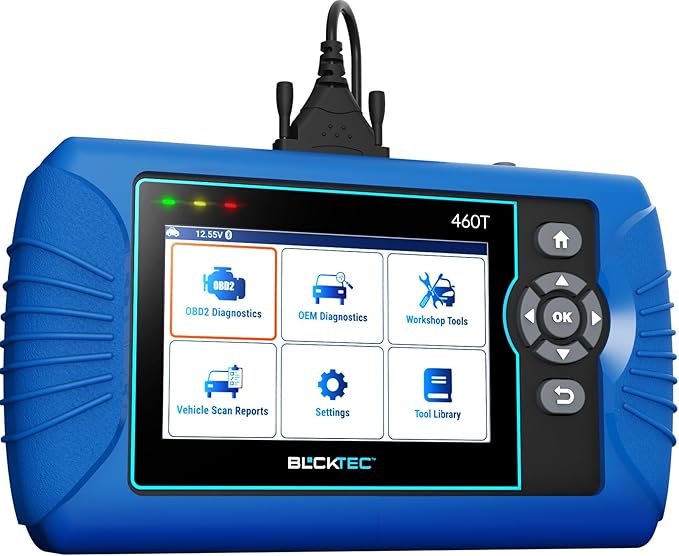 |
BLCKTEC 460T OBD2 Scanner Car Code Reader Engine ABS SRS Transmission Diagnostic | Check Price |
| 2 |  |
ANCEL AD310 Classic Enhanced Universal OBD II Scanner Car Engine Fault Code | Check Price |
| 3 |  |
BlueDriver OBD2 Scanner Bluetooth No Subscription ABS SRS TPMS | Check Price |
| 4 |  |
MOTOPOWER MP69033 Car OBD2 Scanner Code Reader Engine Fault Scanner CAN Diagnostic | Check Price |
| 5 |  |
TOPDON AD600S OBD2 Scanner Engine ABS SRS Transmission Diagnostic Tool | Check Price |
BLCKTEC 460T OBD2 Scanner Car Code Reader Engine ABS SRS Transmission Diagnostic
The BLCKTEC 460T is the most complete option in this group for a DIY owner who wants to go beyond a basic check-engine diagnosis. It can scan the engine, transmission, ABS, and SRS systems, while its live-data and freeze-frame functions provide more context than a single trouble-code description. That matters when a warning appears intermittently or when several sensors could be involved.
Its service-toolset is another major advantage. Oil maintenance, ABS bleeding, EPB, steering-angle, DPF, throttle-body, battery, TPMS, transmission, and other resets can help with routine ownership and selected repairs. These functions are not universal guarantees: vehicle software and model support determine what will work, so buyers should check compatibility before assuming a particular reset is available.
AutoVIN and automatic system scanning reduce the amount of menu navigation needed at the beginning of a diagnosis. Pairing the scanner with the RepairSolutions2 app can add verified repair information, parts guidance, maintenance schedules, technical service bulletin information, warranty details, and recall data. The scanner supports OBD2-compliant vehicles sold and registered in the United States and Canada from 1996 onward, with the supplied information noting support generally through 2023 models.
Pros
- Reads engine, transmission, ABS, and SRS systems.
- Offers 12 or more useful reset and maintenance functions.
- Includes AutoVIN, AutoScan, live data, and freeze-frame data.
- Provides free lifetime updates and optional RepairSolutions2 support.
Cons
- Not every function is available on every compatible vehicle.
- Scanner and app support is limited to the United States and Canada.
- Its deeper feature set may be unnecessary for simple code reading.
My Opinion
The 460T is the strongest all-around pick here for owners who expect to handle more than occasional engine warnings. Confirm the exact vehicle and desired service functions before buying, especially if ABS bleeding, DPF work, or battery registration is the main reason for the purchase.
ANCEL AD310 Classic Enhanced Universal OBD II Scanner Car Engine Fault Code
The ANCEL AD310 takes a deliberately simple approach. It connects directly to the vehicle, displays information on its own screen, and focuses on reading and clearing engine emissions codes. For someone who wants to investigate a check-engine light before visiting a repair shop, that narrow purpose can be a benefit rather than a weakness.
Its 2.5-foot cable gives the user some flexibility while sitting in the driver’s seat, and the compact handheld body is easy to keep in a glove box, backpack, or garage drawer. The thick cable insulation and lightweight construction also make it a practical travel tool. Since it draws power through the OBD-II connection, there is no separate battery or charger to remember.
The AD310 supports common OBD-II protocols, including CAN, KWP2000, ISO9141, and the J1850 formats listed in the supplied information. Compatibility covers many 1996-and-newer U.S. vehicles, 2000-and-newer European and Asian vehicles, and newer cars, light trucks, and SUVs that use the appropriate interface. The important limitation is system coverage: it is for emissions-related engine diagnostics, not ABS, SRS, transmission, or other non-engine modules.
Pros
- Simple standalone operation with no app or subscription.
- Supports major OBD-II communication protocols.
- Compact body and long, flexible cable suit travel use.
- Reads and clears engine emissions trouble codes quickly.
Cons
- Does not diagnose ABS, SRS, transmission, or other non-engine systems.
- Only works through an OBD-II interface.
- Clearing a code does not repair the underlying fault.
My Opinion
The AD310 is the sensible choice for a beginner who wants an inexpensive, uncomplicated engine-code reader. Choose something more advanced if the vehicle has an ABS or airbag warning, or if service resets and live information from multiple modules are important.
BlueDriver OBD2 Scanner Bluetooth No Subscription ABS SRS TPMS
BlueDriver turns a compatible phone or tablet into the display and control center for the scanner. The small Bluetooth sensor plugs into the vehicle’s OBD-II port, eliminating the cable that can get in the way of the driver’s seat. That arrangement is especially appealing to people who prefer a graphical mobile interface and want diagnostic information saved on a device they already use.
Its main advantage over basic readers is enhanced system access. Depending on the vehicle, BlueDriver can read and clear codes from the engine, ABS, SRS or airbag, TPMS, and transmission systems. It also provides live data, freeze frames, smog-readiness information, and Mode 6 results, giving a careful DIY owner more evidence to consider before replacing parts.
The app’s VIN-matched, technician-verified repair reports can help translate codes into possible causes and confirmed fixes. That does not replace proper testing, but it can reduce the guesswork that often follows a generic code definition. Coverage is strongest across the listed North American brands, and the supplied compatibility information applies to gas-powered vehicles from 1996 onward sold in the United States, Canada, and Mexico.
Pros
- Wireless Bluetooth connection avoids a dangling diagnostic cable.
- Reads more than basic engine codes on supported vehicles.
- Provides live data, freeze frames, Mode 6, and smog-readiness information.
- No subscription is required for the listed functionality.
Cons
- Requires a compatible phone or tablet for operation.
- Enhanced coverage varies by make, model, and system.
- Gas-vehicle compatibility does not automatically cover every powertrain.
My Opinion
BlueDriver is a strong fit for mobile-first buyers who want useful repair context without carrying a larger handheld scanner. Check the brand-specific coverage chart before purchase, particularly if ABS, SRS, TPMS, or transmission access is the main objective.
MOTOPOWER MP69033 Car OBD2 Scanner Code Reader Engine Fault Scanner CAN Diagnostic
The MOTOPOWER MP69033 sits between a bare-bones code reader and a more advanced service scanner. It uses a built-in 2.8-inch display, a six-button control layout, and power from the vehicle’s diagnostic connector. There is no need to pair a phone, install an app, or maintain a separate rechargeable battery, which keeps the basic workflow approachable.
For engine troubleshooting, it offers more information than simply displaying a code. The tool can show freeze-frame data, readiness status, vehicle information, data flow, a real-time curve, vehicle speed, calculated load, and engine coolant temperature. Its built-in code library may also help a beginner understand the general area connected with an engine warning, although the code itself is not proof that a particular part has failed.
The MP69033 supports nine listed protocols and works with many 1996-and-newer U.S. vehicles, 2000-and-newer European and Asian vehicles, and newer OBD-II/CAN domestic or imported vehicles. Six language choices add convenience for some households. Its most important limitation is clear: it cannot read or clear ABS, airbag, oil-service, or other systems outside the OBD-II engine-emissions scope.
Pros
- Large 2.8-inch screen with adjustable backlight and contrast.
- Includes freeze frame, readiness, live data, and code lookup functions.
- Uses vehicle power, so no charger or battery is needed.
- Supports several protocols and six display languages.
Cons
- Does not support ABS or airbag codes.
- Cannot reset oil-service or other non-OBD-II warning systems.
- Live data requires the engine to be running.
My Opinion
The MP69033 makes sense for owners who want a self-contained engine diagnostic tool with a clearer display and more data than a minimal reader. It is not the right purchase for anyone specifically seeking full-system diagnostics or maintenance resets.
TOPDON AD600S OBD2 Scanner Engine ABS SRS Transmission Diagnostic Tool
The TOPDON AD600S is aimed at buyers who want a touchscreen scanner with broader system access and a modern interface. It diagnoses the engine, ABS, transmission, and SRS systems, displays ECU information and live data, and supports all 10 OBD-II test modes. A 5-inch touchscreen, Android 11, 32GB of storage, and AutoVIN give it a more tablet-like operating experience than the simpler handheld readers here.
Nine everyday service functions cover oil, brake or EPB, battery, steering angle, DPF, TPMS, throttle or ETS, ABS bleeding, and injector coding. It also supports CAN-FD and FCA gateway access, along with coverage for more than 90 vehicle brands and many 12-volt light-duty vehicles from 1996 onward. Those capabilities can be valuable for a mixed-vehicle household or a serious home garage, but actual function availability still depends on the vehicle.
One ownership detail deserves attention. The scanner provides free lifetime software updates through Wi-Fi and has no recurring update fee according to the supplied information. After activation, it automatically unlocks a free 30-day trial of all 30 special services; afterward, it returns to the original nine services. Keeping the unit charged at least weekly during storage is also recommended to protect battery health.
Pros
- Four-system diagnostics cover engine, ABS, transmission, and SRS.
- Offers nine continuing service functions with free lifetime updates.
- Includes a 5-inch touchscreen, AutoVIN, storage, and report sharing.
- Supports CAN-FD and FCA gateway access on applicable vehicles.
Cons
- The full 30-service feature set is only available during a limited trial.
- Vehicle-specific coverage must be confirmed before purchase.
- Battery care matters during extended storage.
My Opinion
The AD600S is a compelling alternative to the first-place scanner for buyers who prefer a touchscreen and Wi-Fi updating. Its continuing nine-service package is useful, but shoppers should not purchase it expecting permanent access to all 30 special functions.
How I Selected These Auto Diagnostic Tools
The selection gives priority to what changes real ownership: the systems a scanner can reach, whether it needs a phone, how it receives power and updates, which service functions remain available, and how clearly compatibility limitations are stated. Customer-feedback volume and ratings were also considered as supporting evidence, not as a substitute for examining the actual capabilities.
BLCKTEC and TOPDON rank higher because they combine multiple-system diagnostics with maintenance functions and update support. BlueDriver earns a place through its wireless design and VIN-matched repair information. ANCEL and MOTOPOWER serve a different but important audience: people who primarily need engine and emissions information without paying for features outside their needs.
Selection takeaway: A scanner that reaches more modules is not automatically the best choice. The right tool is the one that covers the systems and service jobs your vehicle actually uses.
Compatibility was treated as a central buying factor. OBD-II support usually establishes a baseline for engine emissions diagnostics, but ABS, SRS, transmission, TPMS, and reset functions often vary by make, model, year, and market.
Important limitation: Never assume that a listed service function works on every compatible vehicle. Verify the exact vehicle and function before buying when a specific repair depends on it.
How to Choose the Best Scanner for Your Budget
Start with the warning lights and repair tasks you expect to handle. If you only want to identify an engine code, a simple wired reader can be the most sensible purchase. If you work on brakes, batteries, steering sensors, diesel emissions equipment, or multiple electronic modules, broader coverage becomes more valuable.
- Match the scanner to the vehicle’s year, market, fuel type, and communication systems.
- Decide whether engine-only or full-system access is necessary.
- Check whether the desired reset function is supported on the exact vehicle.
- Choose a standalone display or phone app based on your preferred workflow.
- Confirm update terms, trial periods, and any geographic restrictions.
Engine-only versus full-system diagnostics
Engine code readers focus mainly on emissions-related faults and check-engine warnings. They can be excellent for basic triage, but they usually cannot inspect an airbag light, wheel-speed fault, transmission module, or electronic parking brake. A full-system tool costs more in exchange for reaching additional control units and offering more useful information during complex repairs.
Service resets and special functions
Reset functions are valuable only when they match your maintenance routine. Oil reset and battery registration may be useful for many owners, while ABS bleeding, DPF regeneration, injector coding, or throttle relearn appeal to people doing more involved work. Read the fine print around temporary trials, because a scanner may demonstrate more functions initially than it keeps permanently.
Standalone scanner or phone-connected tool?
A standalone reader works without a phone, app permissions, or Bluetooth pairing. That can be reassuring in a roadside situation. A phone-connected tool may offer better graphs, searchable reports, and easier software updates, but the experience depends on the mobile device, operating system, and app support.
Check Compatibility Before Purchase
Vehicle compatibility is more complicated than the model year printed on a registration document. A tool may connect successfully for engine codes but lack access to a particular manufacturer module. Market restrictions also matter: several products in this comparison specify North American coverage, and BLCKTEC specifically limits its scanner and companion app to the United States and Canada.
What to verify
- Vehicle year, make, model, engine, and fuel type.
- Country where the vehicle was sold and registered.
- Whether the vehicle uses a standard OBD-II connector.
- Which control unit you need to diagnose.
- Whether the required reset or relearn is explicitly listed.
For a planned repair, search the manufacturer’s compatibility tool or coverage chart for the exact function, not merely the vehicle brand. If the product page says “most” vehicles or notes that functions vary, treat that as a reason to verify rather than a promise of universal support.
How to Set Up a New Auto Scanner
Setup is usually simple, but the order matters. Park safely, switch off unnecessary accessories, and locate the vehicle’s OBD-II port. Do not force the connector, and avoid using a scan tool while the vehicle is moving unless the procedure specifically requires live observation and can be performed safely.
- Plug the scanner into the OBD-II port with the ignition off unless the instructions say otherwise.
- Turn the ignition to the required position, usually the on position for an initial scan.
- Allow the tool to identify the vehicle or enter the requested details manually.
- Run a health check before clearing anything so the original information is preserved.
- For Bluetooth tools, install the correct app and pair the sensor as directed.
- Record codes, freeze-frame data, and warning-light conditions before beginning repairs.
For the MOTOPOWER MP69033, the supplied connection guidance says to plug it in, turn on the ignition, and press OK; the engine must be running to view live data. Phone-connected tools may require Bluetooth permissions and a stable app connection, while Wi-Fi-capable handhelds should be connected before attempting software updates.
How to Use Diagnostic Codes Safely
A diagnostic trouble code identifies a system or monitored condition, not necessarily a failed component. For example, a sensor-related code can result from wiring, connectors, vacuum leaks, low voltage, or another condition that affects the sensor’s reading. Treat the code as a starting point for inspection and testing.
Clear codes only after recording them
Clearing codes can turn off a warning temporarily, but it also removes useful information and may reset emissions monitors. Save the code number, freeze-frame details, mileage, and symptoms first. After repairs, clear the code if appropriate, then drive through the required conditions and confirm whether it returns.
Use live data thoughtfully
Live data is most useful when compared with symptoms, operating conditions, and the vehicle’s service information. Watch for values that change when the problem occurs rather than assuming that an unusual-looking number proves a part is defective. A graph or real-time curve can reveal an intermittent issue more clearly than a static reading.
Keeping a Scanner Updated and Ready
Update policies differ significantly. BLCKTEC and TOPDON list free lifetime updates, while BlueDriver receives its functionality through the mobile app. A simple reader such as the ANCEL AD310 or MOTOPOWER MP69033 does not rely on the same type of software-update workflow, but it still needs careful storage and a clean connector.
- Use a stable vehicle power source during scans and updates.
- Do not disconnect a device while firmware or software is being installed.
- Keep a Wi-Fi scanner charged, especially before a planned repair.
- Store the tool away from moisture, extreme heat, and loose tools.
- Protect the cable and connector from sharp bends or unnecessary pulling.
TOPDON specifically recommends charging the AD600S at least once a week during storage because prolonged deep discharge may prevent normal operation. For a wired reader, the main care concerns are physical: keep the cable from being pinched and avoid dropping the unit while it is connected under the dashboard.
Common Mistakes to Avoid
Most frustration comes from expecting a code reader to perform a repair or assuming that an OBD-II connector guarantees full access to every system. A little preparation prevents many incorrect conclusions.
- Buying an engine-only reader for an ABS, SRS, or transmission warning.
- Assuming every listed reset works on every vehicle.
- Clearing codes before saving freeze-frame and fault information.
- Replacing a part solely because its name appears in a code description.
- Ignoring battery voltage, loose connectors, and damaged wiring.
- Forgetting that a temporary special-function trial may expire.
- Using a regional product outside its stated country coverage.
Do not confuse “code cleared” with “problem fixed.” A warning that returns after a drive cycle still requires diagnosis.
When a Basic Code Reader Is Enough
A basic reader is usually enough when the goal is to identify an emissions-related check-engine code, check readiness monitors before emissions testing, or confirm whether a repair has changed the stored fault. The ANCEL AD310 and MOTOPOWER MP69033 are especially well suited to that role because they operate independently and focus on engine information.
Choose a broader scanner when the vehicle has multiple warning lights, when you maintain several makes, or when you expect to perform battery, brake, steering, DPF, throttle, or transmission-related work. Paying for system access you never use is wasteful, but buying a second scanner later can also cost more than selecting the appropriate coverage initially.
FAQS About Best Auto Scanner Under $500
What is the best auto scanner under $500 for full-system diagnostics?
The BLCKTEC 460T is the leading choice in this comparison because it covers engine, transmission, ABS, and SRS systems and adds numerous service functions. The TOPDON AD600S is a strong alternative for buyers who prefer a 5-inch touchscreen and Wi-Fi updates.
What is the best auto scanner under $500 for simple check-engine codes?
The ANCEL AD310 is the simplest fit for reading and clearing engine emissions codes without an app or subscription. The MOTOPOWER MP69033 adds a larger display, code lookup, freeze-frame information, and additional engine-data functions.
Can an auto scanner under $500 read ABS and airbag codes?
Some can, but not all. BLCKTEC 460T, BlueDriver, and TOPDON AD600S list ABS and SRS access, while ANCEL AD310 and MOTOPOWER MP69033 are limited to engine-related OBD-II diagnostics.
Do these scanners reset maintenance lights?
The BLCKTEC 460T and TOPDON AD600S provide several reset functions, and BlueDriver offers enhanced diagnostics depending on the vehicle. ANCEL AD310 and MOTOPOWER MP69033 do not provide the same broad service-reset coverage. Always verify the exact vehicle and function first.
Is a Bluetooth auto scanner better than a handheld model?
Neither format is universally better. Bluetooth tools are compact and can provide convenient mobile reports and graphs, while handheld scanners work without relying on a phone and may be easier to use during basic roadside diagnosis.
Can clearing a code damage a vehicle?
Clearing a stored code is not normally a mechanical repair, but it can erase diagnostic information and reset emissions monitors. Record the code and freeze-frame data first, and do not clear a warning simply to hide a recurring fault.
Final Thoughts
The BLCKTEC 460T is my top recommendation for broad diagnostics and service functions, while the ANCEL AD310 remains the better uncomplicated engine-code choice. BlueDriver is the most appealing phone-based option, and the TOPDON AD600S is a capable touchscreen alternative. For the best auto scanner under $500, choose based on required system coverage and verified vehicle compatibility rather than on feature count alone.