Choosing the best innova scan tool is less about buying the most complicated device and more about matching diagnostic depth to the problems you expect to solve. A basic code reader may be enough for emissions faults, while a home mechanic working on ABS, SRS, transmission, or electronic parking-brake systems needs much broader coverage.
My first choice is Innova 5610 OBD2 Bidirectional Scan Tool. It can display enhanced live data for engine, ABS, SRS, and transmission systems, while its fuel-pump and electronic parking-brake commands make it more capable than a simple code reader.
My second choice is Innova 3020RS OBD2 Check Engine Code Reader. Its all-in-one display, dedicated hotkeys, ABS coverage, emissions readiness information, and RepairSolutions2 app support make everyday diagnosis less intimidating.
My third choice is Innova 5410 All-System OBD2 Scanner Diagnostic Tool. Innova 5410 All-System OBD2 Scanner Diagnostic Tool takes third place for its useful middle ground between basic code reading and professional-style system access. It reads engine, ABS, SRS, and transmission faults, shows live sensor information, and connects with the RepairSolutions2 app without requiring a subscription.
The comparison and buying guidance below explain what each scanner can realistically do, where coverage may vary, and which type of vehicle owner each model suits best. You will also find setup advice, compatibility checks, common mistakes, maintenance tips, and answers to focused questions about choosing an Innova diagnostic tool.
Best Innova Scan Tool
I selected these products for their relevance to the search, breadth of supported diagnostic functions, ease-of-use features, and available customer-feedback evidence. The ranking also considers meaningful differences between basic code reading, all-system scanning, live data, reset procedures, and bidirectional control; no hands-on testing is claimed.
| # | Image | Product | Price on Amazon |
|---|---|---|---|
| 1 |  |
Innova 5610 OBD2 Bidirectional Scan Tool | Check Price |
| 2 | 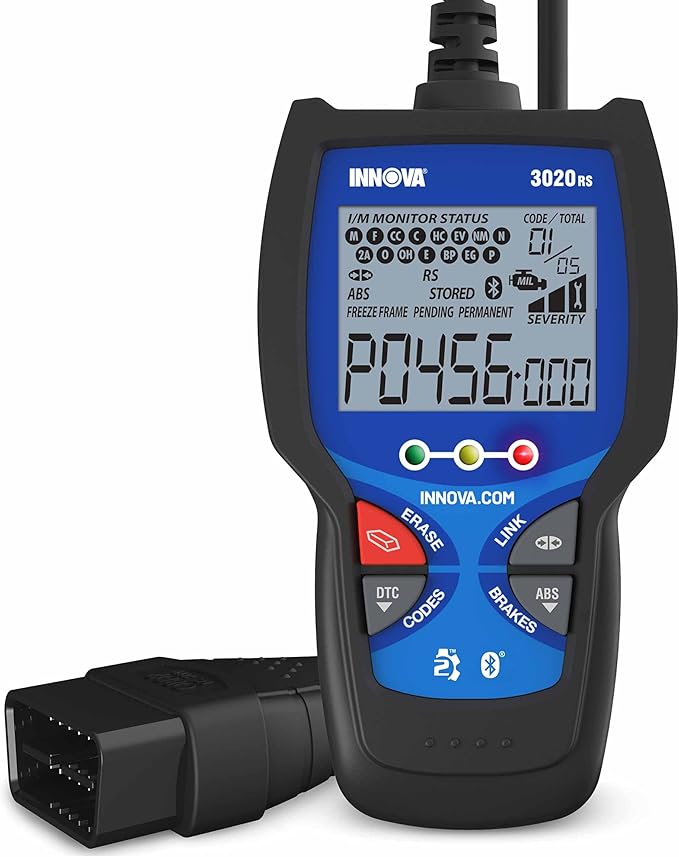 |
Innova 3020RS OBD2 Check Engine Code Reader | Check Price |
| 3 |  |
Innova 5410 All-System OBD2 Scanner Diagnostic Tool | Check Price |
| 4 |  |
Innova 5160RS OBD2 Bidirectional Scan Tool | Check Price |
| 5 |  |
Innova 5310 OBD2 Scanner | Check Price |
Innova 5610 OBD2 Bidirectional Scan Tool
The Innova 5610 is the strongest choice for a buyer who wants to move beyond reading and clearing check-engine codes. Its enhanced data stream can show live information from the engine, ABS, SRS, and transmission systems, giving a clearer picture of what a vehicle is doing when a fault appears intermittently or produces several related codes.
Its biggest advantage is bidirectional control. When supported by the vehicle, the scanner can command functions such as turning a fuel pump on or off or retracting an electronic parking brake. Those commands can help isolate a faulty component instead of relying only on stored trouble codes. Special reset and relearn procedures add further value for owners handling maintenance that might otherwise require a shop-level tool.
The 5610 supports most 1996–2023 OBD2 vehicles, with 2024 coverage noted as coming soon in the supplied information. Coverage and function availability still vary by make, model, and year, so checking Innova’s coverage tool before purchase is essential. English, Spanish, and French support make the interface more approachable, and free updates plus ASE-certified support reduce the worry of owning a complicated scanner.
Pros
- Bidirectional commands for supported vehicle functions.
- Enhanced live data for engine, ABS, SRS, and transmission systems.
- Special reset functions and free updates without subscription fees.
- RepairSolutions2 app support and US-based technical assistance.
Cons
- Advanced functions vary substantially by vehicle.
- More capability may be unnecessary for someone who only reads emissions codes.
- Coverage should be confirmed before purchase, especially for newer vehicles.
My Opinion
The 5610 earns the top position because it offers the most complete mix of diagnosis and active testing in this group. It is the sensible pick for serious DIY repairs, provided the buyer verifies compatibility and understands that bidirectional commands are not universal.
Innova 3020RS OBD2 Check Engine Code Reader
The Innova 3020RS is aimed at people who want quick answers without learning a complicated menu system. Its patented all-in-one display can show more than 20 pieces of information on one screen, and dedicated hotkeys reduce the amount of scrolling needed to reach common functions. That layout is particularly helpful for a first-time scanner owner.
This model reads and clears engine codes and adds ABS coverage, giving it more usefulness than an emissions-only reader. It can also show code severity, helping a driver decide whether a warning deserves immediate attention or can be investigated during scheduled maintenance. The emissions-readiness function is practical before a state smog inspection because it can indicate whether the vehicle is likely prepared for testing.
The companion RepairSolutions2 application adds verified fixes, part recommendations, maintenance schedules, and free technical service bulletins on compatible phones. That support can turn a generic code into a more actionable starting point, although app information should still be treated as guidance rather than proof that one particular part has failed. Compatibility is broad across foreign and domestic 1996-and-newer cars, light trucks, SUVs, and hybrids, but vehicle-specific functions should be confirmed.
Pros
- Simple display with dedicated hotkeys.
- Reads and clears engine codes and supports ABS diagnostics.
- Emissions-readiness information helps before a smog test.
- Mobile app provides fixes, maintenance information, and TSBs.
Cons
- Less suitable for advanced actuator testing or dealership-level procedures.
- App-based guidance may require a compatible phone and connection.
- Coverage details can differ between vehicle makes and years.
My Opinion
The 3020RS is the most approachable option here. It ranks second because it gives beginners useful engine, ABS, and emissions information without the complexity of a high-end bidirectional device, making it a strong fit for routine ownership and basic troubleshooting.
Innova 5410 All-System OBD2 Scanner Diagnostic Tool
The Innova 5410 occupies a useful middle position. It reads and clears trouble codes from the engine, ABS, SRS, transmission, and other supported systems, so it can investigate warning lights that a basic powertrain reader would miss. That broader network scan is valuable for owners of newer vehicles with multiple electronic modules.
Live data gives the user access to readings such as RPM, fuel trims, temperatures, oxygen-sensor performance, and battery voltage. These values can help establish whether a problem is limited to one sensor or reflects a wider operating issue. Live data does not automatically identify the failed part, but it provides more context than a stored code alone and can make conversations with a repair shop more productive.
The handheld scanner works with many 1996-and-newer cars, trucks, and SUVs from major brands, including Toyota, Ford, Honda, Chevrolet, Nissan, and Dodge. It is also Bluetooth compatible with the RepairSolutions2 app, which supplies verified fixes without a subscription. The important limitation is that it is not universal: system access and available functions depend on the particular vehicle, so Innova’s coverage checker should be used before ordering.
Pros
- All-system access can include engine, ABS, SRS, and transmission modules.
- Live sensor data supports more informed diagnosis.
- Works with the RepairSolutions2 app without recurring subscription fees.
- Useful for both home garages and service-oriented users.
Cons
- Not every make, model, or system receives identical coverage.
- It does not offer the bidirectional emphasis of the 5610 or 5160RS.
- Live data still requires interpretation and does not guarantee a part diagnosis.
My Opinion
The 5410 is a balanced selection for buyers who need more than check-engine access but do not specifically need actuator commands. Its combination of all-system scanning, live data, and app guidance makes it a versatile home-garage tool.
Innova 5160RS OBD2 Bidirectional Scan Tool
The Innova 5160RS is aimed at advanced DIY users and mechanics who need broad module access plus active tests. Its all-system network scan can read and clear codes across supported ECU modules rather than focusing only on the powertrain. That makes it more appropriate for complicated vehicles showing multiple warning lamps.
Bidirectional control adds an important diagnostic dimension. Depending on the vehicle, the scanner can command a fuel pump, operate an air-conditioning clutch, or retract an electronic parking brake. Its special reset functions also cover procedures such as steering-angle reset and diesel particulate filter regeneration, while advanced brake-caliper service support can be helpful during modern brake maintenance.
The all-in-one display and hotkeys show more than 20 information points on one screen, which can reduce menu navigation during a repair. RepairSolutions2 adds suggested fixes, parts information, maintenance schedules, recalls, and related data. Still, this is not automatically the best purchase for every owner. The deeper functions require vehicle support and a willingness to interpret results, and buyers should confirm coverage for the exact vehicle before depending on a particular reset or actuator test.
Pros
- All-system network scanning across supported ECU modules.
- Bidirectional tests for selected pumps, clutches, and parking brakes.
- Advanced reset functions such as steering-angle reset and DPF regeneration.
- One-screen data presentation, app guidance, free updates, and a one-year warranty.
Cons
- Advanced procedures are vehicle-dependent and may be unnecessary for casual users.
- More complex functions require careful procedure selection.
- Coverage should be checked before purchase or repair planning.
My Opinion
The 5160RS is a compelling specialist choice when reset procedures and active tests matter more than beginner simplicity. It ranks fourth mainly because its advanced strengths appeal to a narrower audience than the 5610 and its purchase decision depends heavily on vehicle coverage.
Innova 5310 OBD2 Scanner
The Innova 5310 is a practical step up from a basic check-engine reader for owners concerned about safety-related warning lights. It can read ABS and SRS systems in addition to engine codes, allowing a driver to investigate brake and airbag warnings with one handheld device. It also supports total module scans on compatible vehicles.
Its live-data functions show information such as RPM, speed, and oil temperature, while battery and alternator tests can help determine whether a starting or charging concern deserves professional attention. Oil-life information and an oil reset function make it useful during routine maintenance. Hybrid diagnostics, trip-cycle procedures, and emissions status add useful ownership context without pushing the scanner into the most advanced bidirectional category.
The RepairSolutions2 application can provide verified fixes, maintenance details, and part information on a compatible iPhone or Android device. That can shorten the path from a warning light to a sensible next step, although safety systems should never be repaired solely from an app suggestion. The 5310 works with most 1996-and-newer OBD2 cars, trucks, SUVs, and hybrids, but exact ABS, SRS, hybrid, and reset coverage should be confirmed first.
Pros
- ABS and SRS access adds value beyond engine-only code readers.
- Battery, alternator, oil-life, and live-data functions support routine ownership.
- Includes emissions information, hybrid diagnostics, and trip-cycle procedures.
- Compatible with the RepairSolutions2 mobile application.
Cons
- Does not provide the bidirectional control of the 5610 or 5160RS.
- Exact safety-system coverage varies by vehicle.
- App suggestions should not replace proper testing of brake or airbag faults.
My Opinion
The 5310 is a sensible choice for a driver who wants ABS and SRS information, battery testing, and maintenance functions without paying for the deepest active controls. It is especially attractive for routine home use when vehicle coverage is confirmed in advance.
How I Selected These Best Innova Scan Tool Options
For this best innova scan tool comparison, I weighed the kind of information each model can access, the systems it can address, how much help it provides after a code appears, and how approachable its operation appears for a home user. Customer-feedback volume and rating data supplied for each product also helped show which models have attracted substantial buyer attention, though those figures do not replace vehicle-specific compatibility research.
The ranking favors useful capability rather than simply the longest feature list. A scanner rises when its functions solve a real ownership problem, such as locating an ABS fault, checking emissions readiness, viewing live sensor behavior, testing an actuator, or completing a supported reset. Models with broader functions also receive a clear limitation: diagnostic access is determined by the vehicle’s make, model, year, and installed modules.
Coverage is the deciding factor for advanced scan tools. Confirm the exact vehicle and desired function before purchase instead of assuming that “all-system” or “bidirectional” means every procedure works on every car.
Brand consistency also mattered because all five selections come from Innova but serve different levels of need. That makes the comparison more useful: the 3020RS emphasizes simplicity, the 5310 adds safety and maintenance access, the 5410 broadens system coverage, and the 5610 and 5160RS focus more heavily on active testing and resets.
A code reader identifies information; it does not automatically prove which component must be replaced. The best ownership results come from combining codes, live data, symptoms, service information, and sensible electrical or mechanical checks.
How to Choose the Best Innova Scan Tool
The right choice depends on the warning lights you expect to investigate and how much repair work you intend to perform yourself. Start with vehicle coverage, then choose the simplest model that provides the systems and procedures you genuinely need.
- Confirm make, model, year, engine, and desired modules with Innova’s coverage checker.
- Choose the 3020RS for simple engine, ABS, and emissions-readiness needs.
- Choose the 5310 when ABS, SRS, battery, alternator, and oil functions matter.
- Choose the 5410 for broader all-system scanning and live data.
- Choose the 5610 or 5160RS when supported bidirectional tests and resets are important.
Match diagnostic depth to your actual repairs
If your main goal is learning why the check-engine light is on, an advanced bidirectional scanner may add cost and complexity without improving the decision. If you service electronic parking brakes, investigate transmission faults, or work on multiple control modules, a basic reader can leave important information inaccessible.
Understand all-system versus engine-only access
Engine codes are only one part of modern vehicle diagnostics. ABS, SRS, transmission, body, and other modules may store their own faults. A tool described as all-system capable can be more useful when several warning lamps appear, but “all-system” remains dependent on the vehicle’s communication architecture and supported software.
Decide whether live data is necessary
Live data is useful when a fault is intermittent or when the stored code points to a circuit rather than a definite failed part. Readings such as fuel trims, temperature, RPM, oxygen-sensor behavior, and battery voltage can help compare normal operation with the symptoms you are observing. Beginners should expect to spend time learning what each value means.
Consider app support and update expectations
RepairSolutions2 can add verified fixes, maintenance schedules, parts information, recalls, and technical service bulletins. That convenience is valuable, but it does not make the scanner universal. Also confirm how updates are supplied and whether the model’s stated free-update policy matches your ownership expectations.
Check Vehicle Compatibility Before Ordering
OBD2 support from 1996 onward is a useful starting point, not a guarantee of every feature. A vehicle can communicate with the engine while withholding ABS, SRS, transmission, reset, or bidirectional functions from a particular scanner.
- Write down the exact vehicle year, make, model, engine, and trim when available.
- Identify the warning light or service procedure you need to address.
- Use Innova’s coverage checker to look for that exact system and function.
- Confirm whether the listed capability is reading, clearing, live data, resetting, or active control.
- Recheck coverage if the vehicle has been imported, modified, or recently updated.
Hybrid vehicles deserve special attention because their systems can involve high-voltage components and manufacturer-specific procedures. A scanner may display useful information without making high-voltage repair safe for an untrained owner. Treat scan-tool coverage and repair authorization as two separate questions.
Setting Up an Innova Scanner for the First Time
Begin with the vehicle parked safely, the transmission in park or neutral, and the parking brake applied. Read the device instructions before connecting it, especially if you intend to run an actuator test or reset procedure.
Basic connection steps
- Turn the ignition off before connecting the diagnostic cable when the instructions call for it.
- Locate the vehicle’s OBD2 port, usually beneath the dashboard near the steering column.
- Connect the scanner securely, then switch the ignition to the position specified by the tool.
- Allow the scanner to identify the vehicle and select the correct system.
- Record existing codes and freeze-frame information before clearing anything.
If using RepairSolutions2, install the compatible mobile application and follow its pairing or connection instructions. Keep the phone charged and maintain a stable connection while transferring diagnostic information. Do not erase codes simply to turn off a warning lamp; preserved information may help identify the original cause.
How to Use Scan Results Responsibly
A diagnostic trouble code describes a detected condition, circuit, or system. It does not always name the part that failed. For example, a sensor-related code may result from damaged wiring, a poor connector, an air leak, low voltage, or an actual sensor problem.
Use a sensible sequence: record the code, read the definition, inspect obvious wiring and connectors, compare relevant live data, and consider whether the symptoms match the code. After a repair, clear the code only when appropriate and perform the required drive cycle or relearn procedure. Emissions monitors may need time and specific conditions before they become ready again.
When active tests deserve extra care
Bidirectional commands can operate pumps, clutches, valves, or parking-brake mechanisms. Keep hands, tools, and clothing clear of moving parts, and follow the on-screen procedure exactly. Never run a command merely to experiment when the vehicle is unsupported or the result could create a safety hazard.
Common Mistakes to Avoid with an Innova Scanner
Many scanner problems come from incorrect assumptions rather than defective equipment. Avoid treating a code as a parts-ordering shortcut or assuming that clearing a code fixes the underlying condition.
- Do not buy before confirming coverage for the exact vehicle and desired function.
- Do not clear codes before saving the definitions and freeze-frame information.
- Do not assume every ABS, SRS, transmission, or reset function works on every model.
- Do not use an app recommendation as the only proof that a component is bad.
- Do not perform bidirectional tests near moving or high-voltage components without proper precautions.
- Do not disconnect the scanner during a procedure or update unless the instructions allow it.
- Do not ignore a flashing warning light, brake warning, or airbag warning simply because the code was cleared.
Never erase a safety-system code just to make the dashboard look normal. Find out why the warning appeared and repair the underlying issue before returning the vehicle to regular use.
Maintaining and Storing the Scanner
Handheld diagnostic tools generally last longer when their connectors, screen, and cable are treated as working equipment rather than loose accessories. Disconnect by gripping the plug instead of pulling on the cable, and keep the scanner away from oil, coolant, rain, and excessive heat.
Wipe the housing with a soft, lightly damp cloth and avoid spraying cleaner directly onto the display or ports. Store the unit in a dry place where the cable will not be sharply bent. If the scanner uses a removable or rechargeable power source, follow the supplied charging and storage instructions rather than leaving it connected indefinitely.
Keep software and app components current when free updates are available. Updates may improve vehicle coverage or information access, but they do not guarantee that a previously unsupported function will become available for every vehicle. After updating, check that the scanner still recognizes your preferred language and connection settings.
Choosing Between a Handheld Tool and App Assistance
A handheld scanner is useful when you want a direct connection at the vehicle and do not want to depend entirely on a phone. It remains available even when cellular service is poor, and dedicated controls can be easier to operate while standing beside the car.
App assistance is valuable for repair context. RepairSolutions2 can connect diagnostic information with verified fixes, parts, maintenance schedules, recalls, or technical service bulletins, depending on the model and supported vehicle. The best arrangement for many owners is not either-or: use the handheld interface to gather information, then use the app to organize possible next steps.
When a Professional Technician Is the Better Choice
A scan tool can save time and improve communication, but it does not replace mechanical skill, wiring diagrams, safety equipment, or manufacturer procedures. Seek professional help when a problem involves airbags, high-voltage hybrid systems, fuel leaks, severe brake faults, or an engine that may be unsafe to operate.
Professional assistance is also sensible when the same code returns after a verified repair, when multiple modules report communication failures, or when a reset procedure could affect vehicle safety. Bring the recorded codes and symptoms with you. Clear diagnostic notes can reduce repeated testing and help the technician begin with better information.
FAQS About Best Innova Scan Tool
Which Innova scan tool is best for advanced DIY diagnosis?
The Innova 5610 is the strongest overall choice because it combines enhanced live data, all-system-related coverage on supported vehicles, bidirectional controls, and special reset functions. The 5160RS is also highly capable when its specific actuator tests and reset procedures match your vehicle.
Which Innova scanner is easiest for a beginner?
The Innova 3020RS is the most beginner-friendly option in this group. Its all-in-one display and dedicated hotkeys simplify common tasks, while engine, ABS, and emissions-readiness information covers many everyday ownership needs.
Can an Innova scan tool read ABS and SRS codes?
Several models in this selection can access ABS and SRS systems, including the 5310, 5410, 5610, and 5160RS on supported vehicles. The exact functions depend on the vehicle, so verify coverage before purchasing.
Does the Innova 5410 require a subscription?
The supplied product information states that the 5410 provides RepairSolutions2 verified fixes without additional subscription fees. App compatibility and available information can still depend on the phone and vehicle connection.
Are Innova bidirectional controls universal?
No. Bidirectional functions such as fuel-pump control, air-conditioning clutch operation, or electronic-parking-brake retraction depend on the vehicle and its supported modules. Confirm the exact command in Innova’s coverage information before relying on it.
Can these scanners diagnose every 1996-and-newer vehicle?
They are intended for most 1996-and-newer OBD2 cars, trucks, SUVs, and some hybrids, but “most” does not mean every system on every vehicle. Make, model, year, region, trim, and module design can change available coverage.
Final Thoughts
The best innova scan tool for most serious DIY owners is the Innova 5610 OBD2 Bidirectional Scan Tool, thanks to its broad diagnostic focus and active testing capability. Choose the Innova 3020RS OBD2 Check Engine Code Reader for simpler engine, ABS, and emissions work, or the Innova 5410 All-System OBD2 Scanner Diagnostic Tool for a balanced combination of system access and live data. Whichever model you select, verify exact vehicle coverage before buying or attempting an advanced procedure.