Choosing the best scan tool for body shop work is less about finding the most impressive-looking screen and more about matching diagnostic depth to the vehicles, warning systems, and post-repair procedures your shop handles. A basic code reader may be enough for an occasional check-engine light, but collision work often requires access to ABS, SRS, transmission, live data, resets, and component tests.
My first choice is Autel Maxicom MK808Z Bidirectional All-System Diagnostic Scanner. It stands at the top of this 5-product list because it offers the strongest overall fit for the buying priorities covered below.
My alternative is the ANCEL AD310 Classic Enhanced Universal OBD II Scanner Car Engine because it ranks second as a simple, proven code reader with a very large customer-feedback base. It supports common OBD II protocols and quickly reads or clears emission-related engine codes, making it a sensible low-cost backup rather than a complete collision-diagnostics platform.
My third choice is the XTOOL D5S OBD2 Scanner because it reaches four major systems and adds useful reset functions without moving into the most complex price-and-feature category. ABS bleeding, battery registration, injector coding, throttle relearn, and transmission functions give it much more practical reach than a basic reader.
The comparison below explains where each scanner fits, what its limitations mean in daily use, and which type of shop or vehicle owner should consider it. You will also find selection criteria, compatibility checks, setup advice, safe scanning habits, maintenance guidance, common mistakes, and focused answers for collision-repair diagnostic needs.
.amz-product-card:hover{transform:translateY(-3px)!important;box-shadow:0 10px 26px rgba(20,70,110,.12)!important;border-color:#bdd7ea!important;}
Best Scan Tool for Body Shop
I selected these products for their relevance to body-shop diagnostics, the usefulness of their stated functions, vehicle and protocol coverage, ease-of-use considerations, and available customer-feedback evidence. I also included different capability levels and brands so the comparison is useful to both small repair businesses and owners who only need occasional diagnostic access.
| # | Image | Product | Price on Amazon |
|---|---|---|---|
| 1 |  |
Autel Maxicom MK808Z Bidirectional All-System Diagnostic Scanner | Check Price |
| 2 |  |
ANCEL AD310 Classic Enhanced Universal OBD II Scanner | Check Price |
| 3 |  |
XTOOL D5S OBD2 Scanner | Check Price |
| 4 | 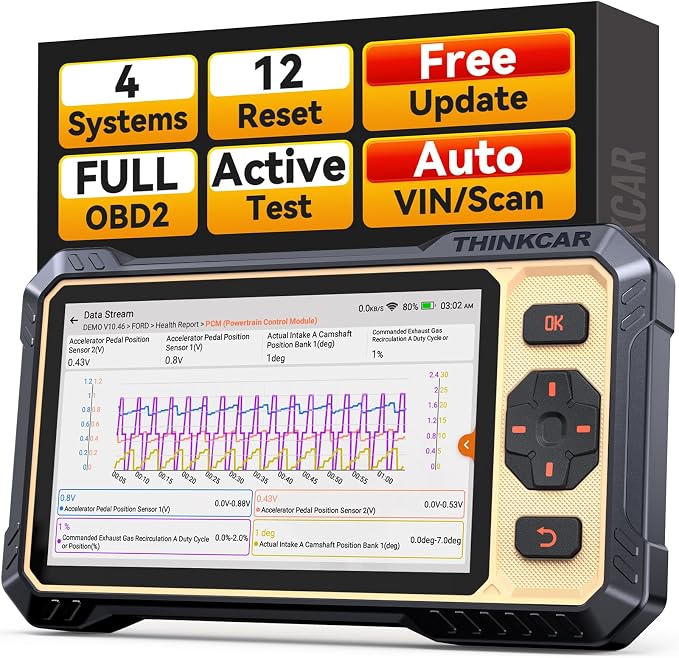 |
thinkcar THINKSCAN 662 Four-System Bidirectional Scan Tool | Check Price |
| 5 |  |
TOPDON TOPDON X800BT OBD2 Scanner Bidirectional Scan Tool 34 Reset | Check Price |
Autel Maxicom MK808Z Bidirectional All-System Diagnostic Scanner
The MK808Z is the most complete option in this group for a shop that needs more than engine-code reading. It can scan all vehicle systems, display live data in text, graph, and analog formats, and provide freeze-frame and ECU information. That matters after collision work because a warning light may originate in the airbag, ABS, body-control, transmission, or another module rather than the engine.
Its bidirectional capability is the bigger advantage. A technician can command supported components such as ABS pumps, window motors, door locks, solenoids, and lights, then observe whether the component responds. This can help separate a failed actuator from wiring, communication, or control-module trouble before parts are replaced.
More than 28 service functions cover common post-repair and maintenance tasks, including oil, EPB, SAS, SRS, injector coding, BMS, and DPF regeneration. The scanner also supports CAN FD and DoIP and claims coverage for more than 180 brands, including newer vehicles. Its Android 11 platform, 4GB of RAM, 64GB of storage, and dual-band Wi-Fi should make navigation and updates practical for frequent use.
Pros
- All-system scanning with live data and active tests
- More than 28 reset and service functions
- CAN FD, DoIP, and FCA Auto Authorization support
- Strong fit for small shops handling varied vehicles
Cons
- More capability than a casual owner may need
- Actual functions can vary by vehicle, year, and module
- Security-gateway procedures may require registration or authorization
My Opinion
This is the best overall match for a body shop that wants one versatile diagnostic tablet rather than separate basic readers and service tools. Buyers should still verify coverage for their common makes and confirm the exact active tests available before depending on it for a specific repair procedure.
ANCEL AD310 Classic Enhanced Universal OBD II Scanner
The ANCEL AD310 takes a deliberately narrow approach: it focuses on standard OBD II engine and emission diagnostics. It reads and clears check-engine codes, shows live data, and supports protocols including KWP2000, J1850 VPW, ISO9141, J1850 PWM, and CAN. For a 1996-or-newer US vehicle, or the stated later European and Asian coverage, that gives a beginner a straightforward way to identify the reason behind an engine warning.
Its physical simplicity is useful in a busy garage. The scanner has a thick, flexible 2.5-foot cable, a compact body, and a lightweight design that can be kept in a tool bag or vehicle. Because it does not depend on a wireless connection or a software subscription for its basic function, it is convenient as an emergency code reader or a backup beside a more advanced tablet.
The limitation is decisive for body-shop buyers. The AD310 is intended for emission-related issues through the OBD II port. It does not provide the ABS, SRS, transmission, or deeper body-module access that many collision-related warnings require. An adapter cannot turn an OBD I vehicle into a supported OBD II vehicle, either.
Pros
- Simple plug-in operation for common engine codes
- Supports major OBD II communication protocols
- Compact, lightweight, and protected by a thick cable
- Supported by a very large customer-feedback history
Cons
- Limited to emission-related OBD II diagnostics
- Cannot scan ABS, SRS, transmission, or body modules
- Not suitable for OBD I vehicles
My Opinion
The AD310 is a smart inexpensive companion, not a complete body-shop scanner. It earns second place because it is exceptionally approachable and widely used for basic engine diagnosis, but a shop repairing airbag, brake, or communication faults will need a more advanced tool alongside it.
XTOOL D5S OBD2 Scanner
The XTOOL D5S occupies the useful middle ground between a basic code reader and a full professional tablet. It accesses engine, transmission, ABS, and SRS systems, which are four of the most relevant areas after mechanical or collision repairs. Live data can be viewed as text or in graphs with up to four parameters, helping users compare values such as RPM, coolant temperature, fuel trim, and oxygen-sensor voltage.
Its 16 reset functions add practical value. EPB, steering-angle, battery, throttle-body, TPMS, ABS bleeding, injector coding, gearbox matching, suspension, and related procedures can reduce the need for separate service equipment. The exact availability of each function remains vehicle-dependent, so buyers should treat the list as broad coverage rather than a guarantee for every model.
The D5S supports more than 90 brands, 12-volt vehicles, light-duty trucks, and CAN FD-equipped applications. A 5.45-inch touchscreen, 32GB of storage, Wi-Fi updates, and stated lifetime software updates make it easier to keep current without adding a subscription fee. Its narrower system coverage than the Autel may be a drawback for shops that need extensive body electronics or many manufacturer-specific active tests.
Pros
- Scans engine, transmission, ABS, and SRS systems
- Includes 16 useful reset and service procedures
- Graphing supports clearer live-data interpretation
- Lifetime Wi-Fi updates are stated without subscription fees
Cons
- Coverage is narrower than a full all-system scanner
- Reset availability varies by vehicle
- Some advanced body or manufacturer-specific functions may be absent
My Opinion
The D5S is a strong value choice for a small shop that regularly sees airbag, brake, transmission, and engine warnings but does not need the broadest possible module access. Confirm the supported year, engine, and reset procedure for the vehicles in your workflow before purchasing.
thinkcar THINKSCAN 662 Four-System Bidirectional Scan Tool
The THINKSCAN 662 emphasizes active testing in a more accessible four-system package. It works with engine, transmission, ABS, and SRS systems, while its stated active-test library includes more than 3,000 tests. In practical terms, that can allow a technician to command supported devices such as an ABS pump, air-conditioning clutch, or radiator fan instead of relying only on stored fault codes.
The scanner also provides 12 reset functions and standard OBD II tools such as live data, freeze frame, I/M readiness, a DTC lookup library, and diagnostic records. Up to four live streams can be graphed together, which is useful when checking whether sensor behavior changes along with engine speed, voltage, fuel trim, or transmission temperature.
Its 6.2-inch screen and 4,150mAh battery are comfortable traits for extended work, while CAN FD and FCA AutoAuth support broaden its newer-vehicle usefulness. FCA AutoAuth access is not included and may require a separate purchase or account. The Android 8 operating system and 2GB of RAM are less modern than some alternatives, although the product states lifetime free updates and 24/7 technical support.
Pros
- Bidirectional testing across four major systems
- Large stated active-test library
- Large display with live-data graphing
- Supports CAN FD and FCA AutoAuth protocols
Cons
- Only four core systems are specifically emphasized
- FCA gateway access may involve a separate purchase
- Older Android platform and lower RAM than some competitors
My Opinion
This is appealing for a shop that values actuator testing and a large screen but does not require the broadest all-module coverage. Before ordering, check whether the advertised active test is available for the exact vehicle and component you expect to diagnose.
TOPDON TOPDON X800BT OBD2 Scanner Bidirectional Scan Tool 34 Reset
The TOPDON X800BT stands out for combining full-system diagnostics, bidirectional testing, and 34 reset services. Its stated service menu reaches oil, steering angle, brake, battery, DPF, ABS bleeding, sunroof, suspension, gearbox, injector, TPMS, throttle adaptation, coolant bleeding, EGR, AdBlue, and other procedures. That breadth may be useful in a mixed shop where collision repairs overlap with maintenance and calibration-related work.
Wireless Bluetooth 5.0 communication gives the VCI a range of up to 33 feet, so the tablet can be moved around the vehicle without keeping a diagnostic cable stretched across the work area. It also supports live-data viewing, graphing, recording, and replay, which can help document an intermittent issue or compare vehicle behavior before and after a repair.
TOPDON states support for FCA, Renault, Nissan, SFD gateway access, and CAN FD. Remote assistance through TeamViewer Quick Support is another useful ownership feature when a technician needs help interpreting a procedure. The trade-off is that the product has fewer customer-feedback entries than the ANCEL and lower stated ratings than the Autel, so buyers should place extra emphasis on confirming vehicle-specific coverage.
Pros
- Full-system diagnostics with bidirectional control
- 34 stated reset and service functions
- Wireless VCI and live-data recording capabilities
- Remote assistance and lifetime Wi-Fi updates are stated
Cons
- Vehicle-specific function coverage still needs verification
- Customer-feedback volume is relatively limited in this group
- Wireless operation adds another device that must remain charged and paired
My Opinion
The X800BT is a compelling feature-rich alternative for buyers who want wireless diagnostics and a large service menu. Its position reflects the need to balance those strengths with less extensive customer-feedback evidence and the normal uncertainty of vehicle-specific coverage.
How I Selected These Options for the Best Scan Tool for Body Shop
The selection starts with the actual demands of collision and body work: identifying faults across multiple modules, confirming whether repaired components respond, clearing codes after repairs, and completing supported resets. A scanner that only reads engine emissions codes can be useful, but it cannot serve as the only diagnostic device when an airbag, ABS, transmission, or body-control warning is involved.
I then compared the supplied evidence for system access, active tests, service functions, communication protocols, update policies, screen and hardware details, and stated vehicle coverage. Customer-feedback volume and ratings were considered as context rather than proof of universal performance. The products were also kept brand-diverse so the list would show different approaches instead of presenting five near-identical tools.
Selection takeaway: “All-system” does not mean every function works on every vehicle. The year, engine, trim, module, communication protocol, and manufacturer security requirements can change what a scanner can actually do.
The ranking favors diagnostic usefulness first. That is why the Autel leads: it combines all-system access, active tests, newer protocols, and a broad reset menu. The ANCEL remains high because basic dependability and simplicity matter, but its narrow emission-only scope prevents it from outranking multi-system tools.
A body shop should buy for its most common repair scenarios, not for the longest feature list. If most jobs involve airbag and ABS warnings, verify those systems first; if the shop handles many newer vehicles, protocol and gateway support become equally important.
How to Choose the Best Scan Tool for Body Shop
The right purchase depends on whether the scanner will be a primary diagnostic platform, a secondary confirmation tool, or an inexpensive backup. Make a list of the vehicle brands and repair types that produce the most work, then compare that list with the tool’s supported systems and procedures rather than relying only on its headline feature count.
- Choose system coverage before screen size: Confirm engine, ABS, SRS, transmission, body, and other modules that matter to your jobs.
- Look for bidirectional control when fault isolation matters: Active tests can command supported components instead of only reporting stored codes.
- Check service functions individually: A scanner may list many resets, but availability can vary by vehicle and module.
- Verify gateway and protocol support: CAN FD, DoIP, FCA access, SFD, or other requirements may affect newer vehicles.
- Consider updates and ownership: Wi-Fi updating, support access, storage, battery life, and subscription terms affect long-term usefulness.
Match the scanner to shop size
A small body shop with mixed makes will usually benefit from an all-system tool that can handle at least ABS and SRS, display live data, and perform common resets. The Autel MK808Z, TOPDON X800BT, and THINKCAR THINKSCAN 662 are positioned toward that broader use, although their exact coverage must still be checked by vehicle.
A shop with a dedicated diagnostic platform may only need a secondary reader in each technician’s tool bag. In that role, the ANCEL AD310 is easier to justify because it is compact, cable-connected, and focused on quick engine-code work. It should not be mistaken for a substitute for a multi-system scanner.
Understand bidirectional testing
Code reading tells you that a control module detected a problem. Bidirectional testing can go a step further by sending a command to a supported actuator. For example, a technician may activate a pump, motor, fan, solenoid, or light and listen, observe, or measure the result.
This does not automatically identify the failed part. A component that does not respond could have a bad motor, damaged wiring, a blown fuse, a communication issue, or a safety condition preventing activation. Active tests should be performed only when the vehicle is safely positioned and the procedure is understood.
Evaluate reset functions realistically
Reset menus are valuable after replacing a battery, steering-angle sensor, brake component, injector, or other supported part. They can reduce trips to another facility and help complete a repair in one workflow. However, “34 resets” or “16 resets” is not a universal promise that every listed procedure works on every car.
Before buying, identify the exact functions your shop commonly needs. Search by make, model, year, engine, and system when the seller or manufacturer provides that information. Also determine whether the function is a simple reset, a relearn, a coding task, or a procedure that requires a separate calibration target or authorization.
Compatibility Checks Before Ordering
OBD II compatibility is only the first step. A vehicle may have a standard diagnostic connector while still restricting access to certain modules through a security gateway. Older vehicles, imported models, commercial vehicles, and unusual powertrains may also fall outside the broad brand statements shown in a listing.
Build a vehicle coverage list
Write down the ten or twenty vehicles most likely to enter the shop. Include model year, engine, drivetrain, and the warning systems encountered most often. Then check whether the scanner supports those specific combinations rather than assuming that brand-level coverage guarantees every function.
Check physical and electrical conditions
Many diagnostic problems are caused by low battery voltage, a damaged connector, an open fuse, or poor communication wiring rather than the scanner itself. A scan tool cannot reliably communicate with a module that is not powered or connected. For extended diagnosis, use an appropriate battery-support solution when the vehicle manufacturer’s procedure calls for stable voltage.
Account for security access
Some newer vehicles require online authorization or a manufacturer-linked account before certain modules can be accessed or programmed. The supplied products mention FCA AutoAuth, SFD, or gateway support, but that does not mean access is automatic or free in every situation. Confirm registration requirements and any separate service costs before promising a customer that a procedure can be completed in-house.
Setting Up a Scanner for the First Time
A careful first setup prevents many avoidable interruptions. Charge the tablet or reader, inspect the diagnostic cable and connector, connect to a reliable Wi-Fi network when updates are available, and register only through the legitimate application or support process associated with the product.
- Update before the first major job. Install available software and vehicle-coverage updates while the tool has stable power and internet access.
- Organize the workspace. Keep the tablet, VCI, cable, and any account credentials together so a technician does not waste time searching during a repair.
- Identify the vehicle manually when needed. AutoVIN can save time, but confirm the detected year and model before selecting a system.
- Scan before clearing anything. Save or record codes, freeze-frame data, and relevant live data before deleting evidence of the fault.
- Follow the on-screen procedure. Read conditions for ignition position, brake-pedal use, battery voltage, and component activation before proceeding.
Use a pre-repair and post-repair scan
A pre-repair scan can document existing faults and protect against confusing unrelated codes with damage caused during a repair. Save the diagnostic record when the scanner allows it, and note the mileage, warning lamps, and vehicle condition.
After the repair, perform a second scan and compare the result. Some codes clear immediately; others require a drive cycle, a relearn, a steering-angle procedure, or a return to normal operating conditions. A cleared code alone is not proof that the underlying fault has been corrected.
How to Use Live Data More Effectively
Live data becomes more useful when you watch related values together instead of scrolling through a long list. For an engine concern, RPM, coolant temperature, fuel trim, oxygen-sensor voltage, and throttle position may provide more context than a single number. For an electrical issue, system voltage and communication behavior may matter more than a generic code description.
Use graphing when the fault changes over time. A recorded or replayed data stream can reveal a dropout, irregular signal, or value that changes only under a particular condition. The XTOOL, THINKCAR, TOPDON, and Autel tools all describe graphing or multiple-data viewing in different ways, but the correct parameters still depend on the vehicle and diagnosis.
Do not treat a live-data value as automatically good or bad based on a universal number. Temperature, engine state, load, sensor design, and manufacturer strategy affect the expected range. Compare readings with service information and with the vehicle’s actual symptoms whenever possible.
Making a Diagnostic Tablet Last Longer
Scan tools often work in dusty, crowded areas, so physical care is as important as software support. Keep the display away from metal tools, avoid pulling a wired scanner by its cable, and place the tablet where it cannot fall into a footwell or onto a painted panel.
- Disconnect using the connector housing rather than tugging the wire.
- Keep the diagnostic port and VCI free of dirt, moisture, and bent pins.
- Charge the battery before long active-test sessions.
- Store the tool in a protected case when it is not in use.
- Install software updates on a stable connection and avoid interrupting the process.
- Keep account credentials and gateway authorization information secure.
Wireless systems also need pairing discipline. Confirm that the correct VCI is connected before beginning a test, and check its battery or connection status if communication suddenly stops. A wired reader such as the AD310 avoids wireless pairing, which is one reason a basic cable tool remains useful as a backup.
Common Mistakes to Avoid with Body-Shop Scanners
Most diagnostic mistakes come from using the right tool in the wrong way. A scan result is evidence that guides diagnosis, not a guaranteed parts list. Slow down when a warning appeared after a collision, because damaged wiring, connectors, grounds, and power supplies can create several misleading codes at once.
- Do not clear codes before recording them. Clearing can remove freeze-frame information and make the original condition harder to reproduce.
- Do not replace a module solely because a code mentions it. Check power, ground, wiring, connectors, and related sensors first.
- Do not assume an OBD II reader scans every system. A standard connector does not guarantee ABS, SRS, body, or transmission access.
- Do not run active tests around moving parts without preparation. Keep hands, tools, doors, windows, and vehicle movement under control.
- Do not promise a reset without checking coverage. Confirm the exact vehicle and procedure before scheduling work around it.
- Do not ignore low voltage. Unstable vehicle power can interrupt communication or produce misleading electronic faults.
Safety caution: Airbag, braking, high-voltage, and moving-component systems can be hazardous. Follow the vehicle’s service information and the scanner’s displayed conditions, and do not activate a component unless the surrounding area is safe.
FAQ About Body-Shop Scan Tools
What type of scanner does a body shop need?
Most body shops should look for access beyond engine emissions, especially ABS and SRS. A tool with live data, active tests, service resets, and support for newer communication protocols is more useful than a basic code reader when the shop handles collision-related warning lights.
Is the ANCEL AD310 enough for collision repair?
The AD310 is enough for basic OBD II engine and emission-code work, but it is not enough as the only scanner for collision repair. It does not access ABS, SRS, transmission, or other deeper vehicle systems according to the supplied information.
Why is bidirectional control useful in a body shop?
Bidirectional control lets the scanner command supported components so a technician can check whether an actuator responds. This can help narrow a fault to a component, circuit, or control issue, although it does not replace wiring checks or manufacturer procedures.
Do all reset functions work on every vehicle?
No. Reset and service functions depend on the vehicle’s year, model, engine, module, software, and security requirements. A product may list many procedures while supporting only some of them on a particular vehicle.
Should a shop choose wired or wireless scanning?
Wireless scanning offers freedom to move around the vehicle, while a wired reader is simple and does not require pairing or a separate wireless interface. The TOPDON X800BT emphasizes wireless Bluetooth operation; the ANCEL AD310 is a straightforward cable-based option.
Are free lifetime updates the same as free access to every function?
No. Free software updates may keep vehicle coverage current, but some security gateways, online authorizations, accounts, or manufacturer-specific procedures can involve separate requirements. Confirm those details for the vehicles your shop services.
Final Thoughts
The best scan tool for body shop work depends on the systems you need to reach, but the Autel MaxiCOM MK808Z is the strongest overall choice for broad diagnostics, active tests, and service functions. The ANCEL AD310 is the practical second choice for simple engine-code duty and backup use, while the XTOOL D5S is the balanced third choice for shops needing engine, ABS, SRS, transmission, and common resets without the broadest platform. Verify exact vehicle coverage before ordering, then choose the tool that matches your real repair mix rather than its headline feature count.