Choosing the best abs bleed scan tool is not simply a matter of picking the scanner with the longest feature list. The important questions are whether it can activate the ABS pump and valves on your vehicle, whether its service functions match your repair plans, and whether its coverage is clear before you buy.
My first choice is Autel Maxicheck PRO Auto Bleed Scan Tool. Its lifetime updates, one-year warranty, and 24/7 technical support add reassurance, although compatibility must be confirmed for the exact vehicle.
My second choice is FOXWELL NT510 Elite GM OBD2 Bidirectional Diagnostic Scanner. It can scan multiple GM modules, perform supported ABS bleeding, and handle tasks such as crankshaft relearn and EPB service.
My third choice is FOXWELL NT630 Plus OBD2 Scanner. FOXWELL NT630 Plus OBD2 Scanner earns my third-choice position for buyers focused mainly on ABS and SRS work. It offers ABS active tests, supported automated bleeding, live data, Wi-Fi updates, and no paid subscription, but it is not a full-system scanner and does not support coding or programming.
This guide compares all five options, explains their important limitations, and shows how to check vehicle compatibility before ordering. You will also find practical advice for setup, brake-bleeding preparation, safe use, maintenance, troubleshooting, and avoiding the mistakes that make an otherwise capable scan tool frustrating.
Best Abs Bleed Scan Tool
I selected these products based on their relevance to ABS bleeding, the usefulness of their diagnostic and service functions, stated vehicle coverage, ownership considerations, and customer-feedback evidence where available. The ranking also balances focused ABS tools with broader scanners, because the right choice depends on whether you need one brake-service function or a tool that can support several systems and vehicles.
| # | Image | Product | Price on Amazon |
|---|---|---|---|
| 1 |  |
Autel Maxicheck PRO Auto Bleed Scan Tool | Check Price |
| 2 |  |
FOXWELL NT510 Elite GM OBD2 Bidirectional Diagnostic Scanner | Check Price |
| 3 |  |
FOXWELL NT630 Plus OBD2 Scanner | Check Price |
| 4 |  |
TOPDON AD600S OBD2 Engine | Check Price |
| 5 | 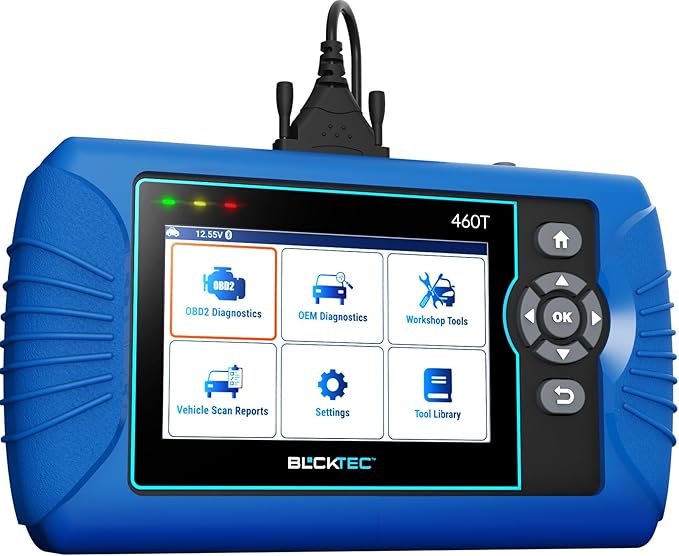 |
BLCKTEC 460T OBD2 All-System Diagnostic Scanner | Check Price |
Autel Maxicheck PRO Auto Bleed Scan Tool
The Autel MaxiCheck PRO is the strongest all-around pick for a buyer who wants ABS automated bleeding without giving up basic diagnostic coverage. It can check ABS operating conditions, activate supported bleeding procedures, and help remove air from the ABS hydraulic module after brake work. That can be useful after replacing a master cylinder, opening hydraulic lines, or servicing a vehicle where ordinary pedal bleeding does not fully clear trapped air.
Its usefulness extends beyond the brake system. The scanner reads and clears ABS and SRS codes, handles the ten standard OBD2 test modes, displays live data, retrieves freeze-frame information, and checks emissions readiness. Supported service functions also include oil reset, EPB, SAS, and BMS operations, although none of those functions should be assumed universal across every vehicle.
The most important limitation is compatibility. ABS bleeding is available only on specific vehicle models, with most supported applications reportedly from 2015 or earlier and some GM coverage extending to 2018. Asian and Japanese vehicles, including certain Toyota applications, may not have the required automated-bleed capability. Contacting the seller with the model year, VIN, and desired function before purchase is a sensible step.
Pros
- ABS automated bleeding and bidirectional control on supported vehicles
- ABS, SRS, and ten-mode OBD2 diagnostic coverage
- Lifetime free updates, one-year warranty, and 24/7 technical support
- Useful live data, freeze-frame, readiness, and service functions
Cons
- Automated bleeding is highly vehicle-specific
- Many supported applications are older than 2015
- Japanese vehicle capability should be verified with a dealer or seller
My Opinion
This is my top recommendation for mixed home-garage use, provided compatibility is confirmed first. Its combination of ABS service control and everyday diagnostics is more useful than a brake-only reader, but buyers should not purchase it assuming every listed function will appear on every vehicle.
FOXWELL NT510 Elite GM OBD2 Bidirectional Diagnostic Scanner
The FOXWELL NT510 Elite is a particularly sensible choice for owners and independent technicians working primarily on Chevrolet, Buick, Cadillac, and GMC vehicles. Its AutoVIN function can scan available modules across the engine, transmission, ABS, airbag, body, chassis, HVAC, and other systems. That wider access helps when an ABS warning is actually caused by a communication, sensor, or related module problem rather than by the hydraulic unit itself.
For supported GM applications, the tool offers a substantial group of maintenance and relearn procedures. ABS bleeding, EPB service, SAS calibration, TPMS and throttle-body relearns, injector coding, airbag reset, and crankshaft relearn can reduce the need for a dealership visit. Bidirectional controls also let the user command selected components, such as windows, doors, fuel pumps, sunroofs, and wipers, which can make fault localization more direct than code reading alone.
There is a clear trade-off: this is not a general multi-brand scanner. The supplied coverage is limited to 1996–2025 Chevrolet, Buick, Cadillac, and GMC vehicles, and both compatibility and available functions vary by year and model. The crankshaft relearn feature is valuable after certain engine repairs, but it does not make the tool equally useful for non-GM cars.
Pros
- Broad GM system coverage with AutoVIN support
- ABS bleeding plus numerous reset, relearn, and calibration functions
- Bidirectional tests for selected vehicle components
- Ten OBD2 functions and graphical live PCM data
Cons
- Not compatible with other vehicle brands
- Function availability changes by GM model and year
- Buyers must verify exact compatibility before ordering
My Opinion
For a GM-focused driveway or small repair operation, the NT510 Elite may be more useful than a broader but shallower scanner. It ranks second because its capabilities are impressive within its niche, while the strict brand limitation makes it a poor choice for a mixed-brand household.
FOXWELL NT630 Plus OBD2 Scanner
The FOXWELL NT630 Plus takes a more focused approach than the first two products. Its main value is access to enhanced ABS and SRS diagnostics, including supported ABS automated bleeding, active tests, live data, freeze-frame information, and two-in-one graphing. For a beginner trying to understand an ABS warning, that information can help distinguish a wheel-speed sensor or wiring concern from a pump, valve, hydraulic, or module issue.
It also supports selected SAS calibration, EPB service, and oil-light reset functions, along with standard OBD2 engine diagnostics. The direct connection to a vehicle’s 16-pin port means no separate power supply is needed. A 2.8-inch screen, step-by-step menus, hard carrying case, Wi-Fi updating, and no paid subscription make it approachable for occasional home use.
However, the name should not be mistaken for full-system dealer equipment. The NT630 Plus does not support ECU coding or programming, airbag crash-data or module reset, or transmission diagnostics. ABS auto bleed and active tests vary by year, model, and ABS configuration, and some Chrysler, Jeep, and Dodge vehicles may have partial support. A specific-function check is essential before purchase.
Pros
- Strong focus on ABS and SRS fault finding
- Supported ABS bleeding, active tests, live data, and graphing
- Wi-Fi updates without a paid subscription
- Simple plug-in operation and included carrying case
Cons
- Not a full-system diagnostic scanner
- No ECU coding, programming, or crash-data reset
- Transmission coverage is not included
My Opinion
This is the best fit for someone who wants a straightforward ABS/SRS specialist rather than an expansive all-system platform. Its large customer-feedback base and practical interface are appealing, but the buyer must accept narrower coverage and verify that automated bleeding is supported on the intended vehicle.
TOPDON AD600S OBD2 Engine
The TOPDON AD600S is the broadest lifestyle and maintenance choice in this group. It diagnoses four major systems—engine, ABS, transmission, and SRS—and adds ten standard OBD2 tests. That makes it useful for a household with several warning lights or for an owner who wants one scanner for more than brake work.
Its nine ongoing service functions cover oil reset, EPB, BMS, SAS, DPF regeneration, TPMS, throttle or ETS relearn, ABS bleeding, and injector coding. CAN-FD and FCA gateway access can help extend usefulness on newer compatible vehicles, while the stated 90-plus-brand coverage is attractive for mixed-brand ownership. AutoVIN, a five-inch touchscreen, DTC lookup, and four-in-one live-data graphing also make routine diagnosis easier to organize.
The ownership detail that deserves attention is the update and service-function arrangement. Lifetime software updates are free, but 30 days after activation the scanner unlocks a trial of all 30 special services; after that trial, it returns to the original nine services, which remain free. Buyers should also charge it about weekly during storage because prolonged deep discharge may affect the battery.
Pros
- Four-system diagnostics covering engine, ABS, transmission, and SRS
- Nine continuing service functions with free lifetime updates
- Broad stated brand coverage plus CAN-FD and FCA gateway access
- Large touchscreen, AutoVIN, reports, and live-data graphing
Cons
- Not every function works on every vehicle
- The full special-function set is only a limited trial
- Battery care matters during extended storage
My Opinion
The AD600S is a strong choice when ABS bleeding is one part of a larger maintenance plan. It ranks below the more focused options because its broad coverage still depends on vehicle-specific support, but its screen, service selection, and subscription-free ongoing updates give it excellent everyday appeal.
BLCKTEC 460T OBD2 All-System Diagnostic Scanner
The BLCKTEC 460T is aimed at home mechanics and small workshops that want all-system access and a large set of reset functions. It can read and clear engine, transmission, ABS, and SRS codes, display live data, access freeze-frame information, and perform all ten standard OBD2 modes. For brake-related work, its ABS bleeding, EPB reset, SAS recalibration, and battery-related functions provide useful coverage around the central repair.
Its AutoVIN, AutoScan, and AutoReLink features are intended to reduce setup time. After connection, the scanner can identify the vehicle, scan its ECUs, and reconnect to modules without requiring repeated manual selections. The supplied RepairSolutions2 app adds a verified-fix database, possible parts information, maintenance schedules, technical service bulletins, warranty information, and recall details when paired with the device.
Compatibility still needs careful attention. The scanner and app are limited to the United States and Canada, and while coverage is stated for OBD2 vehicles from 1996 onward, individual functions may not be available on every model. The listing also references most 1996–2023 vehicles, so buyers with newer vehicles should confirm coverage instead of relying only on the broad compatibility statement.
Pros
- All-system diagnostics with ABS, SRS, transmission, and engine access
- More than twelve common reset and service functions
- AutoVIN, AutoScan, AutoReLink, and real-time OEM data
- Free lifetime updates and useful RepairSolutions2 integration
Cons
- Coverage is restricted to the United States and Canada
- Functions vary by vehicle even within the stated coverage
- Newer-model compatibility should be confirmed directly
My Opinion
The 460T makes sense for a buyer who values broad system access and repair-information support more than a narrow ABS specialty focus. It is a capable fifth-place option, especially for multi-vehicle owners, but regional restrictions and function-by-function compatibility checks remain important.
How I Selected These Abs Bleed Scan Tools
The central selection factor was whether each device can do more than read a generic engine code. A useful brake-service scanner should be able to communicate with the ABS module and, on supported vehicles, command the pump or valves involved in automated bleeding. I also considered diagnostics surrounding the repair, such as ABS code clearing after the fault is fixed, live data, active tests, SRS access, EPB service, steering-angle calibration, and general OBD2 capability.
Brand diversity was practical here because the products serve different buyers. Autel offers a balanced ABS and OBD2 package, FOXWELL provides both a GM-specific all-system option and an ABS/SRS-focused model, TOPDON emphasizes broad vehicle and maintenance coverage, and BLCKTEC adds all-system diagnostics with repair-information integration. Ratings and customer-feedback counts supplied for the products helped indicate market acceptance, but they do not replace exact vehicle verification.
ABS bleeding is never a universal feature simply because it appears in a scanner’s name or feature list. The vehicle year, make, model, ABS configuration, and sometimes VIN determine whether the command is actually available.
The safest ranking is based on usable coverage, not the number of advertised service functions. A narrower scanner that definitely supports your vehicle can be a better purchase than a broad scanner with uncertain brake-module access.
How to Choose an Abs Bleed Scan Tool
Start with your vehicle and the exact job, not with the scanner brand. The ideal tool for a single GM vehicle may be different from the right purchase for a mixed-brand household, and a device that reads ABS codes may not be able to operate the hydraulic unit. Treat compatibility as a required specification rather than an optional bonus.
- Confirm ABS automated bleeding for the exact year, make, model, and VIN when possible.
- Decide whether you need only ABS/SRS access or full-system diagnostics.
- Check whether EPB, SAS, BMS, TPMS, or other service functions matter to your repairs.
- Look at update terms, regional limits, subscription requirements, and trial restrictions.
- Choose a screen and connection method you can use comfortably at the vehicle.
Vehicle compatibility comes first
The same model of scanner may show different menus on two vehicles from the same manufacturer. Some vehicles support automated bleeding only through a particular ABS module, while others require a manual procedure or a pressure or vacuum bleeder in addition to electronic activation. Before ordering, provide the seller with the VIN, vehicle year, make, model, engine where relevant, and the exact function you need.
Do not assume that standard OBD2 compatibility guarantees ABS service compatibility. Standard OBD2 primarily covers emissions-related engine communication; enhanced ABS, SRS, transmission, and reset functions depend on the manufacturer and module.
Choose diagnostic depth deliberately
A focused tool can be easier to learn and less expensive than an all-system scanner. If your main objective is ABS warning-light diagnosis and brake bleeding, the NT630 Plus may be sufficient when supported. If you maintain several systems or several vehicles, a broader device such as the AD600S or 460T can provide more value. GM owners may benefit from the deeper brand-specific controls of the NT510 Elite.
Understand service-function wording
Terms such as reset, relearn, calibration, active test, and bidirectional control describe different actions. A reset may clear a maintenance reminder. A relearn may make a module memorize a sensor relationship. An active test commands a component, while bidirectional communication generally means the scanner can send commands as well as receive data. None of these terms alone promises ABS bleeding on your vehicle.
Compatibility Checks Before Ordering
Make a short list before contacting a seller: vehicle identification number, model year, make, model, engine, ABS warning symptoms, and the desired operation. Ask specifically whether the scanner can access the ABS module, run automated bleeding, perform active tests, and clear codes after repair. Save the response if the purchase decision depends on it.
Pay attention to regional limits. The BLCKTEC 460T and its associated app are stated for the United States and Canada, while other products may have brand or model restrictions. A tool that works on a US-market vehicle may not offer the same menus on an imported version, even when the model name is identical.
Setting Up the Scanner for Brake Service
Before plugging in, park on a stable surface, engage the parking brake when appropriate, and keep the vehicle battery adequately charged. A scan tool cannot compensate for low system voltage, and an interrupted ABS procedure can create confusing fault codes or leave the job incomplete.
- Inspect the brake system and repair visible leaks, damaged hoses, or worn components first.
- Connect the scanner to the 16-pin diagnostic port and identify the vehicle manually if AutoVIN is incorrect.
- Read and save existing ABS codes and live data before clearing anything.
- Open the ABS service menu and confirm that the automated-bleed routine matches the vehicle.
- Follow the on-screen sequence, keeping the reservoir filled and using the required manual bleeding steps.
- Clear codes only after the physical fault and air contamination have been addressed.
- Perform the final pedal, fluid, warning-light, and road-safety checks in a controlled setting.
Using Automated ABS Bleeding Safely
The scan tool usually activates the ABS pump and valves; it does not supply brake fluid, catch expelled fluid, or replace every manual bleeding step. Read the vehicle service procedure before starting. Some systems require a pressure bleeder, a specific wheel order, repeated ignition cycles, or a second conventional bleed after the electronic routine.
Keep the master-cylinder reservoir from running dry and use only the correct brake fluid. Protect painted surfaces because brake fluid can damage finishes. Never treat a successful scan-tool command as proof that the hydraulic system is safe. A firm pedal, correct fluid level, no leaks, and the absence of relevant warning lights still matter.
How to Use Live Data and Active Tests
Live data is most valuable when compared across sensors rather than viewed as an isolated number. During a slow drive in a safe area, wheel-speed readings that disagree can point toward a sensor, tone ring, wiring, or bearing issue. Active tests can help confirm whether a pump, valve, or related component responds, but the available tests and data identifiers vary by vehicle.
Record codes and freeze-frame information before clearing them. Clearing a code removes useful diagnostic history and does not repair the underlying problem. If the warning returns immediately, look for wiring, power, ground, hydraulic, or module faults instead of repeatedly clearing the light.
Updates, Power, and Ownership Care
Update the scanner before a planned repair, especially when the device uses Wi-Fi or offers free lifetime software updates. An update may improve vehicle coverage or menu behavior, but it should not be treated as a guarantee that a previously unsupported function will appear.
Store the tool in its case away from moisture, brake fluid, and extreme heat. Inspect the diagnostic cable for bent pins or damaged insulation. For the TOPDON AD600S, charging about once a week during storage is specifically important because prolonged deep discharge may prevent normal recovery. Keep account details available for devices that require registration, update access, or an accompanying app.
Common Mistakes to Avoid
Most problems come from buying for a general vehicle category instead of confirming the exact module and function. Other mistakes involve starting a brake procedure with an unresolved hydraulic fault or assuming that clearing a light completes the repair.
- Buying based only on the phrase “ABS bleeding” without checking vehicle-specific support.
- Assuming every advertised service function works on every model year.
- Failing to save codes and freeze-frame data before clearing them.
- Allowing the brake-fluid reservoir to run empty during bleeding.
- Using the wrong brake fluid or mixing fluids without following the vehicle procedure.
- Driving normally before confirming pedal firmness and warning-light status.
- Leaving a rechargeable scanner unused until its battery is deeply discharged.
- Expecting a scan tool to replace mechanical inspection or a proper pressure bleeder.
Never road-test a vehicle simply because the scanner reports that a procedure completed. Confirm the hydraulic result and basic brake operation first.
When a Scan Tool Is Not Enough
A scanner is an electronic diagnostic aid, not a complete brake-service system. Persistent pedal softness, fluid leaks, damaged hoses, seized calipers, contaminated fluid, a failing master cylinder, or a failed ABS module may require mechanical diagnosis and replacement parts. No software command can correct a physical hydraulic problem.
Professional help is sensible when the ABS module will not communicate, the vehicle loses brake pressure, the warning light returns immediately, or the required procedure is unclear. The scan tool can still provide codes and data that make that conversation more efficient.
FAQS About Best Abs Bleed Scan Tool
Can any ABS scanner perform automated bleeding?
No. Automated bleeding depends on the vehicle’s ABS module, model year, configuration, and the scanner’s software coverage. Always verify the exact application before purchase.
Is an ABS bleed scan tool the same as a code reader?
No. A basic code reader may only access generic engine emissions codes. An ABS-capable scanner needs enhanced communication and, for automated bleeding, bidirectional control of supported ABS components.
Do I still need to bleed the brakes manually?
Often, yes. The scan tool may cycle the ABS pump and valves, but the vehicle’s service procedure may still require pressure, vacuum, or conventional pedal bleeding before or after the electronic routine.
Which tool is best for a GM vehicle?
The FOXWELL NT510 Elite is the strongest GM-focused choice in this selection because it covers Chevrolet, Buick, Cadillac, and GMC systems with bidirectional controls and several relearn and reset functions. Confirm the exact function for the specific vehicle.
Which scanner is best for several vehicle brands?
The TOPDON AD600S and BLCKTEC 460T offer broad multi-brand coverage, while the Autel MaxiCheck PRO provides a balanced combination of ABS, SRS, and OBD2 capability. Individual functions still vary by vehicle.
Can clearing an ABS code fix the problem?
No. Clearing a code only removes the stored warning after the underlying problem has been repaired. If the fault remains, the code or warning light will usually return.
Final Thoughts
The Autel MaxiCheck PRO Auto Bleed Scan Tool is my top choice for balanced ABS service and general diagnostics, while the FOXWELL NT510 Elite is the better specialist option for GM owners. The FOXWELL NT630 Plus is a practical ABS/SRS-focused alternative. For broader multi-system ownership, consider the TOPDON AD600S or BLCKTEC 460T—but verify vehicle coverage before buying the best abs bleed scan tool for your garage.