Finding the best transmission scan tool is harder than choosing a basic check-engine reader. Transmission faults can involve the engine computer, transmission control module, ABS network, live data, service resets, and vehicle-specific procedures, so the right choice depends on how deeply you need to diagnose and maintain your vehicle.
My first choice is XTOOL D5S OBD2 Scanner. Its transmission, engine, ABS, and SRS access, live-data graphs, CAN FD support, and 16 service functions make it a strong fit for serious DIY owners.
My second choice is ANCEL AD310 Classic Enhanced Universal OBD II Scanner Car Engine Fault Code. It supports major OBDII protocols and quickly reads or clears emission-related codes, although it does not provide transmission, ABS, or SRS diagnostics.
My third choice is Innova 5610 OBD2 Bidirectional Scan Tool. Innova 5610 OBD2 Bidirectional Scan Tool earns third place for its bidirectional controls, enhanced data access, and repair-oriented support. It can command certain vehicle functions and perform advanced relearn procedures, but coverage still needs to be checked by make, model, year, and function.
This guide compares the five selected scanners, explains where each one fits, and covers compatibility, setup, live data, transmission diagnosis, maintenance functions, common mistakes, and ownership considerations. The goal is to help a beginner choose enough capability without paying for features the vehicle or owner will never use.
Best Transmission Scan Tool
I selected these products by comparing their transmission relevance, system coverage, service functions, usability, compatibility information, update policy, and available customer-feedback evidence. The list also includes different capability levels and brands, from a basic engine-only code reader to bidirectional equipment intended for more involved vehicle troubleshooting.
| # | Image | Product | Price on Amazon |
|---|---|---|---|
| 1 |  |
XTOOL D5S OBD2 Scanner | Check Price |
| 2 |  |
ANCEL AD310 Classic Enhanced Universal OBD II Scanner Car Engine Fault Code | Check Price |
| 3 |  |
Innova 5610 OBD2 Bidirectional Scan Tool | Check Price |
| 4 |  |
TOPDON AD600S OBD2 Scanner | Check Price |
| 5 | 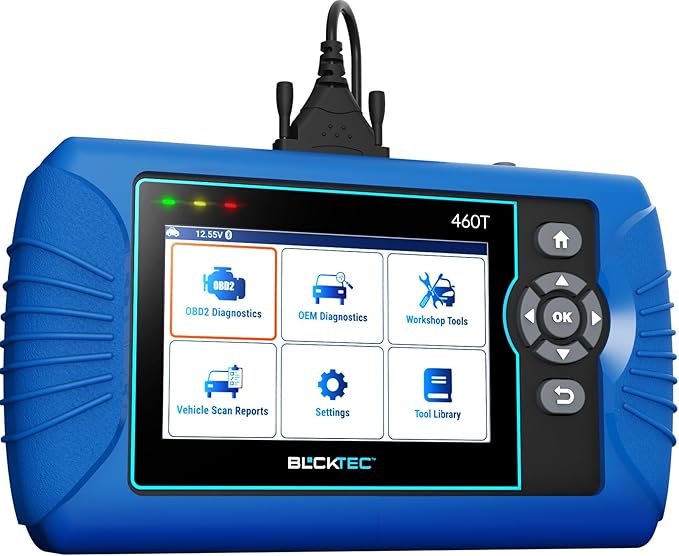 |
BLCKTEC 460T OBD2 Scanner Car Code Reader Engine ABS SRS Transmission Diagnostic | Check Price |
XTOOL D5S OBD2 Scanner
The XTOOL D5S is the most complete choice in this group for a buyer who wants more than a check-engine reader. It accesses the engine, transmission, ABS, and SRS systems, so one device can help investigate shift complaints, warning lights, wheel-speed faults, and airbag-related codes. That broader coverage is especially useful when a transmission symptom may actually be linked to another control module.
Its live-data display can show readings as text or in graphs with up to four PIDs at once. That gives a DIYer a better way to watch items such as RPM, coolant temperature, fuel trim, oxygen-sensor voltage, and transmission data instead of relying only on stored codes. The scanner also provides 16 reset and service functions, including gearbox matching, EPB, SAS, BMS, throttle relearn, TPMS, ABS bleeding, and injector coding.
The 5.45-inch touchscreen, 32GB storage, Wi-Fi updates, and support for more than 90 brands make it practical for a household with several vehicles. It supports OBDII-equipped vehicles built after 1996, 12V vehicles, and CAN FD in supported applications. However, broad coverage does not mean every special function works on every vehicle, so checking coverage before purchase remains important.
Pros
- Four-system diagnostics for engine, transmission, ABS, and SRS.
- Sixteen useful reset and maintenance functions.
- Free lifetime Wi-Fi updates with no subscription fees.
- Live data can be displayed in text or four-PID graphs.
Cons
- Some functions depend on the vehicle’s make, model, year, and equipment.
- Its advanced feature set may be unnecessary for simple code reading.
My Opinion
The D5S is the strongest all-around pick here for owners who expect to diagnose transmission and related warning systems at home. Its combination of service functions, broad coverage, and lifetime updates gives it better long-term value than a basic reader.
ANCEL AD310 Classic Enhanced Universal OBD II Scanner Car Engine Fault Code
The ANCEL AD310 takes a much simpler approach. It is primarily an engine code reader for emission-related faults, making it appropriate for someone who wants to understand a check-engine light before visiting a repair shop. It can read and clear applicable trouble codes and display live data, which is enough for basic fault investigation and confirming whether a repaired emission problem has returned.
Its compact body weighs 12 ounces, and the thick, flexible 2.5-foot cable is convenient when the diagnostic connector is in an awkward position. The straightforward design also means there is less software to learn, fewer menus to navigate, and no need to manage a large touchscreen or a battery-powered tablet. That simplicity is a genuine advantage for occasional use or keeping a scanner in a glove box or travel bag.
The AD310 supports common OBDII protocols, including CAN, KWP2000, ISO9141, J1850 VPW, and J1850 PWM. It is intended for OBDII vehicles from 1996 onward, with stated coverage for many US, European, and Asian cars, SUVs, and light trucks. Its key limitation is decisive: it does not diagnose ABS, SRS, or transmission systems, and it cannot substitute for an enhanced scanner when the warning light is outside the emission system.
Pros
- Compact, lightweight, and easy to carry.
- Supports common OBDII communication protocols.
- Reads and clears applicable engine emission codes quickly.
- Does not require subscription-based software access.
Cons
- Engine emission diagnostics only.
- No ABS, SRS, or transmission code access.
- Cannot diagnose older OBDI vehicles through an adapter.
My Opinion
The AD310 is a sensible low-complexity choice for check-engine-light questions, not a transmission diagnostic purchase. Choose it when basic engine information is all you need; otherwise, its narrow system coverage will become frustrating quickly.
Innova 5610 OBD2 Bidirectional Scan Tool
The Innova 5610 stands apart through bidirectional control. Instead of only asking a vehicle for information, it can send certain commands to test functions such as switching a fuel pump on or off or retracting an electronic parking brake. Those commands can help narrow down a fault, although the exact available tests depend on the vehicle.
Enhanced data access covers engine, ABS, SRS, and transmission systems. The scanner also provides OEM live data and special reset procedures intended to support relearns at a level beyond a basic code reader. For a careful DIY owner, that can make it easier to verify whether a repair changed the system’s behavior rather than simply clearing a warning light.
Its connection with the RepairSolutions2 app adds repair information, and ASE-certified support is available according to the supplied product details. English, Spanish, and French language support improves accessibility. Free updates and no subscription fees are also helpful for continued ownership, but Innova specifically recommends checking its coverage tool because functions vary across vehicles. The stated broad range is most useful when the buyer confirms the exact application first.
Pros
- Bidirectional controls can actively test selected vehicle functions.
- Enhanced live data includes transmission, ABS, SRS, and engine systems.
- Supports special reset and relearn procedures on applicable vehicles.
- Includes free updates, app integration, and technical support.
Cons
- Bidirectional and service features are vehicle-dependent.
- Coverage should be confirmed before purchase.
My Opinion
The 5610 is appealing for an owner who wants guided troubleshooting and active tests rather than code retrieval alone. It is a particularly interesting middle ground between basic readers and more expensive professional equipment, provided the coverage checker confirms the needed functions.
TOPDON AD600S OBD2 Scanner
TOPDON’s AD600S focuses on the four systems most buyers want to reach: engine, ABS, transmission, and SRS. It can read and clear applicable codes, show ECU information and live data, and use the ten standard OBD2 test modes. That gives it a useful foundation for investigating warning lights and checking whether a repair resolved the original fault.
Nine everyday service functions are included at the stated permanent level: oil reset, EPB, BMS, SAS, DPF regeneration, TPMS, throttle or ETS relearn, ABS bleeding, and injector coding. These functions make the scanner more useful after maintenance, particularly when a battery, brake component, steering sensor, or diesel emissions component has been serviced. A 30-day trial unlocks additional special services after activation, but the scanner returns to the original nine when that trial ends.
The five-inch touchscreen runs Android 11 and includes AutoVIN, DTC lookup, 32GB storage, and live-data views in text or four-in-one waveform graphs. Reports can be saved, shared, printed, or emailed. CAN FD and FCA AutoAuth gateway access extend compatibility on supported vehicles, while free lifetime Wi-Fi updates avoid recurring software charges. Buyers should also remember to charge it at least weekly during storage because prolonged deep discharge can affect battery health.
Pros
- Four-system diagnostics with nine permanent service functions.
- Free lifetime updates without annual subscription fees.
- AutoVIN, DTC lookup, graphs, and shareable diagnostic reports.
- Supports CAN FD and FCA gateway access where applicable.
Cons
- Additional special services are only available during the free trial.
- Vehicle support for individual functions is not universal.
- Requires regular charging during storage.
My Opinion
The AD600S is a strong value-oriented option for a DIYer who wants modern tablet usability and regular service functions. Its nine continuing services are more important than the temporary expanded trial, so buyers should make their decision based on those permanent capabilities.
BLCKTEC 460T OBD2 Scanner Car Code Reader Engine ABS SRS Transmission Diagnostic
The BLCKTEC 460T is aimed at users who want all-system access and a collection of workshop-style maintenance tools. It reads and clears codes from the engine, transmission, ABS, and SRS systems, supports all ten OBD2 modes, and displays both standard and advanced OEM live data. Freeze-frame information can preserve the conditions present when a fault was recorded, which is useful when a warning light is intermittent.
Its 12-plus reset functions cover common jobs such as oil maintenance, EPB, SAS recalibration, DPF, throttle relearn, battery initialization, TPMS relearn, transmission reset, fluid-change reset, ABS bleeding, injector coding, and battery testing. AutoVIN, AutoScan, and AutoReLink are intended to reduce setup time by identifying the vehicle and scanning modules with fewer manual steps.
Pairing the scanner with RepairSolutions2 adds a verified-fix database, parts information, maintenance schedules, technical service bulletin information, warranty details, and recall information. Free lifetime updates are included. The most important limitation is regional: the scanner and app are intended for the USA and Canada, and not every function works on every 1996-and-newer vehicle. Compatibility should be checked before ordering, especially for a specific transmission reset or relearn.
Pros
- All-system diagnostics with transmission, ABS, SRS, and engine access.
- More than 12 useful reset and service functions.
- AutoVIN, freeze-frame data, AutoScan, and AutoReLink simplify workflow.
- RepairSolutions2 adds repair and maintenance information.
Cons
- Use is limited to supported vehicles in the USA and Canada.
- Function availability varies by vehicle.
My Opinion
The 460T makes sense for a home mechanic who wants guided repair information alongside broad diagnostics. It is a capable alternative to the first-place pick, but its regional restriction makes compatibility checking especially important.
How I Selected These Transmission Diagnostic Tools
Selection began with the central question: can the device help with transmission-related faults, or is it limited to generic engine emissions? I then compared access to transmission, ABS, SRS, and engine modules; live-data depth; bidirectional controls; reset functions; update costs; vehicle coverage; and practical ownership details. The best transmission scan tool for one owner may be excessive for another, so the ranking weighs useful capability against limitations rather than assuming the most features are automatically best.
A scanner that reads generic engine codes may not communicate with the transmission control module. Always separate “OBD2 compatible” from “enhanced transmission diagnostics.”
Customer-feedback volume and ratings were considered where supplied, but they were not treated as proof that every feature works on every vehicle. Product claims were also balanced against stated restrictions, such as the AD310’s engine-only scope, the TOPDON trial-service limitation, and BLCKTEC’s USA-and-Canada availability.
Coverage is more important than a long feature list. A scanner is only valuable when its needed function supports the exact vehicle being diagnosed.
How to Choose a Transmission Diagnostic Scanner
Choosing the best transmission scan tool starts with the problem you need to solve, not the number of buttons or service icons shown on the package. Identify the vehicle, warning light, desired test, and maintenance task first; then select the least complicated device that can perform those jobs.
- Confirm transmission-module access, not just generic OBD2 engine support.
- Check coverage by exact make, model, year, engine, and transmission.
- Decide whether you need live data, active tests, or only stored codes.
- Compare permanent service functions with temporary trials.
- Account for regional restrictions and future update costs.
Generic OBD2 versus enhanced diagnostics
Generic OBD2 mainly addresses standardized emission-related information. It can be enough for a check-engine light, readiness monitors, and common powertrain codes, but it may not reach manufacturer-specific transmission, ABS, or SRS data. Enhanced diagnostics communicate with additional modules and often provide more detailed code descriptions, live values, and service procedures.
When bidirectional control matters
A bidirectional scanner can command a supported component or actuator to operate. This may help distinguish an electrical, mechanical, or communication problem, but it does not turn the tool into an automatic repair device. Commands should be used only when the vehicle-specific procedure is understood, and availability varies considerably by application.
Reset functions and relearns
Reset functions are useful after jobs such as battery replacement, brake work, steering-angle calibration, throttle service, or transmission fluid maintenance. They do not repair the underlying fault. Clearing codes before recording them can erase helpful diagnostic information, so save codes and freeze-frame data first whenever possible.
Updates and total ownership cost
Free lifetime updates can be valuable as vehicles change, especially when newer communication standards or gateway systems are involved. Still, update policy is only one part of ownership. Consider charging needs, storage, app requirements, regional limits, coverage tools, and whether the scanner’s ongoing functions are permanent rather than trial-based.
Compatibility Checklist Before Buying
Compatibility should be checked before relying on a product title or a general statement such as “90-plus brands.” Brand coverage is not the same as feature coverage. A scanner may connect to the engine on a vehicle while lacking the transmission reset, ABS bleed, or active test you specifically need.
- Write down the vehicle’s year, make, model, engine, and transmission type.
- Identify the warning light or maintenance task.
- Use the manufacturer’s coverage checker when available.
- Look for the exact module and function, not only the vehicle brand.
- Confirm regional availability if an app or cloud service is involved.
For older vehicles, check whether the vehicle uses OBDII rather than an older OBDI interface. An adapter does not necessarily give a modern scanner the ability to diagnose an OBDI vehicle. For newer vehicles, look for support for standards such as CAN FD or gateway access when the application requires it.
How to Set Up a New Scanner
Start with the vehicle parked safely, the transmission in the correct position, and the parking brake applied. Locate the diagnostic port, connect the scanner securely, and switch the ignition on without starting the engine unless the instructions call for a running engine. Let the tool identify the vehicle automatically when that option is available, but verify the displayed details before continuing.
Connect to Wi-Fi and install available updates before beginning a complicated repair. Registering or pairing an app may be necessary for repair information or enhanced features. Keep the vehicle battery adequately charged during long sessions because repeated ignition cycles and module communication can place extra demand on a weak battery.
First-use routine
- Record existing codes and freeze-frame data.
- Save a diagnostic report if the scanner supports it.
- Read all relevant modules before clearing anything.
- Compare live data with the vehicle’s symptoms.
- Perform repairs and then verify the result with a second scan.
Using Live Data for Transmission Problems
Live data is most useful when it is connected to a specific symptom. For harsh shifting, you might compare engine RPM, vehicle speed, commanded gear, input or output speed information when available, and transmission temperature. For delayed engagement, note whether the control module recognizes the selected gear and whether related engine or brake-system codes are present.
Do not treat one unusual reading as a confirmed failed part. Sensor values can be affected by wiring, connectors, software logic, battery voltage, temperature, or communication faults. Record readings under repeatable conditions and compare them with service information for the vehicle. A scanner identifies information; it does not replace mechanical inspection or manufacturer test procedures.
Graphing and freeze-frame data
Graphing can reveal a signal that drops out or changes irregularly, while freeze-frame data shows the conditions recorded at the moment of a fault. Use these tools to build a diagnosis rather than to guess at a replacement part. Save screenshots or reports when a fault is intermittent so the information is not lost after clearing codes.
Transmission Code Clearing and Reset Safety
Clearing a code can turn off a warning light, but it may also erase freeze-frame details and reset readiness monitors. It should normally happen after the code has been documented and the cause addressed. A transmission reset or relearn can also change adaptive behavior, so follow the vehicle-specific procedure and allow the required drive cycle afterward.
Never use a service function simply because it appears in a menu. ABS bleeding, injector coding, throttle relearning, EPB retraction, and battery registration can affect safety or drivability when performed incorrectly. If the procedure requires special tools, fluid checks, wheel lifting, or a particular voltage level, prepare those requirements first.
How to Maintain and Store the Scanner
Wipe the screen and housing with a soft, slightly damp cloth rather than applying cleaner directly to the device. Keep the diagnostic cable from sharp bends and avoid pulling the scanner by its lead. Store it in a dry location away from extreme heat, moisture, and loose tools that could damage the connector or display.
For tablet-style scanners, charge the internal battery regularly even when the device is not being used. The TOPDON AD600S data specifically advises charging at least weekly during storage to help prevent deep discharge. Keep software current over a reliable Wi-Fi connection, and save important reports somewhere other than the scanner if the information may be needed later.
Common Mistakes to Avoid
Many frustrating diagnostic sessions begin with a mismatch between the buyer’s expectation and the scanner’s actual scope. Avoid assuming that every OBD2 device can access every module or perform every reset.
- Buying a generic engine reader for an ABS, SRS, or transmission warning.
- Skipping the exact vehicle coverage check.
- Clearing codes before saving freeze-frame information.
- Assuming a listed service function works on every supported brand.
- Using an active test without understanding the vehicle procedure.
- Ignoring a weak vehicle battery during long diagnostic sessions.
- Treating a code as proof that the named component must be replaced.
Do not confuse “code cleared” with “problem fixed.” Scan again after the repair and verify that the symptom, code, and live data have actually improved.
When a Scanner Is Not Enough
A scan tool cannot measure every mechanical or hydraulic condition inside a transmission. Slipping clutches, low fluid, blocked passages, worn solenoids, damaged wiring, and internal mechanical failures may produce similar symptoms or no code at all. A proper diagnosis may require fluid inspection, electrical testing, pressure testing, a wiring diagram, or specialized manufacturer information.
Escalate the diagnosis when the vehicle enters limp mode repeatedly, loses drive, has severe engagement delays, shows a burning-fluid smell, or displays multiple communication faults. Drive cautiously and avoid clearing serious warnings simply to make the dashboard appear normal. The scanner is most useful as one part of a larger diagnostic process.
FAQS About Best Transmission Scan Tool
Can a basic OBD2 reader diagnose transmission codes?
Not necessarily. Basic readers such as the ANCEL AD310 focus on standardized engine emission information. Transmission-module access generally requires enhanced diagnostics, and coverage depends on the vehicle.
What is the best transmission scan tool for a DIY owner?
The XTOOL D5S is the strongest overall fit in this selection because it combines transmission, engine, ABS, and SRS diagnostics with 16 reset functions and free lifetime updates. The Innova 5610 is a good alternative for buyers who prioritize bidirectional controls.
Do all transmission scanners perform resets and relearns?
No. Reset and relearn functions vary by scanner and vehicle. Even when a function appears in the menu, it may not be supported for the exact vehicle or transmission.
Can a scan tool tell me which transmission part to replace?
It can provide codes, live data, and sometimes active tests that narrow the possibilities, but it cannot guarantee that a particular part has failed. Mechanical, wiring, fluid, and power-supply checks may still be necessary.
Should I clear a transmission code after reading it?
Save the code and freeze-frame information first. Clear it only after understanding the fault and completing the appropriate repair or diagnostic step, then rescan to confirm the result.
Are lifetime updates the same as lifetime vehicle coverage?
No. Lifetime updates provide software improvements according to the product policy, while vehicle coverage and individual functions can still vary by make, model, year, and system.
Final Thoughts
The best transmission scan tool in this group is the XTOOL D5S for broad diagnostics and service capability. Choose the ANCEL AD310 for simple engine-code work, or the Innova 5610 when bidirectional testing and guided repair information matter most. TOPDON AD600S and BLCKTEC 460T are capable alternatives for owners who want four-system access and maintenance functions, provided their vehicle coverage is confirmed first.