Finding transmission temperature data is harder than choosing a basic check-engine reader. The best obd2 scanner for transmission temperature must communicate with the vehicle’s transmission module, display useful live data, and remain compatible with the particular car being diagnosed.
My first choice is FOXWELL Car Scanner NT604 Elite OBD2 Scanner ABS SRS Transmission. Its live-data capability, automatic VIN function, broad support for more than 60 brands, protective case, and lifetime updates make it a practical starting point for many DIY owners.
My second choice is TOPDON AD600S OBD2 Scanner. It adds a touchscreen, Wi-Fi updates without subscription fees, CAN-FD and FCA gateway access, four-system diagnostics, and live-data graphing, although some advertised service functions are limited to a trial before returning to the included nine.
My third choice is BLCKTEC 460T OBD2 Scanner Car Code Reader Engine ABS SRS Transmission Diagnostic. BLCKTEC 460T OBD2 Scanner Car Code Reader Engine ABS SRS Transmission Diagnostic takes third place for its unusually broad reset and data capabilities. It is appealing to home mechanics who want transmission information alongside freeze-frame data, all-system scanning, AutoVIN, and access to the RepairSolutions2 app, but its app and regional availability require careful checking before purchase.
This guide compares all five choices, then explains compatibility, live-data expectations, setup, safe scanning habits, maintenance, common mistakes, and the limits of transmission temperature readings. The goal is to help a beginner choose a scanner that fits both the vehicle and the type of diagnosis they actually plan to perform.
Best Obd2 Scanner for Transmission Temperature
I selected these products for their relevance to transmission-module diagnostics, ability to access live or vehicle-specific data, practical ownership features, and available customer-feedback evidence. I also considered coverage, update policies, service functions, ease of use, and meaningful limitations rather than treating every multi-system scanner as interchangeable.
| # | Image | Product | Price on Amazon |
|---|---|---|---|
| 1 |  |
FOXWELL Car Scanner NT604 Elite OBD2 Scanner ABS SRS Transmission | Check Price |
| 2 |  |
TOPDON AD600S OBD2 Scanner | Check Price |
| 3 | 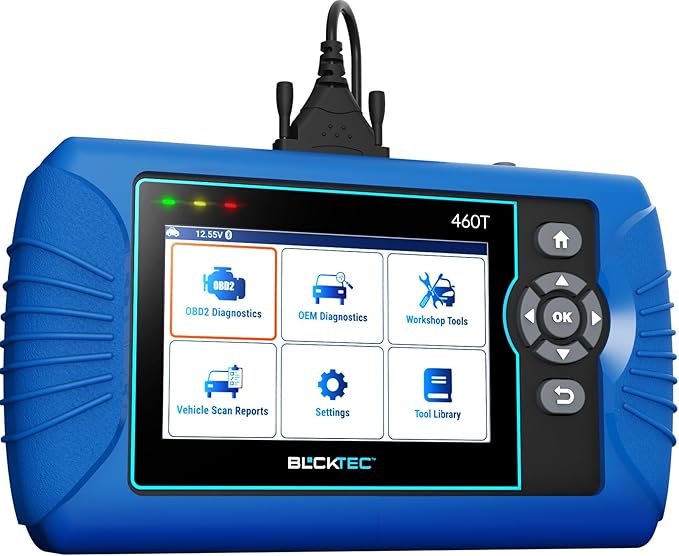 |
BLCKTEC 460T OBD2 Scanner Car Code Reader Engine ABS SRS Transmission Diagnostic | Check Price |
| 4 |  |
OBDMATE OBD2 Scanner ABS SRS Transmission | Check Price |
| 5 |  |
UJS Rocco Pro OBD2 Scanner Bluetooth ABS/SRS/Transmission No Subscription | Check Price |
FOXWELL Car Scanner NT604 Elite OBD2 Scanner ABS SRS Transmission
The FOXWELL NT604 Elite is a focused choice for owners who want more than generic engine codes. It can communicate with the engine, ABS, SRS, and transmission systems, which matters when a transmission warning is accompanied by an ABS or stability-control fault. For temperature-related troubleshooting, the important advantage is access to transmission live data when the vehicle makes that parameter available through its diagnostic module.
Its plug-and-play format keeps the learning curve reasonable. The AUTOVIN function can retrieve vehicle information without requiring the user to type the VIN manually, and support for more than 60 worldwide brands gives it useful breadth for a household with several vehicles. The included protective hard case is another practical touch because a handheld scanner is often stored in a garage, toolbox, or trunk.
There are clear boundaries. FOXWELL states that this tool is for specialized diagnostics of the engine, ABS, SRS, and transmission, not for service operations such as oil reset, battery registration, ABS bleeding, throttle-body relearn, or ABS relearn. Compatibility still controls which live-data parameters appear, so buyers should not assume that every vehicle will expose transmission-fluid temperature simply because the scanner can enter the transmission module.
Pros
- Dedicated engine, ABS, SRS, and transmission diagnostics.
- Live data, I/M readiness, and automatic VIN retrieval.
- More than 60 supported vehicle brands and lifetime updates.
- Protective hard case included.
Cons
- Does not provide the listed service resets and relearns.
- Available transmission temperature data depends on vehicle compatibility.
- Wired operation is less convenient than a Bluetooth adapter.
My Opinion
The NT604 Elite is the most balanced pick for a beginner who wants transmission access without paying for a much more elaborate platform. Choose it when reading data and codes is the priority, and verify the vehicle-specific coverage before expecting a particular temperature PID.
TOPDON AD600S OBD2 Scanner
TOPDON’s AD600S suits buyers who want a larger role from their scanner after the initial transmission diagnosis. It covers engine, ABS, transmission, and SRS modules, reads and clears codes, displays ECU information and live data, and supports all 10 OBD2 test modes. The five-inch touchscreen and Android 11 interface should be easier to navigate than a small button-only reader for users who frequently move between menus.
Live data can be viewed as text or in a four-in-one merged waveform graph. That presentation is useful when comparing several signals while a vehicle warms up or when looking for a change during a road test. Reports can also be saved, shared, printed, or emailed, giving a DIY owner a better record to provide to a repair shop.
The AD600S is more capable for routine maintenance than the FOXWELL because it includes nine service functions, including oil, EPB, BMS, SAS, DPF, TPMS, throttle, ABS bleeding, and injector-related operations. It supports more than 90 brands, newer CAN-FD vehicles, and FCA gateway access. One important ownership detail is that a 30-day trial of all 30 special services begins after activation; after that, the scanner returns to the nine included functions. It also needs regular charging, including about once a week during storage.
Pros
- Four-system diagnostics with live data and all 10 OBD2 modes.
- Five-inch touchscreen, AutoVIN, and report-sharing tools.
- Free lifetime Wi-Fi updates with no recurring subscription fee.
- Nine useful service functions remain available after the trial.
Cons
- The full set of 30 special services is only temporarily unlocked.
- It requires battery care during storage.
- Transmission temperature availability remains vehicle dependent.
My Opinion
This is the better choice for a hands-on DIY owner who expects to perform maintenance resets as well as investigate transmission data. Its broader feature set is valuable, but buyers should understand the trial arrangement and confirm the exact functions supported on their vehicle.
BLCKTEC 460T OBD2 Scanner Car Code Reader Engine ABS SRS Transmission Diagnostic
The BLCKTEC 460T is aimed at users who want professional-style information without limiting themselves to a basic code reader. It performs all-system diagnostics across engine, transmission, ABS, SRS, and other electronic control units, while freeze-frame data can preserve the conditions recorded when a fault occurred. That can be more informative than looking only at a current code after the problem has changed.
For transmission work, the combination of real-time OBD2 data and advanced OEM live data is its main attraction. The scanner can also provide transmission reset and fluid-change-related functions where the vehicle supports them. More than 12 service functions cover common jobs such as oil maintenance, battery initialization, TPMS, EPB, SAS, DPF, throttle relearn, and ABS bleeding, making it useful beyond temperature monitoring.
AutoVIN, AutoScan, and AutoReLink are intended to reduce setup steps by identifying the vehicle and scanning its control units automatically. Pairing the device with the RepairSolutions2 app adds verified repair information, parts guidance, maintenance schedules, technical-service information, warranty details, and recall information. However, the scanner and app are limited to the United States and Canada, and not every function works on every vehicle. Compatibility checking is essential, especially for model-year and transmission-module coverage.
Pros
- All-system diagnostics with OEM live data and freeze-frame information.
- More than 12 service and reset functions.
- AutoVIN, automatic scanning, and free lifetime updates.
- RepairSolutions2 adds repair and maintenance information.
Cons
- Use is restricted to the United States and Canada.
- Some functions depend heavily on vehicle-specific support.
- The large feature set may be more than a casual owner needs.
My Opinion
The 460T is a strong fit for a serious DIY mechanic or someone maintaining multiple compatible vehicles. Its data depth and app support are compelling, but a buyer outside North America or with an unusual vehicle should eliminate it before purchase unless compatibility is confirmed.
OBDMATE OBD2 Scanner ABS SRS Transmission
OBDMATE’s OM901 keeps the feature set centered on the four systems most owners are likely to need: engine, ABS, SRS, and transmission. Its 3.5-inch screen displays sensor data from the ECM and TCM in a dedicated handheld format, and its plug-and-play design avoids pairing a separate phone or tablet. For someone who wants a simple tool in the glove box, that direct approach has real appeal.
The OM901 also supplies practical general diagnostic functions, including code reading and clearing, freeze-frame information, vehicle information, and one-button I/M readiness access. A battery-voltage check and DLC 16-pin test can help identify power or connector concerns before a user assumes the transmission itself is at fault. That makes the scanner useful for preliminary checks, though voltage readings should not be treated as a complete battery or charging-system diagnosis.
Free updates are installed through a computer by downloading the OM901 software and running the installer. The package includes a silicone protective cover, hard storage case, USB-C cable, and manual. Claimed coverage is 99% of vehicles made after 2000 in the United States, 2002 in Europe, and 2008 in Asia, but broad percentages do not replace checking a specific make, model, year, and transmission. The five available interface languages are another convenience for some households.
Pros
- Four-system diagnostics in a straightforward handheld format.
- Live data, freeze-frame information, I/M readiness, and voltage checks.
- Hard case and silicone protection included.
- Free updates with no subscription fees.
Cons
- Fewer advanced service functions than the TOPDON or BLCKTEC.
- Updates require a computer and manual installation.
- Temperature data still depends on the vehicle’s accessible parameters.
My Opinion
The OM901 makes sense for a budget-conscious owner who values direct operation and four-system coverage over a long list of resets. It is a sensible compact option, provided the buyer confirms that the target vehicle exposes the transmission data needed.
UJS Rocco Pro OBD2 Scanner Bluetooth ABS/SRS/Transmission No Subscription
The Rocco Pro takes a different route by using Bluetooth and a free companion app rather than a self-contained display. It supports full-system diagnostics for the engine, ABS, airbag, and transmission, along with 10 standard OBD protocols. That arrangement can be convenient for drivers who prefer viewing data on a phone and keeping diagnostic history digitally.
Its live-data graphing, battery-voltage test, and one-touch AutoVIN are useful for both fault investigation and used-car shopping. The app can store profiles for up to eight vehicles, while the advertised hidden-fault detection is intended to help identify issues that may not be obvious during a quick inspection. AI-assisted explanations and shareable diagnostic reports may also make technical codes less intimidating for a first-time owner.
The Rocco Pro supports more than 20 OBD2 modes, including I/M readiness, EVAP testing, and oxygen-sensor monitoring. It is listed for 1996-and-newer OBDII/EOBD-compliant cars in the United States. That regional wording matters: Bluetooth compatibility is not the same as worldwide vehicle coverage, and a phone-based tool also depends on the app, operating system, and wireless connection working properly. The product has a small customer-feedback sample compared with the higher-ranked choices, so its feature promise should be weighed alongside the need to verify compatibility.
Pros
- Bluetooth convenience with a free app and no subscription fees.
- Engine, ABS, SRS, and transmission system access.
- Live-data graphs, AutoVIN, battery testing, and vehicle profiles.
- More than 20 OBD2 modes and lifetime updates.
Cons
- Requires a compatible phone and app connection.
- Listed vehicle coverage is focused on the United States.
- Smaller customer-feedback sample than the other selections.
My Opinion
Rocco Pro is attractive for a connected-car owner who prefers app guidance and digital records. It is less ideal for someone who wants a standalone tool that works without a phone, and the lower amount of available feedback makes compatibility verification especially important.
How I Selected These Options for the Best Obd2 Scanner for Transmission Temperature
The central selection question was not simply whether a scanner could read generic OBD2 codes. I looked for tools that specifically list transmission diagnostics, live-data access, vehicle identification, and useful ways to interpret or document faults. I then weighed broader ownership factors such as update costs, supported systems, service functions, display format, app dependence, regional restrictions, and the amount of customer feedback available.
Transmission temperature is a vehicle-data question as much as a scanner question. A tool may enter a TCM but still lack a particular temperature parameter on a specific year, make, or transmission. For that reason, the rankings favor products with clear transmission-module support while treating compatibility as a condition rather than promising a universal result.
Before buying, confirm the exact vehicle and transmission coverage. “Transmission diagnostics” does not guarantee that transmission-fluid temperature will be available as a selectable live-data item.
Brand diversity also mattered. FOXWELL and OBDMATE emphasize straightforward handheld use, TOPDON adds a touchscreen and service coverage, BLCKTEC offers extensive data and app resources, and Rocco Pro focuses on Bluetooth convenience. This gives buyers several legitimate operating styles instead of five nearly identical readers.
A scanner can report a code or temperature, but it cannot independently prove that a fluid, sensor, solenoid, cooler, or transmission is healthy. Treat its information as a diagnostic starting point.
How to Choose an Obd2 Scanner for Transmission Temperature
Start with the vehicle, not the scanner’s longest feature list. Confirm that the tool supports the vehicle’s model year, communication protocol, transmission control module, and the live-data parameter you want. Then decide whether a simple wired reader, a larger service tool, or a Bluetooth app better matches your comfort level.
- Choose dedicated transmission-module access rather than engine-only OBD2 reading.
- Confirm live-data and temperature-PID availability for the exact vehicle.
- Compare update policies, regional limits, and any trial-based functions.
- Decide whether service resets, reports, graphs, or app guidance are genuinely useful.
- Prefer clear limitations over a product that makes universal promises.
Transmission-module access
Generic OBD2 functions are often centered on emissions-related engine data. A scanner that lists transmission diagnostics has a better chance of reading TCM codes and manufacturer-specific information. Even then, access can vary by vehicle. Ask whether the scanner reads live TCM data, not merely whether it can clear a transmission warning light.
Live data and graphing
A numerical temperature value can be enough for a quick check, while graphing helps reveal trends as the vehicle warms or as operating conditions change. A four-in-one graph or OEM data stream may be useful when comparing temperature with engine load, vehicle speed, pressure-related readings, or shift behavior. More data is not automatically better if the interface becomes difficult to interpret.
Coverage and updates
Vehicle coverage can change by region, model year, module, and function. Lifetime updates are useful because diagnostic software evolves, but they do not guarantee every future feature on every vehicle. Tools with FCA gateway or CAN-FD support may be preferable for certain newer vehicles, while older cars may need only standard OBD2 compatibility.
Standalone versus Bluetooth operation
A standalone scanner has its own screen and is ready to use when connected to the vehicle. Bluetooth tools can offer better graphs, digital reports, and guided explanations, but they depend on a phone, app permissions, wireless communication, and software support. Choose based on the environment where the scanner will actually be used rather than assuming one format is universally superior.
How to Confirm Temperature Data Before Buying
Look for a compatibility page, vehicle lookup tool, or manufacturer support channel that identifies the exact make, model, year, engine, and transmission. Ask specifically whether the TCM exposes transmission-fluid temperature or an equivalent parameter. Some vehicles label it differently, and some do not make it available through the diagnostic connector.
Do not rely only on a marketplace title containing the word “transmission.” That wording may refer to reading trouble codes, clearing a warning, or accessing a module without promising a temperature display. A written confirmation for the exact vehicle is more valuable than a general claim covering thousands of cars.
How to Set Up a New Scanner
- Park safely, set the parking brake, and switch off unnecessary electrical accessories.
- Locate the vehicle’s 16-pin diagnostic connector and connect the scanner firmly.
- Turn the ignition to the required position without starting the engine unless the instructions say otherwise.
- Allow the tool to identify the vehicle, then verify that the displayed make, model, and year are correct.
- Run a code scan before clearing anything, and save or photograph the results.
- Open the transmission or TCM menu and look for live data or data-stream options.
If the scanner fails to power up, check the connector, the vehicle’s diagnostic fuse, and the cable connection. Avoid forcing the plug or using an improvised adapter. For app-based products, install the official application, allow only necessary permissions, and complete updates before beginning a diagnosis.
How to Read Transmission Temperature Responsibly
Record the starting condition first: ambient temperature, engine state, vehicle mileage, and whether the vehicle is cold or already warmed. Then observe the reading as the vehicle reaches normal operating conditions. A single number without context is less useful than a pattern showing how the value changes during similar driving conditions.
Do not compare a cold reading with a warmed-up reading as though they were equivalent. Do not assume that a displayed value is fluid temperature unless the scanner identifies the parameter clearly. If the reading is missing, unusually fixed, or inconsistent with other information, the cause may involve unavailable data, a sensor, wiring, software interpretation, or a module communication problem.
Using Live Data During a Road Test
Only observe the scanner while another person drives, or configure the display before moving. A wired tool should be positioned so that the cable cannot interfere with the pedals, steering wheel, shifter, or driver visibility. A phone-based scanner should be secured according to local safety rules and never handled while driving.
Use repeatable conditions when comparing readings: similar road speed, load, outside temperature, and duration. Note whether the transmission is shifting normally, whether a warning light appears, and whether the temperature changes after stopping or climbing. These notes help a technician interpret the data more effectively than a bare screenshot.
What a Temperature Reading Can and Cannot Tell You
A transmission temperature value can help identify a trend, support a fluid-service decision, or show that the module is receiving information from a sensor. It cannot by itself determine fluid condition, internal wear, cooler flow, pressure, clutch health, or the cause of every shift complaint.
Use codes, freeze-frame data, live values, service history, fluid condition, and physical symptoms together. A normal-looking temperature does not rule out a mechanical problem, and an abnormal-looking value may be caused by a sensor or communication issue rather than actual overheating.
Maintenance and Storage Tips
Keep a handheld scanner in its case and protect the connector from dust, moisture, and bent pins. Do not leave it in extreme heat inside a parked vehicle. Clean the screen and housing with a soft, slightly damp cloth rather than spraying cleaner into openings.
Follow the product’s update instructions and keep a record of the software version. The TOPDON AD600S specifically benefits from regular charging, including weekly charging during storage to reduce the risk of deep discharge. For Bluetooth tools, keep the app and phone operating system current, but do not update in the middle of an active diagnostic session.
Common Mistakes to Avoid
Most disappointing scanner purchases result from a mismatch between expectations and vehicle support, not from the scanner failing to power on. Avoid these errors before and during ownership.
- Buying an engine-only reader when TCM access is required.
- Assuming every vehicle exposes transmission-fluid temperature.
- Clearing codes before saving the original code and freeze-frame information.
- Using a service reset without confirming the correct procedure for the vehicle.
- Trusting a generic temperature threshold without consulting vehicle-specific guidance.
- Performing a road test while holding a scanner or phone in your hand.
- Ignoring country, model-year, app, or gateway restrictions.
Never clear a transmission code merely to turn off the warning light. Record the code first, investigate the conditions that created it, and confirm that the vehicle is safe to drive.
When to Seek Professional Diagnosis
Stop relying on scanner data alone if the vehicle has severe slipping, harsh engagement, loss of drive, burning odor, fluid leakage, repeated overheating warnings, or a flashing warning indicator. A scan can narrow the possibilities, but transmission diagnosis may require pressure testing, wiring inspection, temperature verification, or manufacturer-level equipment.
Bring the saved codes, temperature observations, driving conditions, service history, and any photographs to the technician. This information can make the appointment more efficient without encouraging unnecessary parts replacement.
FAQS About Best Obd2 Scanner for Transmission Temperature
Can an OBD2 scanner show transmission temperature?
It can when the vehicle exposes transmission temperature through the TCM and the scanner supports that live-data parameter. Transmission-module access alone does not guarantee a temperature reading.
What should I look for in a scanner that reads transmission temperature?
Look for dedicated transmission or TCM diagnostics, live-data access, vehicle-specific compatibility, and clear support for the exact make, model, year, and transmission. Graphing is helpful but not essential.
Is the FOXWELL NT604 Elite suitable for transmission temperature data?
It is a strong candidate because it supports transmission diagnostics and live data, but the available temperature parameter remains dependent on the vehicle. Verify coverage before buying.
Do all transmission scanners display the same temperature?
No. Vehicles can expose different parameters, use different labels, or provide no temperature value through the diagnostic connector. Two scanners may therefore show different data access on the same vehicle.
Can I use a Bluetooth scanner for a transmission temperature check?
Yes, if the Bluetooth adapter and companion app support the vehicle’s transmission module and live data. The phone, app, wireless connection, and regional coverage all become part of the compatibility equation.
Should I clear a transmission code after checking temperature?
Not immediately. Save the code and freeze-frame information first, diagnose the cause, and clear it only when appropriate. Erasing the code can remove useful evidence and readiness information.
Final Thoughts
For most beginners, the FOXWELL Car Scanner NT604 Elite is the best obd2 scanner for transmission temperature because it balances dedicated four-system diagnostics, live data, coverage, and simple ownership. Choose the TOPDON AD600S for a touchscreen and stronger service-tool capability, or the BLCKTEC 460T for deeper all-system data and extensive resets. Confirm vehicle compatibility first, because the scanner can only display transmission temperature when the vehicle makes that information available.