Finding the best auto scanner with live data is less about choosing the most complicated tool and more about matching the scanner to the problems you actually need to diagnose. A beginner may only need engine codes and sensor readings, while a home mechanic could benefit from battery testing, ABS access, service resets, or all-system diagnostics.
My first choice is FOXWELL NT301 OBD2 Scanner Live Data Professional Mechanic OBDII Diagnostic Code Reader. Its color screen, I/M readiness shortcut, oxygen-sensor and EVAP testing, lifetime updates, and plug-and-play design make it a particularly sensible choice for check-engine-light diagnosis.
My second choice is Innova 5210 OBD2 Scanner & Engine Code Reader. Innova 5210 OBD2 Scanner & Engine Code Reader ranks second as the better alternative for buyers who want battery and alternator checks alongside engine diagnostics. It also adds oil-light resetting, live sensor readings, emissions readiness information, and access to RepairSolutions2 guidance without a subscription.
My third choice is BLCKTEC 440 Bluetooth OBD2 Scanner Diagnostic Tool. BLCKTEC 440 Bluetooth OBD2 Scanner Diagnostic Tool takes third place for its convenient Bluetooth-compatible approach, live-data graphs, charging-system testing, color display, printer support, and lifetime updates. It is a good fit for DIY owners who want a compact diagnostic tool with more reporting flexibility than a basic code reader.
This comparison explains what each scanner can do, where its limits matter, and which type of vehicle owner should consider it. The buying guide then covers compatibility, live-data interpretation, setup, emissions testing, maintenance, common mistakes, and practical ownership decisions.
Best Auto Scanner with Live Data
I selected these products according to their relevance to live-data diagnosis, the usefulness of their supported functions, compatibility information, customer-feedback evidence where available, and differences in design and brand approach. The ranking favors tools that offer meaningful information to beginners without ignoring the needs of more advanced DIY users.
| # | Image | Product | Price on Amazon |
|---|---|---|---|
| 1 |  |
FOXWELL NT301 OBD2 Scanner Live Data Professional Mechanic OBDII Diagnostic Code Reader | Check Price |
| 2 |  |
Innova 5210 OBD2 Scanner & Engine Code Reader | Check Price |
| 3 |  |
BLCKTEC 440 Bluetooth OBD2 Scanner Diagnostic Tool | Check Price |
| 4 |  |
Innova SD35 OBD2 Scanner ABS | Check Price |
| 5 | 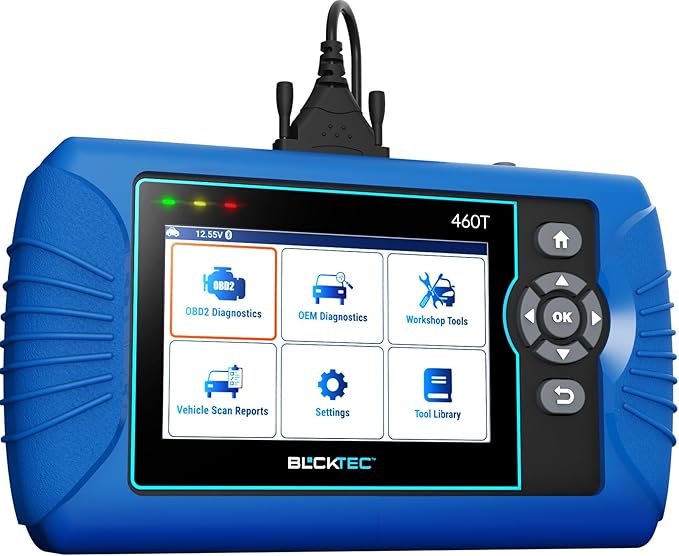 |
BLCKTEC 460T OBD2 Scanner Car Code Reader Engine ABS SRS Transmission Diagnostic | Check Price |
FOXWELL NT301 OBD2 Scanner Live Data Professional Mechanic OBDII Diagnostic Code Reader
The FOXWELL NT301 is the strongest all-around option here for someone who wants a dedicated, wired scanner rather than a phone-dependent adapter. It plugs into the vehicle’s 16-pin diagnostic port, powers from the car, and uses a bright 2.8-inch color display. That makes it easy to begin diagnosing without charging a battery, pairing Bluetooth, or installing an app.
Its most useful advantage is the combination of code reading with live-data graphing. You can watch information such as oxygen-sensor readings, fuel trims, coolant temperature, and engine speed while the vehicle is operating. That does not automatically identify every failed part, but it gives a clearer picture than simply reading and clearing a trouble code.
The NT301 also includes one-button I/M readiness access, red-yellow-green status lights, and a built-in speaker. Those details are helpful before an emissions inspection, although clearing codes or disconnecting the battery can reset readiness monitors and require another drive cycle. Oxygen-sensor and EVAP testing add diagnostic depth, but supported functions can still depend on the vehicle.
Pros
- Clear live-data graphs and a daylight-readable color screen.
- Includes I/M readiness, oxygen-sensor, and EVAP-related functions.
- Supports major OBDII protocols and many 1996-and-newer vehicles.
- No subscription, battery charging, or app setup required.
Cons
- Primarily focused on powertrain and OBDII functions rather than all vehicle modules.
- Compatibility should be checked for specific European, Asian, and diesel applications.
- A wired design is less convenient than a wireless adapter for some users.
My Opinion
The NT301 is the easiest recommendation for a first diagnostic tool when check-engine-light work and live sensor monitoring are the priority. Confirm your vehicle’s coverage first, especially if you need functions beyond standard OBDII.
Innova 5210 OBD2 Scanner & Engine Code Reader
The Innova 5210 earns its position by covering several common ownership jobs in one device. In addition to reading and clearing engine codes, it can test the vehicle battery and alternator. That is useful when a warning light, slow starting, or charging concern makes it difficult to know whether the problem is the battery, the alternator, or an engine-management issue.
Live readings include engine speed, temperature, fuel trims, and oxygen-sensor information. The drive-cycle readiness feature is also practical for checking whether a car is prepared for an emissions inspection. After a code is cleared or the battery is disconnected, however, the monitors need time and normal driving conditions to repopulate.
Another advantage is the built-in oil-light reset and connection to the RepairSolutions2 app. The app can provide verified fixes, suggested parts, repair guidance, and cost estimates without an extra subscription. ABS code access is listed as available with coverage variation, so buyers should use Innova’s coverage checker rather than assume every function works on every make and year.
Pros
- Combines engine diagnostics with battery and alternator testing.
- Provides live data, oil reset, and emissions-readiness information.
- RepairSolutions2 adds repair guidance and parts information at no extra fee.
- Works with many US, Asian, and European vehicles from 1996 onward.
Cons
- ABS coverage and other functions vary by vehicle.
- It is important to seat the connector firmly and follow the correct ignition sequence.
- It may be more capability than a buyer who only wants basic code reading needs.
My Opinion
The 5210 is a strong choice for practical home maintenance because battery testing and oil reset make it useful between warning-light events. Its best value appears when the buyer verifies coverage and intends to use the app’s repair information.
BLCKTEC 440 Bluetooth OBD2 Scanner Diagnostic Tool
The BLCKTEC 440 takes a balanced middle position between a basic reader and a more advanced workshop device. Its live-data graphing can help a DIY owner observe changing engine values instead of relying only on stored codes. Battery and charging-system testing adds another useful check when the vehicle has starting or electrical symptoms.
A 2.8-inch color screen keeps the device usable without depending entirely on a phone, while Bluetooth compatibility gives it a more flexible connection style than a conventional cable-only scanner. Printer compatibility may also help a small repair operation or careful owner share diagnostic information, though most casual users will not need printed reports.
The I/M readiness hotkeys and color-coded LEDs make emissions preparation approachable for beginners. It supports cars, SUVs, light trucks, and 12-volt diesel vehicles equipped with OBDII, but “OBD-compliant” does not mean that every manufacturer-specific system or enhanced function is available. Free lifetime updates and expert support improve long-term ownership, provided the user keeps the tool updated when appropriate.
Pros
- Offers live-data graphing and battery/charging-system checks.
- Color display, readiness shortcuts, and LEDs are beginner-friendly.
- Supports lifetime updates and can work with a printer for reports.
- Useful across many OBDII-compliant vehicles from 1996 and newer.
Cons
- Advanced manufacturer-specific coverage may vary.
- Bluetooth adds convenience but may involve more setup than a simple cable.
- Its feature set may not satisfy buyers seeking extensive service resets.
My Opinion
The BLCKTEC 440 suits owners who want accessible graphing and electrical-system checks without moving to a much more specialized scanner. It is especially appealing if report sharing or lifetime update access matters to you.
Innova SD35 OBD2 Scanner ABS
The Innova SD35 is the most appropriate pick in this group for shoppers who want to look beyond the engine computer. Its tablet-style format supports diagnostics for the engine, transmission, ABS, SRS, TPMS, and other systems when the vehicle provides that coverage. For a car showing an airbag, brake, or tire-pressure warning, that broader access can be more useful than a powertrain-only code reader.
Live data remains central, with readings such as RPM, fuel trims, temperature, and oxygen-sensor performance. The high-resolution display should make larger diagnostic screens easier to follow, especially when comparing several values. The tool also supports battery and alternator checks, oil resets, and TPMS-related functions, bringing routine maintenance and fault diagnosis together.
The major qualification is coverage. All-system access is not universal across every make, model, and year, and service functions may vary as well. Innova’s coverage checker is essential before purchase. The included RepairSolutions2 access can help interpret findings, but software guidance should support—not replace—basic mechanical inspection and manufacturer-specific procedures.
Pros
- Provides broader system access than a basic engine-code scanner.
- Supports ABS, SRS, TPMS, oil reset, live data, and charging checks where covered.
- Tablet-style display is useful for viewing diagnostic information.
- RepairSolutions2 offers verified fixes and maintenance information without a subscription.
Cons
- System and service coverage varies substantially by vehicle.
- It may be unnecessary for owners who only need check-engine-light information.
- Recent customer-feedback volume is smaller than that of the top-ranked option.
My Opinion
The SD35 is the better fit when warning lights involve safety or chassis systems, not just emissions. Buy it only after confirming that the ABS, SRS, TPMS, and reset functions you need are supported on your vehicle.
BLCKTEC 460T OBD2 Scanner Car Code Reader Engine ABS SRS Transmission Diagnostic
The BLCKTEC 460T is the most function-heavy option in this ranking. It can scan engine, transmission, ABS, SRS, and other systems, while also providing OBDII and advanced OEM live data plus freeze-frame information. AutoVIN, AutoScan, and AutoReLink are intended to reduce manual steps after connecting the scanner and help identify faults across the vehicle’s electronic control units.
Its biggest distinction is the collection of service functions. Depending on vehicle coverage, it can support oil, EPB, battery, steering-angle, TPMS, DPF, throttle, transmission, and other resets, along with ABS bleeding. That makes it more attractive to a home mechanic who performs maintenance than to a driver who simply wants to decode a dashboard light.
There is a meaningful trade-off: advanced functions can carry consequences if used incorrectly, and no scanner can guarantee the same access on every vehicle. The tool and RepairSolutions2 app are limited to the USA and Canada, and compatibility notes state that not all functions work on all vehicles. Verify coverage and understand the procedure before changing adaptations or resetting modules.
Pros
- Offers all-system diagnostics, freeze-frame data, and OEM live data.
- Includes more than 12 useful reset and service functions.
- AutoVIN and AutoScan can reduce setup time.
- Lifetime updates and RepairSolutions2 add long-term information value.
Cons
- Not every service function is available on every vehicle.
- USA and Canada use is specified; other regions are not supported.
- Advanced resets require more care and knowledge than ordinary code reading.
My Opinion
The 460T is the right step up for a capable DIY owner who needs module access and service resets. Its lower ranking reflects complexity and coverage qualifications, not a lack of capability.
How I Selected These Best Auto Scanner with Live Data Options
I gave the highest priority to tools that show useful sensor information in real time rather than merely displaying a stored trouble code. I also considered whether each scanner adds practical functions such as readiness checks, battery testing, oil resets, all-system access, service resets, or repair guidance. Customer-feedback volume and ratings helped provide context, but they were not treated as proof that a scanner works identically on every vehicle.
Brand diversity also mattered. FOXWELL, Innova, and BLCKTEC approach vehicle diagnostics differently, giving readers a choice between simple wired operation, app-assisted guidance, broader tablet-style coverage, and more advanced service functions. The ranking is therefore based on usefulness for likely buyers, not just the number of advertised capabilities.
Selection takeaway: A scanner ranks well when its live readings are paired with a clear use case. More functions are valuable only when they work on the owner’s specific vehicle and the owner understands what those functions change.
Compatibility claims were treated carefully because model year, market, engine, and control module can affect access. A tool that reads standard engine data may not also read ABS, SRS, transmission, or TPMS codes. That is why coverage checking is part of the buying process, not an optional final step.
Important limitation: These tools can reveal diagnostic information, but a trouble code does not automatically identify a failed part. Confirm the cause with visual checks, electrical testing, service information, or qualified assistance when the repair involves safety systems.
How to Choose the Best Auto Scanner with Live Data
Start with the warning lights and maintenance tasks you expect to handle. If your main goal is checking engine codes and watching sensor values, a simple OBDII scanner is usually easier to live with. If you need airbag, ABS, transmission, TPMS, or reset functions, prioritize verified system coverage over a low purchase price.
- Confirm make, model, year, engine, region, and required modules before buying.
- Choose wired operation for simplicity or app/Bluetooth support for connection flexibility.
- Look for graphing, freeze-frame data, and readiness status rather than code clearing alone.
- Match service resets to work you genuinely perform.
- Prefer free updates and no required subscription when long-term ownership matters.
Standard OBDII Versus All-System Access
Standard OBDII normally centers on emissions-related powertrain information. It can be enough for a check-engine light, fuel-trim investigation, oxygen-sensor data, and inspection readiness. All-system tools go further by communicating with modules such as ABS, SRS, transmission, or TPMS, but their coverage is more vehicle-specific.
Do not assume that a scanner described as compatible with 1996-and-newer vehicles can access every system on every car from that period. The connector may fit while a manufacturer-specific module remains unavailable. Use the maker’s coverage checker and search for the exact function, not merely the vehicle year.
What Live Data Actually Tells You
Live data is a stream of readings from the vehicle while the ignition is on or the engine is running. RPM can confirm engine-speed information, coolant temperature can reveal an implausible cold or hot reading, and fuel trims can show how the computer is adjusting fueling. Oxygen-sensor values can help identify patterns, but they should be interpreted alongside symptoms and other tests.
Graphing is often easier than watching a rapidly changing number. Look for values that remain fixed, respond slowly, or change in a way that does not match engine conditions. Save or note the conditions before clearing anything, because erasing codes may also remove useful freeze-frame information and reset inspection monitors.
Screen, Connection, and App Choices
A wired scanner is generally quick to connect and does not require a separate battery. It can be a good choice for a glovebox tool that needs to work immediately. Bluetooth-compatible products may provide app access, repair information, or flexible viewing, but they introduce another connection step and may depend on phone compatibility.
A larger or higher-resolution screen is helpful when viewing several parameters, while color indicators can make readiness checks more understandable for beginners. Consider whether you will diagnose in daylight, inside a garage, or while seated in the driver’s seat before choosing a display style.
How to Set Up an OBD2 Scanner Safely
Park securely, set the transmission in Park or Neutral as appropriate, and apply the parking brake. Locate the 16-pin diagnostic connector, usually beneath the dashboard, and avoid forcing the plug. Follow the scanner’s recommended order for connecting and turning the ignition on.
- Turn the ignition to the ON position with the engine off unless the instructions say otherwise.
- Connect the scanner firmly to the diagnostic port.
- Allow the tool to identify the vehicle or enter the requested details.
- Read and record codes, freeze-frame data, and relevant live readings before clearing anything.
- Disconnect only after the scan is complete and the ignition is off if instructed.
If the screen stays blank, check that the connector is fully seated and that the vehicle’s diagnostic port has power. A blown fuse, damaged port, weak vehicle battery, or incorrect ignition position can prevent communication.
How to Use Live Data More Effectively
Begin with a small group of parameters instead of displaying every available sensor. Engine speed, coolant temperature, short- and long-term fuel trims, and oxygen-sensor information are common starting points. Compare the readings with the symptoms, weather, engine temperature, and driving condition.
Cold Start and Warm Engine Checks
On a cold engine, coolant temperature should generally make sense relative to the surrounding conditions. As the engine warms, the reading should change rather than remain frozen. Fuel trims and oxygen-sensor behavior can also change during warm-up, so recording only one moment may lead to an incomplete conclusion.
Use Freeze-Frame Data Before Clearing Codes
Freeze-frame information records operating conditions associated with a stored fault when the vehicle supports it. Note engine speed, temperature, load, and other available details. Clearing the code first may remove clues that help reproduce the problem.
Emissions Readiness and Drive-Cycle Planning
Readiness monitors indicate whether the vehicle’s self-checks have completed. A scanner can show whether the car appears ready, but it cannot instantly make incomplete monitors complete. Clearing codes or disconnecting the battery commonly resets these checks.
After repairs, drive the vehicle normally under varied conditions and allow enough time for the required monitors to run. Exact drive-cycle requirements differ by vehicle, so consult the owner’s manual or manufacturer service information. Do not clear a warning immediately before an inspection and assume the car will pass.
Battery, Charging, and Connection Troubleshooting
Battery and alternator testing can help separate a starting problem from an engine-management problem, but the results are most useful when the battery is connected correctly and the vehicle is in the requested state. Follow the scanner prompts for ignition-off, ignition-on, or running tests.
For connection problems, inspect the diagnostic port for bent pins, debris, looseness, or physical damage. Make sure the vehicle battery is not severely depleted. On app-connected scanners, confirm Bluetooth permissions, phone compatibility, and the correct application before assuming the scanner itself has failed.
Maintenance, Storage, and Updates
Wipe the scanner with a soft, slightly damp cloth and keep liquids away from the connector and screen. Do not leave the cable where it can interfere with pedals or become pinched. Store the tool in a dry location rather than hanging it permanently from the diagnostic port.
Install available lifetime updates according to the maker’s instructions, especially before diagnosing a newer vehicle. Keep app-based tools paired with the correct application and check that the phone operating system remains supported. Updates may improve vehicle coverage, but they do not guarantee access to every manufacturer-specific function.
Common Mistakes to Avoid with Live-Data Scanners
Most disappointing scanner experiences come from incorrect expectations or poor diagnostic habits. A scanner reports information; it does not automatically prove which component should be replaced.
- Do not clear codes before writing down the code and freeze-frame information.
- Do not treat one abnormal reading as proof of a failed sensor.
- Do not assume a 1996-or-newer claim guarantees ABS, SRS, TPMS, or reset coverage.
- Do not use service resets without understanding the procedure and its consequences.
- Do not drive with the cable positioned near the pedals or steering controls.
- Do not rely on an emissions-readiness result immediately after clearing codes.
When a warning involves braking, airbags, steering, or a serious drivability symptom, use the scanner as one part of the diagnosis rather than taking a guess-and-replace approach.
Which Scanner Fits Which Buyer?
For straightforward engine diagnostics, live graphing, and emissions preparation, the FOXWELL NT301 is the most balanced choice. It is especially suitable for a first scanner that should work without an app or subscription.
The Innova 5210 is a practical alternative for owners who want battery, alternator, oil-reset, and repair-guidance functions in addition to live engine information. The BLCKTEC 440 is appealing when graphing, charging checks, Bluetooth flexibility, and report sharing matter.
Move to the Innova SD35 if ABS, SRS, TPMS, or broader system access is central to your needs. Choose the BLCKTEC 460T when you are comfortable with a more advanced device and genuinely need multiple service resets, OEM live data, or automated vehicle scanning.
FAQS About Best Auto Scanner with Live Data
What is the best auto scanner with live data for beginners?
The FOXWELL NT301 is the most beginner-friendly choice in this group because it uses a direct wired connection, has a color screen, offers simple readiness indicators, and does not require app pairing or a subscription. Its live-data graphs provide more information than a basic code reader while keeping the operation relatively straightforward.
Can a live-data scanner identify the exact failed part?
Usually not by itself. Live readings and trouble codes can narrow the possibilities, but wiring faults, vacuum leaks, mechanical problems, and several related components can create similar symptoms. Confirm important findings with additional inspection or testing.
Will these scanners read ABS and airbag codes?
Coverage varies. The Innova SD35 and BLCKTEC 460T are the strongest choices for broader system access, while the Innova 5210 may provide ABS access on supported vehicles. Check the exact make, model, year, and function before purchase.
Does clearing a code make a car ready for an emissions test?
No. Clearing a code can reset readiness monitors to incomplete. The vehicle normally needs a suitable drive cycle before those monitors can run again, and the precise requirements depend on the vehicle.
Do live-data scanners require a subscription?
The products listed here advertise core scanner operation without a subscription. Some connect to RepairSolutions2 or other software for additional repair information. App availability and vehicle coverage should still be confirmed for your region and device.
Are these scanners compatible with diesel vehicles?
Compatibility depends on the vehicle and diagnostic system. The FOXWELL NT301 and BLCKTEC 440 specifically mention support for certain 12-volt diesel vehicles equipped with OBDII, while the BLCKTEC 460T lists broad USA and Canada OBD2 coverage. Verify the exact application before buying.
Final Thoughts
The FOXWELL NT301 is my overall pick for accessible engine diagnostics and live graphing, while the Innova 5210 is the better alternative for battery testing, oil resets, and app-assisted repair guidance. The BLCKTEC 440 is a capable third choice for charging checks and flexible reporting. For broader module access, consider the Innova SD35 or BLCKTEC 460T after confirming coverage. Choosing the best auto scanner with live data ultimately means selecting the functions your vehicle and your maintenance habits actually require.