Finding a dependable diagnostic tool for a Volkswagen vehicle can be frustrating because standard code readers frequently miss proprietary fault codes tucked inside complex German control networks. Selecting the best bluetooth obd2 scanner for vw requires understanding the difference between generic powertrain readers and specialized diagnostic interfaces that communicate directly with Volkswagen Auto Group protocols.
My first choice is ANCEL BD500 Bluetooth Diagnostic Scan Tool. It earns the top spot because it integrates manufacturer-level Volkswagen Auto Group diagnostics alongside critical routine maintenance functions without forcing users into third-party software subscriptions. It pairs broad system access with everyday usability for common tasks like rear brake maintenance and throttle adaptation.
My second choice is KINGBOLEN SOLOSCAN Bluetooth OBD2 Scanner. It ranks second by providing an outstanding depth of bidirectional active testing and dealer-level calibration routines across Volkswagen models with a transparent no-subscription approach. This makes it an ideal fit for dedicated home mechanics tackling involved component troubleshooting.
My third choice is OBDLink MX+ OBD2 Bluetooth Scanner. It secures the third position because of its professional-grade data throughput, rock-solid multi-platform stability, and wide compatibility with popular community diagnostic software suites. It delivers exceptional versatility for motorists who maintain mixed-brand vehicle fleets alongside their Volkswagen.
In this guide, you will explore in-depth evaluations of the top five wireless diagnostic adapters, an analysis of specialized German car diagnostic protocols, and a comprehensive buyer manual. You will also discover practical ownership guidance covering app pairings, port safety, routine maintenance resets, and troubleshooting common electronic connection issues.
Best Bluetooth Obd2 Scanner for Vw
To identify the strongest wireless diagnostic tools for Volkswagen owners, I evaluated hardware capability, genuine Volkswagen Auto Group protocol support, reset function breadth, software ecosystems, and verified user feedback. Every selected device offers proven reliability and distinct advantages ranging from beginner-friendly maintenance resets to multi-app platform adaptability.
| # | Image | Product | Price on Amazon |
|---|---|---|---|
| 1 |  |
ANCEL BD500 Bluetooth Diagnostic Scan Tool | Check Price |
| 2 | 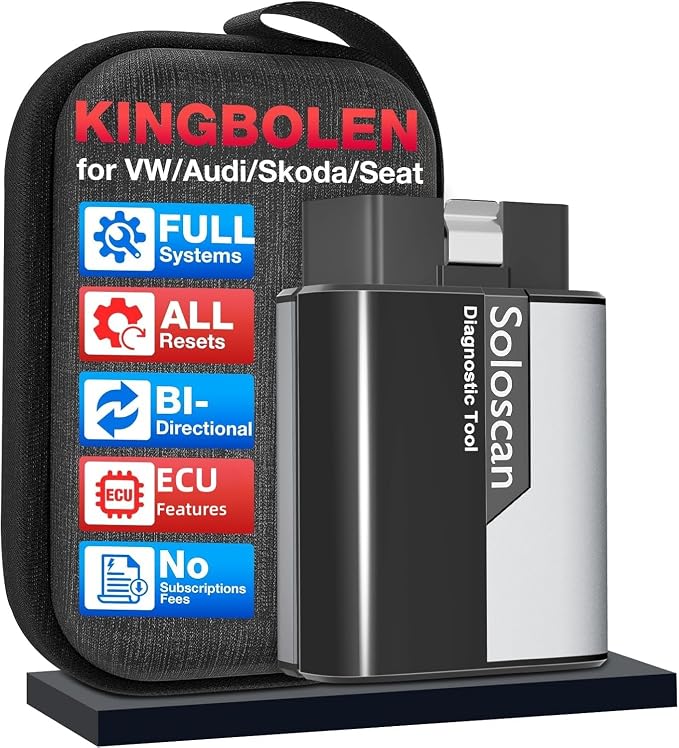 |
KINGBOLEN SOLOSCAN Bluetooth OBD2 Scanner | Check Price |
| 3 |  |
OBDLink MX+ OBD2 Bluetooth Scanner | Check Price |
| 4 |  |
Vgate Icar Pro Bluetooth 4.0 BLE OBD2 Fault Code Reader | Check Price |
| 5 |  |
UMEIJA OBD2 Scanner Diagnostic Tool Car Scanner Ios Android Bluetooth | Check Price |
ANCEL BD500 Bluetooth Diagnostic Scan Tool
The ANCEL BD500 is tailored specifically to bridge the gap between basic dashboard warning light readers and dealership service computers. While generic readers only inspect standard engine codes, this unit accesses transmission, airbag, antilock braking, electronic stability, and body control modules across Volkswagen, Audi, Skoda, and Seat models. It communicates across traditional KWP, TP20, and modern UDS network architectures.
For routine maintenance, this adapter stands out by addressing jobs that normally require a technician. It incorporates an electronic parking brake service mode, which retracts the rear brake calipers safely so you can swap pads without destroying expensive servo motors. It also supports oil service resets and throttle body relearning procedures, guiding users directly through the required steps within its proprietary smartphone app.
Beyond diagnostics, the tool includes battery voltage monitoring and trip braking performance checks. When plugged into non-Volkswagen vehicles, it steps down to standard powertrain OBD2 functionality to clear engine fault codes and verify emissions readiness. Updates to the in-house app are provided without recurring fees, protecting long-term value.
Pros
- Full-system scanning across proprietary Volkswagen control modules
- Includes electronic parking brake retract and throttle relearn procedures
- In-house dedicated mobile application with no ongoing subscription costs
- Supports legacy and modern protocols including KWP and UDS
Cons
- Non-Volkswagen vehicles are restricted to basic engine-only OBD2 features
- Does not support battery management programming or registration
My Opinion
The ANCEL BD500 offers the best overall balance for Volkswagen owners who want dedicated brand access, essential maintenance resets, and a streamlined proprietary mobile application without paying ongoing monthly or annual fees.
KINGBOLEN SOLOSCAN Bluetooth OBD2 Scanner
The KINGBOLEN SOLOSCAN targets DIYers and intermediate mechanics seeking deeper diagnostic control over Volkswagen Auto Group electronics. Beyond reading and erasing diagnostic trouble codes across engine, transmission, chassis, and supplemental restraint systems, this scanner incorporates active bidirectional testing. That feature allows you to send commands directly to vehicle components to verify real-time functionality.
With bidirectional capability, tracking down broken systems becomes methodical rather than speculative. You can manually actuate cooling fan relays, command fuel pumps, cycle electronic switches, and test individual solenoid actuators. This diagnostic depth saves significant time when troubleshooting mysterious electrical or sensor faults across modern Volkswagen, Audi, and related vehicle lines.
Maintenance support is remarkably extensive. It handles standard oil and parking brake resets while also supporting steering angle sensor calibration, antilock brake bleeding routines, fuel injector coding, and tire pressure monitoring system adaptations. An automatic vehicle identification feature identifies your chassis quickly, while four-parameter live data graphing provides dynamic telemetry during component testing.
Pros
- Bidirectional active testing commands cooling fans, switches, and fuel circuits
- Extensive calibration suite including steering angle and ABS bleeding
- One-time purchase model with lifetime Wi-Fi software upgrades
- Auto VIN decoding and quad-parameter live visual data graphing
Cons
- Advanced active test menus require careful handling by unfamiliar users
- Initial connection requires downloading model-specific vehicle software packages
My Opinion
If you perform involved mechanical repairs, component replacements, or electrical troubleshooting on your Volkswagen, the bidirectional testing and actuator control of the KINGBOLEN SOLOSCAN provide unmatched technical capability at this price level.
OBDLink MX+ OBD2 Bluetooth Scanner
The OBDLink MX+ is an industry benchmark for data throughput, hardware construction, and broad ecosystem compatibility. Instead of locking you into a single proprietary diagnostic ecosystem, this high-performance adapter functions seamlessly with popular diagnostic and modification applications, including Carista, Torque, DashCommand, and BimmerCode across iOS, Android, and Windows systems.
Its primary technical strength lies in rapid data transmission and robust protocol management. When monitoring live vehicle parameters, it streams sensor data with minimal latency, eliminating stutter when observing ignition timing, boost pressure, or transmission temperatures. This speed makes it a favorite for drivers who mount a smartphone or tablet on the dashboard for real-time performance instrumentation.
Safety engineering is an integral part of this unit. It features built-in overvoltage protection to shield internal electronics from erratic vehicle alternator spikes. Its intelligent battery drain protection monitors electrical state and enters a low-power sleep mode when your car engine is turned off, ensuring the adapter will not drain your 12-volt battery when left inserted.
Pros
- Exceptional data transmission speeds with minimal telemetry lag
- Wide cross-platform compatibility across iOS, Android, and Windows systems
- Works with leading independent diagnostic and customization software
- Integrated battery saver and electrical overvoltage protection circuits
Cons
- Advanced Volkswagen features depend heavily on third-party app purchases
- Priced higher than single-purpose, entry-level scan tools
My Opinion
The OBDLink MX+ is the premier hardware choice for enthusiasts who demand rapid telemetry speeds, multi-vehicle flexibility, and the freedom to use industry-standard third-party diagnostic and coding applications.
Vgate Icar Pro Bluetooth 4.0 BLE OBD2 Fault Code Reader
The Vgate iCar Pro Bluetooth 4.0 BLE represents an ultra-compact, cost-effective gateway for vehicle diagnostics. Built around low-energy wireless transmission, this reader communicates with modern iOS and Android smartphones without requiring manual Bluetooth network pairing codes inside system menus. You open your preferred diagnostic application, select the device, and establish an instant data bridge.
Despite its minimal physical footprint, it delivers solid reliability when paired with prominent community applications such as Car Scanner ELM327, OBD Fusion, or Torque. When paired with Volkswagen-focused diagnostic software, it can monitor standard engine parameters, extract diagnostic trouble codes, and help you determine whether an illuminated dashboard warning stems from a loose fuel cap or a serious sensor fault.
Power management is another strong benefit of this unit. The adapter draws roughly 3mA during its automated sleep cycle, protecting your vehicle battery from phantom drain during extended parking. Clearly visible light-emitting diodes on the casing provide instant visual confirmation of power, active Bluetooth pairing, and vehicle communication traffic.
Pros
- Extremely compact design stays unobtrusive inside low-clearance footwells
- Low 3mA standby power draw with automatic sleep and wake cycles
- Frictionless Bluetooth Low Energy connectivity for iOS and Android
- Firmware can be upgraded over wireless connections via mobile app
Cons
- Hardware interface only; full diagnostic depth requires third-party apps
- Auto-wake functionality can be intermittent on certain hybrid models
My Opinion
The Vgate iCar Pro is an outstanding budget-friendly hardware platform, giving Volkswagen drivers a dependable, low-profile tool that pairs effortlessly with affordable mobile diagnostic software.
UMEIJA OBD2 Scanner Diagnostic Tool Car Scanner Ios Android Bluetooth
The UMEIJA V011 wireless diagnostic adapter utilizes modern Bluetooth 5.4 transmission to deliver stable, rapid wireless data transfer between your vehicle and smartphone. By focusing on connection reliability and approachable software design, this scanner is built specifically for drivers who want straightforward explanations of vehicle warning alerts without confronting cryptic technical menus.
The scanner comes with an exclusive companion mobile application that translates abstract fault codes into plain-language mechanical descriptions. Along with identifying the source of an illuminated check engine indicator, the application suggests likely root causes, helping motorists avoid unnecessary repair visits or costly misunderstandings at the garage. It also monitors emission readiness states to verify inspection compliance.
Sensor telemetry is presented using intuitive visual graphs, making it simple to track coolant temperature, engine revolutions, vehicle speed, and charging voltage over time. It supports nine universal OBD2 communication standards across a broad spectrum of vehicle manufacturers, ensuring useful utility even if you operate vehicles from different brands alongside your Volkswagen.
Pros
- Modern Bluetooth 5.4 protocol delivers fast, dependable data links
- Dedicated smartphone app provides plain-language code explanations
- Clear graphical data displays for essential engine sensor streams
- Straightforward setup suitable for complete automotive beginners
Cons
- Limited specialized Volkswagen Auto Group module resets compared to dedicated tools
- Cannot perform advanced actuation or bidirectional component testing
My Opinion
The UMEIJA V011 is an accessible, beginner-friendly diagnostic reader that excels at translating dashboard engine lights into actionable, plain-English guidance through an intuitive mobile interface.
How I Selected These Bluetooth OBD2 Scanners
Selecting the best bluetooth obd2 scanner for vw requires looking past generic product marketing claims. Volkswagen vehicles operate on intricate communication networks that integrate specialized control modules for safety, comfort, and performance. Standard diagnostic code readers often read only generic emissions data, leaving major vehicle systems invisible. My evaluation framework focused on identifying adapters capable of delivering meaningful insights into the unique electronic ecosystem of German vehicles.
Protocol Compatibility and Module Depth
A primary selection criterion was the scanner’s ability to communicate across proprietary Volkswagen Auto Group communication protocols, including older KWP2000, TP2.0, and modern UDS networks. I prioritized devices that interrogate non-powertrain control modules such as the antilock braking system, supplemental restraint system airbags, central electrics, body controllers, and transmission computers.
Software Ecosystem and Operating Costs
Diagnostic hardware is only as good as the software driving it. I evaluated whether each scanner relies on a dedicated proprietary application or functions across open-architecture third-party platforms like Car Scanner ELM327 or Carista. Additionally, I examined the financial model, giving heavy preference to products that offer lifetime access and updates without forcing owners into recurring monthly or annual app subscriptions.
Hardware Integrity and Electrical Safety
Vehicles feature sensitive electronic control units that can be damaged by electrical spikes or erratic data signals. I selected adapters built with solid interface chips, firmware update support, and built-in power-management safeguards such as low-draw sleep modes or overvoltage protection circuits.
Selection Insight: Generic code readers only access standard OBD2 emissions codes. True Volkswagen diagnostics require hardware that reads proprietary manufacturer codes across body, braking, transmission, and chassis control modules.
How to Choose the Best Bluetooth OBD2 Scanner for Your VW
Choosing the best bluetooth obd2 scanner for vw comes down to identifying whether you need quick engine health checks, routine home maintenance capabilities, or advanced component level testing. Evaluating your intended mechanical workload before purchasing ensures you do not overpay for complex coding tools or end up stranded with a basic tool that cannot retract an electronic brake caliper.
- Define Diagnostic Scope: Decide if you only need engine code clearing or complete access to airbag, transmission, and body modules.
- Verify Maintenance Functions: Ensure the adapter handles specific maintenance tasks you plan to do, such as electronic parking brake retractions or oil service resets.
- Check Software Transparency: Guide whether the tool includes a free application or requires purchasing third-party software subscriptions.
- Inspect Operating System Support: Confirm stable wireless pairing compatibility with your specific iOS, Android, or Windows mobile device.
- Assess Latency and Speed: Look for modern Bluetooth chipsets if you plan to monitor real-time boost, temperature, or performance gauges while driving.
Understanding Generic OBD2 vs. VAG-Specific Diagnostics
Every vehicle sold in the United States since 1996 features standard OBD2 protocols governing basic engine emissions. However, Volkswagen utilizes proprietary network structures that govern everything from power windows to antilock brake pumps. An inexpensive generic reader will report that no codes exist even when an airbag or transmission fault light illuminates your dashboard. A VAG-specific or broad-module scanner reads these manufacturer-specific fault codes accurately.
Routine Maintenance Functions
Modern Volkswagens require diagnostic commands to perform simple service procedures. When changing rear brake pads, vehicles equipped with an electronic parking brake require software commands to retract the caliper servos. Forcing the pistons back manually without diagnostic software destroys the caliper motor. Look for adapters supporting electronic parking brake service, oil service interval resets, and throttle body alignment.
Software Subscriptions vs. Standalone Tools
Some wireless adapters offer low initial hardware prices but hide required ongoing monthly subscriptions within their software apps. Others provide a dedicated application with lifetime free updates included in the hardware price. If you prefer flexibility, open-interface adapters allow you to pick and choose your software, giving you control over features and expenditure.
Understanding VAG Communication Protocols
Diagnosing a Volkswagen vehicle requires hardware that understands the brand’s shifting electronic network architecture. Over the past three decades, Volkswagen has transitioned through three major internal communication protocols. Understanding these standards helps you select hardware compatible with your vehicle’s model year.
K-Line and KWP2000 (Early 2000s and Prior)
Older Volkswagen models, such as the Golf MK4 and early Passat platforms, relied heavily on serial line protocols known as K-Line and KWP2000. These systems operated at relatively slow baud rates, communicating across dedicated single-wire connections. Quality adapters designed for Volkswagen vehicles include backwards compatibility with these legacy protocols to service older modern classics.
CAN-Bus and TP 2.0 (Mid-2000s to Early 2010s)
Starting with platforms like the Golf MK5 and Jetta, Volkswagen transitioned to Controller Area Network (CAN-Bus) systems. To manage internal data traffic, they implemented a proprietary protocol called Transport Protocol 2.0 (TP 2.0). Many generic universal scanners struggle to communicate with secondary electronic modules running on TP 2.0 networks, resulting in communication error alerts.
UDS (Unified Diagnostic Services)
Modern Volkswagen models built on modern shared platforms utilize Unified Diagnostic Services (UDS) over high-speed CAN networks. UDS standardizes diagnostic routines and fault descriptions across vehicle electronics. Modern wireless scan tools must support UDS commands to access sub-controllers, comfort systems, and safety electronics on modern vehicles.
Essential Maintenance Resets for Volkswagen Owners
Modern vehicle ownership involves more than changing mechanical parts; electronic modules must be notified when physical components are serviced or replaced. Investing in a capable diagnostic tool allows you to perform these vital electronic calibrations at home.
Electronic Parking Brake (EPB) Service Mode
On vehicles fitted with an electronic handbrake switch instead of a mechanical lever, electric servo motors are integrated directly into the rear brake calipers. To install new rear brake pads:
- Connect your diagnostic tool to the OBD2 port and turn the vehicle ignition on.
- Select the EPB maintenance menu within your diagnostic app.
- Execute the caliper retraction command; you will hear the electric motors unwind.
- Physically replace your brake pads, rotors, and hardware.
- Use the scanner to close the calipers and perform the initial calibration clamp test.
Throttle Body Alignment
Over time, carbon deposits accumulate around the throttle plate, causing the engine control unit to compensate by adjusting idle position. After cleaning carbon deposits or disconnecting the battery, an electronic throttle relearn establishes the mechanical baseline stops, preventing erratic idle surges and sluggish throttle response.
Service Interval Reset
Volkswagen instrument clusters display periodic service alerts for minor and major maintenance. Simple dashboard button sequences frequently fail to reset extended flexible service schedules or inspection warnings correctly. A diagnostic scanner resets both the mileage and calendar countdown parameters inside the instrument cluster module cleanly.
Step-by-Step Guide: Setting Up a Bluetooth OBD2 Scanner
Setting up a wireless vehicle scanner is straightforward, but improper connection steps frequently lead to pairing errors and interrupted data streams. Following a structured connection routine ensures stable communication with your vehicle’s computers.
- Locate the Port: Find the 16-pin diagnostic port, typically positioned beneath the driver’s side dashboard near the hood release latch or behind an access coin pocket.
- Insert the Adapter: Firmly press the scanner into the port until fully seated. Confirm that the hardware power indicator light turns on.
- Turn Ignition to Accessory: Switch the vehicle ignition to the “ON” or accessory position without starting the engine. This powers all onboard control modules without introducing alternator electrical noise.
- Establish Bluetooth Connection: On Apple iOS devices, open the diagnostic app directly and connect within app settings (Bluetooth Low Energy does not require pairing in your phone’s main Bluetooth menu). On Android, open your Bluetooth menu, pair with the scanner using default PINs like 1234 or 0000, and then open the software.
- Run Diagnostic Scan: Select your specific Volkswagen chassis or run an automated system scan to inspect active modules and capture diagnostic trouble codes.
Real-Time Live Data: What Parameters VW Drivers Should Monitor
Live sensor telemetry turns a static code reader into a powerful real-time monitoring and diagnostic workstation. When troubleshooting performance irregularities, monitoring these specific live parameters helps isolate faulty components before mechanical failure occurs.
Long-Term and Short-Term Fuel Trims (STFT / LTFT)
Fuel trims represent the air-fuel ratio corrections made by the engine computer in response to oxygen sensor readings. Normal trims fluctuate within plus or minus five percent. If your long-term fuel trim creeps past positive ten percent, the engine is compensating for a vacuum leak, unmetered air entering downstream of the mass airflow sensor, or failing fuel injectors.
Coolant and Oil Temperature Correlation
Volkswagen engines depend heavily on accurate operating temperatures to manage emission controls, turbocharger lubrication, and variable valve timing. Comparing live digital coolant temperatures against your physical dashboard gauge often reveals failing thermostat housings or stuck sensors before overheating damages the cylinder head.
Turbocharger Boost Pressure
For turbocharged TSI and TDI engines, tracking specified boost against actual boost pressure is critical. If the engine control unit calls for 18 PSI of boost but the manifold pressure sensor only records 11 PSI, you are dealing with a boost leak, a torn diverter valve diaphragm, or a sticking turbocharger wastegate actuator.
Common Mistakes When Using Bluetooth Scanners on Volkswagens
Operating diagnostic hardware requires basic safety precautions to prevent data corruption or vehicle system faults. Many common issues experienced by vehicle owners stem from simple procedural mistakes.
Caution: Never attempt to flash vehicle coding, clear safety module codes, or perform actuator calibrations while the vehicle battery is weak or unsupported by a stable power source.
- Erasing Fault Codes Without Documentation: Clearing trouble codes without recording freeze-frame data deletes valuable diagnostic history, making intermittent faults much harder to trace.
- Connecting Through Operating System Menus on iOS: Modern Bluetooth Low Energy adapters must connect directly inside the application; attempting to pair through the standard iOS Bluetooth settings screen results in failure.
- Leaving Unprotected Scanners Inserted Continuously: Inexpensive adapters lacking automatic low-power sleep modes will drain your vehicle’s 12-volt starting battery if left plugged into the diagnostic port for weeks.
- Interrupting Active Service Procedures: Closing your diagnostic app or switching off the ignition while retracting parking brakes or performing calibrations can corrupt controller adaptation channels.
- Ignoring Low Battery Voltage: Volkswagen control modules are exceptionally sensitive to low system voltage. Running scans on a weak battery generates phantom communication error codes across unaffected systems.
How to Maintain and Store Your Diagnostic Adapter
Diagnostic tools are precision electronic devices containing sensitive transceivers and logic boards. Proper storage and handling ensure your hardware remains ready when unexpected dashboard lights appear.
Protecting the Diagnostic Interface Pins
The 16-pin interface utilizes friction-fit gold or nickel-plated pins designed to mate with the vehicle’s diagnostic socket. Avoid tossing the adapter into loose gloveboxes where coins, keys, or debris can bend the pins or cause electrical shorts across positive voltage pins.
Thermal and Environmental Management
Vehicle interiors experience dramatic thermal shifts, ranging from sub-zero winter temperatures to scorching summer heat exceeding 140 degrees Fahrenheit on sunny dashboards. Prolonged exposure to extreme heat degrades the internal solder joints and adhesive casings of wireless adapters. Store the scanner in a protective case inside your center console or glove compartment.
Firmware Maintenance
Vehicle manufacturers constantly update controller software versions during dealership service visits. Periodically open your scanner’s official configuration or update utility to download the latest firmware patches. Updated firmware resolves communication bugs, optimizes pairing speed, and maintains compatibility with newer mobile operating systems.
Troubleshooting Bluetooth Connection Failures
If your diagnostic scanner refuses to connect or drops data during live monitoring, walk through these troubleshooting steps to identify whether the issue originates in the phone, the adapter, or the vehicle network.
Check Port Power and Fuses
If the adapter’s power LED does not light up when inserted, the diagnostic port itself is unpowered. On many Volkswagen models, pin 16 of the diagnostic socket shares an electrical fuse with the 12-volt cigarette lighter circuit. If you have a blown accessory fuse, your scanner will not receive power.
Reset Smartphone Wireless Radios
Bluetooth caches frequently become cluttered with stale device handshakes. Toggle your phone’s Bluetooth radio off for ten seconds and turn it back on. In persistent cases, restart your mobile device or navigate to app settings to clear the diagnostic application’s cache.
Verify Protocol Settings Inside Software
Most universal diagnostic applications default to automatic protocol detection. If the app gets stuck attempting to connect, manually navigate to protocol configuration settings inside the software and select “Volkswagen CAN” or “ISO 15765-4” to force direct communication with the vehicle’s network bus.
FAQS About Best Bluetooth Obd2 Scanner for Vw
Can a Bluetooth OBD2 scanner clear the airbag light on a Volkswagen?
Basic generic code readers cannot clear supplemental restraint system airbag warning lights because they only access powertrain emissions electronics. To clear an airbag light, you must use a specialized scanner that supports Volkswagen Auto Group proprietary systems, reads safety module trouble codes, and allows clear commands once the physical defect has been repaired.
Will these Bluetooth scan tools work on other car brands?
Yes. Every adapter evaluated in this guide operates on standard OBD2 protocols when plugged into other domestic or import vehicles. While specialized Volkswagen adaptation functions like parking brake retracts may not carry over to other brands, you can still read and clear check engine lights, monitor live engine data, and verify emissions readiness states.
Can I leave my Bluetooth OBD2 scanner plugged in all the time?
You can leave adapters plugged in continuously only if they feature an automatic low-power sleep mode or battery saver circuitry. Quality adapters draw as little as 2 to 3 milliamps when the ignition is switched off. Inexpensive basic readers without intelligent sleep features remain awake continuously and will gradually drain your vehicle battery over several days.
Why does my scanner connect to my phone but fail to connect to the vehicle ECU?
This communication failure typically occurs when the vehicle ignition is turned off, the adapter is not fully seated into the 16-pin socket, or the diagnostic port fuse is blown. Make sure your ignition key is turned to the accessory position so onboard control computers receive power, and verify that your diagnostic app is configured to communicate with Volkswagen protocols.
Do I need to pay monthly subscription fees to use a Bluetooth VW scanner?
No. While certain brand ecosystems operate on annual licensing models, the top scanners highlighted in this guide feature lifetime access with no required recurring fees. Some hardware adapters support optional third-party applications that offer one-time purchase upgrades for advanced module coding, but standard diagnostics and maintenance resets operate without recurring subscriptions.
Final Thoughts
Investing in the best bluetooth obd2 scanner for vw pays for itself the first time you diagnose an ambiguous dashboard warning light or perform a rear brake replacement at home without paying commercial shop diagnostic rates. Understanding the unique communication protocols used in German vehicles ensures you pick hardware that communicates deeply with your car’s underlying systems rather than merely skimming generic emissions data.
For motorists seeking a dedicated, cost-effective tool with built-in maintenance routines, the ANCEL BD500 delivers the ultimate balance of proprietary system access, parking brake resets, and straightforward mobile software. If you require advanced diagnostic actuation and professional-grade bidirectional active testing, the KINGBOLEN SOLOSCAN provides unmatched component control. For multi-vehicle households seeking ultra-fast telemetry, rock-solid hardware engineering, and broad third-party application support, the OBDLink MX+ remains an outstanding long-term investment.