
Finding the best reliable dash cam means balancing clear footage, dependable power, useful coverage, and storage that will not become a daily headache. A high resolution alone is not enough if the camera struggles at night, lacks a practical parking mode, or makes important clips difficult to save.
My first choice is REDTIGER F7NP 4K Front and Rear Dash Cam. Its 4K front camera, 1080P rear camera, GPS, fast Wi-Fi, included memory card, and parking options make it a well-rounded choice for commuters and road-trippers.
My second choice is ROVE R2-4K Dual Front and Rear Dash Cam. My alternative is the ROVE R2-4K Dual Dash Cam Front and Rear STARVIS 2 because it offers a polished dual-camera package with a 128GB card, GPS, fast phone transfers, and several parking modes. Its front video is upscaled from 2.5K rather than native 4K, but it remains a practical choice for buyers who want an organized setup.
My third choice is IIWEY N6 4-Channel 360-Degree Dash Cam. Four cameras record the front, rear, and sides, while infrared night vision and GPS help document activity around the entire vehicle.
This guide compares all 10 options by image quality, camera coverage, night performance, parking protection, storage, installation demands, and ownership considerations. You will also find practical advice for choosing a camera, setting it up correctly, protecting footage, and avoiding common mistakes.
10 Best Reliable Dash Cam Comparison
I selected these cameras by looking for relevant combinations of video quality, coverage, night performance, power design, storage, smartphone access, and parking protection. I also considered available customer-feedback volume, stated ratings, brand variety, and the practical limitations attached to each feature rather than treating resolution as the only deciding factor.
| # | Image | Product | Price on Amazon |
|---|---|---|---|
| 1 | 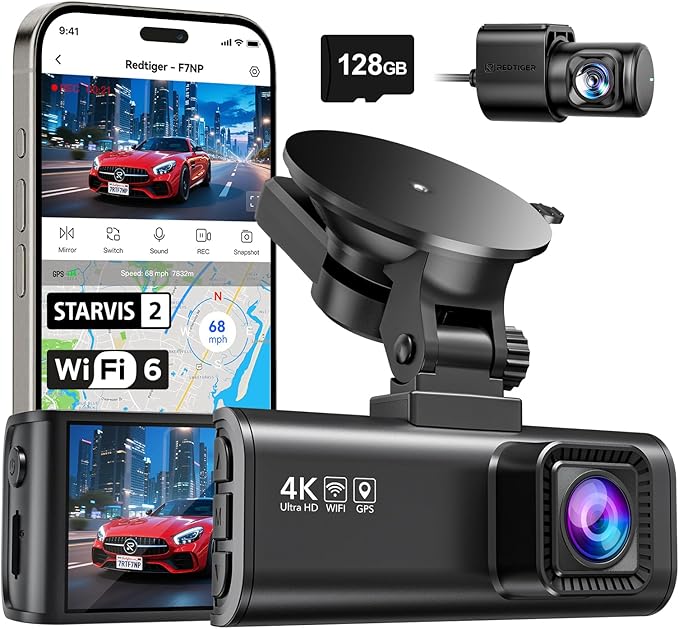 |
REDTIGER F7NP 4K Front and Rear Dash Cam | Price on Amazon |
| 2 |  |
ROVE R2-4K Dual Front and Rear Dash Cam | Price on Amazon |
| 3 |  |
IIWEY N6 4-Channel 360-Degree Dash Cam | Price on Amazon |
| 4 |  |
VIOFO A229 Pro 4K HDR Front and Rear Dash Cam | Price on Amazon |
| 5 |  |
BOTSLAB G980H 4K Front and Rear Dash Cam | Price on Amazon |
| 6 |  |
Garmin Dash Cam 67W 1440p | Price on Amazon |
| 7 |  |
Aputeta 4K+4K Dual Front and Rear Dash Cam | Price on Amazon |
| 8 |  |
pelsee S1 Pro Native Dual 4K Dash Cam | Price on Amazon |
| 9 |  |
Seemopen 4K+4K Front and Rear Dash Cam | Price on Amazon |
| 10 |  |
Affver 5-Channel 4K Dash Cam | Price on Amazon |
REDTIGER F7NP 4K Front and Rear Dash Cam
The REDTIGER F7NP stands out as a balanced front-and-rear system. Its front camera records in 4K while the rear camera records in 1080P, giving the driver detailed forward footage and useful evidence of what happens behind the vehicle. The 170-degree front lens and 140-degree rear lens cover a broad section of the road without requiring a multi-camera setup.
Night performance is supported by a STARVIS 2 sensor, a large F1.5 aperture, six-layer optical lens, WDR, and HDR. Those technologies are intended to manage bright headlights and darker surroundings, which can make a meaningful difference when an incident happens after sunset. Built-in 5.8GHz Wi-Fi also makes it easier to preview, download, and share clips through the Redtiger Cam app instead of removing the card every time.
Loop recording overwrites older unlocked clips, while the G-sensor protects files associated with sudden impacts. The included memory card makes the package easier to use immediately. For parked-vehicle protection, time-lapse and collision-triggered modes are available, although installation for continuous parking operation should follow the supplied instructions and power requirements. A supercapacitor offers better heat resistance than a conventional battery, and the 18-month guarantee adds useful ownership reassurance.
Pros
- 4K front and 1080P rear recording with wide viewing angles.
- STARVIS 2, WDR, and HDR support clearer footage in difficult lighting.
- Fast 5.8GHz Wi-Fi, GPS data, loop recording, and an included card.
- Supercapacitor design is suitable for hot climates and longer service.
Cons
- The rear camera is 1080P rather than 2K or 4K.
- Parking installation and accessory compatibility require attention to the manual.
My Opinion
The F7NP is the strongest all-around starting point here because it combines detailed forward footage, useful rear coverage, convenient file access, and a heat-tolerant power design. It suits drivers who want broad protection without moving to a more complex four- or five-channel system.
ROVE R2-4K Dual Front and Rear Dash Cam
The ROVE R2-4K Dual is a sensible choice for someone who wants a complete front-and-rear kit with strong software support and generous included storage. Its front camera records at 2.5K and intelligently upscales the output to 4K, while the rear camera records at 1080P. That distinction matters: buyers seeking native 4K detail should look elsewhere, but the system still aims to provide sharper everyday playback than a basic 1080P camera.
A Sony STARVIS 2 IMX675 sensor, F1.5 front aperture, F1.8 rear aperture, and HDR help the camera gather more light and control high-contrast scenes. That combination is useful for nighttime commuting, signs, and vehicles ahead, although real-world clarity will still depend on cleanliness, mounting position, weather, and traffic movement.
ROVE includes a 128GB microSD card, GPS, a 3-inch IPS screen, and dual-band Wi-Fi with reported download speeds of up to 20MB per second. The app can handle previews and transfers, while the computer GPS Player adds route and speed information during playback. Parking protection is unusually flexible, offering time-lapse, motion detection, and collision detection. However, a hardwire kit is required and is not included. The box does provide installation accessories such as a trim tool, clips, mounts, and a cleaning wipe.
Pros
- Complete front-and-rear package with a free 128GB card.
- STARVIS 2 sensor, HDR, GPS, screen, and fast phone connectivity.
- Three parking options for drivers willing to add a hardwire kit.
- Included installation accessories can simplify cable routing.
Cons
- The front image is upscaled 4K from 2.5K, not native 4K.
- The hardwire kit for parking mode costs extra and requires more installation work.
My Opinion
The ROVE R2-4K Dual is a strong second choice for buyers who value a complete package and clear app-based file management. It is especially appealing to drivers who appreciate several parking modes but understand that continuous parked monitoring requires an additional power connection.
IIWEY N6 4-Channel 360-Degree Dash Cam
The IIWEY N6 takes a different approach from ordinary front-and-rear cameras. It records the front, rear, and both sides at the same time, giving drivers of larger vehicles, rideshare cars, and busy urban commuters a way to reduce side blind spots. The front and rear cameras use 1440P recording, while the side cameras use wide viewing angles of up to 150 degrees. Adjustable side cameras make positioning especially important during installation.
Infrared night vision and Vision Enhance technology help the system capture useful footage when cabin and roadside light are limited. Built-in GPS records speed and route information, and Wi-Fi 6 support on the 5.8GHz band can transfer files at up to about 20MB per second through the app. A 128GB card is included, and loop recording manages storage by replacing older unlocked clips while the G-sensor protects sudden-impact files.
This is a wired camera with no built-in battery, so it must receive power from the vehicle charger or a compatible hardwire kit. The stated 48-hour parking modes also require the IIWEY hardwire kit, which is sold separately. Installation deserves extra care because the rear camera must be configured properly, and red guidelines can appear if the setup is incomplete. Remove the protective film from each lens before driving; leaving it in place can reduce clarity and create visible red lines.
Pros
- Four-channel coverage records forward, rear, and side views together.
- Infrared night vision helps with low-light surroundings and cabin areas.
- GPS, fast Wi-Fi, loop recording, and a 128GB card are included.
- Side cameras can help reduce blind spots on larger vehicles.
Cons
- There is no built-in battery, and parking mode requires a separate hardwire kit.
- More cameras and cables make installation more involved than a dual system.
My Opinion
The N6 is the right fit when all-around visibility matters more than a compact installation. It offers valuable coverage for rideshare and larger-vehicle use, but buyers should be prepared for more careful wiring, positioning, and power planning.
VIOFO A229 Pro 4K HDR Front and Rear Dash Cam
The VIOFO A229 Pro focuses on image quality and advanced event protection rather than maximum camera count. Its front camera records in 4K and its rear camera in 2K, with separate Sony STARVIS 2 sensors supporting both channels. HDR is available for the front and rear views, helping balance bright headlights, dark road edges, and other high-contrast scenes where ordinary footage can lose detail.
For drivers concerned about incidents while parked, the buffered parking function is useful because it preserves 15 seconds before and 30 seconds after a detected event. The camera offers auto event detection, low-bitrate recording, and time-lapse modes, giving owners more control over how parking footage uses storage. Exact installation and power arrangements should be planned according to the desired parking mode and the vehicle.
Voice control supports 12 commands, including locking footage, changing the camera view, turning Wi-Fi or audio on and off, and taking photos. That can reduce the need to reach for the camera while driving. The 5GHz Wi-Fi connection works with the VIOFO app for configuration and transfers, while the quad-mode GPS module uses GPS, BEIDOU, GALILEO, and GLONASS for route, speed, and timestamp information. Loop recording handles ordinary files, and impact detection protects important clips from automatic replacement.
Pros
- Native 4K front and 2K rear recording with dual STARVIS 2 sensors.
- HDR on both channels helps preserve detail in difficult lighting.
- Buffered parking recording captures footage before and after an event.
- Voice commands, 5GHz Wi-Fi, and multi-system GPS add convenience.
Cons
- It records only front and rear views, not the sides or cabin.
- Its advanced settings may take longer for a first-time owner to configure.
My Opinion
The A229 Pro is a compelling choice for buyers who prioritize high-quality dual-channel footage and sophisticated parking protection. It is less suitable for anyone needing side coverage, but its sensor combination and buffered event recording make it a serious option for detailed incident documentation.
BOTSLAB G980H 4K Front and Rear Dash Cam
The BOTSLAB G980H pairs true 4K front recording with 2K rear recording and includes a 64GB memory card. The IMX415 front sensor is intended to preserve detail on dark roads and in changing light, while WDR helps balance very bright and very dark portions of the scene. Its 170-degree front and 150-degree rear angles provide broad road coverage without requiring additional side cameras.
Where this model differs from many basic cameras is its driver-assistance system. An AI processing chip supports alerts for pedestrian collision risk, vehicles moving ahead, lane departure, following distance, and driver fatigue reminders every two hours. These prompts may help some drivers stay attentive, but they should be treated as supplementary alerts rather than a replacement for direct observation. Camera placement and road conditions can affect how useful any visual warning becomes.
GPS records the driving route and displays speed, while the G-sensor locks footage during an incident. Loop recording keeps normal coverage moving as the card fills. The 24/7 parking function requires the dedicated BOTSLAB hardwire kit, sold separately. A supercapacitor supports operation during sudden power loss and a stated temperature range of -20°C to 70°C, which is useful for vehicles exposed to seasonal heat and cold. The included static sticker can help create a cleaner installation with less adhesive residue.
Pros
- True 4K front and 2K rear recording with broad viewing angles.
- AI-based driver alerts add extra awareness for some commuters.
- GPS, emergency file locking, loop recording, and a 64GB card are included.
- Supercapacitor construction supports heat and cold resistance.
Cons
- Parking monitoring requires a separate dedicated hardwire kit.
- AI alerts may become distracting or less accurate in changing traffic conditions.
My Opinion
The G980H makes the most sense for drivers who want detailed dual-channel video plus optional driver alerts. It offers a strong feature mix, but buyers should decide whether they will actually use the assistance functions and budget for the hardwire kit if parked monitoring is important.
Garmin Dash Cam 67W 1440p
The Garmin Dash Cam 67W is a compact option for drivers who prefer a discreet camera rather than a large screen or multi-camera system. It records 1440P video through an extra-wide 180-degree lens, so it can capture more of the surrounding road than many narrower front-facing cameras. Garmin Clarity HDR optics are intended to retain crisp detail during both daytime and nighttime driving.
Its strongest advantage is the connected ownership experience. Saved videos can upload over Wi-Fi to Garmin’s secure online Vault, where they can be viewed and shared later. Voice control allows commands for saving video, managing audio recording, and taking still images. The supported languages are English, German, French, Spanish, Italian, and Swedish, so buyers should confirm that their preferred command language is available.
Parking Guard can monitor activity around a parked vehicle and send an incident alert through the Garmin Drive app, but it requires a Wi-Fi connection. Live View also requires constant power, an active Wi-Fi connection, and a compatible smartphone. Driver alerts for forward collision, lane departure, and speed cameras add awareness, although Garmin notes that conditions can affect their operation and that some warnings are unavailable in certain regions. This is a front-only camera, so it cannot document rear or side events as a dual or multi-channel system can.
Pros
- Compact design is easy to keep discreet on the windshield.
- 180-degree lens and 1440P HDR video provide broad front coverage.
- Voice control and Wi-Fi Vault storage simplify file handling.
- Connected parking and live-view functions add remote awareness.
Cons
- It records only the front view at 1440P.
- Parking Guard and Live View depend on specific Wi-Fi, phone, and power conditions.
My Opinion
The Garmin 67W is a good match for drivers who want a discreet, user-friendly front camera backed by a familiar connected ecosystem. It is not the best fit for buyers seeking rear coverage or maximum resolution, but its compact size and voice features are attractive for uncomplicated daily use.
Aputeta 4K+4K Dual Front and Rear Dash Cam
The Aputeta dual camera is aimed at buyers who want the same high resolution from both ends of the vehicle. It records 4K from the front and 4K from the rear, using 170-degree and 160-degree lenses respectively. That can make rear footage more useful when documenting a collision or identifying a vehicle approaching from behind, although two 4K channels also create a heavier demand on memory-card capacity.
A starlight-level sensor, F1.5 aperture, five-element optical lens, and WDR are intended to improve clarity in low-light and high-contrast conditions. Built-in dual-band Wi-Fi can transfer files at up to 20MB per second to a phone, while GPS records positioning information. The app supports playback and settings management, and voice guidance can make basic operation easier without repeatedly reaching toward the camera.
Loop recording handles ordinary files, while the collision sensor locks important footage. A time-lapse parking mode can provide long-duration monitoring, and an impact can trigger a full one-minute clip that is placed in a protected event folder. That parking function requires a hardwire kit, so the camera is better suited to owners who are comfortable with a more permanent installation. The manufacturer also states that the camera is built to withstand extreme cold and heat, and an 18-month coverage period with 24/7 support adds a useful service benefit.
Pros
- Native 4K recording from both front and rear cameras.
- Wide lenses, WDR, starlight imaging, GPS, and fast Wi-Fi support daily use.
- Impact-triggered one-minute clips can help document parked incidents.
- 128GB card and 18-month coverage improve initial value.
Cons
- Dual 4K footage can fill storage quickly.
- Parking monitoring requires a separate hardwire kit and careful installation.
My Opinion
The Aputeta is appealing when rear image detail matters almost as much as front image detail. It is a promising choice for buyers willing to manage larger files and a more involved power installation, while drivers wanting a simpler system may prefer a lower-resolution rear camera.
pelsee S1 Pro Native Dual 4K Dash Cam
The Pelsee S1 Pro offers native 4K recording from both the front and rear cameras, powered by 8MP sensors. Its 170-degree front lens and 150-degree rear lens cover a broad area, while HDR helps manage headlights, tunnel entrances, and shadowed roads. For drivers who regularly want to inspect rear footage in detail, dual 4K is a meaningful advantage over systems that reserve the highest resolution for the front only.
Night performance receives particular attention through an F1.4 aperture, hybrid glass lens, high-sensitivity sensor, and multi-frame noise reduction. The goal is full-color footage in dim areas rather than a heavily grainy image. Built-in Wi-Fi 6 supports 2.4GHz and 5.8GHz connections with transfer speeds of up to 30MB per second, making phone downloads more convenient when a clip needs to be shared quickly.
The included 128GB card can store up to 12 hours of continuous dual 4K footage according to the supplied information, and loop recording replaces older ordinary clips while protecting impact files. Voice commands control views, screen and audio functions, snapshots, and file locking. A 3.39-inch screen helps with initial positioning and playback. The 24-hour vehicle protection system uses time-lapse and G-sensor collision locking, while thermal protection is intended to support operation in very hot or cold conditions.
Pros
- Native 4K recording from both cameras with wide coverage.
- Strong low-light specification with an F1.4 lens and noise reduction.
- Fast Wi-Fi 6, voice control, GPS, and a 128GB card are included.
- Large screen and thermal protection support easier ownership.
Cons
- Dual 4K files require dependable, high-capacity storage management.
- The larger screen and broader feature set may be more than a basic commuter needs.
My Opinion
The Pelsee S1 Pro is one of the strongest choices for buyers who specifically want native 4K at both ends of the vehicle. Its combination of fast transfers and detailed night-focused hardware is attractive, provided the owner is prepared for large files and regular storage care.
Seemopen 4K+4K Front and Rear Dash Cam
The Seemopen D026 combines 4K recording on both the front and rear channels with HDR night capabilities. Its purpose is straightforward: preserve useful detail in front and behind the vehicle when light changes quickly, such as during tunnel driving, nighttime traffic, or bright headlights. The dual-channel HDR approach can help maintain a more balanced image in scenes with both glare and shadow.
Built-in Wi-Fi 6 supports 2.4GHz and 5.8GHz connections, and the app can transfer clips at up to 20MB per second. GPS adds speed, route, location, and compass information to the footage, while a 3-inch fully laminated screen displays the camera view and helps with positioning. A supplied 128GB card is optimized for 4K recording, and the system supports cards up to 1TB. Because two 4K channels create substantial files, larger capacity can be useful for frequent road trips.
Parking protection includes time-lapse recording for up to 72 hours and collision detection that wakes the camera to capture and lock relevant footage. A hardwire kit is required for parking use. Loop recording allows 1-, 3-, or 5-minute clips, giving the owner control over file size and handling. The camera is rated for operation from -4°F to 158°F, and the included power cable or a compatible 5V USB source should be used for stable operation. An 18-month warranty and 24/7 support add confidence for new owners.
Pros
- 4K front and rear recording with HDR night assistance.
- 128GB card included, with support for capacities up to 1TB.
- GPS, Wi-Fi 6, adjustable clip length, and a clear 3-inch screen.
- Long time-lapse parking option and a broad stated temperature range.
Cons
- Parking monitoring requires a separate hardwire kit.
- Two 4K channels make memory-card quality and capacity especially important.
My Opinion
The Seemopen is a good fit for buyers who want detailed front-and-rear footage, flexible storage, and a long time-lapse parking option. Its lower customer-feedback volume than some established alternatives means cautious buyers may prefer to pay close attention to setup support and return terms.
Affver 5-Channel 4K Dash Cam
The Affver system is the most comprehensive coverage option in this group. It records the front at 4K while four additional cameras capture the rear, left side, right side, and cabin at 1080P. That arrangement is particularly relevant to rideshare, taxi, delivery, and large-vehicle drivers who may need evidence from directions that a normal front-and-rear camera cannot see.
Infrared cabin night vision helps document activity inside a dark vehicle, while built-in GPS records speed, route, and timestamps. Wi-Fi 6 provides quick phone access to the files, which can be valuable when a driver needs to locate a specific angle after an incident. The included 128GB card is helpful, but recording five channels simultaneously places greater demand on storage. Affver supports up to 512GB and recommends a high-endurance, heat-resistant card rated Class 10, U3, V30, or higher.
Loop recording replaces older unlocked footage, and the adjustable G-sensor locks synchronized files when a collision is detected. Parking surveillance uses time-lapse or impact recording when connected to the professional hardwire kit, sold separately. The stated low-voltage protection is intended to help prevent excessive vehicle-battery drain. Installation will involve more cameras, cables, and positioning decisions than any other option here, so owners should allow time for a clean route and verify every view before relying on it.
Pros
- Five synchronized views cover front, rear, both sides, and the cabin.
- 4K front footage is paired with four 1080P cameras for broad protection.
- Infrared interior vision, GPS, Wi-Fi 6, and emergency locking are included.
- Supports up to 512GB with a suitable high-endurance memory card.
Cons
- Five-channel installation is more complex and creates much larger storage demands.
- Parking mode requires a separate hardwire kit.
My Opinion
The Affver is the specialist choice for drivers who need cabin and side evidence as well as front and rear footage. It is excessive for a simple commute, but its coverage can be highly valuable for professional drivers and owners of vehicles with significant blind spots.
How I Selected These Dash Cameras for a Reliable Buy
To interpret the search for the best reliable dash cam, I prioritized features that affect whether footage is actually useful after a stressful event. Resolution, sensor type, HDR or WDR support, lens coverage, GPS, file locking, storage, and parking power all matter, but each creates different benefits and trade-offs.
I also looked at the available customer-feedback volume and stated ratings as signals of how much ownership information is available, not as proof that every buyer will have the same experience. Products with more extensive feedback provide a broader evidence base, while newer models with fewer responses may still be attractive when their specifications fit a particular need. Brand diversity was included so the list would not treat one design philosophy as the only path to dependable ownership.
The ranking favors balanced usefulness rather than a simple resolution contest. A native dual 4K camera can produce excellent detail, but a 4K front and 1080P rear system may be easier to store and install. Likewise, a five-channel camera offers impressive protection but introduces more cabling and greater storage demands than most commuters need.
Reliable ownership depends on the entire system: camera placement, power delivery, memory-card quality, file protection, and the ability to retrieve footage quickly.
Parking features should be treated as a separate installation decision. Many cameras support them, but continuous parked monitoring commonly requires a compatible hardwire kit and careful attention to vehicle-battery protection.
How to Choose a Reliable Dash Cam
The best reliable dash cam for one driver may be the wrong fit for another. Start with the type of evidence you need, then match the camera count, resolution, parking requirements, storage, and installation complexity to your vehicle and daily routine.
- Choose front-and-rear coverage if rear impacts and tailgating evidence matter.
- Prioritize a strong sensor and HDR or WDR when nighttime driving is common.
- Confirm whether parking mode needs a separate hardwire kit.
- Use a suitable high-endurance card, especially for multi-channel 4K recording.
- Compare app, GPS, voice, and screen features based on how you will retrieve footage.
Decide How Much Coverage You Need
A front-only camera is compact and simple, but it cannot document what happens behind the vehicle. A front-and-rear system is a more balanced choice for most private cars. Four-channel and five-channel options make sense for rideshare drivers, commercial use, larger SUVs, trucks, and anyone concerned about side or cabin disputes. More coverage also means more wires, more installation time, and more storage consumption.
Understand Native 4K Versus Upscaled Video
Native 4K uses a sensor and recording process intended to capture 3840×2160 detail directly. Upscaled 4K starts with a lower-resolution source and processes it into a larger output. Upscaling can still look sharper than basic footage, but buyers who specifically want maximum source detail should focus on native 4K specifications. Rear resolution matters too; a high-resolution front camera does not automatically make the rear view equally detailed.
Look Beyond the Resolution Number
Sensor quality, aperture, lens construction, HDR, WDR, and image processing affect how usable footage appears in glare, shadow, rain, and darkness. A wide lens captures more surroundings, but an extremely wide view can make distant license plates appear smaller. The ideal balance depends on whether the priority is reading details ahead or documenting a broader scene.
Match Parking Protection to Your Vehicle
Time-lapse parking mode saves storage by recording at a reduced frame rate, while impact detection focuses on events such as bumps or tampering. Buffered systems can preserve footage from before an event, which may help show what led to a collision. Check whether the camera requires a proprietary hardwire kit, whether low-voltage protection is stated, and whether your vehicle can support the installation without affecting other electronics.
Installation and First-Time Setup
A well-positioned camera is more useful than a technically advanced camera aimed through a poor angle. Before permanently routing cables, connect the system and confirm that every channel works, the lens film has been removed, and the image is level.
Position the Front Camera Carefully
Mount the front camera high enough to preserve the driver’s view but low enough to see the road clearly. The lens should face straight ahead rather than toward the sky or dashboard. Avoid placing it behind heavily tinted glass, in a location blocked by windshield wipers, or where the housing interferes with airbags and other safety equipment.
Route Rear, Side, and Cabin Cables Safely
Run cables along existing trim where possible, leaving enough slack near hinges and moving parts. Rear-camera wiring should not be pinched by a hatch or trunk lid. Side and interior cameras need firm mounts that will not shift when doors close or passengers enter. Do not allow loose cables to hang near pedals, steering components, or airbag deployment paths.
Complete a Stationary Function Check
With the vehicle parked, confirm that the front and rear views are recording, the date and time are correct, GPS has a signal if available, and the memory card is recognized. For multi-channel models, check the left, right, and cabin views one at a time. Drive only after the screen, cable route, and camera angle are secure.
Memory Cards, Storage, and File Protection
High-resolution and multi-channel cameras create large files, so storage is part of reliability rather than a minor accessory. A card that is too slow, worn out, or poorly suited to heat can cause recording interruptions, missing clips, or file errors.
Use the Right Card for the Camera
Follow the camera’s stated capacity and speed requirements. The Affver five-channel system specifically recommends a high-endurance, heat-resistant card rated Class 10, U3, V30, or higher. Even when a card is included, inspect it for errors and format it in the camera before regular use. Larger capacity is helpful for dual 4K or five-channel recording, but compatibility matters more than simply choosing the biggest card available.
Format Regularly and Protect Important Files
Loop recording normally replaces the oldest unlocked files, while G-sensor events are moved to a protected folder. Locked clips can accumulate and eventually consume space, so copy important evidence to a phone or computer and then clear unnecessary protected files. Formatting in the camera at sensible intervals can help keep the file system organized, but never format before saving footage that may be needed.
Keep a Backup Routine
After a collision, unusual road event, or security incident, stop unnecessary driving if practical and preserve the relevant clip promptly. Download the original file before editing or sharing it. Keep a second copy in a separate location, and retain GPS data when route, speed, or timing may be relevant to an insurance claim.
Parking Mode and Power Management
Parking monitoring can provide valuable evidence, but it is also the feature most likely to require additional equipment and careful vehicle-specific planning. A camera that records while the engine is off must receive power without creating an unacceptable battery-drain risk.
Know Which Mode You Are Selecting
Time-lapse mode records continuously at reduced intervals, which can show activity over a longer period while using less storage. Motion or impact detection records more selectively. Buffered event systems are useful because they can preserve moments immediately before an impact instead of starting only after the sensor reacts.
Plan the Power Source
Many models in this list require a dedicated hardwire kit for 24-hour monitoring. Use the kit specified for the camera when one is identified, and confirm that it includes suitable low-voltage protection where appropriate. Avoid improvised wiring or low-quality adapters. If you do not need parked monitoring, regular accessory-socket power is usually the simpler ownership path.
Check the Vehicle After Installation
After enabling parking mode, confirm that the camera enters the intended state when the ignition is switched off. Check that the vehicle starts normally after sitting overnight and that the camera does not remain active unexpectedly. If battery behavior changes, disable the parking function and reassess the wiring before continuing.
Using Dash Cam Footage Effectively
A camera is most helpful when its owner can find the right clip quickly and understand what information it contains. Take a few minutes to learn the app, camera folders, lock controls, and GPS playback before an incident occurs.
Use Wi-Fi for Short Transfers
Built-in 5.8GHz or Wi-Fi 6 connections can make short phone downloads faster than removing the card. Park safely before connecting, because the app may require the camera’s Wi-Fi network and temporarily disconnect the phone from normal internet access. For large batches of 4K files, a computer and card reader may be more efficient.
Preserve the Original File
Keep the original file untouched and make a separate copy for trimming or sharing. Avoid repeatedly sending a compressed clip through messaging apps if the footage may be used for an insurance claim. GPS overlays can provide useful context, but save the original video even when you also export a version with route or speed information displayed.
Use Voice or Physical Controls Safely
Voice control can be convenient for locking a clip or taking a still image, but it should not distract from driving. If a camera has no voice function, pull over before changing settings, removing the card, or handling the app. The most important footage is not worth creating a second safety problem.
Cleaning, Maintenance, and Long-Term Ownership
Dash cams live in a difficult environment: direct sunlight, windshield vibration, dust, temperature swings, and occasional loose cables. A small maintenance routine can protect image quality and reduce preventable failures.
Keep the Lens and Windshield Clean
Clean the windshield area in front of the lens with a suitable glass cleaner and a soft lint-free cloth. Wipe the camera lens gently without applying excessive pressure. Dirt, fingerprints, condensation, and oily film can create glare that looks like a camera problem even when the hardware is working properly.
Inspect Mounts and Connections
Check the camera angle after strong heat, cold weather, or a rough road. Adhesive mounts can loosen over time, and a slightly tilted camera can reduce the usefulness of every recording. Inspect rear-camera plugs and power connections for looseness, especially after adjusting trim or loading cargo.
Protect the Camera From Unnecessary Heat
Supercapacitor-equipped models are designed for better heat tolerance than battery-powered designs, but no camera should be exposed to extreme conditions unnecessarily. Park in shade when practical, keep the windshield area clear of objects that trap heat, and use only the recommended power cable and accessories. If the camera repeatedly shuts down or displays card errors, stop relying on it until the cause is identified.
Compatibility and Ownership Considerations
The right camera must fit the vehicle, not merely the shopping list. Before ordering, consider windshield space, rear-camera cable length, available power outlets, tinting, hatch movement, and whether you are willing to install a hardwire kit.
Cars, SUVs, Trucks, and RVs
Compact front-only cameras are easy to place in small cars. SUVs, trucks, vans, and RVs may benefit from longer rear cables, wider coverage, or side cameras, but cable routing becomes more important. The IIWEY N6 and Affver systems can cover more directions, while ordinary dual systems may be easier to install in a standard sedan.
Rideshare and Professional Driving
Drivers carrying passengers may value cabin recording, infrared interior vision, and side coverage more than an especially discreet front camera. Before enabling interior recording, check local privacy laws and any platform or workplace requirements. The Affver is built around this broader evidence need, while the IIWEY offers side coverage without adding a dedicated five-channel layout.
Windshield and Privacy Constraints
Confirm that the camera does not block the driver’s view or interfere with legally required windshield areas. Interior and rear cameras may record passengers, pedestrians, or neighboring vehicles, so adjust settings and use footage responsibly. A camera can document an event without giving the owner unlimited permission to share every person captured in the frame.
Common Mistakes Dash Cam Owners Should Avoid
Many disappointing results come from setup and storage errors rather than a lack of camera features. Avoid treating installation as a one-time task that never needs checking.
- Do not leave protective film on the lens; it can reduce clarity and create visible markings.
- Do not use an unknown low-quality cable or incompatible power adapter.
- Do not assume a 4K label means the rear camera also records in native 4K.
- Do not fill the protected event folder and expect loop recording to clear it automatically.
- Do not enable parking mode without confirming power requirements and battery protection.
- Do not hide cables near pedals, steering parts, hinges, or airbag deployment paths.
- Do not wait until after an incident to learn how to lock or download a file.
Before relying on any camera, perform a test drive, inspect footage from every channel, confirm the date and time, and verify that the memory card is recognized.
FAQS About Best Reliable Dash Cam
What makes a reliable dash cam dependable for daily use?
Dependability comes from more than resolution. A suitable sensor, stable power connection, correctly installed mount, compatible memory card, loop recording, emergency file locking, and manageable heat performance all contribute to dependable daily coverage.
Is a front-and-rear dash cam better than a front-only model?
For most drivers, front-and-rear coverage offers more useful evidence because rear impacts and following vehicles are documented too. A front-only model such as the Garmin 67W can still be a strong choice when compact size and simple installation matter more than rear protection.
Does every reliable dash cam need a hardwire kit?
No. A hardwire kit is generally needed for continuous parking monitoring, not ordinary driving. Cameras can usually operate from an appropriate vehicle power source while the car is running, but always follow the model’s power instructions and use compatible accessories.
How much storage does a 4K dash cam need?
The answer depends on the number of cameras, clip length, compression, and driving time. Dual 4K systems use storage faster than a front-only 1440P model, while five-channel cameras create an even greater demand. Use the supplied card initially, confirm compatibility, and choose a high-endurance replacement when the camera supports one.
Are HDR and WDR important for nighttime dash cam footage?
They can be helpful because they balance bright headlights, dark surroundings, tunnel entrances, and other high-contrast scenes. They do not guarantee perfect license-plate visibility in every situation, but they can preserve more usable detail than a camera without dynamic-range processing.
Should I choose a dual 4K camera or a multi-channel camera?
Choose dual 4K when detailed front and rear footage is your priority. Choose four- or five-channel coverage when side blind spots, passenger activity, or professional driving create a need for more viewing angles. The broader systems require more installation effort and storage capacity.
Final Thoughts
The REDTIGER F7NP 4K Front and Rear Dash Cam is my top recommendation for balanced coverage, useful night hardware, GPS, fast file access, and a heat-tolerant power design. The ROVE R2-4K Dual Front and Rear Dash Cam is a strong alternative for its complete package and flexible parking options, while the IIWEY N6 4-Channel 360-Degree Dash Cam is the better fit when side coverage is essential. Choose according to your vehicle, storage habits, and parking needs, and the best reliable dash cam will be the one you can install correctly and depend on when evidence matters.