
Choosing the best sd card for redtiger dash cam means balancing dependable recording, enough capacity for your routine, and compatibility with your specific camera model. A card that looks fast on its packaging may still be the wrong fit if its capacity or format is not supported by the dash cam.
My first choice is microSDXC UHS-I Class 10 U3 V30 A2 Support. It is positioned for 4K recording and includes an adapter, making it a straightforward starting point for supported REDTIGER models.
My second choice is microSDXC UHS-I Class 10 U3 V30 A2 Support. My alternative is microSDXC UHS-I Class 10 U3 V30 A2 Support in 256GB, which ranks second for drivers who want more room between file-management sessions. It carries the same stated 40MB/s write speed and named camera compatibility as the 128GB option, with double the capacity.
My third choice is TLC High Endurance Pro Speed Up to 100MB/S. It is a useful alternative for shoppers who want a non-REDTIGER-branded card and value the included five-year limited warranty information.
Below, I compare five cards, explain the trade-offs behind their rankings, and cover compatibility checks, setup, capacity, formatting, and everyday care. The goal is to help you choose a card that fits your camera and recording habits, rather than simply selecting the largest number on the package.
5 Best Sd Card for Redtiger Dash Cam Comparison
I prioritized relevance to REDTIGER dash cams, the product details available for recording speed and capacity, and clearly stated compatibility information. Customer-feedback evidence and ratings were not supplied for these products, so the ordering relies on documented specifications and brand diversity where practical; I do not claim hands-on testing.
| # | Image | Product | Price on Amazon |
|---|---|---|---|
| 1 |  |
microSDXC UHS-I Class 10 U3 V30 A2 Support | Price on Amazon |
| 2 | 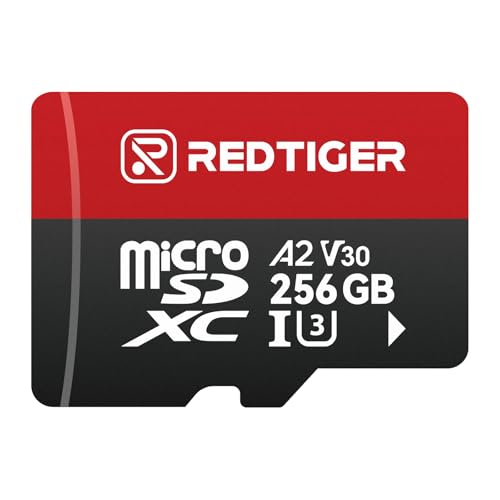 |
microSDXC UHS-I Class 10 U3 V30 A2 Support | Price on Amazon |
| 3 |  |
TLC High Endurance Pro Speed Up to 100MB/S | Price on Amazon |
| 4 |  |
512GB Microsdxc UHS-I Class 10 U3 V30 A2 Support | Price on Amazon |
| 5 | |
microSDXC UHS-I Class 10 U3 V30 A2 Support | Price on Amazon |
microSDXC UHS-I Class 10 U3 V30 A2 Support
This 128GB card is the most balanced starting point in the group. REDTIGER specifies a 40MB/s write speed and Class 10, U3, V30, and A2 classifications, with support for 4K recording. For a driver who records regular commutes and occasional longer trips, 128GB offers a useful amount of space without moving immediately to a very large card.
The product listing names several compatible REDTIGER models: F7NP-V07, F9, F7NT-V04, F17, VP20, A4, and F17PLUS. That named compatibility makes it easier to check fit than it is with a card whose listing only says “dash cam.” Still, model versions and supported capacities can differ, so confirm your camera’s manual before buying. The supplied adapter is useful if you want to connect the card to a computer with a full-size SD slot.
REDTIGER describes the card as waterproof, shockproof, and able to withstand temperature extremes. Those protections suit the changing conditions a card may encounter in a vehicle, but they do not make it a substitute for backups: important clips should be copied off the card promptly. The listing also presents the card as usable in other devices, including action cameras, phones, and tablets, though dash-cam compatibility should remain the deciding factor.
Pros
- 128GB capacity and stated 40MB/s write speed.
- Names multiple compatible REDTIGER camera models.
- Includes an adapter and lists environmental protections.
Cons
- Capacity is lower than the 256GB and 512GB alternatives.
- Ratings and customer-feedback details were not supplied.
My Opinion
This is my first pick for buyers who want a REDTIGER-branded card with a useful capacity and a clear, model-specific compatibility list. Check the manual first, particularly if your camera is not one of the listed models.
microSDXC UHS-I Class 10 U3 V30 A2 Support
With 256GB of storage, this REDTIGER card suits drivers who prefer more recording space before they need to manage files. Its stated 40MB/s write speed and 4K recording support match the 128GB version, so the main practical distinction is capacity rather than a faster stated write rate. It retains the Class 10, U3, V30, and A2 labels.
The listing identifies compatibility with F7NP-V07, F9, F7NT-V04, F17, VP20, and F17PLUS. It does not name the A4 model that appears in the 128GB listing, so owners of that camera should not assume the 256GB version is supported just because the smaller card is listed for it. Check the camera documentation or confirm with REDTIGER before choosing a capacity beyond the listed models’ supported limits.
An included adapter makes it easier to transfer files using a compatible SD card reader. REDTIGER also describes the card as waterproof, shockproof, and temperature-resistant. Those are helpful protections in a vehicle environment, but they cannot prevent file loss from card wear, accidental deletion, or a camera fault. Save important footage somewhere else instead of treating the card as a permanent archive.
One trade-off is that more capacity does not remove the need to check and protect important clips. Loop recording may overwrite older footage as storage fills, depending on the dash cam’s settings. If you regularly need to preserve incidents, plan to export those files rather than relying on spare capacity alone.
Pros
- 256GB capacity for more recording space than the 128GB option.
- Stated 40MB/s write speed and 4K recording support.
- Includes an adapter and lists several REDTIGER models.
Cons
- The stated write speed is the same as the 128GB card.
- Compatibility should be checked carefully for models not named in its listing.
My Opinion
This is a sensible second choice if your camera supports 256GB and you want additional room without changing brands. It is less suitable when your model’s maximum card capacity is uncertain.
TLC High Endurance Pro Speed Up to 100MB/S
GIGASTONE’s 256GB card stands out by describing itself as a TLC high-endurance product. That positioning is relevant for a dash cam, which repeatedly records and rewrites files, although the supplied information does not give a specific write-cycle rating or expected service life. Treat “high endurance” as a useful product distinction, not a promise that the card will never wear out.
The listed speed is up to 100MB/s read and 60MB/s write, and the card is marked UHS-I, A1, V30, and U3. The stated write figure is higher than the 40MB/s listed for the REDTIGER cards, but actual performance depends on the camera and recording conditions; a faster card does not automatically improve footage if the dash cam cannot use that speed. GIGASTONE lists compatibility with REDTIGER as well as Rove, VIOFO, VANTRUE, PRUVEEO, and ARIFAYZ.
The package information includes a microSD-to-SD adapter and a small case. The listing also describes the card as waterproof, shockproof, temperature-proof, and X-ray-proof. GIGASTONE specifies a five-year limited warranty, while the source title mentions five years of free data recovery. Those are distinct claims, and recovery availability may have conditions; read the current terms before relying on that service.
This option makes sense for someone who values a high-endurance positioning, broad named-brand compatibility, or the stated warranty. The limitation is that no REDTIGER model-by-model compatibility list is provided here, so checking the camera’s maximum supported capacity and card requirements matters.
Pros
- 256GB capacity with stated read/write speeds up to 100/60MB/s.
- TLC high-endurance positioning and broad named-brand compatibility.
- Includes an adapter and case; a five-year limited warranty is specified.
Cons
- No specific REDTIGER camera model list is supplied.
- Endurance figures and data-recovery terms are not detailed.
My Opinion
This is the strongest alternative for buyers interested in a non-REDTIGER card with high-endurance positioning. Confirm support for your exact camera before placing more weight on its broader compatibility claim.
512GB Microsdxc UHS-I Class 10 U3 V30 A2 Support
At 512GB, this is the largest-capacity option in the roundup. REDTIGER positions it for extended recording and 4K video, with a stated 40MB/s write speed and Class 10, U3, V30, and A2 labels. The main appeal is reducing how often you need to manage files or swap cards, provided your dash cam supports a capacity this large.
The compatibility information names F7NP, F7NT, F17, VP20, and F17PLUS. It does not specify the version suffixes shown in some other REDTIGER listings, nor does it list every REDTIGER camera. This makes a manual check especially important: do not assume that a high-capacity card will work simply because a lower-capacity model from the same brand does.
REDTIGER describes the card as waterproof, shockproof, and able to withstand temperature extremes. It also says the card is suitable for other devices such as action cameras, smartphones, and tablets. The included adapter can help with file transfers, but a computer or reader must support microSDXC and the card’s capacity for access to work as expected.
Large capacity has a practical trade-off: it can keep more footage available, but it may also mean more files to sort through when you need a particular clip. A dash cam’s loop-recording behavior and file-protection controls determine what stays on the card. Export critical recordings promptly, and do not rely on capacity alone to preserve evidence.
Pros
- 512GB capacity for buyers whose cameras support it.
- Stated 40MB/s write speed and support for 4K recording.
- REDTIGER branding, an adapter, and listed environmental protections.
Cons
- Camera support for 512GB must be verified before purchase.
- The stated write speed is not higher than the smaller REDTIGER cards.
My Opinion
Choose this card only when your model’s manual confirms 512GB support and you have a genuine need for more space. For many drivers, a smaller card may be easier to manage.
microSDXC UHS-I Class 10 U3 V30 A2 Support
This fifth option is a REDTIGER 256GB microSDXC card with an adapter, listed with Class 10, U3, V30, and A2 classifications and support for dash cams and 4K recording. Its headline capacity puts it in the same general category as the second-ranked REDTIGER card, but the supplied product information is much shorter and does not provide a camera-by-camera compatibility list.
That lack of detail is the main reason to approach it carefully. The listing does not provide a stated write speed, environmental protection details, or named supported camera models. Those omissions do not prove the card will not work, but they give a buyer less information to compare. Before ordering, check your camera manual for supported microSDXC cards, the maximum capacity, and any recommended speed class.
The adapter may be handy when moving files to a computer or another device with a compatible SD slot. Remember that an adapter changes the physical connector, not the card’s storage capacity or performance. For dash-cam use, the camera’s own compatibility and formatting requirements remain central.
This card may suit someone who wants a REDTIGER-branded 256GB option and can verify compatibility independently. If you want an explicit model list or a stated write-speed figure before buying, the first two picks provide more detail in the supplied product information. Whichever card you choose, back up important clips and periodically check that recording is continuing normally.
Pros
- 256GB capacity with U3 and V30 classifications.
- Adapter is included, according to the product name.
- Listed for dash cams and 4K recording.
Cons
- No named compatible REDTIGER camera models are provided.
- No write-speed figure or environmental protection details are supplied.
My Opinion
This is a plausible option when the camera manual confirms support, but the limited product details make it harder to recommend over the better-documented REDTIGER cards.
How I Selected These Best Sd Cards for Redtiger Dash Cams
I ranked the five options by how directly their supplied details address dash-cam storage: stated capacity, speed classifications or write-speed figures, and named compatibility. The first two entries are REDTIGER cards with specific model lists; GIGASTONE adds a different brand and explicit high-endurance positioning; the remaining REDTIGER options broaden the capacity choices.
No ratings or customer-feedback evidence were included in the supplied product information. I therefore have not treated popularity or buyer satisfaction as established facts, and the rankings should be read as specification-based guidance rather than a guarantee of performance in every camera.
Check the exact dash-cam model and maximum supported capacity before buying. A card’s headline speed or storage size cannot override the camera’s compatibility limits.
What the listed speed labels tell you
Class 10, U3, and V30 are speed-class markings associated with minimum sustained recording performance under their respective standards, while a stated speed such as 40MB/s or “up to 60MB/s write” is a separate product claim. Those numbers are not interchangeable, and a dash cam may not take advantage of every card’s top speed. A2 and A1 are application-performance classifications; they are not by themselves evidence that a card is more durable for continuous recording.
Why model-specific information matters
Several REDTIGER products name compatible cameras, but their lists are not identical. The 128GB listing includes A4, for example, while the 256GB listing does not. Treat each product’s compatibility details separately rather than assuming every capacity is approved for every camera in a product family.
How to Choose the Best Sd Card for Redtiger Dash Cam
Start with the camera’s manual, then match the card’s capacity and speed class to its requirements. These quick checks can narrow the choice before you compare smaller differences between products.
- Confirm the exact model: Similar model names or versions may have different supported card capacities.
- Choose capacity for your routine: Consider how often you can transfer clips and whether you record long trips.
- Compare sustained-speed labels: Use the camera’s stated requirements, not only a maximum speed printed on packaging.
- Look for dash-cam suitability: Continuous recording repeatedly writes data, so high-endurance positioning may be relevant.
- Plan to protect important files: A card is working storage, not a permanent backup.
Match capacity to your recording habits
A 128GB card may be adequate for a driver who can manage files regularly, while 256GB or 512GB offers more room when the camera supports it. There is no single recording-duration estimate that applies to every setup: resolution, frame rate, number of cameras, audio settings, and the dash cam’s file-management behavior all affect storage use. If you need a specific number of hours, consult the camera maker’s capacity guidance or check the camera’s recorded-file sizes.
Understand the card’s write-speed information
Dash cams write files continuously, so sustained write performance matters more than impressive read speed alone. A higher “up to” speed can help with transferring files to a compatible reader, but it does not guarantee better recording in a camera that has lower requirements or limitations. Give priority to the speed class your camera calls for, and avoid substituting an unlisted low-speed card simply because its capacity is large.
Weigh endurance and warranty details
GIGASTONE specifically uses TLC high-endurance positioning and supplies a five-year limited warranty in the provided details. The REDTIGER cards list environmental protections, but no specific write-cycle rating or warranty information was supplied for them here. Read the current warranty and any data-recovery terms carefully; a warranty does not necessarily restore lost footage or cover every type of failure.
Check Your REDTIGER Camera’s Compatibility Before Buying
Compatibility is not just a question of whether a card physically fits. The camera must also support the card format, capacity, and speed requirements. This is particularly important when moving from a smaller card to 256GB or 512GB.
Use the manual as the deciding reference
Find the storage section of your camera’s manual or official support material. Check for the maximum capacity, recommended card class, and any named or approved card types. Then compare that information with the exact listing you plan to buy. If a listing names your model, that is useful evidence, but the manual is still the best place to confirm limits and setup instructions.
Be cautious with model variations
Product listings sometimes include model suffixes or omit them. Do not assume that two cameras with similar names have identical storage requirements. When the information conflicts or leaves out your exact model, ask REDTIGER support before buying rather than relying on a guess.
Check the reader and computer too
The supplied adapters allow a microSD card to fit a full-size SD slot, but they do not make an incompatible reader compatible with every card. If a computer does not recognize a large-capacity card, check whether its card reader supports microSDXC and the card’s capacity before concluding that the card is faulty.
Set Up a New Dash-Cam Card Carefully
A simple setup routine helps catch problems before you depend on a card during a drive. Use the steps below as general guidance, and follow your camera’s instructions if they differ.
- Confirm the card type and capacity match the camera’s stated limits.
- Insert the card in the correct orientation without forcing it into the slot.
- Use the dash cam’s own format command if its manual recommends in-camera formatting.
- Check the camera screen or app to confirm that the card is recognized.
- Make a short test recording, then confirm the file can be played back.
- Set up any important-clip or incident-lock functions described in the camera manual.
Formatting deletes files, so do not format a card that contains footage you still need. If the camera fails to recognize a new card, remove it safely and check the manual before trying additional steps. Avoid repeatedly formatting or changing settings without first making sure that needed files have been copied elsewhere.
Manage Loop Recording and Important Clips
Many dash cams use loop recording, which replaces older footage as storage fills. The exact behavior depends on your camera and settings, so learn how it handles ordinary files and protected incident clips. More capacity can increase the amount of footage available, but it is not a replacement for deliberately saving a file you need.
Copy time-sensitive footage promptly
If an incident occurs, use the camera’s lock or save function if available, then transfer the clip to another device as soon as it is safe to do so. Do not assume that a protected file can never be overwritten; consult the camera instructions to understand how protected clips are stored and how much space they use.
Keep a separate copy of anything important
Store essential recordings on a computer or another backup location. A card can be lost, damaged, reformatted, or eventually wear out, and a product’s recovery-related wording is not a substitute for maintaining your own copy. When sharing footage, preserve the original file until you know the copy is complete and playable.
Maintain and Replace Your Card Thoughtfully
Dash-cam cards live in a cycle of recording, overwriting, and exposure to vehicle conditions. Sensible care can reduce avoidable problems, though no routine guarantees that a card will last indefinitely.
Format only when appropriate
Some camera makers recommend periodically formatting the card in the dash cam. Follow the guidance for your specific model rather than applying a universal schedule. Before formatting, export recordings you want to keep; formatting erases the card’s contents.
Watch for recording interruptions
Check occasionally that the camera is still recording and that recent clips play correctly. A card error message, missing files, or repeated recording stops calls for investigation. First preserve any accessible footage, then consult the camera manual and card support information before deciding whether to reformat or replace the card.
Handle the card and adapter gently
Power down the camera or follow its safe-removal instructions before taking out the card. Keep the contacts clean and avoid bending or forcing either the card or adapter. Store a spare card in a case, away from loose objects that could damage it. The adapters included with some options are useful for transfers, but they are not intended to make careless handling risk-free.
Common Mistakes to Avoid with a REDTIGER Dash-Cam Card
A few avoidable assumptions can lead to a card that does not work as expected or to missing footage later. Use this checklist before and after installation.
- Buying by capacity alone: A 512GB card is not a good fit if the camera does not support that size.
- Assuming every REDTIGER model is covered: The product listings provide different compatibility lists.
- Confusing read speed with sustained recording speed: Check the required speed class and the stated write information.
- Treating an adapter as a speed upgrade: It changes the connection format, not the card’s capabilities.
- Leaving important clips only on the card: Copy valuable footage to another location.
- Formatting without checking the files: Save needed recordings first because formatting erases data.
- Assuming protection claims mean indestructible: Environmental resistance does not prevent every failure or data loss.
When a card is not recognized, pause before formatting it. First check camera compatibility and preserve any accessible files; repeated troubleshooting can erase footage you meant to keep.
FAQS About Best Sd Card for Redtiger Dash Cam
Which card is the best overall choice for a REDTIGER dash cam?
The REDTIGER High Speed 128GB microSDXC Memory Card is my overall pick because its listing gives a 40MB/s write speed, 4K recording support, and a specific list of compatible camera models. Confirm that your exact model is included and that 128GB suits your storage needs.
Is a 256GB card compatible with every REDTIGER dash cam?
No universal compatibility is established by the supplied information. The 256GB REDTIGER listing names several models, but the list differs from the 128GB listing. Check your camera’s manual for its supported maximum capacity.
Can I use a 512GB card in my REDTIGER camera?
Only if your particular camera supports 512GB. The 512GB REDTIGER listing names F7NP, F7NT, F17, VP20, and F17PLUS, but you should verify the exact camera version and capacity limit before buying.
Does a faster card improve REDTIGER dash-cam video quality?
Not necessarily. A card must meet the camera’s recording requirements, but a higher maximum speed does not automatically increase image quality. The camera’s own sensor, resolution, settings, and supported recording rate determine the footage it produces.
Should I format a new microSD card in the dash cam?
Follow the instructions for your camera. If they recommend in-camera formatting, use that procedure after confirming the card is compatible. Formatting erases stored data, so copy any files you need first.
How can I keep an important dash-cam clip from being lost?
Use the camera’s file-lock or save feature if available, then transfer the clip to another storage location promptly. Do not rely on the microSD card as the only copy of important footage.
Is the GIGASTONE card compatible with REDTIGER dash cams?
GIGASTONE lists REDTIGER among the compatible brands, but the supplied information does not name specific REDTIGER models. Check your camera’s card requirements and maximum capacity before choosing it.
Final Thoughts
The best sd card for redtiger dash cam depends on the camera’s limits and how much footage you want available. My top choice is the REDTIGER High Speed 128GB microSDXC Memory Card for its stated speed and model-specific compatibility; choose the REDTIGER High Speed 256GB microSDXC Memory Card for more capacity, or the GIGASTONE TLC High Endurance Pro 256GB microSDXC Card for its high-endurance positioning. Confirm compatibility, format as your camera directs, and back up clips you cannot afford to lose.