Finding the best scan tool for mercedes sprinter is not simply a matter of choosing the scanner with the longest feature list. Sprinter vans can require access to engine, transmission, ABS, airbag, suspension, and body modules, so the right tool should match your model year, repair goals, and comfort level with diagnostic work.
My first choice is FOXWELL NT510 Elite Bi-Directional Scan Tool. Auto VIN, live data graphing, a 32GB memory, Wi-Fi updates, and functions such as ABS bleeding, DPF regeneration, EPB service, and suspension resets make it a strong all-around option.
My second choice is iCarsoft M900 V2.0 Full Systems Diagnostic Scan Tool. It offers full-system fault access, battery testing, nine popular service functions, and lifetime free updates, although older Mercedes vehicles may need a separate 38-pin adapter.
My third choice is iCarsoft MB V3.0 Bidirectional Scan Tool. iCarsoft MB V3.0 Bidirectional Scan Tool earns third place because it provides advanced active tests, a broad list of up to 39 reset services, and a 38-pin Mercedes adapter. It is particularly appealing to owners who want to command components such as windows, pumps, or ABS equipment, but its relatively small number of customer ratings gives me less feedback evidence than the higher-ranked choices.
This guide compares all five scanners by system coverage, bidirectional capability, service functions, compatibility warnings, updating method, and ownership practicality. It also explains how to choose a tool, prepare a Sprinter for scanning, avoid common mistakes, and decide when a home scanner is sufficient versus when professional diagnosis is still appropriate.
Best Scan Tool for Mercedes Sprinter
I selected these products for their direct relevance to Mercedes-Benz Sprinter diagnostics, the depth of their supplied feature information, customer-feedback evidence where available, and useful differences between FOXWELL and iCarsoft models. The ranking favors tools that can reach more than the basic engine module while still offering understandable maintenance functions for home owners and small fleets.
| # | Image | Product | Price on Amazon |
|---|---|---|---|
| 1 | 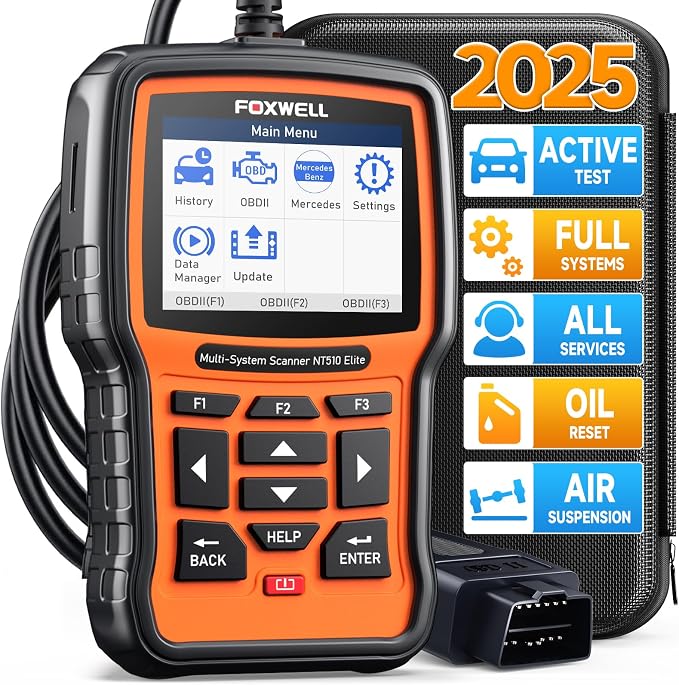 |
FOXWELL NT510 Elite Bi-Directional Scan Tool | Check Price |
| 2 |  |
iCarsoft M900 V2.0 Full Systems Diagnostic Scan Tool | Check Price |
| 3 |  |
iCarsoft MB V3.0 Bidirectional Scan Tool | Check Price |
| 4 |  |
iCarsoft Bidirectional Diagnostic Tool | Check Price |
| 5 |  |
FOXWELL NT710 Mercedes-Benz Bidirectional OBD2 Scanner | Check Price |
FOXWELL NT510 Elite Bi-Directional Scan Tool
The FOXWELL NT510 Elite stands out as the most balanced choice in this group. It can access major vehicle systems such as the engine, transmission, brake system, airbag, suspension, ECU, cluster, and body modules. That broader access matters on a Sprinter because a warning light may originate outside the engine computer, and a basic code reader can leave the most useful information hidden.
Its bidirectional active tests add another layer of diagnosis. Instead of only reading stored faults, the scanner can command selected actuators and body components, including items such as fuel pumps, throttles, windows, mirrors, and wipers when supported by the vehicle. Live data, freeze-frame information, PID graphing, and the ability to merge two graphs can also make intermittent faults easier to understand.
For routine ownership, the NT510 Elite offers more than 10 maintenance functions, including oil service, EPB, ABS bleeding, SAS, TPMS, DPF regeneration, throttle adjustments, crankshaft relearn, and suspension-level resets. Not every function will work on every Sprinter configuration, so the feature list should be treated as vehicle-dependent rather than universal. Its bright color display, 32GB memory, faster processor, and Wi-Fi updating improve usability without requiring a USB update connection.
Pros
- Full-system access with active tests for supported modules.
- More than 10 useful maintenance and reset functions.
- Auto VIN, live graphs, freeze-frame data, and Wi-Fi updates.
- Broad OBDII compatibility beyond Mercedes vehicles.
Cons
- Specific functions depend on the Sprinter’s equipment and model year.
- The extensive menus may take time for a first-time user to learn.
My Opinion
This is the strongest all-purpose pick for a Sprinter owner who wants serious system access without moving immediately to a higher-cost professional platform. Confirm the exact vehicle and desired reset functions before purchase, then keep the tool updated over Wi-Fi.
iCarsoft M900 V2.0 Full Systems Diagnostic Scan Tool
The iCarsoft M900 V2.0 is a Mercedes-focused alternative with a straightforward ownership proposition: full-system diagnostics, a 4-inch TFT display, automatic VIN recognition, and lifetime free updates. It can read and clear faults across supported systems, show live data, provide vehicle and ECU information, and perform battery tests, O2 sensor tests, EVAP checks, freeze-frame viewing, and onboard monitoring functions.
Its nine highlighted service functions cover common maintenance needs such as oil reset, steering-angle calibration, EPB service, electronic throttle control, ABS bleeding, injector coding, and battery registration. That mix should appeal to Sprinter owners who want to handle recurring maintenance tasks at home rather than visit a shop for every service reminder. The CAN-FD support is also a useful forward-looking detail for compatible newer vehicles.
The main limitation is compatibility detail. The listing identifies support from 1996 to present, but it specifically warns that many pre-2003 Mercedes models use a 38-pin round diagnostic port. A Sprinter owner should still verify the van’s connector and model coverage before ordering. The supplied information also notes a one-year brand warranty and support from iCarsoft, while updates may be important when a function does not initially operate as expected.
Pros
- Mercedes-focused full-system scanning with AutoVIN.
- CAN-FD support and lifetime free updates.
- Battery testing plus nine useful service functions.
- Large 4-inch screen and fast boot-up.
Cons
- Older vehicles with a 38-pin connector need compatibility planning.
- Some functions may require an update or may not apply to a particular van.
My Opinion
The M900 V2.0 is a sensible second choice for a newer Sprinter owner who values an easy display and regular maintenance coverage. It is less compelling if you need the widest possible active-test menu, but its CAN-FD support and update policy give it useful long-term appeal.
iCarsoft MB V3.0 Bidirectional Scan Tool
The iCarsoft MB V3.0 takes a more aggressive approach to Mercedes diagnostics by combining all-system scanning with bidirectional control and a stated total of up to 39 reset services. The tool can read and erase codes from systems such as the engine, ABS, SRS, transmission, TPMS, fuel pump, ESP, EPB, suspension, and adaptive systems. That coverage is useful when a Sprinter problem crosses several control modules.
Active testing is the model’s defining advantage. When the vehicle supports the command, the scanner can activate components and receive information from the ECU while checking items such as an EVAP system, ABS motor pump, windows, and sunroof. On a van, this type of command-based diagnosis can help separate a failed component from a wiring, switch, or control-module issue. It does require caution: commanding a part is a diagnostic step, not proof that replacing it is safe or necessary.
The service list reaches beyond basic oil and brake resets to areas such as DPF, air conditioning, head lamps, body stability, fuel pump, injector coding, transmission control, AdBlue, battery management, clutch, and water pump functions. A 38-pin adapter is included for applicable older Mercedes vehicles. The scanner can record real-time data, graph values, print or guide stored information, and receive lifetime PC-based updates. With only 25 customer ratings supplied, long-term ownership evidence is more limited than for the top two choices.
Pros
- Up to 39 service functions for supported vehicles.
- Bidirectional control for component-level testing.
- Includes a 38-pin Mercedes adapter.
- Real-time recording, graphing, data guide, and multiple languages.
Cons
- Some updates require a PC rather than direct Wi-Fi installation.
- Vehicle-specific support must be confirmed for each reset or active test.
- Customer-feedback volume is relatively small.
My Opinion
This is the most attractive pick for a mechanically confident Mercedes owner who specifically wants extensive active testing and service coverage. The included adapter adds value, but the broad menu makes checking exact Sprinter compatibility especially important before attempting advanced procedures.
iCarsoft Bidirectional Diagnostic Tool
This iCarsoft MB V3.0 diagnostic tool is closely related in capability to the third-ranked model, offering full-system access, bidirectional tests, AutoVIN, battery testing, and up to 39 service functions. It is listed for most Mercedes-Benz, Sprinter, Maybach, and Smart vehicles from 1996 through 2025. Its system access reaches engine, ABS, SRS, transmission, fuel pump, ESP, EPB, EPS, suspension, steering, and adaptive modules.
For owners managing a work van, the large service menu can be helpful. Listed functions cover oil, steering angle, EPB, electronic throttle, DPF, TPMS, ABS, suspension, air conditioning, head lamps, body stability, engine control, seats, fuel systems, air filters, doors, immobilizer, injector coding, transmission control, AdBlue, battery management, clutch, and water pump tasks. The ability to graph and preserve live data gives the owner something more useful than a one-time fault-code display.
However, this model comes with an unusually important compatibility warning. The supplied information says not every Mercedes model includes every ECU, so certain resets may be unavailable or the scanner may be incompatible with a specific vehicle. Pre-2003 Mercedes vehicles may also use a 38-pin round connector. The listed coverage through 2025 should not be interpreted as a guarantee that every Sprinter trim or module supports every function. One year of warranty coverage is supplied, and free updates are part of the ownership plan.
Pros
- Full-system diagnostics and active tests for supported modules.
- Up to 39 service functions with battery testing.
- AutoVIN, live-data graphing, and multiple-language support.
- Broad stated coverage for Mercedes vehicles through 2025.
Cons
- Compatibility varies substantially by ECU and vehicle configuration.
- Older 38-pin vehicles require connector verification.
- Its 3.7 rating is lower than the other listed choices.
My Opinion
This scanner makes sense when its lower customer rating is acceptable and the buyer has confirmed the exact Sprinter configuration. It offers impressive breadth on paper, but I would not purchase it solely for a particular reset without first checking whether that function is supported on the van.
FOXWELL NT710 Mercedes-Benz Bidirectional OBD2 Scanner
The FOXWELL NT710 is a Mercedes-specific scanner aimed at making advanced functions less intimidating for home users. Its 4.3-inch touchscreen and AutoVIN function can load the appropriate vehicle menu without requiring lengthy manual entry. The tool reads faults from systems such as ABS, airbags, TPMS, and transmission, while a built-in library of more than 10,000 code definitions can make fault descriptions easier to interpret.
Bidirectional control allows supported components to be activated for functional checks. The supplied examples include selective cylinder deactivation for misfire investigation, door and window tests, sunroof operations, and initialization procedures. This can save time when a code alone does not identify whether a component, circuit, or module is responsible. As always, active commands should be used carefully and only when the vehicle-specific instructions are understood.
For maintenance, the NT710 handles common oil, brake-pad, EPB, and other service resets, with additional support for battery registration and air-suspension calibration. The latter functions deserve extra care because an incorrect calibration can affect vehicle behavior. Full OBD2 modes include freeze frame, live data, I/M readiness, and onboard monitor tests, which can help prepare for an emissions inspection. Wi-Fi delivers lifetime free updates, and the scanner supports 20 languages. Its lower ranking reflects a 3.9 rating and less stated breadth than the NT510 Elite.
Pros
- Large touchscreen with AutoVIN and 20-language support.
- Bidirectional actuator testing for supported Mercedes systems.
- Air-suspension calibration, battery registration, and common resets.
- Built-in code-definition library and Wi-Fi updates.
Cons
- Mercedes-only compatibility limits use with other vehicle brands.
- Advanced calibration functions require careful vehicle-specific use.
- Its customer rating trails the first three selections.
My Opinion
The NT710 is a good fit for a Mercedes owner who prefers a touchscreen and wants guided access to common service work. Choose it over a general-purpose scanner when Mercedes coverage is the priority, but choose the NT510 Elite if broader service depth and graphing flexibility matter more.
How I Selected These Scan Tools for a Mercedes Sprinter
The ranking weighs four practical questions: Can the scanner reach important Sprinter modules, can it do more than erase an engine code, does it offer useful service support, and is the compatibility information clear enough for a careful buyer? I also considered update methods, connector warnings, display and data features, customer-feedback volume, and the difference between a tool with broad claims and one with clearly described functions.
Selection takeaway: A full-system scanner is more useful for a Sprinter than a basic engine-code reader, but “full system” never means every function works on every model, engine, or control module.
Customer ratings helped provide context, but they were not treated as a substitute for technical details. The FOXWELL NT510 Elite ranked first because it offers a strong balance of system coverage, active testing, maintenance functions, data viewing, and updating convenience. The iCarsoft models remain valuable alternatives when their service menus, adapters, or newer-vehicle support better match the van.
How to Choose the Best Scan Tool for Mercedes Sprinter
The best scan tool for mercedes sprinter owners depends on whether the goal is occasional warning-light diagnosis, routine fleet maintenance, or deeper component testing. Start with the van’s year, engine, connector, and specific repair task rather than assuming a scanner’s headline feature applies universally.
- Prioritize full-system access if the van has ABS, SRS, transmission, suspension, or body warnings.
- Choose bidirectional control only if you understand the component tests you plan to run.
- Confirm support for the exact Sprinter year, engine, chassis, and desired reset.
- Check whether updates use Wi-Fi, a PC, or another process you can manage.
- Keep a professional diagnostic option in mind for security, programming, or complex network faults.
Match the scanner to the job
For reading and clearing a check-engine code, nearly any capable OBD2 scanner may be enough. Sprinter ownership often demands more, especially when the dashboard warning involves ABS, SRS, transmission, DPF, air suspension, or body electronics. Full-system access gives you a better chance of identifying the affected module and seeing related data before replacing parts.
Understand bidirectional control
Bidirectional control lets a scanner send a command to a vehicle component and observe the response. It can help test a pump, actuator, window, fan, or other supported device. It is not the same as programming a new module, and it cannot overcome a damaged wire, dead battery, locked security system, or unsupported ECU. Treat active tests as controlled diagnosis, not automatic repair.
Check reset and calibration support
Reset functions vary by Sprinter configuration. Oil reminders are usually a simpler ownership task, while ABS bleeding, injector coding, DPF regeneration, battery registration, and air-suspension calibration can require more preparation. If one function is the reason for your purchase, verify that function for your exact vehicle before ordering.
Consider display, records, and update convenience
A bright screen, AutoVIN, graphing, freeze-frame storage, and recorded live data can make a diagnostic session easier to follow. Wi-Fi updating is convenient for owners who do not want to connect the scanner to a computer, while PC-based updates may still be acceptable if you use the tool less often. A larger display does not automatically mean deeper vehicle coverage, so treat usability and capability as separate buying factors.
Compatibility Checks Before You Buy
Begin by writing down the Sprinter’s model year, engine, chassis generation if known, and the exact symptom or service job. Then compare those details with the scanner’s supported vehicle list. “For Mercedes-Benz” is a helpful starting point, but it does not prove that every Sprinter module or maintenance function is available.
Connector style deserves special attention on older Mercedes vehicles. The supplied iCarsoft information warns that many pre-2003 models use a 38-pin round diagnostic port. A matching adapter may be included with some products, such as the iCarsoft MB V3.0, but the presence of an adapter still does not guarantee complete access to every system.
For a newer van, ask whether the scanner supports the communication systems used by that model. The M900 V2.0 specifically lists CAN-FD support, while other tools emphasize broad Mercedes coverage and update programs. If the seller or manufacturer provides a compatibility checker, use the VIN or exact model information before placing the order.
First-Time Setup for a Sprinter Scanner
- Park on a level surface, switch off unnecessary electrical accessories, and apply the parking brake.
- Locate the diagnostic connector and inspect it for dirt, bent pins, moisture, or visible damage.
- Connect the scanner securely before turning the ignition to the position required by the instructions.
- Allow AutoVIN to identify the vehicle, then confirm the displayed model information manually.
- Update the scanner before relying on a newer service function or module menu.
- Run a complete scan and save the original fault list before clearing anything.
A stable vehicle battery is important during scanning, especially when communicating with several modules or performing a service procedure. If the battery is weak, charge it appropriately before beginning. Do not disconnect the scanner while a reset, calibration, or other active procedure is in progress.
How to Use Live Data More Effectively
Live data is most useful when you compare related values and observe them under a repeatable condition. For example, record sensor information at idle, then again during a controlled increase in engine speed. Look for values that remain fixed, respond slowly, or disagree with related readings rather than treating one unusual number as a final diagnosis.
Freeze-frame data can show what the vehicle was doing when a fault occurred, including operating conditions captured by the module. Record the code, freeze-frame information, and relevant live data before clearing anything. Graphing tools such as those supplied with the FOXWELL NT510 Elite and iCarsoft models can make changing signals easier to recognize.
Using Resets, Regeneration, and Calibration Functions
Service functions can save a trip to a repair facility, but they should follow the mechanical work rather than replace it. An oil reset belongs after the oil service. Battery registration should follow the correct battery replacement procedure. DPF regeneration requires suitable vehicle conditions and should not be used to hide a fault that caused excessive soot loading.
Air-suspension calibration, ABS bleeding, injector coding, and transmission-related procedures deserve extra preparation. Read the on-screen instructions, use the correct fluid or replacement component, and confirm that the van is safely supported when a procedure may change ride height or activate moving parts. If the scanner reports that a function is unavailable, do not repeatedly force the command.
Keeping Diagnostic Data Organized
Save the first complete scan before clearing codes, especially when a warning is intermittent. Note the date, mileage, battery condition, symptoms, and repairs already attempted. A short record can help distinguish a recurring fault from a one-time communication glitch and gives a repair shop more useful information if professional help becomes necessary.
Use the scanner’s stored data, print capability, or screenshots where available. Label files with the vehicle and date rather than relying on memory. This habit is particularly valuable for work vans that accumulate several unrelated codes over time.
Maintenance and Storage Tips
- Keep the scanner, cable, and adapters together so an older connector is not misplaced.
- Install software updates on a reliable connection and avoid interrupting them.
- Protect the display and cable from oil, moisture, extreme heat, and sharp bends.
- Wipe the housing with a dry or lightly damp cloth; do not spray cleaner into ports.
- Store the tool where it will not slide under pedals or remain in direct sun.
- Inspect the diagnostic cable periodically for pulled strain relief or damaged insulation.
A scanner is an electronic diagnostic device rather than a permanent vehicle accessory. Disconnect it after use unless the instructions specifically permit extended connection. Leaving equipment attached can expose it to accidental impact, moisture, or unwanted battery drain.
When a Scanner Cannot Finish the Repair
These products can identify faults, display data, run supported tests, and perform selected resets. They may not replace factory programming equipment, wiring diagrams, a scope, pressure gauges, mechanical inspection, or security authorization. A code identifies a system condition; it does not always identify the failed part.
Escalate the problem when a fault returns immediately, the vehicle will not communicate with multiple modules, a safety system remains active, or a procedure involves programming and immobilizer functions beyond the scanner’s stated capability. Continuing to erase codes without correcting the cause can make later diagnosis harder.
Common Mistakes Sprinter Owners Should Avoid
Most scanner problems come from incorrect expectations or poor preparation rather than from the basic act of plugging in the tool. The following errors can waste time or create unnecessary repair costs.
- Buying by brand name alone without checking the exact Sprinter year and connector.
- Assuming every listed reset works on every engine, trim, or ECU.
- Clearing codes before saving freeze-frame and live-data information.
- Replacing a part solely because its system generated a fault code.
- Running an active test near moving components without proper precautions.
- Starting a calibration with a weak battery or unstable electrical supply.
- Ignoring update instructions when a function is missing or behaving unexpectedly.
- Using DPF, ABS, or suspension procedures without completing the required mechanical work.
When a scanner says a function is unsupported, treat that message as compatibility information—not as an invitation to repeat the command until something changes.
FAQS About Best Scan Tool for Mercedes Sprinter
What should a Mercedes Sprinter scan tool be able to read?
For useful ownership coverage, look for access to the engine, transmission, ABS, SRS or airbag, suspension, TPMS, body, and other available control modules. Basic OBD2 access may read engine emissions faults but can miss important chassis and body information.
Is bidirectional control necessary for a Sprinter?
It is not necessary for basic code reading, but it is valuable for testing supported actuators and components. A bidirectional scanner can help determine whether a pump, window, throttle, or other commanded device responds, although it does not replace electrical or mechanical testing.
Will every service reset work on every Sprinter?
No. Reset and calibration availability depends on the model year, engine, installed ECU, and vehicle configuration. Always verify the specific function before purchase and follow the scanner’s instructions during the procedure.
Do older Mercedes vehicles need a 38-pin adapter?
Many pre-2003 Mercedes vehicles use a 38-pin round diagnostic connector rather than the later style. Check the vehicle before buying. Some iCarsoft packages, including the MB V3.0 listed here, supply a 38-pin adapter.
Can these scanners program a Mercedes Sprinter module?
The supplied product information emphasizes diagnostics, active tests, resets, calibration, and service functions. It does not establish universal module-programming capability. For programming, immobilizer work, or advanced security functions, confirm dedicated support or use a qualified service facility.
Should I clear a Sprinter fault code immediately?
Usually, save the code list, freeze-frame data, and relevant live data first. Clearing a code can remove useful clues. After the underlying issue is repaired, clear the code and rescan to confirm whether it returns.
Final Thoughts
The FOXWELL NT510 Elite Bi-Directional Scan Tool is my top choice for balanced Mercedes coverage, active testing, and maintenance capability. The iCarsoft M900 V2.0 is the strongest alternative for a newer-vehicle owner who values CAN-FD support and a clear display, while the iCarsoft MB V3.0 Bidirectional Scan Tool is best suited to buyers wanting extensive active tests and service functions. For the best scan tool for mercedes sprinter, verify exact compatibility first and choose the depth of capability that matches the work you actually plan to do.