Modern vehicles rely on intricate electronic control units to run everything from throttle bodies to anti-lock braking systems. When an active fault occurs, basic code readers only show half the story by pulling trouble codes without letting you trigger components manually. Sourcing the best bi directional scan tool with free updates allows you to verify mechanical failures through functional actuation tests without getting trapped in expensive recurring software subscriptions.
My first choice is GEARWRENCH Professional Bi-Directional Diagnostic Scan Tool GWSMARTBT. It earns the top spot by combining dealer-level bi-directional functionality with a strict promise of no subscriptions, no recurring fees, and free lifetime software updates directly on your mobile device. Delivering twenty-three essential relearn functions and live actuation capabilities, it gives DIYers and technicians reliable diagnostic power in a pocket-sized form factor.
My second choice is mucar 892BT Full System AI Bidirectional Scan Tool Free Lifetime. It ranks second because it pairs lifetime software support with a rapid Android 10 platform, an eight-inch touchscreen, and thirty-five maintenance services. Incorporating an artificial intelligence troubleshooting assistant, it effortlessly decodes complex fault trees across more than one hundred forty vehicle makes.
My third choice is mucar 682 AI-Assisted OBD2 Scanner Bidirectional Scan Tool Scanner. It ranks third due to its balance of physical tactile buttons, responsive touch display, and access to over three thousand active component tests. With more than twenty common reset routines and factory-level protocol support, it offers dependable workshop performance without demanding continuous software payments.
In this guide, you will explore comprehensive breakdowns of these top tools alongside robust commercial choices from OTOFIX and Innova. You will gain insight into critical communication protocols, active testing workflows, essential service functions, and practical maintenance habits to keep your diagnostic scanner running reliably for years to come.
Best Bi Directional Scan Tool with Free Updates
I evaluated dozens of market options to identify tools that deliver legitimate active test commands while eliminating steep annual renewal fees. Each selection was weighed against protocol compatibility, bi-directional responsiveness, community feedback across thousands of owners, and manufacturer update commitments.
| # | Image | Product | Price on Amazon |
|---|---|---|---|
| 1 |  |
GEARWRENCH Professional Bi-Directional Diagnostic Scan Tool GWSMARTBT | Check Price |
| 2 |  |
mucar 892BT Full System AI Bidirectional Scan Tool Free Lifetime | Check Price |
| 3 |  |
mucar 682 AI-Assisted OBD2 Scanner Bidirectional Scan Tool Scanner | Check Price |
| 4 | 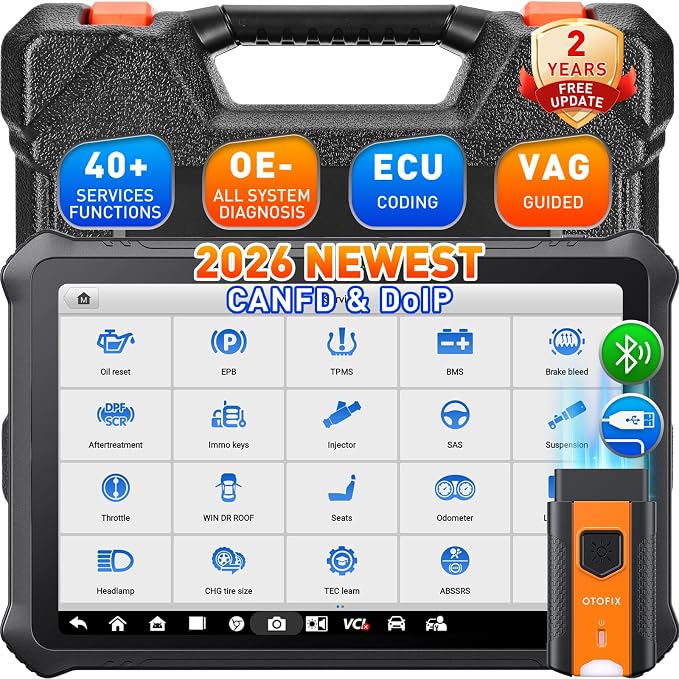 |
OTOFIX D1 PROS 2026 Bidirectional Scan Tool 2 Years Free | Check Price |
| 5 |  |
Innova 5610 OBD2 Bidirectional Scan Tool Understand Your Vehicle Pinpoint | Check Price |
GEARWRENCH Professional Bi-Directional Diagnostic Scan Tool GWSMARTBT
The GEARWRENCH GWSMARTBT takes a streamlined approach to automotive electronics by transforming your existing smart device into a dealer-level bi-directional console. Operating through a dedicated mobile interface, it eliminates the bulk and physical battery maintenance associated with full-sized diagnostic tablets. Its core appeal lies in a zero-subscription framework that provides free software upgrades indefinitely, making it a dependable companion for home garages and field repairs.
Where this compact interface excels is in its functional execution Rather than limiting users to passive data streaming it features full bi-directional control that enables live actuation tests on vehicle components Whether you need to cycle a cooling fan relay pulse an individual fuel injector or actuate solenoids the dongle sends active commands straight to the vehicle control modules It also incorporates twenty-three specialized maintenance and relearn functions handling routine chores such as ABS bleeding electronic.
Live data mapping and freeze frame capturing provide deep insight into intermittent electronic gremlins. The software plots operational data streams alongside reference parameters, making it easier to spot anomalous voltage drops or sensor lag under driving loads. Because it relies on the processing speed and display clarity of your phone or tablet, screen navigation remains quick and familiar.
This tool is ideal for enthusiasts, mobile roadside technicians, and DIY mechanics who already own modern mobile devices and refuse to pay recurring licensing fees. While it requires you to maintain a charged phone or tablet during use, its low weight, zero-cost maintenance, and expansive diagnostic coverage deliver immense long-term value.
Pros
- Permanent free software updates with zero subscriptions or recurring annual fees.
- Complete bi-directional actuation testing paired with live data mapping and freeze frame capture.
- Supports twenty-three essential service relearns including ABS bleeding and throttle matching.
- Ultra-compact dongle hardware that operates directly off smart devices.
Cons
- Relies entirely on your personal phone or tablet display and battery life.
- Fewer total specialty service resets compared to larger shop-oriented diagnostic consoles.
My Opinion
The GEARWRENCH GWSMARTBT provides an unbeatable combination of portable convenience and genuine functional testing, making it a standout choice for anyone seeking reliable diagnostic power without long-term licensing overhead.
mucar 892BT Full System AI Bidirectional Scan Tool Free Lifetime
The mucar 892BT is built as an all-in-one diagnostic station, combining a vibrant eight-inch touchscreen with free lifetime software upgrades. Running on an Android 10 foundation driven by a four-core processor, 4GB of system memory, and 64GB of onboard storage, it eliminates the lag often felt when pulling large live data arrays. Its wireless Bluetooth VCI gives you the freedom to run actuations from under the hood while commanding components from the bench.
Its active testing suite gives mechanics direct command over critical vehicle actuators. Technicians can operate headlights, activate variable oil pressure solenoids, test wheel speed sensor circuits, and cycle brake assemblies on demand. Backing this hardware power is an artificial intelligence diagnostic assistant. When fault codes are retrieved, the integrated AI engine evaluates the trouble codes against historical failure patterns, giving repair guidance and conversational troubleshooting assistance right on the screen.
System coverage is vast, spanning over one hundred forty vehicle brands and ten thousand individual models across engine, transmission, body control, electronic parking brake, and steering systems. For specialized servicing, it supplies more than thirty-five reset functions, including diesel particulate filter regeneration, battery registration, injector coding, and advanced ECU coding to personalize modules or adapt replacement control units. It also supports FCA AutoAuth for accessing secure gateway modules on modern vehicles.
This scanner fits busy automotive hobbyists and general repair shops that need broad vehicle coverage and deep module adaptation without an ongoing expense ledger. The expansive screen makes evaluating multi-channel live graphs comfortable during prolonged diagnostic sessions.
Pros
- Free lifetime software updates that cover active tests and system definitions.
- Generous eight-inch Android display backed by 4GB RAM and 64GB storage.
- Integrated AI-assisted troubleshooting assistant for rapid code interpretation.
- Comprehensive ECU coding and more than thirty-five maintenance service routines.
Cons
- Accessing FCA Secure Gateway vehicles requires a separate individual AutoAuth account.
- Larger physical profile requires more storage space in field service bags.
My Opinion
By blending modern tablet hardware, AI repair assistance, and unlimited lifetime software support, the mucar 892BT delivers exceptional daily convenience for mechanics handling diverse car lines.
mucar 682 AI-Assisted OBD2 Scanner Bidirectional Scan Tool Scanner
The mucar 682 blends a 6.2-inch high-definition touch display with dedicated physical buttons, creating a practical hybrid design that works effortlessly even when wearing work gloves. Powered by a quad-core 1.8GHz processor with 2GB of RAM and 32GB of internal storage, this tool delivers rapid boot times and fluid navigation across complex vehicle networks. Best of all, it provides free updates out of the box, ensuring long-term utility without software expiration dates.
Functional diagnostic depth is outstanding for its class, boasting access to more than three thousand active tests across all available vehicle modules. Mechanics can independently cycle windows, actuate electronic fuel pumps, command transmission solenoids, and trigger cooling fans to verify circuit integrity. Beyond simple actuation, the tool conducts full-system scans spanning engine, supplemental restraint, traction control, transmission, and body modules, reading and clearing diagnostic trouble codes in seconds.
The unit features more than twenty high-demand maintenance services, including oil service resets, steering angle recalibration, CAN FD protocol communication, electronic throttle adaptation, and ABS hydraulic bleeding. An automated VIN recognition system pulls vehicle profiles immediately upon connection, while the built-in MUAI engine offers diagnostic recommendations and real-time guidance when tracking stubborn electrical issues. Modern communication support is extended through built-in CAN FD and FCA SGW compatibility.
This handheld unit is tailor-made for shade-tree mechanics and mobile service pros who appreciate physical buttons alongside touch responsiveness. It provides a balanced, durable diagnostic interface that handles daily maintenance tasks without unnecessary complexity.
Pros
- Ergonomic hybrid control layout featuring both a responsive touch display and tactile buttons.
- Supports over three thousand bi-directional active component tests.
- Free software updates included without subscription traps.
- Native support for modern high-speed CAN FD communication protocols.
Cons
- Internal memory of 32GB is smaller than higher-tier tablet alternatives.
- Cabled direct interface lacks the free-roaming range of wireless Bluetooth tools.
My Opinion
The mucar 682 is a rugged, highly responsive diagnostic tool that hits a sweet spot between price, hardware dependability, and deep bi-directional functional testing.
OTOFIX D1 PROS 2026 Bidirectional Scan Tool 2 Years Free
The OTOFIX D1 PROS represents an advanced diagnostic console designed to tackle sophisticated dealership-level diagnostic routines Centered around a bright 10 1-inch display and powered by Android 10 with a massive 15 000mAh internal battery it delivers unmatched endurance for continuous shop environments Built with 4GB of RAM and 128GB of internal storage it effortlessly caches deep technical databases system backups and extended live data captures It comes packaged with two full years of free.
Diagnostics with this unit extend far past standard actuation tests. In addition to triggering individual relays, valves, and motor circuits, the D1 PROS delivers advanced online and offline ECU coding. It enables programmable module installation for replacing damaged control boxes on European and domestic makes, alongside customer personalization adjustments. For Volkswagen and Audi Group vehicles, it incorporates step-by-step VAG Guided Functions, removing the guesswork from security access codes and adaptation channel numbers.
Connectivity is among the best in the industry, integrating wireless Bluetooth, dual-band Wi-Fi, and native hardware handling for modern DoIP protocols and CAN FD architectures. AutoScan 2.0 scans vehicle networks in seconds, mapping complex multi-module topologies with clarity. Cloud-based report management enables instant wireless printing or digital sharing via QR code, streamlining workflow for busy repair operations.
This tool is ideal for serious technicians and specialty European workshops that demand advanced module initialization, guided procedures, and lightning-fast network communication. While software renewals come into play after the initial two-year window, its capabilities during that period rival systems costing significantly more.
Pros
- Dealer-level online and offline ECU coding with programmable module installation.
- Expansive 10.1-inch screen backed by an industry-leading 15,000mAh battery.
- Native CAN FD and DoIP protocol compatibility for cutting-edge vehicle networks.
- Includes guided procedures for VAG models and two years of free software updates.
Cons
- Free software updates are limited to two years rather than indefinite lifetime access.
- Higher initial cost makes it overkill for light, occasional code clearing.
My Opinion
If you require complex ECU coding, guided European workflows, and cutting-edge DoIP support, the OTOFIX D1 PROS offers immense professional horsepower backed by two years of full software coverage.
Innova 5610 OBD2 Bidirectional Scan Tool Understand Your Vehicle Pinpoint
The Innova 5610 provides an approachable, highly durable diagnostic layout crafted specifically around North American vehicle maintenance needs. Built with a familiar handheld form factor, clear color screen, and dedicated hotkeys, it avoids the complexities of bulky tablet operating systems. Innova includes software updates and pairs the device with its RepairSolutions2 companion ecosystem, granting access to a massive database of verified fixes without requiring subscription commitments.
Bi-directional control on the 5610 allows technicians to send active command routines straight to onboard systems. Users can independently pulse electric fuel pumps, cycle ABS solenoids, command electronic parking brakes into service mode for pad replacements, and initiate transmission solenoid checks. It reads enhanced live data parameters across core vehicle systems—including engine, ABS, SRS airbags, and automatic transmissions—letting you observe circuit responses in real time.
A major strength of this platform is the integrated guidance network. Innova supports users through toll-free, US-based technical support staffed by ASE-certified technicians. When paired with the companion mobile platform via Bluetooth, the scanner correlates retrieved trouble codes with probable causes, required replacement parts, and repair difficulty levels, helping newer mechanics approach complex electronic jobs with clarity.
This device suits weekend DIYers, fleet maintenance personnel, and seasoned mechanics who prefer a traditional, rugged handheld scanner that works instantly without boot delays. Its combination of bi-directional testing, lifetime updates, and verified repair guidance makes it an exceptionally dependable garage asset.
Pros
- Includes software updates with absolutely no required subscription fees.
- Direct bi-directional commands for fuel pumps, parking brakes, and core actuators.
- US-based customer support backed by ASE-certified technicians.
- Seamless integration with the RepairSolutions2 verified repair platform.
Cons
- Monochrome-style menu flow lacks the modern multi-touch navigation of Android tablets.
- Bi-directional actuation library is more focused on domestic and Asian core systems.
My Opinion
The Innova 5610 is an incredibly solid, straightforward handheld diagnostic scanner that pairs functional bi-directional tests with industry-leading domestic support and zero subscription fees.
How the Products Were Selected
Identifying the top automotive diagnostic scanners offering active testing and recurring software access requires looking past promotional claims and analyzing real-world ownership parameters. The tools highlighted in this guide were chosen through a thorough evaluation of technical specifications, verified owner documentation, hardware teardowns, firmware support schedules, and industry service records. Rather than relying on brief showroom demonstrations or proprietary vendor checklists, the selection process focused on genuine functionality, hardware durability, and software reliability across diverse workshop and home garage environments.
A primary criterion for inclusion was genuine bidirectional control capability paired with clear, transparent update policies. In the modern diagnostic tool market, many devices advertise software updates but bury mandatory recurring subscriptions or feature paywalls in their service agreements. The units evaluated here were selected specifically because their manufacturers offer perpetual functional access or cost-free, lifetime system improvements without holding active test routines hostage behind annual license fees. Special attention was paid to the exact scope of these update models—verifying whether free updates apply solely to system operating software, specific diagnostic databases, or comprehensive full-system coverage across American, Asian, and European vehicle architectures.
Beyond licensing terms, the selection process examined the physical and operational performance metrics that govern day-to-day diagnostic tasks. These include:
- Processor and Memory Allocation: Evaluating processing speeds, system memory (RAM), and on-board storage capacity to ensure the hardware can parse modern high-speed CAN bus data and large live graphing buffers without system latency or freezing.
- Vehicle Protocol Support: Confirming compatibility with legacy protocols as well as contemporary standards such as Controller Area Network Flexible Data-Rate (CAN-FD) and DoIP (Diagnostics over Internet Protocol), which are essential for communicating with newer vehicle architectures.
- ECU System Coverage: Evaluating the depth of accessible control modules, confirming that bidirectional commands can reach safety, body, chassis, infotainment, and powertrain systems rather than just standard engine electronics.
- Independent Repair Feedback: Analyzing hundreds of documented user experiences from professional technicians, fleet mechanics, and advanced DIY repairers to verify consistent hardware stability, physical connector durability, and long-term brand responsiveness.
Buying Guide: Choosing the Best Bi Directional Scan Tool with Free Updates
Investing in a bidirectional scan tool represents a substantial technical upgrade over standard code readers. While an entry-level code scanner merely receives broadcast data from the vehicle’s powertrain control module, a bidirectional scanner initiates two-way communication. It transmits active command signals to onboard microcontrollers to actuate relays, pulse solenoids, cycle motors, and toggle valves directly. When paired with an update structure that does not impose recurring financial penalties, this diagnostic capability yields an exceptional return on investment. However, determining which tool best matches your repair workflow requires a firm grasp of several critical hardware, software, and logistical factors.
6. Live Data Fusion and PID Graphing Integration
Actuating a component bidirectionally is useless unless you can verify its physical and electrical response in real time. The ultimate strength of any bidirectional tool lies in how seamlessly it combines active commands with live Parameter ID (PID) graphing.
Ensure the tool supports customized split-screen views or dynamic overlay graphing. For instance, when running an active test to pulse an idle air control valve or an EGR positioner, the interface should display the commanded signal alongside the actual sensor position voltage, manifold absolute pressure, and engine RPM on synchronized timelines. A tool that forces you to exit the active test screen to view the corresponding live data stream severely diminishes your diagnostic accuracy.
Initial Setup and Wi-Fi Configuration
Preparing a modern bidirectional scan tool for service requires establishing a clean baseline configuration before connecting to any vehicle diagnostic port. Straight out of the box, the internal lithium battery must be charged to 100 percent using an appropriately rated wall adapter rather than a low-amperage computer USB port. Operating system calibration and multi-gigabyte diagnostic installations demand consistent, stable power; an unexpected shutdown mid-installation can corrupt base software partitions.
Once charged, power the device on and proceed through the initial setup wizard to establish a solid Wi-Fi connection. Connect the tool to a high-speed, stable 2.4 GHz or 5 GHz network. Diagnostic tools frequently struggle with public Wi-Fi networks requiring captive portal logins (such as coffee shops or hotel networks), so a secure, authenticated network is essential. Configure the internal time and date settings accurately. Diagnostic servers rely on strict SSL/TLS cryptographic handshakes during verification and update processes; an incorrect system date or time zone can trigger immediate verification failures and block server access.
The final step of initial setup involves product registration. Create a manufacturer user profile directly through the tablet’s native interface, linking your valid email address and serial number to your account. This binds the lifetime or extended update entitlement to your hardware identity. Store your account credentials in a secure location, as access to future software updates, server-side data lookups, and cloud report backups will permanently rely on this profile.
Software Update and Storage Management Best Practices
Maximizing the benefits of free updates requires an intentional management strategy. When a scan tool offers lifetime software, the sheer volume of downloadable files can quickly overwhelm the internal solid-state drive if managed passively. Automotive software suites are modular: manufacturers release isolated patches for specific car brands, transmission families, or safety systems on a rolling basis.
Adopt a selective update routine rather than clicking “Update All” indiscriminately, especially if your device has limited internal storage (e.g., 32 GB). If your work focuses primarily on domestic and Asian passenger cars, prioritize downloading the latest packages for those manufacturers. Refrain from downloading heavy European or commercial vehicle files until you actively need them. This preserves physical storage space and ensures the internal flash memory operates with adequate free space, preventing system slowdowns.
Before launching a major software patch or sweeping brand update, verify that your scanner holds at least a 50 percent battery reserve, or keep it plugged into its AC charger. Never interrupt the installation process, power down the unit, or cycle the Wi-Fi router while files are writing to internal flash memory. Regularly navigate to the system settings menu to clear out cached application data and old installation files. If the tool supports external MicroSD storage, configure the file path to offload vehicle history logs, screen recordings, and PDF health check reports to the card to keep the primary storage drive uncluttered.
Vehicle Compatibility, Pinouts, and Protocol Matching
A bidirectional scan tool operates as a specialized computer communicating with an internal network of vehicle microcontrollers. Consequently, bidirectional functionality is fundamentally bounded by vehicle communication protocols, pin configurations, and individual electronic control unit (ECU) programming. While standard OBD-II read/clear commands are federally mandated across all passenger cars sold in the United States since 1996, bidirectional actuation routines are non-standardized and entirely proprietary to each automaker.
Understanding physical pinouts on the standard 16-pin DLC (Data Link Connector) helps prevent communication headaches:
- Pin 16: Supplies unswitched 12V battery power directly from the vehicle harness.
- Pins 4 and 5: Serve as chassis and signal grounds, respectively. A weak ground at the DLC can prevent the scanner from powering up or cause communication dropped packets.
- Pins 6 and 14: Handle standard High-Speed CAN communication (CAN-H and CAN-L), typically terminating with a nominal 60-ohm network resistance.
- Pins 2 and 10: Manage legacy SAE J1850 (PWM and VPW) communication used on older domestic platforms.
- Pins 7 and 15: Manage ISO 9141-2 and K-Line data for older Asian and European models.
When selecting a bidirectional active test, verify that the vehicle’s specific trim level and powertrain package actually contain the physical actuators in question. For instance, attempting an active test for variable intake manifold flaps on a base-engine model lacking those hardware servos will result in a “Function Not Supported” or “Command Rejected” system error. Furthermore, on vehicles equipped with modern Security Gateway (SGW) modules—such as late-model FCA (Chrysler/Dodge/Jeep) or modern Nissan platforms—the physical DLC connection will block active bidirectional commands unless the scan tool is authenticated through an approved security portal. Ensure your scan tool platform supports the appropriate gateway unlocking workflows if you frequently service these makes.
Effective Diagnostic Workflows and Safe Actuation
Bidirectional testing should never be used as a blunt trial-and-error guessing method. Because active tests deliberately override factory safety parameters and ECU logic, improper or unguided actuations can stress mechanical components, flood engine cylinders, or drain electrical circuits. Incorporating bidirectional actuations within a logical diagnostic progression ensures accurate isolation of physical faults without risking collateral vehicle damage.
Follow a disciplined sequence whenever executing bidirectional diagnostic tests:
- Perform a Full Health Scan: Document and record all active, pending, and historic Diagnostic Trouble Codes (DTCs) alongside their frozen freeze-frame telemetry before manipulating any circuits.
- Verify Pre-Condition Baselines: Most bidirectional actuations have rigid prerequisite criteria programmed into the vehicle ECU. Ensure the engine state matches requirements (engine off/ignition on, or engine idling), transmission is in Park/Neutral, the parking brake is set, and cooling systems are within safe operating temperatures.
- Connect a Clean Battery Maintainer: Performing extended bidirectional actuations—such as cycling ABS valves or pulsing cooling fans—places a significant load on the vehicle’s 12V battery. If system voltage drops below 12.0 volts during active communication, modern ECUs will automatically abort testing and may write false communication codes.
- Monitor Response with Telemetry: Keep relevant live sensor data side-by-side with active command buttons. If commanding an EVAP vent solenoid closed, simultaneously watch fuel tank pressure sensor voltage to confirm a physical seal is occurring.
- Observe Operating Duty Cycles: Do not continuously cycle electromagnetic actuators, such as fuel injectors or shift solenoids, indefinitely. Extended duty-cycle actuation without fluid flow for cooling can quickly overheat and damage delicate internal coil windings.
Hardware Care, Cable Management, and Storage Strategies
Diagnostic tablets and their accompanying VCI modules operate in harsh working environments exposed to abrasive dust, engine oils, caustic solvents, and extreme temperature fluctuations. Protecting your diagnostic equipment through disciplined physical maintenance prevents premature hardware failures and preserves the integrity of internal electronics.
Protecting the touchscreen requires deliberate care. Diagnostic interfaces use capacitive or resistive glass surfaces that degrade when exposed to automotive fluids such as brake fluid, aerosol brake cleaners, and synthetic oils. Immediately wipe away chemical residues using a clean, dry microfiber cloth. When cleaning the housing and display, avoid industrial petroleum-based solvents or ammonia glass cleaners; instead, use screen-safe cleaning solutions or standard 70 percent isopropyl alcohol wipes applied to the cloth rather than sprayed directly onto the unit’s seams.
Cable integrity is the most frequent point of failure in wired diagnostic equipment. Never yank, yank-release, or lift the diagnostic tool by its main interface cable. When coiling cables for storage, avoid sharp bends or kinked loops that fracture internal copper signal strands. Use the “over-under” cable coiling technique and secure it with a soft hook-and-loop strap. For wireless dongles, store the VCI inside a dedicated, padded tablet compartment when not plugged into a car to prevent leaving it behind in customer footwells or dropping it onto hard shop floors.
Finally, temperature management is vital for the health of internal lithium-ion batteries. Never store a diagnostic scanner inside a vehicle cabin parked under direct sunlight, where interior temperatures can rapidly exceed 130°F (54°C). Extreme heat accelerates lithium cell degradation and can cause dangerous battery swelling that separates display panels from the chassis. Conversely, operating a frozen unit can cause internal condensation as it warms. Always store the tool in a clean, temperature-controlled environment between 50°F and 85°F (10°C to 29°C).
Troubleshooting Connection Errors and Communication Failures
Communication timeouts, failed actuations, and frozen scanning screens are common challenges in computerized automotive repair. When your bidirectional scan tool fails to communicate with a vehicle, systematically troubleshooting the communication chain will quickly isolate the root issue.
| Observed Symptom | Probable Underlying Cause | Recommended Corrective Action |
|---|---|---|
| Scanner completely fails to power on when plugged into the vehicle DLC. | Blown OBD-II power fuse (often shared with the 12V auxiliary power/cigarette lighter circuit) or oxidized DLC terminal pins. | Locate and test the auxiliary power fuse using a digital multimeter; inspect pin 16 on the vehicle connector for 12V reference voltage and pin 4/5 for ground continuity. |
| “Communication Error” or “Vehicle Not Responding” warning across all modules. | Key position incorrect, bad ground, damaged CAN bus wiring, or incompatible communication protocol selection. | Confirm ignition is switched to the “ON/RUN” position with engine off; verify battery voltage is above 12.2V; manually select vehicle model rather than relying on Auto-VIN detection. |
| Scanner reads engine ECU data but shows “No Response” from ABS, SRS, or Body modules. | Blown module fuse, severed secondary CAN bus trunk line, or vehicle model uses a specialized gateway blocking basic access. | Check for active Security Gateway requirements; verify specific subsystem fuses under hood and dash panels; inspect pinouts for non-powertrain networks. |
| Bidirectional command fails immediately with an “Action Aborted” or “Conditions Not Met” error. | Vehicle safety pre-conditions are not met (e.g., engine running when test requires key-on/engine-off, door open, or parking brake disengaged). | Consult the software pop-up instructions; ensure vehicle coolant temperature, gear selector, parking brake, and engine status match the required testing criteria exactly. |
| Wireless VCI fails to maintain a stable Bluetooth connection to the host tablet. | Local RF interference, internal hardware pairing freeze, or low vehicle battery voltage disrupting the VCI’s onboard radio. | Unplug the VCI, wait 10 seconds, and reconnect; restart the tablet’s Bluetooth stack; ensure the vehicle’s 12V battery is supported by a stable power supply. |
Common Mistakes When Using Bidirectional Tools
Even seasoned technicians can make costly diagnostic errors when operating advanced bidirectional scan tools. Avoiding these common procedural mistakes will save repair time, prevent mechanical damage, and ensure clear diagnostic insights.
One widespread error is using bidirectional controls to “fix” a vehicle instead of diagnosing it. Actuating a fuel pump or forcing an A/C compressor clutch to engage proves that the relay, power circuit, and component motor are physically operational; it does not mean the ECU’s automated control logic or input sensor stream is healthy. If a fuel pump runs when manually commanded by the scanner but will not run during normal engine cranking, the mechanical pump is fully functional—the fault lies within the crank sensor, theft-deterrent module, or ignition switch circuit.
Another frequent mistake is failing to clear software-induced adaptations following mechanical repairs and bidirectional testing. Many active tests—such as throttle body alignments, steering angle sensor recalibrations, or transmission clutch resets—require a secondary adaptation or “relearn” procedure once the physical component is serviced. Simply actuating the part without executing the accompanying software relearn can leave the vehicle running poorly or trigger persistent adaptation codes.
Finally, many technicians neglect vehicle battery voltage during active diagnostic sequences. Leaving the ignition switched on while running extensive bidirectional testing can quickly draw down the vehicle’s battery. As system voltage drops below critical thresholds, individual microcontrollers will drop off the vehicle’s data network one by one, generating a confusing array of false “U-codes” (network communication errors). Always maintain clean system voltage when operating bidirectional active tests.
FAQS About Best Bi Directional Scan Tool with Free Updates
What is the difference between a standard diagnostic scanner and a bidirectional scan tool?
A standard diagnostic scanner operates strictly in a “read-only” capacity. It passively gathers information broadcast by vehicle control modules, reading Diagnostic Trouble Codes (DTCs) and displaying live sensor data streams. In contrast, a bidirectional scan tool communicates two ways: it can both read system data and send active, direct digital commands to vehicle control modules. This allows you to override normal ECU control logic to actuate physical components—such as cycling ABS valves, opening EVAP purge solenoids, activating cooling fans, or running cylinder balance tests—to verify hardware operation.
Do “lifetime free updates” truly mean zero ongoing costs?
When a manufacturer genuinely designates a tool as having lifetime free updates, it means you can download diagnostic software patches, system upgrades, bug fixes, and newer model-year databases without ever paying a recurring annual subscription fee. However, always guide the fine print: some tools limit free updates to base system applications, while charging extra for specialized online coding or advanced OEM security gateway access. True standalone bidirectional diagnostic functions, however, remain fully accessible without recurring fees.
Can a bidirectional scanner damage vehicle components during an active test?
Yes, if tests are run carelessly. Bidirectional scanners intentionally override the vehicle computer’s built-in protective logic. For instance, commanding an electric cooling fan to run continuously at 100 percent duty cycle for an extended period, pulsing fuel injectors on a stationary engine without ignition, or forcing hydraulic valves open without correct fluid pressures can cause component overheating, cylinder wash, or mechanical strain. Always follow on-screen preconditions and limit actuations to brief, controlled test cycles.
What is an Auto-VIN function, and why does it sometimes fail on certain cars?
Auto-VIN is an automated diagnostic protocol routine where the scanner interrogates the vehicle’s primary powertrain or body module to retrieve the 17-digit Vehicle Identification Number, automatically configuring make, model, year, and engine specifications. Auto-VIN can fail if the vehicle is manufactured before the mid-2000s (when Auto-VIN standardization became widespread), if aftermarket stereo installations or remote starters disrupt CAN communication lines, or if low battery voltage corrupts the initial identification handshake. In these scenarios, manual vehicle selection will bypass the issue.
Do I need an active internet connection while performing bidirectional tests?
For the vast majority of physical bidirectional actuations—such as cycling relays, bleeding ABS brakes, or testing windows—an internet connection is entirely unnecessary. The diagnostic software libraries and command sets reside locally on the tool’s internal storage drive. An internet connection is primarily required for downloading software updates, translating DTCs via cloud databases, sending diagnostic PDF reports via email, or authenticating through secure OEM gateway platforms on newer vehicles.
Will a bidirectional tool with free updates work on electric or hybrid vehicles?
Yes, provided the software packages included with the tool list coverage for those specific hybrid and EV platforms. Bidirectional tools can interface with hybrid and EV cooling pumps, contactor relays, battery cooling valves, and regenerative brake systems. However, keep in mind that high-voltage battery cell balancing or direct high-voltage isolation procedures often require dedicated OEM-level software suites and specialized high-voltage safety certifications that exceed the scope of universal multi-brand scanners.
Conclusion
Securing a high-capability bidirectional scan tool without the burden of ongoing subscription fees transforms automotive diagnostics from frustrating guesswork into a swift, systematic science. By commanding actuators directly and watching component responses in real time, you cut diagnostic times down to minutes and eliminate the expensive habit of replacing good parts on a hunch. Choosing a platform that delivers modern communication protocol compatibility, robust internal hardware, and clear, cost-free software updates ensures your garage or repair shop remains equipped to tackle complex vehicle electronics for years to come.