
Finding the best smart dash cam means balancing video clarity, parking protection, phone connectivity, coverage, and setup demands rather than choosing the camera with the biggest resolution number. A good model should make important footage easy to save and share while fitting the way you actually drive.
My first choice is 70mai Dash Cam M310 Dash Camera. Its 3-megapixel camera, WDR, night-processing technology, and app support make it a strong everyday option, although the time-lapse parking mode requires the separately sold 70mai UP03 hardwire kit.
My second choice is Escort M2 Smart 1080P Full HD Dash Cam. It records in 1080P, supports dual-band Wi-Fi, and can send an automatic text to an emergency contact after a serious accident, while its parking mode requires a hardwire connection.
My third choice is LINGDU LD4K 4K Mirror Dash Cam Front and Rear. It rounds out my top three with a useful alternative for buyers whose priorities differ from the first two choices.
This guide compares all 10 selections, explains the most important differences between front-only, dual-camera, mirror, cabin, and four-channel systems, and covers storage, parking power, installation, night footage, app use, and long-term ownership. The goal is to help you match the camera to your vehicle and driving habits instead of buying features you will not use.
10 Best Smart Dash Cam Comparison
I selected these products for their relevance to connected dash-camera shopping, the usefulness of their supplied specifications, the range of coverage and installation styles, and available customer-feedback evidence. The ranking also considers practical trade-offs such as included memory cards, parking-mode requirements, app connectivity, camera placement, and brand diversity rather than relying on resolution alone.
| # | Image | Product | Price on Amazon |
|---|---|---|---|
| 1 |  |
70mai Dash Cam M310 Dash Camera | Price on Amazon |
| 2 |  |
Escort M2 Smart 1080P Full HD Dash Cam | Price on Amazon |
| 3 |  |
LINGDU LD4K 4K Mirror Dash Cam Front and Rear | Price on Amazon |
| 4 |  |
COBRA SC 220C Smart Dual View Front and Cabin Dash Cam | Price on Amazon |
| 5 | 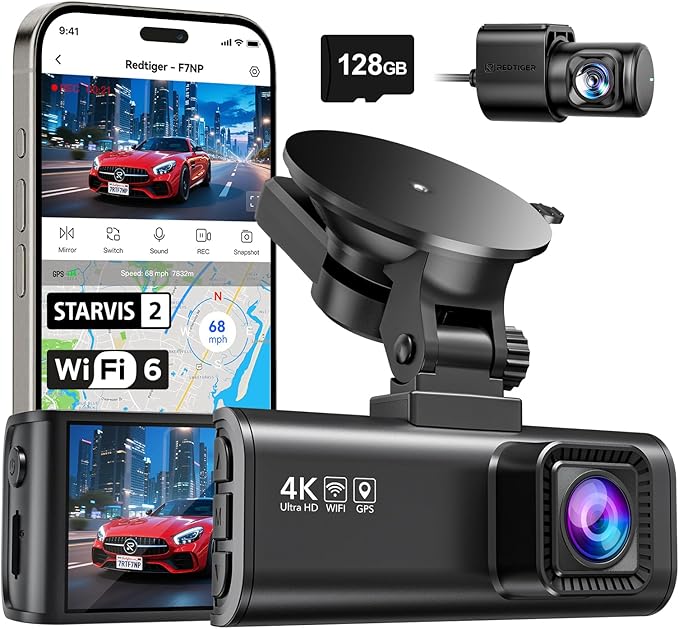 |
REDTIGER F7NP 4K Front and Rear Dash Cam | Price on Amazon |
| 6 |  |
ROVE R2-4K Dual Front and Rear Dash Cam | Price on Amazon |
| 7 |  |
WOLFBOX G840S 12-Inch 4K Mirror Dash Cam | Price on Amazon |
| 8 |  |
IIWEY N6 Four-Channel 360 Dash Cam | Price on Amazon |
| 9 |  |
VIOFO A229 Plus 2K Dual Dash Cam | Price on Amazon |
| 10 |  |
galphi 4K 5ghz Wi-Fi Front Mini Dash Cam | Price on Amazon |
70mai Dash Cam M310 Dash Camera
The 70mai M310 is a compact front-facing camera aimed at drivers who want more detail than standard 1080P without moving into a larger multi-camera system. Its 2304 x 1296P recording captures road signs, license plates, and nearby vehicles with useful extra detail, while the 130-degree field of view covers a broad section of the road without the more exaggerated perspective of some ultra-wide cameras.
Low-light driving benefits from the combination of WDR and 3D noise reduction. WDR helps balance bright and dark areas, while noise reduction can make nighttime footage look cleaner. Built-in Wi-Fi and the iOS/Android app make it easier to access clips without removing the camera from the windshield. Loop recording keeps the camera recording by replacing older files, and the built-in G-sensor protects footage when it detects a collision.
Parking protection is more flexible than the basic camera size suggests. The M310 can detect impacts while the vehicle is unattended, and its time-lapse mode compresses 30 minutes of footage into one minute. However, time-lapse requires the separately sold 70mai UP03 hardwire kit. The camera also requires a compatible Class 10 or faster microSD card from 16GB to 256GB, and no card is included.
Pros
- 1296P QHD recording with WDR and 3D noise reduction.
- Built-in Wi-Fi, mobile app support, and 130-degree coverage.
- G-sensor emergency protection and optional time-lapse parking mode.
- 18-month warranty and technical support.
Cons
- MicroSD card is not included.
- Time-lapse parking recording requires the UP03 hardwire kit.
- Front-only coverage does not record the cabin or rear of the vehicle.
My Opinion
The M310 is a sensible first choice for a commuter who wants connected features and dependable everyday coverage without a complicated dual-camera installation. Budget for a suitable memory card and, if parking surveillance matters, the compatible hardwire kit.
Escort M2 Smart 1080P Full HD Dash Cam
The Escort M2 takes a different approach from high-resolution cameras by emphasizing connected safety tools and integration. Its 1080P video is suitable for documenting daily driving, and the camera is optimized for both daylight and nighttime conditions. Built-in GPS adds speed and location information to recordings, which can provide useful context when organizing footage after an incident.
Its strongest advantage is the connected ecosystem. Dual-band Wi-Fi supports access to stored footage, cloud management, software updates, and alerts. The M2 can also work with compatible Escort detectors, including the Redline 360c, Redline Ex, MAX 360c, MAX 360, MAX 3, Escort iXC, and Escort iX. Passport X80 compatibility requires an optional mounting bracket, so detector owners should confirm their exact model before buying.
Drivers who spend considerable time on the road may appreciate the emergency mayday function. After a serious accident, the camera can send an automatic text to an emergency contact, while the emergency recording button and incident detection protect important files from being overwritten. Parking mode is available, but it requires a hardwire connection. Apple CarPlay and Android Auto compatibility, plus shared alerts from the Drive Smarter community, add value for drivers already using that ecosystem.
Pros
- Built-in GPS records speed and location with video.
- Cloud video management and dual-band Wi-Fi support connected access.
- Emergency mayday texting and protected incident footage.
- Works with several compatible Escort detectors and vehicle displays.
Cons
- 1080P resolution is lower than several other cameras in this group.
- Parking mode requires a hardwire connection.
- Some detector compatibility may require an optional mounting bracket.
My Opinion
The M2 ranks second because its smart functions are unusually useful for connected drivers, especially Escort detector owners. It is a better fit for ecosystem integration and emergency communication than for shoppers whose only priority is maximum image resolution.
LINGDU LD4K 4K Mirror Dash Cam Front and Rear
The LINGDU LD4K is a mirror-style system for drivers who want a large display and coverage in both directions. Its front camera records at 4K UHD, while the rear unit records at 2.5K, giving the system more detail than a basic front-only camera. The 12-inch mirror display can show what the cameras are capturing and may provide a broader visual aid than a conventional reflective mirror, although it also creates more equipment to position and wire.
Smart driving alerts are a major part of its appeal. ADAS can provide warnings for forward collisions, lane departures, pedestrians, front-vehicle movement, and following distance. Blind-spot detection and lane-change assistance monitor areas beside and behind the vehicle. These alerts can be helpful on busy highways, but they should be treated as assistance rather than a replacement for checking mirrors and blind spots manually.
Voice control gives the driver hands-free access to 10 commands, including turning on Wi-Fi, taking snapshots, and locking recordings. The 5.8GHz Wi-Fi connection works with the LINGDU app for previewing, downloading, and sharing clips. A 64GB TF card is included, and the camera supports cards up to 512GB. A separate hardwire kit is required for 24/7 parking monitoring, and the listed warranty period is one year.
Pros
- 4K front and 2.5K rear recording in a mirror-style design.
- Large 12-inch display with ADAS, blind-spot, and lane-change alerts.
- Voice commands and fast 5.8GHz Wi-Fi.
- Includes a 64GB card and supports up to 512GB.
Cons
- Hardwire kit for continuous parking monitoring is sold separately.
- Mirror installation and rear-camera wiring are more involved.
- Driver-assistance alerts should not replace attentive driving.
My Opinion
The LD4K is a strong third choice for buyers who want an all-in-one mirror display with substantial front and rear detail. It makes the most sense for people comfortable with a more involved installation and interested in alerts beyond basic video recording.
COBRA SC 220C Smart Dual View Front and Cabin Dash Cam
The COBRA SC 220C is built for drivers who want to document both the road and the vehicle interior. Its front camera records in QHD 1440P, while the dual-view system captures the cabin in Full HD 1080P. That combination suits rideshare drivers, family vehicles, and anyone who wants a record of conversations or activity inside the car as well as events ahead.
A built-in three-inch screen lets the driver see what both cameras are recording in real time. This can make initial alignment easier and gives a quick way to confirm that the cabin angle is useful. The screen does add a visible component to the windshield, however, so placement should be chosen carefully to avoid creating a distraction or blocking the driver’s view.
COBRA also emphasizes connected services. The Drive Smarter community supplies live alerts related to red-light cameras, speed traps, and crowdsourced radar information. With a hardwire setup and the Drive Smarter app, Parking Live View can provide remote access to the connected cameras. Incident reports can combine policy information, event details, and video for sharing with an insurance company, while a mayday alert can text an emergency contact after a serious accident. Trip Clips create condensed time-lapse videos for sharing scenic drives.
Pros
- QHD front recording plus Full HD cabin coverage.
- Three-inch display makes camera alignment straightforward.
- Connected alerts, Parking Live View, incident reports, and mayday support.
- Useful for rideshare, family, and interior-monitoring needs.
Cons
- Parking Live View requires hardwiring and app connectivity.
- The screen and cabin camera need careful placement.
- Front and interior coverage does not provide a dedicated rear camera.
My Opinion
The SC 220C is a practical specialty choice when interior footage matters as much as road footage. It is less suitable for someone seeking a discreet camera or dedicated rear-window coverage, but its connected incident tools make it appealing for rideshare and family use.
REDTIGER F7NP 4K Front and Rear Dash Cam
The REDTIGER F7NP is a dual-camera system focused on high-resolution evidence. Its front camera records in 4K and the rear camera in 1080P, with 170-degree front and 140-degree rear lenses. That broad coverage can help document surrounding traffic and rear impacts, while the front resolution gives useful detail for road signs, plates, and vehicles ahead.
Night performance is supported by a STARVIS 2 sensor, an F1.5 aperture, a six-layer optical lens, WDR, and HDR. These features are intended to balance highlights and shadows and retain detail in difficult lighting. They do not eliminate glare or poor visibility caused by a dirty windshield, so careful placement and a clean lens remain important.
Built-in 5.8GHz Wi-Fi works with the REDTIGER Cam app, and listed download speeds can reach up to 20MB per second. GPS information can show route, speed, and location in the app. The included memory card reduces the initial setup cost, while loop recording automatically replaces older files and protects collision clips. Parking protection offers time-lapse and G-sensor modes. A supercapacitor rather than a lithium battery is intended to improve heat resistance and service life, and the camera carries an 18-month guarantee.
Pros
- 4K front and 1080P rear recording with wide viewing angles.
- STARVIS 2, WDR, HDR, and a large-aperture front lens support night footage.
- Fast 5.8GHz Wi-Fi, app access, and GPS data.
- Memory card included and 18-month guarantee provided.
Cons
- Rear resolution is limited to 1080P.
- Dual-camera wiring takes longer than a front-only installation.
- Safe operation depends on using recommended cables and accessories.
My Opinion
The F7NP is a compelling choice for drivers who want broad front-and-rear coverage and strong paper specifications for nighttime recording. Its included card and supercapacitor are helpful ownership advantages, but installation quality will strongly affect the finished result.
ROVE R2-4K Dual Front and Rear Dash Cam
The ROVE R2-4K Dual records the road ahead and behind at the same time, but buyers should understand the difference between its front label and its underlying capture method. The front camera records at 2.5K QHD and intelligently upscales the playback to 4K, while the rear camera records in 1080P. This can produce a sharper-looking file, but it is not the same as native 4K capture.
A Sony STARVIS 2 IMX675 sensor, F1.5 front aperture, F1.8 rear aperture, and HDR help the system gather more light and balance difficult scenes. Built-in GPS records route, location, speed, and compass information, and the three-inch IPS screen can display live speed and direction. The ROVE app uses 5.8GHz or 2.4GHz Wi-Fi, with listed downloads reaching up to 20MB per second.
The package is generous for a dual system. It includes a 128GB ROVE PRO microSD card, front and rear cameras, power accessories, mounts, clips, a trim tool, and a cleaning wipe. Three parking options are available: one-frame-per-second time-lapse, motion detection, and collision detection. A hardwire kit is required for parking mode and is not included. In collision mode, a parked event can trigger a full one-minute video that is locked for protection.
Pros
- Front and rear recording with a useful 128GB card included.
- STARVIS 2 sensor, HDR, and wide-aperture lenses support low-light capture.
- GPS, fast Wi-Fi, screen, and several parking modes.
- Package includes installation tools and multiple power accessories.
Cons
- Front footage is upscaled from 2.5K rather than native 4K.
- Rear camera records at 1080P.
- Hardwire kit for parking mode is not included.
My Opinion
The R2-4K Dual is an appealing value-oriented package for buyers who want two-camera coverage and plenty of included accessories. Its honest upscaled-4K distinction matters, but the combination of GPS, storage, and parking choices remains useful for everyday ownership.
WOLFBOX G840S 12-Inch 4K Mirror Dash Cam
The WOLFBOX G840S replaces the standard rearview mirror experience with a large 12-inch display. Its front camera records in 4K and the rear camera in 1080P, while 170-degree front and 140-degree rear lenses provide broad coverage. The large screen offers roughly 1.5 times the viewing area of a standard mirror and can reduce blind spots, especially when the rear camera is mounted and aligned correctly.
The mirror format is particularly useful for vehicles where rear visibility is limited by passengers, cargo, or a high rear seat. Split-screen viewing can show both camera feeds, and a 2.5D curved design is intended to integrate with the vehicle interior. WDR, HDR, a six-glass lens, and a low-reflectivity LCD help with challenging light and daytime reflections, though the screen still needs careful adjustment to avoid distracting glare.
An external GPS antenna supplies speed and location information, and the WOLFBOX app supports live viewing, playback, and sharing over 5.8GHz Wi-Fi. Its 24-hour parking monitor uses time-lapse recording to conserve power and storage, but a hardwire kit is required. The included card is 32GB, and the camera carries a 12-month guarantee. WOLFBOX specifically advises using original accessories, which is important when replacing power or camera components.
Pros
- Large 12-inch display with 4K front and 1080P rear video.
- Wide front and rear viewing angles and split-screen mode.
- External GPS, app access, Wi-Fi, and low-reflection display.
- Time-lapse parking monitoring is available with hardwiring.
Cons
- Hardwire kit is required for parking monitoring.
- Rear camera resolution is 1080P.
- Mirror replacement design may require more adjustment than a small windshield camera.
My Opinion
The G840S is a good fit for drivers who want a broad digital rearview display rather than a nearly invisible windshield camera. It is especially practical for obstructed rear visibility, but buyers should plan the mirror fit, rear cable route, and parking power before installation.
IIWEY N6 Four-Channel 360 Dash Cam
The IIWEY N6 is the most coverage-oriented option in this group. It records four channels at once: front, rear, and both sides. Front and rear cameras record at 1440P, while the side cameras use wide 150-degree views. With 170-degree front and rear angles, the system is intended to reduce blind spots and document side impacts that a conventional front-and-rear camera might miss.
Infrared night vision and Vision Enhance technology support visibility after dark, making the N6 attractive for drivers who want cabin-side or perimeter awareness. Its four-camera arrangement also creates more installation work and more footage to manage. The rear camera must be installed and configured correctly; the supplied instructions specifically warn that red guide markings can appear if the setup is not completed properly.
The camera includes a 128GB card and uses 5.8GHz Wi-Fi 6, with listed speeds up to approximately 20MB per second. GPS records speed and route for playback in the app or PC viewer. It is a wired camera with no built-in battery, so it must receive power from the included car charger or a suitable hardwire setup. For parking surveillance, the IIWEY hardwire kit is required; time-lapse mode can monitor for up to roughly 48 hours, while impact detection locks a short event clip.
Pros
- Four-channel front, rear, and side coverage reduces blind spots.
- 1440P recording on front and rear channels with infrared night vision.
- 128GB card, GPS, Wi-Fi 6, and app or PC playback.
- Time-lapse and impact parking modes are available with hardwiring.
Cons
- No built-in battery; the camera must remain connected to vehicle power.
- Four cameras require more wiring and careful configuration.
- Parking mode requires a separate compatible hardwire kit.
My Opinion
The N6 is the right kind of specialized purchase for drivers who genuinely need side coverage, such as city drivers, fleet users, or people concerned about blind-zone incidents. It is more equipment than most commuters need, and the wiring demands should be accepted before choosing it.
VIOFO A229 Plus 2K Dual Dash Cam
The VIOFO A229 Plus focuses on balanced front-and-rear image quality instead of pairing a very high-resolution front camera with a lower-resolution rear unit. Both channels record at 1440P, and both use Sony STARVIS 2 IMX675 sensors. That dual-sensor arrangement can help maintain consistent detail between the road ahead and the scene behind, especially when an incident develops outside the front camera’s view.
HDR recording is available on the front and rear cameras, helping expose bright and dark areas more evenly during fast-moving scenes. The STARVIS 2 sensors are also intended to reduce noise and motion blur in low light. These features make the A229 Plus a strong candidate for nighttime commuters, though no camera can guarantee readable plates when glare, distance, weather, or motion are severe.
Hands-free operation includes 12 voice commands, such as taking a photo, locking a clip, turning on Wi-Fi, and switching between front and rear views. Its quad-mode GPS supports GPS, BEIDOU, GALILEO, and GLONASS for recorded location, speed, and time data. The VIOFO app uses 5GHz Wi-Fi for faster transfers. Three parking approaches are offered: buffered automatic event detection, time-lapse, and low-bitrate recording. Buyers should verify the required power arrangement before relying on continuous parking protection.
Pros
- True 1440P front and rear recording with dual STARVIS 2 sensors.
- HDR on both channels supports difficult lighting conditions.
- Voice commands, precise multi-system GPS, and 5GHz Wi-Fi.
- Three parking-mode options provide flexibility.
Cons
- No memory card is identified in the supplied product details.
- Dual-camera installation requires routing a rear cable.
- Continuous parking use requires careful planning for vehicle power.
My Opinion
The A229 Plus is a strong technical choice for buyers who value equal front-and-rear detail and dependable low-light capability. It is less of an out-of-box budget package than models that include a card, but its balanced two-channel recording is a meaningful advantage.
galphi 4K 5ghz Wi-Fi Front Mini Dash Cam
The galphi front camera is aimed at drivers who prefer a small, screen-free device with high-resolution recording. Its 4K capture and 160-degree lens can document a broad view of the road, while the compact body is less likely to obstruct the windshield. The absence of a display also reduces visual distraction, although checking alignment and footage requires the phone app rather than an on-camera screen.
Its 5GHz Wi-Fi connection is rated for downloads of up to 8MB per second, which is intended to reduce the waiting time involved in transferring clips. The app can be useful for evaluating footage, changing settings, and sharing files without removing the camera. A 32GB memory card is included according to the supplied listing information, but the listing also notes a change in included card capacity over time, so buyers should confirm the package contents at purchase.
Loop recording keeps the camera running by overwriting older clips when storage fills, while the G-sensor locks footage after sudden movement or a collision. A 24-hour parking mode is available through time-lapse recording, but it requires a Type-C hardwire kit that is not included. That makes the camera easy to start as a basic front recorder, but unattended parking protection adds an accessory and installation step.
Pros
- Compact screen-free design minimizes windshield distraction.
- 4K front recording and a 160-degree viewing angle.
- 5GHz Wi-Fi with listed downloads up to 8MB per second.
- G-sensor protection and a memory card included according to the listing.
Cons
- Front-only coverage does not capture the rear or cabin.
- Parking mode requires a separate Type-C hardwire kit.
- Changing settings and checking alignment depends on the phone app.
My Opinion
The galphi mini camera is a straightforward pick for a first-time buyer who wants a discreet front recorder and does not need a screen or rear camera. It is attractive for simple commuting, but the hardwire requirement and changing card-capacity note deserve attention before purchase.
How I Selected These Best Smart Dash Cam Options
I treated the best smart dash cam as a practical category rather than a single specification contest. The ranking weighs video resolution, front and rear coverage, cabin or side visibility, low-light tools, app access, GPS, parking functions, included storage, installation requirements, and the clarity of the product information supplied for each model.
Customer-feedback volume and ratings were also considered when available, but they were not treated as a substitute for feature fit. A camera with thousands of ratings may be a safer choice for a mainstream buyer, while a newer or more specialized four-channel model may suit a narrower need. Brand diversity matters because connected apps, support policies, accessory requirements, and camera designs vary considerably between manufacturers.
Selection takeaway: A smart dash camera earns its place through useful ownership features. Fast phone transfers, protected emergency files, GPS context, usable parking power, and simple storage management can matter more than a resolution label alone.
Why the ranking favors different camera types
The first positions go to products that balance several everyday needs instead of serving only one niche. The 70mai M310 is compact and broadly useful, the Escort M2 adds an unusually strong connected safety ecosystem, and the LINGDU LD4K combines a large mirror display with front-and-rear coverage and driver alerts.
The remaining products are not interchangeable. COBRA is especially relevant when cabin footage and incident communication matter. REDTIGER, ROVE, and VIOFO focus on two-channel coverage with different approaches to resolution, sensors, and included accessories. WOLFBOX and LINGDU use mirror displays, IIWEY adds side cameras for four-channel coverage, and galphi keeps the design small and screen-free.
Important limitation: The supplied product information does not establish identical testing conditions between brands. Resolution, sensor type, app speed, and parking claims should therefore be used to compare intended capability, not treated as guaranteed real-world performance in every vehicle.
How to Choose the Best Smart Dash Cam
Choosing the best smart dash cam starts with deciding what you need documented: the road ahead, the rear of the vehicle, the cabin, side blind spots, or some combination. Then match the camera’s storage, power, phone connection, and physical design to how often you drive and where the vehicle is parked.
- Choose coverage first: Front-only cameras are simplest, while dual, cabin, mirror, and four-channel systems cover more potential incidents.
- Compare real capture resolution: Native 4K, 1440P, 1296P, and upscaled 4K are not identical.
- Plan for parking power: Many parking functions need a separate hardwire kit.
- Check storage requirements: Confirm whether a card is included, what capacity is supported, and whether it is Class 10 or faster.
- Think about daily access: Wi-Fi, GPS, voice commands, and an on-camera screen are useful only if they fit your habits.
Front-only versus dual-camera coverage
A front-only camera is usually easier to mount, power, and hide behind the mirror. It can be enough for a driver whose primary concern is documenting events ahead. The trade-off is obvious: a front-only unit cannot record a rear impact, a vehicle approaching from behind, or activity inside the cabin.
Dual-camera systems add a rear cable and more installation time, but they provide a much more complete record. Rear resolution varies widely, from 1080P to 2.5K, so read both channel specifications instead of focusing only on the front number. A cabin camera is more useful for rideshare and passenger documentation, while side cameras provide a different type of protection for blind-zone incidents.
Native 4K, 2K, QHD, and upscaled video
Higher resolution can make small details easier to identify, particularly when a vehicle or sign is several car lengths away. However, resolution is only one part of image quality. Sensor type, aperture, HDR or WDR processing, lens quality, lighting, motion, windshield cleanliness, and camera position all influence the final clip.
ROVE clearly identifies its front output as upscaled from 2.5K QHD to 4K. That may improve playback sharpness, but it should not be compared directly with native 4K capture. Similarly, a camera with good 1440P front and rear sensors may produce more balanced evidence than a system with a very high-resolution front camera and a basic rear unit.
Night recording and glare management
Look for practical low-light tools such as STARVIS 2 sensors, WDR, HDR, large apertures, noise reduction, and infrared illumination where appropriate. These features can help maintain detail in shadows and reduce the impact of bright headlights, but they cannot overcome a smudged windshield or severe glare.
Before judging nighttime footage, clean the windshield inside and outside, remove protective film from the lens, and position the camera behind the wiper-cleared portion of the glass. A camera mounted too high, too low, or behind a tinted area may not capture the same useful detail suggested by its specifications.
Smart features that actually help
Wi-Fi is useful because it lets you transfer a clip to a phone without removing the card. Faster 5GHz connections can reduce transfer time, but the phone still needs to connect to the camera’s network and the file size depends on resolution and recording length. GPS adds speed, route, and location context, which can help organize footage after a trip.
Voice commands are helpful when they lock a clip or take a photo without requiring the driver to reach toward the camera. Driver-assistance alerts can provide an extra prompt, but forward-collision, lane, blind-spot, and following-distance warnings should not be treated as autonomous safety systems.
Setting Up a Smart Dash Camera Correctly
Plan the camera position before sticking anything down
Place the front camera near the top center of the windshield, generally behind or close to the rearview mirror, while keeping the lens inside the area cleared by the wipers. The camera should have a clear road view without blocking important sight lines. Mirror-style systems need additional attention because their display replaces or overlays the standard mirror view.
Do not permanently attach a rear or cabin camera until you have checked its angle on the display or in the app. For a rear camera, confirm that the image is upright, the road is visible, and any parking guidelines appear correctly. Four-channel systems require an extra check of both side cameras so that their fields of view overlap usefully without pointing at interior trim.
Route cables safely
Use trim channels where possible and keep cables away from airbags, pedals, steering components, and areas where they can be pinched. A rear cable should have enough slack for hatch or trunk movement without hanging into the driver’s view. Do not force a connector into the wrong port, and use the supplied or officially recommended power cable when the manufacturer specifies one.
After installation, start the vehicle and confirm that every connected camera records. Make a short drive, then inspect a front clip, a rear clip, and any cabin or side clips. This quick check can catch loose connectors, reversed orientation, lens film, or an incorrectly selected camera channel before an important event occurs.
Memory Cards, Loop Recording, and File Protection
Dash cameras record continuously, so storage is not optional. Several models in this list include a card, but others require a separate purchase. Check the supported capacity and speed carefully: the 70mai M310 calls for a 16GB to 256GB microSD card with Class 10 or faster read/write performance, while other cameras support larger capacities or include a card sized for immediate use.
Loop recording prevents the camera from stopping when the card fills. It does this by replacing the oldest standard clips with newer ones. Collision detection, an emergency button, or a protected-file function can lock an important clip so it is not removed during normal looping. Locked files can still consume storage, so move important footage to a phone or computer and format the card when appropriate.
How to reduce storage problems
- Use the required card type and speed rather than the cheapest card available.
- Format a new card in the camera when the instructions recommend it.
- Check that recording starts automatically after the vehicle powers on.
- Download important clips promptly after an incident.
- Replace a card that produces errors, missing files, or repeated recording stops.
Higher-resolution front and multi-camera systems fill storage faster than basic 1080P front cameras. If you need long driving coverage, a larger supported card can be useful, but storage capacity does not eliminate the need to protect and organize evidence.
Parking Mode and Vehicle Power
Parking protection is one of the most misunderstood dash-camera features. A camera can only monitor the vehicle while parked if it continues receiving power after the ignition is off. Many products in this group require a separate hardwire kit for time-lapse, motion, impact, or remote live-view functions.
Time-lapse records fewer frames or compresses activity to conserve storage and power. Impact detection waits for a bump or shake and then protects a short event clip. Buffered systems may save footage from before and after an event, which can provide more context. The exact behavior differs by model, so select the mode that matches whether you want continuous surroundings or event-focused evidence.
When a hardwire kit makes sense
A hardwire kit is worth considering if the vehicle is regularly parked in public areas, a driveway without good visibility, or a workplace lot where unattended incidents are a concern. Installation should be done carefully, with attention to the vehicle’s fuse layout and the camera’s power requirements. If you do not need overnight monitoring, the regular car charger may be simpler and may reduce unnecessary battery drain.
Products such as the 70mai M310, LINGDU LD4K, ROVE R2-4K Dual, WOLFBOX G840S, IIWEY N6, and galphi specifically identify an additional or compatible hardwire requirement for certain parking functions. Do not assume that a camera advertising “24-hour” protection includes the hardware needed to operate that way.
Using Wi-Fi, GPS, and Companion Apps
Phone connectivity makes it easier to find a clip after a close call, but the process is different from normal internet access. The phone usually connects directly to the camera’s Wi-Fi network, then the companion app displays stored files or a live view. Internet access may be unavailable during that connection, so download and share the file after disconnecting if needed.
Fast 5GHz Wi-Fi can make large 4K or multi-camera files more convenient to transfer. The listed maximum speeds are not guarantees for every phone, distance, or file. Keep the phone close to the camera, close other apps, and avoid turning off the camera while a file is transferring.
What GPS data adds
GPS can record route, speed, location, direction, and time information alongside the video. This is useful for identifying where a clip occurred and sorting footage from a long trip. Escort, ROVE, WOLFBOX, IIWEY, and VIOFO provide GPS-related functions in different forms, with some using an external antenna or a PC playback tool.
GPS data is context, not proof that every speed or position value is perfect in every environment. Tunnels, dense buildings, weather, and satellite availability can affect positioning. Guide the settings so you know whether speed and location stamps appear directly on the video or are available through a separate player.
Cleaning, Maintenance, and Long-Term Ownership
A clean lens and windshield often contribute more to usable footage than a small difference in advertised resolution. Wipe the windshield area in front of the lens with a suitable glass cleaner and a lint-free cloth. Clean the camera lens gently without scratching it, and remove any protective film before recording.
Inspect the power cable and rear-camera connection periodically, especially after hot summers or repeated hatch movement. A loose connector can cause intermittent recording or a missing camera channel. Check the app or camera screen for memory-card errors and confirm that the date, time, and recording settings remain correct after any power interruption.
Heat and accessory care
Vehicles can become extremely hot when parked in direct sunlight. The REDTIGER F7NP identifies a supercapacitor design intended for safer heat resistance, but every camera should still be protected from unnecessary heat and prolonged exposure when possible. Use only original or officially recommended cables and accessories when the manufacturer calls for them.
Do not leave loose memory cards, connectors, or mounting pieces where they can interfere with pedals or controls. If you remove a camera temporarily, protect the lens and store the unit in a clean, dry place. When reinstalling it, verify the angle rather than assuming the mount returned to exactly the same position.
Common Mistakes to Avoid with a Smart Dash Camera
Many dash-camera problems come from setup assumptions rather than defective equipment. A camera can be technically capable of excellent footage but still fail to help if the lens is covered, the card is incompatible, or the parking mode has no power source.
- Leaving the lens film in place: Protective film can reduce clarity and create markings or colored lines in the footage.
- Using a slow or unreliable card: Recording errors and missing clips may result.
- Ignoring the rear-camera angle: A rear unit pointed at the sky, interior trim, or a blocked window is not useful evidence.
- Assuming parking mode works from the regular charger: Many systems need a hardwire kit after ignition power stops.
- Hiding cables near airbags: Route wiring safely and avoid interfering with restraint systems.
- Never checking locked files: Protected clips can fill the card even when loop recording continues normally.
- Relying entirely on safety alerts: ADAS, blind-spot, and lane warnings are assistance features, not replacements for attentive driving.
Before daily use, confirm four things: the camera starts recording, the image is level, the memory card is recognized, and every connected camera appears in the saved footage.
Practical Ownership Examples
For a daily commuter
A compact front camera such as the 70mai M310 or galphi can be enough when the main goal is documenting incidents ahead. The M310 adds a wider set of parking and image-processing tools, while galphi is smaller and screen-free. Either choice keeps wiring simpler than a dual or four-channel system.
For a family vehicle
A dual-camera model can document both traffic ahead and events behind the vehicle. The REDTIGER F7NP, ROVE R2-4K Dual, or VIOFO A229 Plus are logical fits, with differences in front resolution, rear resolution, storage, GPS, and sensor design. A mirror-style option such as WOLFBOX or LINGDU can be useful when passengers or cargo make the standard rearview mirror harder to use.
For rideshare or interior monitoring
The COBRA SC 220C is the most directly aligned with cabin recording because it combines front and interior views. Buyers should think about privacy, camera angle, screen placement, and local rules governing recordings. A front-and-rear system will not substitute for an interior camera when the cabin itself is the concern.
For broadest incident coverage
The IIWEY N6 is the specialized option because it records front, rear, and both sides. It may make sense for drivers who regularly face dense city traffic or want evidence around blind zones. The added protection comes with more cables, more files, greater storage use, and a stronger need for careful installation.
FAQS About Best Smart Dash Cam
What makes a smart dash cam different from a basic dash cam?
A smart dash cam generally adds connected functions such as Wi-Fi, a phone app, GPS, voice commands, cloud access, emergency alerts, driver-assistance warnings, or remote parking features. The exact combination varies, so buyers should identify which smart functions they would actually use.
Which camera in this list has the best front-and-rear balance?
The VIOFO A229 Plus stands out for recording 1440P on both front and rear channels with dual STARVIS 2 sensors and HDR. The LINGDU LD4K also offers high-resolution front and rear recording, but it uses a larger mirror-style design with additional alerts and a display.
Do all smart dash cams need a hardwire kit?
No. A regular vehicle charger can power normal driving recording for many cameras. However, parking features that continue after the ignition is off commonly require a compatible hardwire kit. Always check the specific product’s parking-mode instructions before buying accessories.
Is 4K always better than 1440P for dash-camera footage?
Not automatically. Native resolution, sensor quality, lens design, HDR or WDR processing, nighttime light, and windshield cleanliness all affect the image. Also, the ROVE R2-4K Dual identifies its front output as upscaled from 2.5K, which is different from native 4K capture.
Which smart dash cam is easiest for a first-time buyer?
The 70mai M310 and galphi front cameras are among the simpler options because they avoid rear-camera wiring. The M310 offers more parking and image-processing functions, while galphi has a compact screen-free design. Both still require proper memory-card setup and careful positioning.
Do I need a memory card for a smart dash cam?
Most recording systems need storage, and the supplied products either include a card or specify a compatible microSD capacity and speed. The 70mai M310, for example, supports 16GB to 256GB Class 10 or faster cards but does not include one. Confirm the card requirements before installation.
Can a dash cam record inside the car?
Yes, but only models with a cabin-facing camera are intended for that purpose. The COBRA SC 220C combines front and interior recording. Four-channel systems such as the IIWEY N6 add side views, but side coverage is not the same as a dedicated cabin camera.
How often should dash-camera footage be checked?
Check a short clip after installation, after changing the memory card, and periodically during ownership. Confirm that the date, time, camera channels, and sound or video settings are correct. Download important files promptly because loop recording eventually replaces unlocked footage.
Final Thoughts
The best smart dash cam for most drivers is the 70mai M310 because it balances useful resolution, Wi-Fi, parking options, and simple front-camera ownership. The Escort M2 Smart Dash Cam is the better second choice for connected Escort users and emergency communication, while the LINGDU LD4K is my third choice for buyers who want a large mirror display, high-resolution front-and-rear video, and driver-assistance alerts. Choose among them based on coverage, parking power, storage, and installation comfort rather than resolution alone.