
Choosing a dash camera is harder than comparing resolution numbers alone. The best dash cam features depend on how much of the road you need to capture, how often you drive at night, whether you need parking protection, and how easily you can save important footage.
My first choice is REDTIGER F7NP 4K Dash Cam Front and Rear. Its 4K front camera, 1080P rear camera, STARVIS 2 sensor, GPS, 5.8GHz Wi-Fi, included memory card, and supercapacitor make it a particularly complete choice for everyday drivers.
My second choice is ROVE R2-4K Dual Dash Cam Front and Rear. It records a 2.5K front image that is upscaled to 4K, adds 1080P rear recording, GPS, fast Wi-Fi, and several parking modes, although the package requires a separate hardwire kit for 24-hour parking protection.
My third choice is VANTRUE N4 Pro S 4K 3-Channel Dash Cam. VANTRUE N4 Pro S 4K 3 Channel Dash Cam Triple earns my third-choice position for drivers who need cabin coverage as well as front and rear recording. Its triple STARVIS 2 arrangement, rotating rear camera, buffered parking mode, voice control, GPS, and support for up to 1TB of storage are useful for rideshare drivers, family vehicles, and anyone who wants broader evidence than a standard two-camera system provides.
This guide compares all 10 options by video coverage, nighttime performance, connectivity, parking protection, storage, installation demands, and ownership considerations. You will also learn how to choose the right camera configuration, avoid common setup mistakes, and match a dash cam to your vehicle and driving routine.
10 Best Dash Cam Features Comparison
I selected these products by comparing the supplied image, coverage, storage, parking, connectivity, power, warranty, and installation details rather than relying on resolution alone. Customer-feedback evidence and guide volume were also considered when available, along with brand diversity so the list covers conventional dual cameras, three- and four-channel systems, and specialized five-channel options.
| # | Image | Product | Price on Amazon |
|---|---|---|---|
| 1 | 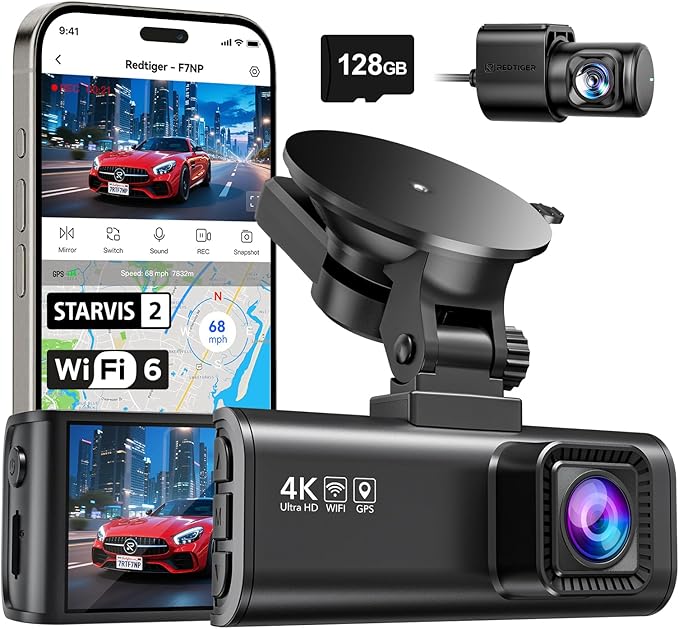 |
REDTIGER F7NP 4K Dash Cam Front and Rear | Price on Amazon |
| 2 |  |
ROVE R2-4K Dual Dash Cam Front and Rear | Price on Amazon |
| 3 |  |
VANTRUE N4 Pro S 4K 3-Channel Dash Cam | Price on Amazon |
| 4 |  |
BOTSLAB 4-Channel 360° Dash Cam | Price on Amazon |
| 5 |  |
70mai A810 Lite 4K Dash Cam Front and Rear 5ghz | Price on Amazon |
| 6 |  |
Aputeta 4K+4K Dual Dash Cam Front and Rear | Price on Amazon |
| 7 |  |
TERUNSOUl 4K+4K Front and Rear Dash Cam | Price on Amazon |
| 8 |  |
pelsee S1 Pro Native Dual 4K Dash Cam Front and Rear | Price on Amazon |
| 9 |  |
Seemopen 4K+4K Front and Rear Dash Cam | Price on Amazon |
| 10 |  |
Affver 5-Channel 4K Dash Cam Front | Price on Amazon |
REDTIGER F7NP 4K Dash Cam Front and Rear
The REDTIGER F7NP is a strong all-around choice because it covers both directions without making the system excessively complicated. Its front camera records in 4K while the rear camera records in 1080P, and the 170-degree front and 140-degree rear lenses help capture neighboring lanes and more of the surrounding scene. That combination should appeal to commuters who want useful detail for road signs, vehicles, and incident documentation without moving to a larger multi-camera setup.
Low-light performance receives serious attention here. The STARVIS 2 sensor, F1.5 aperture, six-layer optical lens, WDR, and HDR are intended to balance bright headlights with darker surroundings. No night system eliminates every limitation caused by glare, dirty glass, or distant plates, but the hardware gives this camera a sensible advantage for evening and early-morning driving.
Built-in 5.8GHz Wi-Fi works with the Redtiger Cam app for phone playback, downloads, settings, and GPS information. Loop recording replaces older unlocked files when the card fills, while the G-sensor protects important event clips. A free memory card reduces the initial setup burden. The supercapacitor is also a useful ownership detail because it is better suited to heat and long parking periods than a conventional battery. Buyers should use the supplied or officially recommended cables and follow the installation instructions carefully; parking features may also require checking the power arrangement for the specific vehicle.
Pros
- 4K front and 1080P rear recording with STARVIS 2.
- Fast 5.8GHz Wi-Fi, GPS data, and an included memory card.
- Supercapacitor design and an 18-month warranty.
Cons
- The rear camera does not match the front camera’s 4K resolution.
- Parking-mode installation and power needs should be confirmed before purchase.
My Opinion
The F7NP is my top-ranked option because it delivers the most balanced mix of image quality, usability, storage convenience, and heat-conscious construction. It is especially well suited to everyday drivers who want a complete front-and-rear system without paying for cabin or side coverage they may not need.
ROVE R2-4K Dual Dash Cam Front and Rear
The ROVE R2-4K Dual stands out for its straightforward two-camera design and useful included accessories. The front camera begins with a 2.5K QHD image and intelligently upscales it to 4K during playback, while the rear camera records at 1080P. That distinction matters: upscaled 4K can make viewing more detailed, but it is not the same as capturing native 4K information at the sensor. For normal commuting, the arrangement still offers a practical balance between file size and clarity.
A Sony STARVIS 2 IMX675 front sensor, F1.5 aperture, F1.8 rear aperture, and HDR help the system handle dim roads and high-contrast scenes. GPS adds route, speed, and location information to compatible footage, and the included 128GB card gives buyers more room before they need to replace or expand storage. The 3-inch IPS display can show speed and compass information directly, which is useful during setup even if many owners later use the screen saver.
Its dual-band Wi-Fi can transfer files at up to 20MB per second through the ROVE app, reducing the need to remove the card for ordinary clips. The package also supplies a charger, mounts, cables, clips, a trim tool, and a cleaning wipe, making it friendly to first-time installers. Parking protection is flexible, with time-lapse, motion detection, and collision detection, but a hardwire kit is required and is not included. That extra purchase and installation step should be part of the budget for anyone expecting continuous parked-vehicle monitoring.
Pros
- Useful front-and-rear coverage with a free 128GB card.
- GPS, dual-band Wi-Fi, HDR, and several parking choices.
- Accessory-rich package for a beginner installation.
Cons
- The front image is upscaled from 2.5K rather than captured natively in 4K.
- The hardwire kit for 24-hour parking mode is sold separately.
My Opinion
The ROVE is a sensible second choice for buyers who value an approachable package and clear operating information. Its upscaled front resolution is the main compromise, but the included 128GB card, GPS, app access, and installation tools make the overall ownership proposition attractive.
VANTRUE N4 Pro S 4K 3-Channel Dash Cam
The Vantrue N4 Pro S is aimed at drivers who need more than front-and-rear evidence. It records the front in 4K, the rear in 2.5K, and a third view in 1080P at 30 frames per second. Wide viewing angles of 155, 160, and 165 degrees create broad coverage for traffic, passengers, and areas that a conventional dual setup may leave out. This makes it a natural fit for rideshare work, family transportation, or anyone who wants cabin context during an incident.
Its three STARVIS 2 sensors and triple HDR processing are intended to improve visibility in low light and difficult backlighting. The PlatePix technology is presented as helping with license-plate clarity, but buyers should still remember that plate readability depends on distance, speed, focus, reflections, weather, and the cleanliness of the windshield. The rear camera rotates 360 degrees, allowing it to face traffic or the trunk depending on the installation.
Owners can switch to a front-and-rear mode using 4K and 2.5K recording when cabin footage is unnecessary. Vantrue says that mode reduces heat by 30 percent and saves power compared with triple recording. Buffered parking mode keeps all three cameras active and captures 10 seconds before an event, which can provide valuable context. Voice control, GPS, 5GHz Wi-Fi, a supercapacitor, and support for up to 1TB add convenience. The camera does not include a card, so a compatible high-endurance U3 card should be purchased before installation.
Pros
- Three-channel recording with strong front, rear, and cabin coverage.
- Rotating rear camera, buffered parking mode, GPS, and voice control.
- Supercapacitor construction and support for up to 1TB.
Cons
- A memory card is not included.
- Triple-channel recording creates larger files and a more involved installation.
My Opinion
The N4 Pro S is the best fit here for buyers who genuinely need cabin or passenger evidence. It ranks third because its broader coverage and advanced parking features come with greater storage, wiring, and setup demands than the leading dual-camera choices.
BOTSLAB 4-Channel 360° Dash Cam
BOTSLAB takes coverage further with four cameras recording at the same time: a 170-degree front view, two 120-degree side views, and a 150-degree rear view. The system records 3K from the front and 1080P from the other three cameras. This broad arrangement is useful for large SUVs, commercial vehicles, and drivers concerned about side impacts, lane changes, or disputes that may not be explained by a forward-facing view alone.
The side cameras use detachable magnetic mounts, so the setup can be adapted as a three-channel or dual-camera system. That flexibility is valuable, but it also means the buyer must think carefully about mounting positions, cable routing, and whether both side views can see past the vehicle’s interior trim. The 3.18-inch touchscreen provides four-way playback, while voice control can make adjustments easier when the vehicle is moving or parked.
For parked protection, the included hardwire kit supports time-lapse recording, motion detection within 15 feet, and collision detection. The G-sensor also saves eight seconds before a severe impact plus the event itself, preserving context that a single instant-triggered file could miss. GPS records route, speed, and location for the app and computer software. A free 128GB card and 5.8GHz Wi-Fi help with storage and file transfers, although four simultaneous views will fill storage faster than a basic dual system.
Pros
- Four-camera coverage reaches the front, rear, both sides, and surrounding blind spots.
- Hardwire kit included for the stated parking modes.
- Touchscreen, voice control, GPS, Wi-Fi, and pre-impact recording.
Cons
- Side-camera installation is more complex than a standard front-and-rear setup.
- Three of the four views record at 1080P rather than 4K.
My Opinion
BOTSLAB is compelling when wide side coverage matters more than a simple installation. It is a practical choice for larger vehicles and intensive parking surveillance, but ordinary commuters may find the extra cameras, cables, and storage requirements unnecessary.
70mai A810 Lite 4K Dash Cam Front and Rear 5ghz
The 70mai A810 Lite combines a discreet physical design with a feature set aimed at connected vehicle owners. It records 4K from the front and 1080P from the rear, using a large F1.55 aperture and HDR to improve balance in tunnels, rain, and nighttime scenes. The compact, credit-card-sized shape should fit neatly behind many rearview mirrors, which helps preserve forward visibility and creates a less distracting installation.
Its most distinctive capability is 4G LTE remote access. Through the app, an owner can view the vehicle remotely, track its location, and receive alerts while the car is parked. This may be especially useful for a vehicle left at an airport, workplace, or public lot. Cellular access can involve additional compatibility or service requirements, so buyers should confirm how the remote functions are activated and supported before depending on them for security.
Wi-Fi 6 transfers files at up to 25MB per second, and the app handles live viewing, saved clips, settings, GPS data, and updates. The three-mode GPS system uses GPS, GLONASS, and BDS for recorded route, speed, and location information. Voice control keeps simple commands away from the touchscreen. For parking, time-lapse and G-sensor detection work with loop recording and low-voltage protection. A supercapacitor improves heat resistance, while the 18-month warranty adds useful ownership support.
Pros
- Compact body with 4K front and 1080P rear recording.
- 4G LTE remote access, Wi-Fi 6, GPS, and voice control.
- Supercapacitor and low-voltage protection for parked monitoring.
Cons
- Remote LTE functions require buyers to confirm connectivity and service details.
- The rear camera is limited to 1080P.
My Opinion
The A810 Lite is a strong option for owners who want to interact with the vehicle from a distance rather than simply save clips after a drive. Its compact form and connected features are appealing, but remote access adds another layer of setup beyond a conventional dash camera.
Aputeta 4K+4K Dual Dash Cam Front and Rear
Aputeta’s main attraction is straightforward: both cameras record in 4K. The front camera uses a 170-degree lens and the rear camera a 160-degree lens, providing high-resolution coverage in both directions instead of prioritizing the front view. For drivers who frequently deal with rear-end risks, busy parking lots, or want similarly detailed footage from either end of the vehicle, that balance is meaningful.
The system uses a large F1.5 aperture, a five-element optical lens, and WDR processing for difficult lighting. Those specifications can help preserve detail in dim scenes and areas with bright highlights, although real-world clarity will still depend on windshield cleanliness, camera alignment, weather, and the amount of light available. The included 128GB card lets owners begin recording without immediately shopping for storage.
Phone connectivity comes through dual-band Wi-Fi with stated download speeds of up to 20MB per second. The app supports playback, file downloads, GPS information, settings, and photo capture. Loop recording handles ordinary storage management, while the collision sensor locks event files. Time-lapse parking monitoring can record continuously for long periods, and an impact can trigger a locked one-minute clip. This parking setup requires a hardwire kit, so it is not a complete plug-in-and-forget solution for parked protection. The 18-month coverage and 24/7 support are useful for buyers who want assistance during installation or ownership.
Pros
- True 4K recording from both front and rear cameras.
- Large apertures, WDR, GPS, app access, and an included 128GB card.
- Collision-locked one-minute parking event clips.
Cons
- A hardwire kit is required for the stated parking mode.
- Dual 4K footage uses storage more quickly than lower-resolution systems.
My Opinion
Aputeta is appealing for buyers who place equal importance on front and rear detail. It offers an impressive resolution-to-price positioning based on the supplied specifications, but owners should plan for larger files and the additional hardware needed for parked monitoring.
TERUNSOUl 4K+4K Front and Rear Dash Cam
The TERUNSOUl dual camera focuses on native 4K recording from both directions while keeping the installation simpler than a multi-channel system. Its front lens reaches 170 degrees, and the large F1.5 front aperture plus F1.8 rear aperture are intended to bring more light to the sensors at night. This combination suits drivers who want detailed evidence from both ends of the vehicle without adding cabin or side cameras.
Wi-Fi 6 works over 5.8GHz and 2.4GHz connections, with stated transfer speeds up to 20MB per second. The companion app handles saved footage, settings, and over-the-air firmware updates, so owners can manage the camera without regularly removing the card. GPS records speed and location into the video, adding useful context when a clip needs to establish where and when an event occurred.
A free 128GB card supports the initial setup, while loop recording replaces older unlocked footage and the G-sensor protects important files. Storage can be expanded to 512GB, which is helpful because two 4K channels generate substantial data. The screen saver feature can reduce distraction during driving. Time-lapse and collision detection provide two parking approaches, but the hardwire kit is sold separately. Heat and cold resistance, a three-year guarantee, and 24/7 customer support make this model especially interesting for owners who value longer stated coverage.
Pros
- 4K front and rear recording with broad front coverage.
- Wi-Fi 6, GPS, OTA updates, a free 128GB card, and 512GB support.
- Three-year guarantee and separate parking-mode choices.
Cons
- The hardwire kit for parking monitoring is sold separately.
- Dual 4K recording creates demanding storage requirements.
My Opinion
TERUNSOUl is a worthwhile contender for buyers who want symmetrical high-resolution coverage and a longer stated guarantee. Its main appeal is practical rather than flashy: strong front-and-rear recording, large-card support, and app updates in a familiar dual-camera format.
pelsee S1 Pro Native Dual 4K Dash Cam Front and Rear
The Pelsee S1 Pro delivers native 4K from both cameras through 8MP sensors, with a 170-degree front lens and 150-degree rear lens. Recording at 3840×2160P at 30 frames per second gives both ends of the vehicle a high-detail view. That is useful for drivers who do not want a lower-resolution rear camera, especially when rear traffic, road signs, or an impact behind the car may matter as much as what happens ahead.
Its low-light design is one of the more distinctive elements in this group. A high-sensitivity CMOS sensor, F1.4 lens, hybrid glass construction, full-color night vision, and multi-frame noise reduction are intended to preserve color and reduce grain in unlit roads and underground parking areas. Bright headlights and poor weather can still affect every camera, but the combination is well matched to drivers who regularly travel after dark.
Wi-Fi 6 supports transfers up to 30MB per second, and built-in GPS adds speed, location, and timestamps to the files. Voice commands can change the camera view, control the screen or audio, capture a snapshot, and lock footage. The included 128GB card is stated to hold up to 12 hours of continuous dual 4K footage, while loop recording protects locked files from automatic replacement. The 3.39-inch IPS screen aids setup and playback. Its adhesive mount and thermal protection support installation in many vehicle types, including SUVs, trucks, vans, and RVs.
Pros
- Native 4K recording from both front and rear cameras.
- Fast Wi-Fi 6, GPS, voice control, and full-color low-light capability.
- 128GB card and a useful 3.39-inch display included.
Cons
- Dual 4K recording can fill the supplied card quickly.
- The adhesive mount requires careful placement before final installation.
My Opinion
Pelsee is a strong choice for buyers who want native dual 4K and particularly value nighttime color and detail. It ranks below the top three mainly because its smaller customer-feedback pool gives less evidence of broad ownership experience in the supplied data.
Seemopen 4K+4K Front and Rear Dash Cam
Seemopen offers another symmetrical 4K setup, recording high-resolution footage from the front and rear cameras at the same time. Dual-channel HDR is intended to control bright headlights, tunnel entrances, and shadowed areas, while the enhanced night system aims to preserve useful detail in dim conditions. Drivers who want consistent resolution in both directions may find this more attractive than a front-heavy 4K-and-1080P arrangement.
Built-in GPS places route, location, speed, and compass information into the footage, and the 3-inch full-laminated display can show those details during normal use. The SEEMOPEN app uses 5.8GHz or 2.4GHz Wi-Fi for phone access and downloads of up to 20MB per second. A computer GPS media player is also available for viewing location overlays. Those tools are helpful when a saved clip needs more context than the video image alone provides.
The supplied 128GB card is optimized for 4K recording, and the camera supports cards up to 1TB. Owners can choose one-, three-, or five-minute loop segments, with locked event files kept separate from ordinary footage. Parking protection offers time-lapse recording for up to 72 hours or impact-triggered recording that wakes and locks a clip. A hardwire kit is required for those parking functions. The stated operating range of -4°F to 158°F, 18-month warranty, and included installation accessories add confidence for vehicles exposed to seasonal temperature changes.
Pros
- 4K front and rear recording with dual HDR and night assistance.
- GPS, 1TB card support, adjustable loop lengths, and a supplied 128GB card.
- Time-lapse parking mode can provide up to 72 hours of monitoring.
Cons
- A hardwire kit is necessary for parking protection.
- Two 4K channels require high-capacity, reliable storage.
My Opinion
Seemopen is a sensible dual-4K alternative for buyers who want flexible storage and a clear parking-mode choice. Its feature mix is strong, though the limited customer-feedback volume in the supplied data makes it harder to judge long-term ownership compared with more established options on this list.
Affver 5-Channel 4K Dash Cam Front
Affver is built for maximum situational coverage rather than minimal installation. It records the front in 4K and captures the rear, cabin, left, and right views in synchronized 1080P. That layout can be valuable for rideshare and taxi drivers, large SUVs, and anyone concerned about side impacts or false claims. An interior camera with infrared lighting also helps preserve cabin details in darkness, which a front-and-rear system cannot provide.
The five-camera design creates a more complete record of an event, but it also increases the number of mounting positions, cables, and angles that need attention. Front footage is the highest-resolution channel, while the other four views prioritize broad coverage over 4K detail. Built-in GPS adds speed, route, and timestamps, and Wi-Fi 6 is intended to make downloading multiple files to a phone less frustrating during an incident.
Parking surveillance requires the professional Affver hardwire kit, which is sold separately. Once connected, the system can use time-lapse or G-sensor crash recording, with low-voltage protection intended to reduce the risk of draining the vehicle battery. A free 128GB card is supplied, but five-channel recording makes a high-endurance, heat-resistant Class 10, U3, V30-or-better card a sensible upgrade. Loop recording replaces unlocked files, while the adjustable G-sensor locks collision footage.
Pros
- Five simultaneous views cover the front, rear, cabin, and both sides.
- 4K front recording, infrared cabin visibility, GPS, and Wi-Fi 6.
- Supports up to 512GB and includes low-voltage parking protection.
Cons
- The hardwire kit is sold separately.
- Five-channel installation and storage management are demanding.
My Opinion
Affver is the specialist choice for drivers who need evidence from nearly every direction. It is not the simplest or most discreet option, but its coverage makes sense for professional passenger transport and larger vehicles where side and cabin events matter.
How I Selected These Dash Cam Features
The ranking weighs usefulness rather than treating the highest resolution as an automatic winner. I looked first at whether each camera gives a driver meaningful coverage, then considered sensor and lens details, night-oriented processing, file access, GPS, storage, parking power, installation demands, and stated support. A dual-camera product can rank above a more elaborate system when it offers a better balance for ordinary commuters, while a multi-channel model earns attention when its extra views solve a specific coverage problem.
Customer-feedback volume was used as context, not as a substitute for product information. The supplied data ranges from heavily represented models with tens of thousands of customer ratings to newer products with smaller feedback pools. That difference affects confidence about broad ownership experience, but it does not automatically determine image quality or suitability for a particular vehicle.
Resolution is only one part of useful evidence. A properly mounted camera with balanced exposure, dependable storage, and easy access to locked files can be more valuable than a higher-numbered specification that is difficult to install or maintain.
How coverage affected the ranking
Front-and-rear systems cover the most common collision directions with moderate complexity. Three-, four-, and five-channel cameras can add cabin and side evidence, but they consume more storage and require more careful cable routing. I treated those extra views as advantages for rideshare, commercial, family, and large-vehicle use rather than universal benefits.
How ownership details affected the ranking
Included cards, supercapacitors, app connectivity, GPS, hardwire requirements, stated warranties, and support all influence the ownership experience. A camera that requires a separate card or parking kit may still be an excellent fit, but that added requirement belongs in the buying decision from the start.
A parking mode is not simply a menu setting. It depends on an appropriate power source, correct wiring, storage capacity, and a vehicle installation that can operate safely while the engine is off.
How to Choose the Best Dash Cam Features
The best dash cam features are the ones that solve your actual driving and ownership needs. Before focusing on a large resolution number, decide whether you need front-only, front-and-rear, cabin, or side coverage, then match the camera’s night performance, storage, power, and connection methods to your vehicle.
- Choose coverage based on the directions and spaces you need documented.
- Compare native resolution, sensor quality, aperture, HDR, and lens angle together.
- Check whether parking protection needs a hardwire kit or another dedicated power setup.
- Use high-endurance storage that matches the camera’s number of channels and resolution.
- Consider app speed, GPS, voice control, warranty support, and installation complexity.
Native resolution versus upscaled output
A native 4K camera captures more image information at the sensor than a camera that starts at 2.5K and enlarges the picture for 4K playback. Upscaling can still produce a sharper-looking file than the original display size suggests, but it should not be treated as identical to native 4K. If front detail is your highest priority, favor a native 4K sensor. If you want a balanced system with manageable storage, an upscaled front channel may be perfectly reasonable.
Viewing angles and image distortion
Wide lenses help capture adjacent lanes and nearby activity, but extreme width can make distant objects appear smaller and may introduce edge distortion. A 170-degree front lens is useful for broad coverage, while a narrower lens may make distant details easier to interpret. Think about the roads you use: crowded city streets may reward wider coverage, while highway drivers may care more about forward detail.
Night performance beyond the resolution number
Large apertures, STARVIS 2 sensors, HDR, WDR, optical lens construction, and noise reduction all affect difficult scenes. These features can help balance headlights and shadows, but they cannot guarantee that every license plate will be readable. Keep expectations realistic in rain, glare, fast motion, and poorly lit roads. A clean windshield and accurate camera angle are just as important as the sensor specification.
Choose the Right Camera Coverage
A front-only camera is usually the easiest and least expensive type to install, but it cannot explain what happens behind or beside the vehicle. Front-and-rear systems are the most broadly useful configuration for private cars. Add cabin coverage for passenger transport or interior incidents, and consider side cameras when blind spots, lane changes, or commercial liability are major concerns.
When a dual camera is enough
Most commuters, families, and road-trip drivers will find front-and-rear coverage sufficient. It documents the direction of travel and the vehicle approaching from behind while keeping installation and storage manageable. The models in this group with dual 4K recording provide more balanced detail, while 4K front and 1080P rear systems generally reduce file demands.
When to select three or more channels
Choose a multi-channel model when the additional view addresses a clear risk. Rideshare drivers may need cabin footage, large vehicle owners may want side views, and commercial operators may benefit from a more complete record. Before buying, confirm that the vehicle has suitable mounting surfaces and enough space to route every cable cleanly.
Plan Power for Parking Mode
Parking mode can capture a collision or activity while the vehicle is unattended, but it changes how the camera receives power. Several models use time-lapse recording, motion detection, impact detection, or a combination of those methods. Some packages include the hardwire kit, while others require it as a separate purchase.
Hardwire considerations
A hardwire installation connects the camera to the vehicle’s electrical system so it can remain available when the ignition is off. Choose a compatible kit and follow the product instructions rather than improvising connections. If you are not comfortable identifying an appropriate fuse location or routing wiring safely, professional installation may be preferable, though no specific installation service is included with these products.
Time-lapse versus impact detection
Time-lapse provides ongoing condensed coverage while using less storage than full-frame recording. Impact detection uses the G-sensor to save an event when a bump is detected, which can preserve storage but may not capture every moment before the impact unless the camera offers buffered recording. Consider whether you want continuous context, lower storage use, or event-triggered evidence.
Choose and Manage the Memory Card
Storage requirements increase quickly with 4K resolution and multiple channels. A dual 4K camera creates more data than a 4K front and 1080P rear system, while a five-channel camera can fill a card particularly quickly. Loop recording replaces older unlocked clips, but locked files remain protected and can eventually consume available space.
Use the card type the camera expects
Follow the brand’s stated capacity and performance recommendations. The supplied products range from included 128GB cards to support for 512GB or 1TB cards, and some specifically recommend industrial-grade or high-endurance U3 storage. Avoid assuming that any inexpensive card will remain stable under continuous recording and high temperatures.
Format and replace storage responsibly
Format a new card through the camera when the instructions call for it. Save important files to another device as soon as practical, especially after a collision. If the camera shows errors, stops recording, corrupts files, or repeatedly asks for formatting, replace the card with a compatible high-endurance model rather than ignoring the warning.
Install the Camera Correctly
A good installation keeps the lens clear, the screen unobtrusive, and the cables away from pedals, airbags, and the driver’s sightline. Clean the glass before attaching a mount, position the front camera where it sees the road without excessive dashboard reflection, and leave enough slack for the rear or side camera connection without creating loops that can snag.
Set the lens angle before final cable routing
Turn the camera on and confirm that the horizon, lanes, and surrounding traffic occupy the intended portion of the frame. A camera pointed too high may lose useful road detail, while one pointed too low may capture excessive dashboard or hood. For adhesive mounts, test the position before pressing firmly because repositioning can weaken the bond or leave residue.
Keep rear and side cameras practical
Rear-camera placement should account for tint, defroster lines, hatch movement, and the path of the cable. Side cameras need a clear view past interior trim and should not interfere with doors or windows. Multi-camera systems deserve extra time during setup because one poorly positioned lens can undermine the benefit of the entire configuration.
Complete a First-Day Setup
After mounting the camera, perform a short stationary check before relying on it for daily driving. Confirm that every channel records, the date and time are correct, the memory card is recognized, and the rear or interior image is oriented properly. Pair the app while parked, download a short clip, and verify that GPS information appears when that feature is enabled.
- Remove any protective film from screens or lenses.
- Set the correct loop length and confirm emergency-lock behavior.
- Check whether audio, screen saver, and voice control match your preferences.
- Test the supplied charger and each camera connection.
- Identify where locked clips are stored before an incident occurs.
Run the camera with the included or officially recommended power cable whenever possible. If a feature behaves unexpectedly, consult the product’s manual or support channel before replacing cables with unverified accessories. A stable power connection is especially important for cameras that use parking monitoring or multi-channel recording.
Use Footage Effectively After an Incident
When something happens, stop in a safe location before handling the camera or phone. Let the event file finish saving, then lock any relevant clip manually if the system allows it. Download the original file through the app or directly from the card, and keep an untouched copy before trimming or sharing.
Keep useful context with the clip
GPS data, speed, route, and timestamps can help establish context, but they should be preserved with the original file rather than recreated later. Save the front, rear, side, and cabin files that cover the same moment. With a multi-channel camera, one view may explain what another view cannot.
Protect privacy when sharing
Dash cam footage can show faces, license plates, passengers, homes, or private conversations. Share only what is necessary and consider removing unrelated personal information before posting a clip publicly. Keep the original file in secure storage in case the edited version loses important metadata or context.
Maintain the Camera in Heat, Cold, and Daily Use
Clean the lens and the windshield area regularly with a soft, lint-free cloth. Dust, fingerprints, film, and windshield haze can reduce contrast more than many buyers expect. Check the mount occasionally, especially after extreme temperatures, and make sure the rear or side cameras have not shifted from vibration or routine vehicle use.
Supercapacitor-based models are designed to handle heat better than conventional battery-powered designs, but no dash cam should be left exposed to avoidable extreme conditions for long periods. Keep vents clear, avoid covering the camera body, and use the recommended accessories. If the device repeatedly freezes, loses files, or becomes unusually hot, stop relying on it until the cause is identified.
Know when to replace a memory card or camera
Replace a memory card when errors continue after proper formatting or when recordings become inconsistent. A camera may also need attention if its date resets, GPS disappears, a channel stops recording, or the mount can no longer hold its position. Firmware updates may solve some problems, but updates should be obtained through the brand’s official app or support process.
Common Mistakes to Avoid
Many dash camera problems come from setup decisions rather than the camera’s headline specification. Avoiding a few common mistakes can improve reliability, preserve footage, and prevent a promising system from becoming a distraction.
- Do not mount the camera where it blocks the driver’s view or interferes with airbags.
- Do not assume an included memory card is optional when the camera requires a specific performance level.
- Do not rely on parking mode without confirming its power source and low-voltage protection.
- Do not use damaged, unverified, or low-quality charging cables.
- Do not wait until a collision to learn how to lock and download a file.
- Do not leave a memory card full of protected clips without checking available space.
- Do not judge nighttime footage before cleaning the windshield and lens.
Before every long trip, confirm that the camera is recording, the card has free space, the date is correct, and every connected camera shows a usable image.
FAQS About Best Dash Cam Features
Which dash cam feature matters most for everyday driving?
Reliable recording is the foundation. For most drivers, that means clear front coverage, a dependable rear camera, stable power, loop recording, protected event files, and storage that can handle continuous use. Resolution, Wi-Fi, GPS, and night processing are valuable, but they cannot compensate for a camera that stops recording or loses important clips.
Is native 4K better than upscaled 4K in a dash cam?
Native 4K generally captures more original detail because the sensor records at that resolution. Upscaled 4K can still look sharper than a lower-resolution display, but it enlarges the captured image rather than adding the same level of sensor information. Compare the full system, including the sensor, lens, night performance, and storage demands.
Do all dash cams include parking mode power equipment?
No. Some packages include a hardwire kit, while others require one to be purchased separately. Time-lapse, motion, and impact detection also differ by model. Check the package contents and power requirements before assuming a camera can monitor the vehicle continuously after the engine is turned off.
How much storage does a dual 4K dash cam need?
There is no universal answer because recording length, loop segment size, frame rate, and the number of channels all affect storage use. Dual 4K systems fill cards faster than 4K front and 1080P rear systems. Use the supplied capacity as a starting point, follow the brand’s maximum-capacity guidance, and choose high-endurance storage for continuous recording.
Are cabin and side cameras worth the extra installation?
They are worthwhile when you need passenger, side-impact, lane-change, or commercial-vehicle evidence. Rideshare drivers, taxi operators, large SUV owners, and people concerned about false claims may benefit significantly. For a typical commuter, front-and-rear coverage may provide enough protection with less wiring and easier file management.
Final Thoughts
The best dash cam features are the ones that fit your vehicle, coverage needs, storage plan, and parking expectations. The REDTIGER F7NP is my best overall choice, the ROVE R2-4K is a practical second option with a generous package, and the Vantrue N4 Pro S is the stronger pick when cabin coverage and three-channel protection matter most.