
Finding the best dash cam for personal use means balancing clear evidence, simple installation, storage, privacy, and the amount of coverage you actually need. A high-resolution front camera may be enough for a daily commute, while a dual- or multi-channel system can make more sense for road trips, rideshare driving, or frequent street parking.
My first choice is REDTIGER F7NP 4K Dash Cam Front and Rear STARVIS 2. Its 4K front and 1080P rear recording, STARVIS 2 sensor, wide lenses, supercapacitor, and 18-month guarantee give it a particularly well-rounded feature set for everyday drivers.
My second choice is ROVE R2-4K Dual Dash Cam Front and Rear STARVIS 2. It records a QHD image that is upscaled to 4K in front, adds 1080P rear recording, and offers built-in GPS, fast Wi-Fi, and several parking modes, although its front resolution is not native 4K.
My third choice is iZEEKER 2.5K Dash Cam Front 1440P QHD. iZEEKER 2.5K Dash Cam Front 1440P QHD Car Camera takes third place for drivers who prefer a straightforward front-facing camera with a useful screen. Its 1440P recording, 170-degree lens, physical controls, Type-C power input, and two-year support make it approachable for beginners who do not need a rear camera or a phone app.
The comparison and buying guide below explain how these ten cameras differ in coverage, image quality, connectivity, parking protection, storage, and ownership requirements. You will also find setup advice, practical maintenance tips, common mistakes to avoid, and answers to focused questions about choosing a dash cam for ordinary personal driving.
10 Best Dash Cam for Personal Use Comparison
I selected these cameras for their relevance to everyday private driving, the usefulness of their supplied specifications, and the range of needs they address. I also considered customer-feedback signals, available ratings and feedback volume, storage and parking features, and brand diversity where practical, without claiming hands-on testing.
| # | Image | Product | Price on Amazon |
|---|---|---|---|
| 1 | 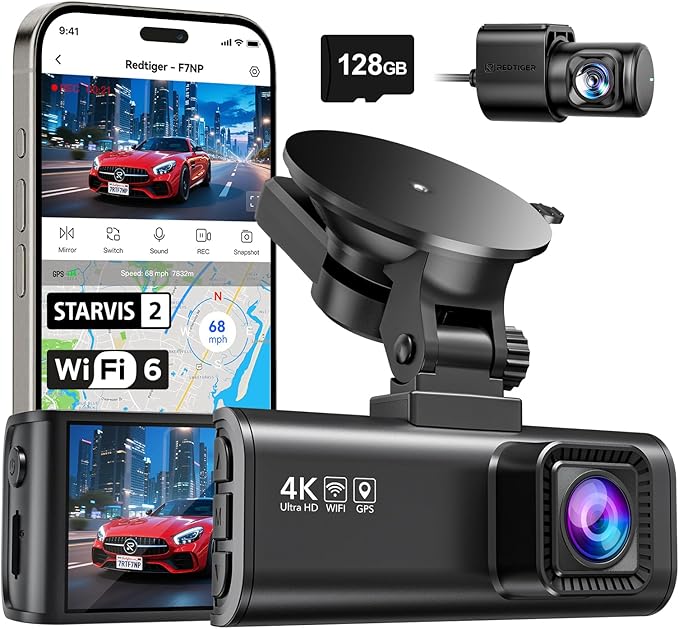 |
REDTIGER F7NP 4K Dash Cam Front and Rear STARVIS 2 | Price on Amazon |
| 2 |  |
ROVE R2-4K Dual Dash Cam Front and Rear STARVIS 2 | Price on Amazon |
| 3 | 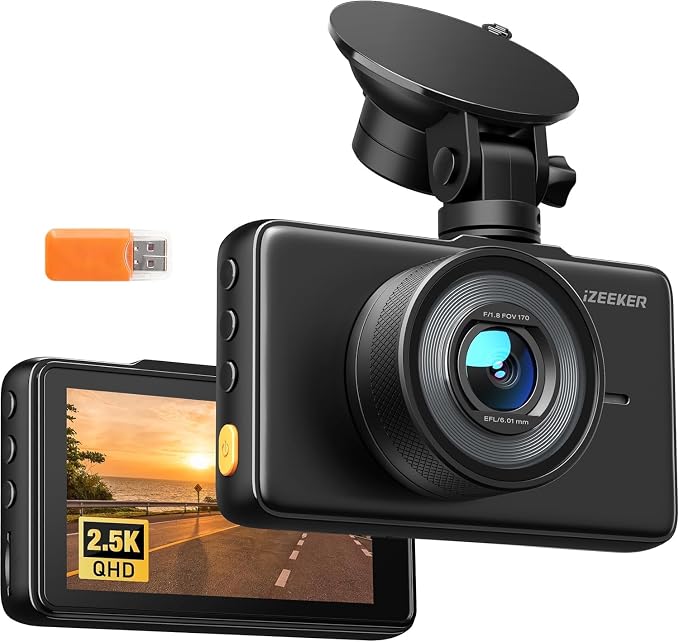 |
iZEEKER 2.5K Dash Cam Front 1440P QHD | Price on Amazon |
| 4 |  |
galphi 4K Front Dash Cam | Price on Amazon |
| 5 |  |
Garmin Dash Cam Mini 3 Ultracompact 1080p HD | Price on Amazon |
| 6 |  |
WOOLAACOO C5 4K Front and Rear Dash Cam | Price on Amazon |
| 7 |  |
70mai A810 Lite 4K Dash Cam Front and Rear 5ghz | Price on Amazon |
| 8 |  |
TERUNSOUl Three-Channel 4K Dash Cam | Price on Amazon |
| 9 |  |
Aputeta 4K Front and Rear Dual Dash Cam | Price on Amazon |
| 10 | 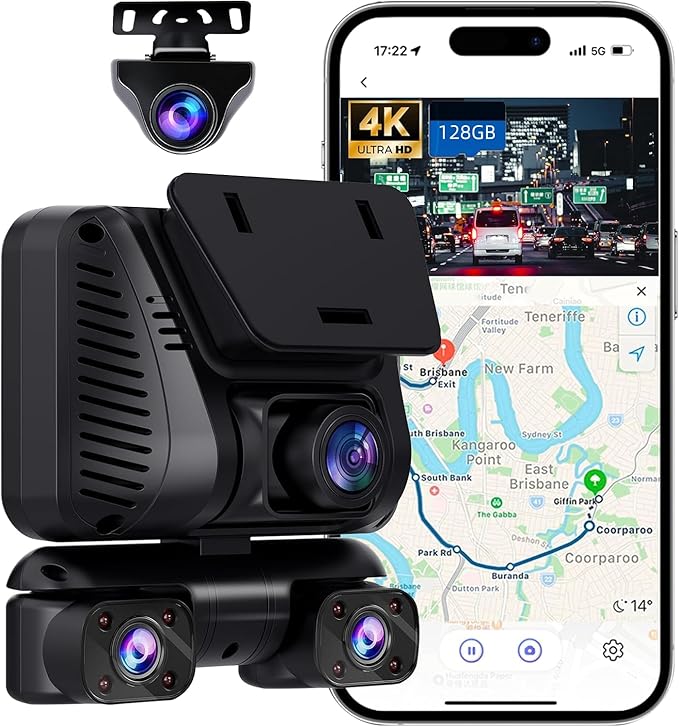 |
Driveye D7 Four-Channel 360-Degree Dash Cam | Price on Amazon |
REDTIGER F7NP 4K Dash Cam Front and Rear STARVIS 2
The REDTIGER F7NP is a strong all-around choice because it records both directions instead of limiting protection to the road ahead. Its 4K front camera and 1080P rear camera give the system enough detail for routine incident documentation, while the 170-degree front and 140-degree rear views help cover adjacent lanes and more of the traffic scene.
Night performance is a major part of its appeal. The STARVIS 2 sensor, F1.5 aperture, six-layer optical lens, WDR, and HDR are intended to balance headlights, shadows, and darker road areas. That does not make every nighttime plate readable in every situation, but the hardware gives this camera a better starting point than a basic low-resolution unit.
Built-in 5.8GHz Wi-Fi and the Redtiger Cam app make it easier to find, download, and share clips without removing the card. GPS data can add route, speed, and location information to the footage. Loop recording automatically replaces older unprotected files, while the included memory card lets a new owner begin without immediately shopping for storage.
The two parking options—time-lapse and collision-triggered recording—can be useful for a car that spends long periods unattended. Buyers should still confirm the required power arrangement before expecting all-day parking protection. The supercapacitor is a sensible choice for heat resistance and long-term durability, and the supplied 18-month guarantee adds some ownership reassurance.
Pros
- 4K front and 1080P rear recording with STARVIS 2 hardware.
- Fast 5.8GHz Wi-Fi, app access, GPS data, and an included card.
- Supercapacitor construction and two parking-mode options.
Cons
- Parking protection may require an appropriate permanent power setup.
- Owners should use the original or officially recommended accessories.
- Two-camera wiring takes more installation time than a front-only unit.
My Opinion
This is the most balanced recommendation in the group for a private driver who wants broad coverage without moving into a complicated multi-camera system. It is especially appealing for commuters, road-trippers, and owners who want phone transfers and GPS information alongside clear front footage.
ROVE R2-4K Dual Dash Cam Front and Rear STARVIS 2
The ROVE R2-4K Dual is built for drivers who want front-and-rear coverage with a generous amount of included storage. The front camera records at 2.5K QHD and intelligently upscales the result to 4K for playback, while the rear camera records at 1080P. That distinction matters: the front image may look sharper than ordinary QHD footage, but it is not the same as footage captured by a native 4K sensor.
A Sony STARVIS 2 IMX675 sensor, F1.5 front aperture, F1.8 rear aperture, and HDR processing help it handle low-light scenes. These specifications are useful for drivers who regularly leave early, return after dark, or travel through mixed lighting. The 3-inch IPS screen also shows live information and makes basic camera operation less dependent on a phone.
ROVE adds built-in GPS, with speed, compass direction, route, and location information available through the camera or its computer player. Dual-band Wi-Fi can transfer clips to a compatible iPhone or Android phone at up to 20MB/s under suitable conditions. The included 128GB microSD card is convenient, though owners should still format and periodically check it.
Parking protection is more flexible than on many simple cameras, with time-lapse, motion detection, and collision detection modes. A hardwire kit is required and is not included, so the advertised parking capability should be treated as a planned installation rather than an instant out-of-box function. The included trim tool, clips, cables, and cleaning wipe make the initial installation less intimidating.
Pros
- Front-and-rear recording with a free 128GB card.
- STARVIS 2 front sensor, HDR, GPS, screen, and fast Wi-Fi.
- Three parking-mode choices for owners willing to hardwire the system.
Cons
- Front footage is upscaled from QHD rather than captured natively at 4K.
- The hardwire kit is an additional purchase for parking protection.
- Rear-camera installation adds cable-routing work.
My Opinion
This is a sensible second choice for buyers who want a feature-rich dual system and appreciate having 128GB included. It is a particularly good fit when an in-car screen, GPS data, and flexible parking options matter more than insisting on native 4K front capture.
iZEEKER 2.5K Dash Cam Front 1440P QHD
The iZEEKER takes a simpler approach by concentrating on the view ahead. Its 2560×1440P recording resolution gives a useful step up from basic 1080P, and the 170-degree lens captures a broad portion of the road. For a commuter who mainly wants incident evidence without routing a rear-camera cable, that focused design can be an advantage.
Its 3-inch IPS display and physical buttons make the camera easy to operate without depending on Wi-Fi or a mobile application. A beginner can change settings, check framing, and locate saved clips directly on the device. The suction-cup mount also makes installation approachable, although a suction mount may be less discreet and less permanent than an adhesive mounting system.
The F1.8 lens and WDR are intended to preserve detail when bright headlights meet darker surroundings. The result will still depend on windshield cleanliness, lighting, weather, and the distance of the subject, but the camera has sensible tools for ordinary day and night driving. Loop recording overwrites older unprotected files, and the G-sensor locks clips after a sudden impact.
This model does not include a memory card, so the owner must supply a compatible 16GB-to-128GB microSD card. Formatting the card before use and choosing a reliable card is important. Parking monitoring offers collision recording and time-lapse options, but long-term parked protection generally requires a suitable power source rather than relying only on the standard vehicle outlet. Type-C power and a detachable car charger provide installation flexibility.
Pros
- 1440P QHD front recording and a wide 170-degree view.
- Large IPS screen and physical controls are friendly to beginners.
- Type-C input, WDR, loop recording, and two-year support.
Cons
- No rear camera for coverage behind the vehicle.
- A microSD card is not included.
- Extended parking monitoring needs a dependable power arrangement.
My Opinion
The iZEEKER is the best fit here for someone who wants uncomplicated front coverage and a screen rather than app-based control. It gives up rear protection and included storage, but its simple controls and 1440P image make it a practical first camera for a personal vehicle.
galphi 4K Front Dash Cam
The galphi is a compact, front-facing camera for buyers who want high stated resolution without a display taking up windshield space. Its 4K recording and 160-degree field of view can capture a broad forward scene, making it suitable for family cars, newer drivers, and people who want a small camera that stays visually unobtrusive.
Because it has no screen the camera minimizes the temptation to watch the display while driving That cleaner design is helpful for a driver who prefers to set the unit once and manage clips through a phone Its 5GHz Wi-Fi connection is rated for downloads up to 8MB s which can make transferring an important clip more convenient than removing the card although the phone must be compatible and.
Loop recording replaces the oldest files when storage fills, while the G-sensor locks footage after a sudden shake or collision. The listing states that a 32GB card is included and also notes a change from an earlier 64GB package beginning June 26, 2026. Buyers should check the current package details before ordering because storage capacity affects how much 4K footage can remain on the card.
A 24-hour parking mode is available through time-lapse recording, but a Type-C hardwire kit is required and is not included. That makes this more suitable for drivers who are comfortable adding a permanent power solution or who mainly need protection while driving. The compact body and straightforward instructions should appeal to first-time owners who do not need a rear or cabin camera.
Pros
- Compact screen-free design with 4K front recording.
- 5GHz Wi-Fi and app access for wireless clip transfers.
- G-sensor, loop recording, and a stated included memory card.
Cons
- No rear camera or built-in display.
- Parking mode needs a separate Type-C hardwire kit.
- The listed card capacity has changed, so package contents should be verified.
My Opinion
This is an appealing minimalist option for a personal car when forward coverage is enough and a distraction-free windshield is a priority. Its main compromises are the absent rear view, the need to confirm the card package, and the additional hardware required for parked monitoring.
Garmin Dash Cam Mini 3 Ultracompact 1080p HD
The Garmin Dash Cam Mini 3 stands out for its tiny, key-sized body. It can sit discreetly behind the windshield area and is less likely to obstruct the driver’s view than a larger camera with a screen. That makes it a strong match for someone who values a low-profile installation over maximum resolution or multiple camera angles.
It records 1080P HD video through a 140-degree lens, which is adequate for ordinary driving documentation while keeping the device and file sizes relatively modest compared with 4K systems. Garmin’s Clarity polarizer lens is intended to reduce windshield glare, a useful detail when reflections would otherwise make parts of the scene harder to see.
Voice control allows spoken commands to save a clip or start and stop audio recording in several supported languages. The Garmin Drive app and online Vault can simplify access to saved clips, but some of the connected features have important conditions. Vault-based storage, live view, and certain remote features require a paid subscription, an active Wi-Fi connection, constant power, and a compatible smartphone.
Parking Guard can notify a phone when an incident is detected, but it is not a completely independent battery-powered security system. The vehicle needs constant power and an appropriate network connection for those alerts. Buyers should also check local rules because the supplied information notes that some jurisdictions regulate or prohibit use of dash cameras or related recording functions.
Pros
- Very small design that can remain nearly unnoticed.
- 1080P recording, 140-degree view, and a glare-reducing polarizer.
- Voice control and optional connected storage and parking alerts.
Cons
- Lower resolution and narrower coverage than several dual-camera options here.
- Many Vault and remote functions require a paid subscription and constant power.
- Local laws may restrict some recording or device use.
My Opinion
The Mini 3 is the right choice for a driver who wants a discreet, established-brand camera and does not need rear coverage. It is less compelling for buyers seeking maximum detail at night or a complete set of connected features without recurring service requirements.
WOOLAACOO C5 4K Front and Rear Dash Cam
The WOOLAACOO C5 offers a straightforward dual-camera package with 4K front and 1080P rear recording. That combination gives the driver a more complete view of an incident than a front-only unit, while keeping the rear channel at a common Full HD level. The compact form should fit behind or near the mirror without creating a large visual obstruction.
Its F1.8 aperture and stated night-vision improvements are intended to preserve useful details in darkness and rain. The 5GHz Wi-Fi connection works with a dedicated iOS or Android app for viewing, downloading, and sharing clips. The supplied range is only about three to five meters, and outdoor connection is not supported, so the phone generally needs to remain close to the car.
A pre-installed 64GB card allows immediate use, but the instructions specifically call for formatting it before the first drive. Loop recording replaces older files, and the G-sensor protects important impact clips from being overwritten. There is also an additional USB port that can charge a phone or another device while the dash cam remains connected to power.
Parking mode offers collision-triggered recording and time-lapse monitoring when paired with the separately sold three-lead hardwire kit. The camera is not wireless; it must stay connected to a power source while operating. That point is easy for a new buyer to overlook, especially when the app connection creates the impression that the camera itself can work independently.
Pros
- 4K front and 1080P rear recording with a 64GB card included.
- App control, 5GHz Wi-Fi, night-vision features, and a compact body.
- Extra USB port and collision-locked footage.
Cons
- Wi-Fi range is limited and does not support outdoor connection.
- The three-lead hardwire kit for parking mode is sold separately.
- The card should be formatted before first use.
My Opinion
This is a sensible value-oriented dual camera for drivers who want included storage and app transfers without paying for more elaborate coverage. It fits ordinary personal driving well, provided the owner understands the short Wi-Fi range and plans separately for permanent parking power.
70mai A810 Lite 4K Dash Cam Front and Rear 5ghz
The 70mai A810 Lite is aimed at drivers who want a broad connected feature set rather than only basic recording It captures 4K front and 1080P rear footage giving the forward camera enough resolution for detailed road scenes while adding useful protection behind the vehicle The front F1 55 aperture and HDR night processing are particularly relevant to drivers.
Its Wi-Fi 6 connection is rated for transfers up to 25MB/s, which can reduce the time needed to move large files to a phone. Built-in GPS using GPS, GLONASS, and BDS records route, speed, and location information. Voice control can handle selected commands without requiring the driver to reach for the camera, while the compact credit-card-sized form is intended to fit discreetly behind the mirror.
The 4G LTE capability adds remote access, live view, vehicle tracking, and alerts through the app. Buyers should verify what network service, SIM, or additional accessory is required in their intended region before counting on those functions. Remote access also depends on connectivity and can involve more setup than ordinary local Wi-Fi file transfers.
For parked protection, the A810 Lite supports collision detection and time-lapse recording, with low-voltage protection intended to help manage vehicle power. A supercapacitor rather than a battery improves heat resistance, and the 18-month warranty provides a defined support period. The system is more involved than a simple single-camera setup, but that complexity is justified for owners who want remote awareness of a frequently parked car.
Pros
- 4K front and 1080P rear recording with strong stated night features.
- Fast Wi-Fi 6, multi-system GPS, voice control, and a compact design.
- 4G LTE remote access and low-voltage-aware parking options.
Cons
- Remote LTE functions may require additional service or setup.
- Dual-camera and parking installations are more involved than front-only systems.
- Buyers should confirm regional network compatibility before purchase.
My Opinion
The A810 Lite is a strong choice for a tech-focused personal driver who wants remote access and fast transfers in addition to clear dual-channel footage. It is less suitable for someone seeking the simplest possible installation or who does not want to manage cellular connectivity.
TERUNSOUl Three-Channel 4K Dash Cam
The TERUNSOUl system expands coverage beyond the road by recording the front, rear, and cabin at the same time. The front channel records in 4K, while the rear and interior channels record at 1080P. A 3.16-inch IPS screen helps the owner check all three views, making this configuration especially useful for family trips, commercial driving, and rideshare work.
Its 170-degree front lens and 165-degree rear and cabin lenses create broad coverage around the vehicle and inside the passenger area. That extra perspective can help clarify what happened during a dispute, but it also means more footage to manage and more attention to privacy. A personal driver should decide whether recording passengers is appropriate and should explain the system to regular occupants when necessary.
The starlight-grade lens, F1.6 aperture, and HDR are intended to improve low-light detail. Built-in GPS embeds route, speed, location, compass, and timestamp information into the files, while 5.8GHz or 2.4GHz Wi-Fi supports app transfers at up to 20MB/s. The included 128GB card provides a useful starting point for three-channel recording, although three streams consume storage faster than a single front camera.
Loop recording replaces the oldest files, and the collision sensor locks important clips. Parking mode requires a separate hardwire kit, so it is not fully ready for unattended protection immediately after opening the package. The 18-month warranty and 24/7 customer support are useful additions for a system with more cameras and cables to configure.
Pros
- Simultaneous 4K front, 1080P rear, and 1080P cabin coverage.
- 128GB card, GPS, screen, Wi-Fi, and low-light recording features.
- Well suited to rideshare, family, and commercial-use scenarios.
Cons
- Three-channel recording uses storage more quickly.
- A separate hardwire kit is required for parking mode.
- Interior recording creates additional privacy responsibilities.
My Opinion
This is the strongest fit for a driver who genuinely needs cabin coverage rather than simply wanting the highest front resolution. For an ordinary solo commuter it may be more equipment than necessary, but rideshare and family-trip users can gain meaningful all-around visibility from the three-channel layout.
Aputeta 4K Front and Rear Dual Dash Cam
The Aputeta is unusual in this group because both its front and rear cameras are specified for 4K recording That gives it a higher-resolution rear channel than the common 1080P rear-camera design which can be useful for drivers who want more detail behind the vehicle as well as ahead The front lens covers 170 degrees and the rear lens 160 degrees providing broad views in both.
Low-light capability comes from a starlight-level sensor, F1.5 aperture, five-element optical lens, and WDR processing. These tools are intended to preserve contrast when a scene contains bright lights and dark areas. As with any dash cam, windshield glare, weather, distance, and motion still affect the final image, but the dual-4K specification is attractive for owners who prioritize detail over smaller files.
Built-in 5.8GHz and 2.4GHz Wi-Fi allows phone access through the app, including clip transfers, playback, GPS information, and settings. The camera also supports photo capture, voice guidance, emergency locking, loop recording, and collision detection. A free 128GB card helps offset the larger storage demands created by two 4K channels, though owners should expect storage to fill faster than with a 1080P rear camera.
Time-lapse parking monitoring can record over longer periods, and a collision event can trigger a full one-minute locked clip. The parking feature requires a hardwire kit, which is listed separately, so installation planning matters. The stated 18-month coverage and 24/7 support add reassurance for buyers choosing a less common brand and a more demanding dual-4K configuration.
Pros
- 4K recording from both front and rear cameras.
- Wide lenses, starlight night features, Wi-Fi, GPS, and voice guidance.
- 128GB card included with a parking-mode option.
Cons
- Two 4K channels create larger files and faster storage use.
- The required hardwire kit is separate.
- Higher resolution may require more time for transfers and file management.
My Opinion
The Aputeta is worth considering when rear detail matters nearly as much as front detail. It is a better match for road-trippers and drivers who want comprehensive two-way image quality than for someone who prefers small files, minimal setup, or a simple front-only camera.
Driveye D7 Four-Channel 360-Degree Dash Cam
The Driveye D7 provides the broadest coverage in this group through four channels: front, rear, left-side, and right-side or interior-facing views. The design is aimed at monitoring traffic, approaching vehicles, passengers, and the cabin, which makes it especially relevant to Uber and Lyft drivers or anyone who wants more context around a side impact or passenger dispute.
When all four channels record together, the listed configuration is 4K front with 1080P recording on the other three channels. The front and rear lenses are also described in a higher 4K-plus-2K configuration, so buyers should pay attention to the selected recording mode rather than assuming every channel records at 4K simultaneously. Each lens has a 150-degree view, creating substantial coverage but also more files to organize.
Night assistance comes from an F1.8 aperture, WDR, six-layer optics, and infrared lighting on the side cameras. GPS records location and speed, while 13 English voice commands can save video, control recording, or take photos without reaching toward the unit. A 128GB card is included, and loop recording overwrites the oldest files at selectable one-, three-, or five-minute intervals.
The enhanced heat-dissipation design is intended to reduce overheating-related interruptions across a stated operating range of -22°F to 158°F. That is useful context for vehicles exposed to hot or cold conditions, but careful cable routing and a clean windshield still matter. The extra cameras make installation and privacy management more demanding than a conventional front-and-rear camera.
Pros
- Four-channel coverage for the front, rear, sides, and cabin.
- GPS, voice commands, infrared side-camera support, and a 128GB card.
- Heat-dissipation design and selectable loop intervals.
Cons
- All-channel recording creates substantial storage and file-management demands.
- Buyers must understand the difference between maximum and simultaneous recording modes.
- More cameras mean more installation, privacy, and adjustment work.
My Opinion
The D7 is the specialist choice for a rideshare driver or owner who truly needs surrounding and interior visibility. It is unnecessary complexity for many private commuters, but its coverage can be valuable when side activity, passenger interactions, or hit-and-run incidents are central concerns.
How I Selected These Dash Cams for Personal Use
The ranking weighs practical usefulness rather than resolution alone. A camera received stronger consideration when it paired clear forward footage with dependable secondary coverage, sensible storage, simple file access, usable parking options, and clear information about limitations. I also looked at whether the package included a card, whether an extra hardwire kit was needed, and how much installation or app dependence a new owner should expect.
Customer-feedback volume and supplied star ratings helped provide context about market reception, but they were not treated as proof of identical performance in every vehicle. A high rating can reflect easy setup, helpful support, or good value, while a lower rating may reflect a difficult installation or a defective unit rather than the camera’s entire design.
Important selection takeaway: A camera is not automatically a better choice because its headline resolution is higher. Native versus upscaled resolution, rear-camera quality, night hardware, file access, and the owner’s willingness to install permanent power can matter just as much.
How the ranking balances different buyers
The first three positions favor broad usefulness and beginner-friendly ownership. The REDTIGER leads with a balanced front-and-rear system, fast phone access, GPS, and a supercapacitor. The ROVE follows closely with a 128GB card, screen, GPS, and several parking options, tempered by its upscaled rather than native 4K front output. The iZEEKER earns third place for a simpler front-only approach that many first-time owners may find easier to live with.
The remaining cameras serve more specific priorities. The galphi and Garmin emphasize discreet front-camera installations, while WOOLAACOO and 70mai offer dual-channel coverage with different levels of connectivity. TERUNSOUl and Driveye are aimed at cabin or surrounding coverage, and Aputeta appeals to buyers who specifically want 4K on both front and rear channels.
Before choosing, write down whether you need front-only, front-and-rear, or cabin coverage. That single decision prevents many buyers from paying for extra cameras they will not install, or from discovering later that a basic front camera cannot document an important rear or side incident.
How to Choose the Best Dash Cam for Personal Driving
The best dash cam for personal use should match the way the vehicle is driven, parked, and maintained. Start with coverage and power requirements, then compare image quality, storage, phone access, and privacy needs instead of selecting solely by the largest number in a product name.
- Choose front-only for simplicity, or front-and-rear when rear incidents matter.
- Separate native resolution from upscaled output before comparing 4K claims.
- Confirm whether a memory card and hardwire kit are included.
- Check app, phone, Wi-Fi, LTE, and subscription requirements in advance.
- Use a supercapacitor or appropriate heat-resistant design for harsh vehicle interiors.
Coverage: front-only, dual, cabin, or four-channel
A front-only camera is usually enough to document traffic ahead and is the easiest option to mount and power. A rear camera adds evidence for rear-end collisions, tailgating incidents, and hit-and-run situations. The extra cable can take more time to route cleanly, especially around hatchbacks, liftgates, and airbags.
Cabin and side cameras are more specialized. They can help rideshare drivers, families, or owners concerned about passenger disputes, but they record more personal activity and consume more storage. A three- or four-channel unit is worth considering only when the additional angles solve a real problem.
Resolution and night performance
Higher resolution can make signs and plates easier to distinguish, particularly when the subject is reasonably close and the lens is clean. However, the image is also influenced by sensor quality, aperture, HDR or WDR processing, lens construction, motion, and exposure. The ROVE’s front image is explicitly upscaled from QHD, while several other cameras specify native 4K capture.
Night claims deserve practical interpretation. STARVIS 2, starlight sensors, wide apertures, HDR, WDR, and polarizers can improve difficult scenes, but they cannot guarantee readable plates through rain, glare, tinted glass, or fast motion. A camera with balanced exposure may produce more useful evidence than one that simply produces a brighter image.
Storage capacity and file management
4K and multi-channel recordings fill a card quickly. A 128GB card gives more room than a 32GB card, but the actual retention period depends on the number of channels, recording length, frame rate, and whether parking files are stored separately. Loop recording protects continuity by replacing older unprotected clips, while G-sensor events should be locked in a separate folder.
Included cards are convenient, but they should still be formatted in the camera before first use. Periodically copy important files to a phone or computer, then format the card according to the manufacturer’s instructions. If the camera begins freezing, losing clips, or reporting card errors, storage media is one of the first areas to check.
Wi-Fi, apps, GPS, and cellular access
Built-in Wi-Fi creates a local connection between the camera and phone; it does not necessarily provide internet access. The phone may need to disconnect from its usual network temporarily, and the connection range can be short. Cameras such as the WOOLAACOO specify a three- to five-meter range, while faster 5GHz or Wi-Fi 6 connections can shorten large-file transfers when conditions are favorable.
GPS stamps can record speed, route, location, compass direction, or time. These details may help organize footage, but drivers should decide whether they want location and speed information embedded in every file. Cellular remote access is more demanding than local Wi-Fi and may require compatible service, additional hardware, constant power, and a subscription or data plan.
Parking mode and vehicle power
Parking mode is not a single universal function. Collision detection waits for an impact or sudden movement, while time-lapse records at a reduced rate to conserve space and power. Motion detection may respond to activity around the vehicle. The camera must remain powered, so a hardwire kit, constant-power outlet, or another approved setup may be necessary.
Check whether the kit is included before budgeting for parked protection. ROVE, galphi, WOOLAACOO, TERUNSOUl, and Aputeta specifically identify additional hardwire requirements in the supplied information. A proper low-voltage protection feature is valuable because it helps reduce the chance of draining the vehicle battery, but it does not replace correct installation.
Installation and First-Time Setup
A careful first installation improves video quality and reduces the chance of loose cables, blocked vision, or accidental power loss. Read the camera’s manual before attaching anything permanently, and test the view and recording behavior while the vehicle is parked.
Mounting the front camera
Clean the windshield where the mount will sit, then place the camera high enough to preserve forward visibility without hiding too much of the road. A position near the rearview mirror often keeps the device discreet, but leave enough room to access buttons, connectors, or the card slot. Avoid locations that interfere with airbags, inspection stickers, or the driver’s direct line of sight.
Use the live display or phone preview to check that the horizon is level and that the hood does not occupy too much of the frame. A wide-angle lens should show nearby lanes without making the view so low that important distant details disappear. Tighten or secure the mount only after the framing looks correct.
Routing a rear-camera cable
For a rear camera, route the cable along the vehicle’s interior trim rather than leaving it loose across the dashboard or headliner. Keep it away from airbag deployment paths and moving hinges. A hatchback or SUV may need extra slack near the liftgate, while a sedan may allow a simpler path along the roof liner and side trim.
Do not force a connector through a narrow opening or sharply bend it at the camera. If the cable will not reach comfortably, stop and reassess the route instead of stretching it. After installation, open and close doors, trunks, and hatchbacks to confirm the wire does not pinch.
Configuring the first drive
Insert the correct card, format it in the camera if instructed, set the date and time, and choose a practical clip length. Confirm that the front and rear views are recording together, then make a short parked test. Check the saved file on the camera, app, or computer before relying on the system for daily driving.
Turn on GPS only if you want location or speed data saved with the footage. Set the G-sensor conservatively at first because an overly sensitive setting can lock too many clips over potholes. Keep the original power cable where possible, since the supplied instructions for several models caution against low-quality replacement accessories.
Memory Cards, Loop Recording, and File Protection
Storage is part of the camera system, not an afterthought. The supplied models range from no card included to 32GB, 64GB, and 128GB packages. A card that works in a phone may still perform poorly in continuous dash-camera recording, so follow the camera’s capacity and compatibility guidance.
How loop recording works
When the card becomes full, loop recording deletes the oldest unprotected clip and saves a newer one in its place. This keeps the camera recording without requiring daily manual deletion. Files protected by the G-sensor or a manual lock command should remain available, but a locked folder can eventually consume the card if too many clips are saved.
Important footage should be copied promptly to a phone, computer, or other secure location. Do not assume that an event file will remain forever just because it is locked. Cards can become corrupted, cameras can be damaged, and formatting eventually removes the stored files.
When to format or replace the card
Format the card in the camera before initial use and after backing up important files, following the manual’s instructions. Formatting can clear file-system problems, but it is not a substitute for replacing a card that repeatedly fails. Freezing, missing clips, corrupted video, card warnings, and unexplained restarts are signs that storage may need attention.
Keep the camera powered off before removing the card. Pulling it during active recording can damage the file system. Store copied clips with the date, approximate location, and event description so that a large collection remains easy to search.
Using Parking Mode Safely
Unattended recording can be useful when a vehicle spends time in public lots, on a street, or at an airport, but it deserves more planning than ordinary driving capture. First identify the camera’s parking method, then confirm how it receives power and how it protects the vehicle battery.
Collision detection versus time-lapse
Collision-triggered parking mode generally waits for a vibration or impact before saving a protected clip. It can conserve storage and power, but a light scrape or event outside the sensor’s threshold may not trigger it. Time-lapse creates continuous low-frame-rate coverage and can show activity over a longer period, but it may not provide the same motion detail as normal recording.
Motion detection, where available, may activate around movement near the vehicle. Different surfaces, weather conditions, and passing traffic can influence how often it triggers. Test the selected mode during a controlled parking period before assuming it will capture every event.
Power and battery precautions
A permanent power kit should be installed according to the camera and vehicle instructions. Look for low-voltage protection when the feature is offered, but understand that no setting makes an incorrect installation safe. If the car has unusual wiring, a complex electrical system, or a sensitive battery, professional installation may be sensible even though no hands-on installation is required for the camera itself.
Do not leave a camera running from a portable battery or improvised cable without confirming that the arrangement is suitable for continuous use. Heat, cable quality, and power stability affect reliability. A supercapacitor can improve the camera’s tolerance for heat and help it finish saving a file, but it does not eliminate the need for correct power management.
Privacy, Audio, and Local Recording Rules
Dash cameras can capture license plates, pedestrians, passengers, conversations, and nearby homes. Personal drivers should treat the footage as sensitive information, particularly when a cabin or side camera is installed. Keep access to the app and copied files limited to people who need them.
Cabin recording and passenger awareness
A three- or four-channel camera may record inside the vehicle whenever the engine is running or parking mode is active. Tell regular passengers what the system records and how files are stored. For rideshare driving, check the platform’s rules and applicable local requirements before using cabin audio or video.
If interior recording is unnecessary, disable that channel or choose a front-and-rear system instead. Reducing the number of active channels also reduces storage consumption and can simplify file management.
Audio and GPS choices
Audio can add context to an incident but may create additional privacy concerns. Voice-controlled models may require a microphone to remain active, while other cameras allow audio recording to be turned off. GPS stamps can be helpful for organizing a trip, yet they also attach location and speed information to files.
Check state and local rules before recording conversations or using a camera in restricted areas. The supplied Garmin information specifically warns that some jurisdictions regulate or prohibit dash-camera use. A camera can provide useful documentation, but it does not override privacy, traffic, or evidence-handling laws.
Maintenance and Long-Term Ownership
Most dash cameras need little daily attention, but small maintenance habits protect image quality and reduce failures. The windshield, lens, mount, cable, and memory card all deserve occasional inspection.
Cleaning the lens and windshield
Dust, fingerprints, dashboard film, and windshield haze can make night glare much worse. Clean the outside of the windshield around the lens with a suitable glass cleaner and a soft, lint-free cloth. Clean the camera lens gently with a lens-safe cloth rather than spraying liquid directly onto the device.
Check the area after using windshield defroster or air conditioning, since condensation can temporarily soften the image. If a polarizer is installed, keep it clean and correctly aligned. A clean lens cannot solve every exposure problem, but it prevents avoidable blur and glare.
Protecting the camera from heat
Vehicles can become extremely hot in direct sunlight. Supercapacitor-equipped models are intended to handle heat better than some battery-based designs, but they should still be mounted and powered according to the instructions. Do not cover ventilation openings, leave loose cables pressed against hot surfaces, or use unapproved chargers.
When the vehicle will remain parked for an extended period in extreme conditions, consider whether continuous parking recording is necessary. Heat, power draw, and long recording periods place more stress on the camera and storage card than an ordinary commute.
Checking footage periodically
Once a month, confirm that the camera starts with the engine, records both intended channels, keeps the correct date and time, and saves clips that can be opened. Check that the rear or cabin camera has not shifted and that the mount has not loosened.
Also check whether the card is nearing capacity with locked files. Back up anything important, then format or replace the card as needed. Periodic checks are more useful than waiting until after an accident to discover that a cable had loosened weeks earlier.
Common Mistakes When Buying and Using a Personal Dash Cam
Many ownership problems come from expectations and setup rather than from the camera’s headline specifications. Avoiding a few predictable mistakes can make the system more dependable and easier to manage.
- Assuming every 4K label means native 4K: The ROVE front camera is specified as QHD footage upscaled to 4K, so read the recording method carefully.
- Forgetting the hardwire kit: Parking mode often needs permanent power, and several cameras do not include the required kit.
- Using an unsuitable card: Format the supplied card and follow the stated capacity guidance instead of inserting an unknown card and ignoring warnings.
- Leaving the lens dirty: A hazy windshield or fingerprint can create more glare than the camera’s night-processing features can correct.
- Routing cables across safety equipment: Keep wires clear of airbags, pedals, hinges, and the driver’s view.
- Keeping every protected file forever: Locked clips can fill a card and prevent normal loop recording.
- Expecting Wi-Fi to work like internet service: Most dash-cam Wi-Fi connections are short-range local links to a phone.
- Ignoring privacy and local rules: Cabin audio, passenger video, GPS data, and recording in certain jurisdictions may require extra care.
Before the first real trip, perform a parked test: verify the date, angle, front and rear channels, audio setting, card status, and saved file. That short check is one of the simplest ways to catch an installation problem early.
Practical Examples for Different Personal Drivers
Daily commuter with one vehicle
A commuter who mainly wants evidence for incidents ahead may prefer the iZEEKER, Garmin Mini 3, or galphi. The iZEEKER offers a screen and physical controls, the Garmin prioritizes a nearly invisible installation, and the galphi provides a screen-free 4K front view with app access. A rear camera becomes more valuable if the vehicle is frequently parked on busy streets or used in dense traffic.
Family road-tripper
A family that spends long hours on highways may benefit from front-and-rear coverage, GPS data, and a larger included card. The REDTIGER, ROVE, WOOLAACOO, or 70mai options provide more complete coverage than a front-only camera. Buyers should plan cable routing before a trip and confirm that the card has enough available space for longer drives.
Rideshare or frequent passenger driver
A passenger-focused driver may find the TERUNSOUl three-channel or Driveye four-channel configuration more useful because it records the cabin and surrounding activity. The trade-off is greater privacy responsibility, more files, and more complicated installation. If only rear and front incidents matter, a dual camera may be easier to manage.
Vehicle left unattended for long periods
For a car parked at work, an airport, or on a public street, parking mode and power planning deserve priority. The 70mai offers a particularly broad connected feature set, while the REDTIGER and ROVE offer practical parking choices. Check the required hardwire kit, low-voltage behavior, cellular or Wi-Fi conditions, and local rules before depending on remote alerts.
FAQS About Best Dash Cam for Personal Use
Is a front-only dash cam enough for ordinary personal driving?
It can be enough when the primary goal is documenting traffic ahead and keeping installation simple. A front-only model such as the iZEEKER, galphi, or Garmin Mini 3 is easier to mount and manage, but it cannot capture detail behind the vehicle. Choose front-and-rear coverage when rear-end incidents, hit-and-run concerns, or frequent highway driving are important.
Should a personal car have front-and-rear cameras?
Front-and-rear coverage is worthwhile when the owner wants evidence from both directions or regularly parks in crowded areas. It adds cable-routing work and usually increases storage use, but the additional angle can provide context that a front camera cannot. The REDTIGER, ROVE, WOOLAACOO, 70mai, and Aputeta all provide this basic arrangement.
Do all dash cams need a hardwire kit for parking mode?
No, but many parking modes need a continuous power source that the standard ignition-switched outlet does not provide. The supplied information specifically identifies separate hardwire requirements for several models. Confirm the exact power method, low-voltage protection, and kit compatibility before planning to leave a camera recording while the car is off.
Is 4K necessary for a personal dash cam?
4K can provide more detail when lighting, distance, and motion are favorable, but it also creates larger files and may increase storage and transfer time. A good 1080P or 1440P camera can still be practical for a commuter. Buyers should compare sensor quality, aperture, HDR or WDR, rear resolution, and actual recording method instead of choosing solely by the 4K label.
How much storage should a personal dash cam have?
A 32GB card can be suitable for a simple front camera, while 64GB or 128GB is more comfortable for 4K, dual-channel, or multi-channel recording. The right capacity depends on recording settings and how often protected clips are copied off the card. Format the card in the camera and back up important files before storage becomes full.
Are dash-cam GPS and audio features necessary?
Neither is essential for every driver. GPS can add route, location, speed, or compass data, which may help organize footage, while audio can provide context. Both can also raise privacy concerns, and GPS data may reveal more information than an owner wants to share. Enable them only when their benefits match the driver’s needs and local rules.
Final Thoughts
The REDTIGER F7NP is my leading recommendation for the best dash cam for personal use because it balances front-and-rear coverage, night-capable hardware, GPS, Wi-Fi, included storage, and practical ownership features. The ROVE R2-4K Dual is my second choice for its 128GB card, screen, GPS, and flexible parking options, while the iZEEKER 2.5K is my third choice for straightforward front coverage with physical controls and a useful display. Choose among them based on the coverage, storage, and power setup you will actually use consistently.