
Choosing the best car battery for dash cam parking mode means balancing overnight coverage, charging speed, camera compatibility, and how much installation work you want to take on. A separate dash cam battery can keep recording after you park without relying on your car’s starter battery, but not every option connects the same way or works with every camera.
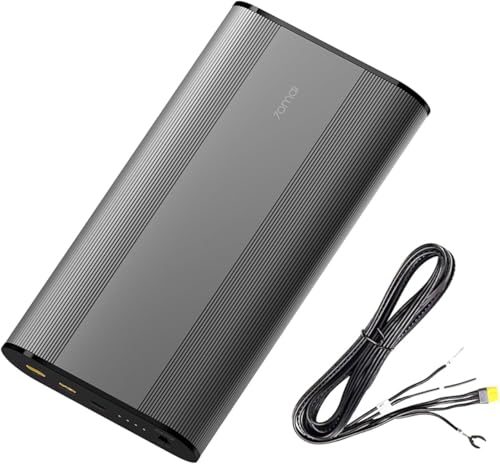
My first choice is 70mai Dash Cam Battery Pack BL96NNX 96wh Lifepo4 Battery Parking. It can provide about 30 hours of power for a typical 3W camera, though actual runtime depends on the camera and parking mode.
My second choice is BlackboxMyCar Powercell 8 Dash Cam Battery Pack. Its broad brand compatibility is useful, but some cameras may need spliced wiring and its USB port is not recommended as the dash cam’s power connection.
My third choice is REDTIGER RTB75N21 Lifepo4 Dash Cam Backup Battery. Its 74Wh capacity and stated fast recharge suit many daily commutes, but compatibility with other brands is not confirmed.
70mai Dash Cam Battery Pack BL96NNX 96wh Lifepo4 Battery Parking
Below, I compare five options and explain an important distinction: the fifth product is a dash cam, not a separate battery pack. The selection notes, buying guidance, setup advice, and FAQs will help you match a battery to your camera, car, parking habits, and tolerance for installation work.
5 Best Car Battery for Dash Cam Comparison
I selected products for their direct relevance to dash cam parking power, the practical details available about capacity, charging, compatibility, and connection methods, and brand variety where it made sense. No ratings or customer-feedback figures were supplied, so the comparison focuses on documented features and clearly notes where compatibility or use is limited.
| # | Image | Product | Price on Amazon |
|---|---|---|---|
| 1 | |
70mai Dash Cam Battery Pack BL96NNX 96wh Lifepo4 Battery Parking | Price on Amazon |
| 2 |  |
BlackboxMyCar Powercell 8 Dash Cam Battery Pack | Price on Amazon |
| 3 |  |
REDTIGER RTB75N21 Lifepo4 Dash Cam Backup Battery | Price on Amazon |
| 4 |  |
12V/24V Battery | Price on Amazon |
| 5 |  |
GPS Tracking HDR Night Vision 24H Parking Mode Voice Control | Price on Amazon |
70mai Dash Cam Battery Pack BL96NNX 96wh Lifepo4 Battery Parking
The BL96NNX is a strong match for drivers who want a dedicated parking-mode power source with substantial capacity. Its 96Wh LiFePO4 battery is rated to provide about 30 hours for a typical 3W dash cam. That is a useful planning estimate rather than a guarantee: a dual-channel camera, higher recording demands, or different parking settings can shorten runtime.
Charging is through a hardwired fuse-box connection, not a cigarette-lighter input. The pack accepts 11.2–30V input and is specified to recharge fully in about 60 minutes, with a 20-second delay after ignition to reduce the immediate electrical load on the vehicle. This favors drivers comfortable with a hardwire installation or willing to arrange one.
For camera connection, the XT30 output simulates standard VCC, ACC, and ground signals, while the included 3.3-meter Type-C cable offers another connection option. These outputs broaden its potential usefulness, but buyers should still confirm that the exact camera and parking-mode activation method work with the chosen cable. The listed 70mai camera runtimes also vary considerably by model, illustrating why an estimate from another camera may not transfer directly.
Pros
- 96Wh LiFePO4 capacity and about 30 hours of stated runtime with a typical 3W camera.
- Fast, approximately 60-minute hardwired charging.
- XT30 and Type-C outputs support a range of connection approaches.
Cons
- Charging requires a fuse-box hardwire connection.
- Actual runtime depends on the camera and parking settings.
My Opinion
This is my top pick for a buyer seeking a high-capacity, broadly useful battery and who is comfortable with hardwiring. Before ordering, check the camera’s input and parking-mode wiring requirements, then plan the installation around the fuse-box connection.
BlackboxMyCar Powercell 8 Dash Cam Battery Pack
The PowerCell 8 offers 96Wh of capacity and is listed as compatible with many camera brands, including BlackVue, Thinkware, VIOFO, Nextbase, Garmin, Vantrue, 70mai, and others. That breadth makes it appealing for a mixed-brand household or someone choosing a battery separately from the camera. Compatibility is not always plug-and-play, however: some models may need wires spliced, and the camera’s parking-mode trigger can affect which output works correctly.
It can charge from a vehicle’s cigarette-lighter socket or through a hardwired cable. The hardwired connection is specified to recharge the pack in as little as 50 minutes, while the socket option gives drivers a less involved installation path. These times describe charging under the stated connection methods; they do not establish how much parking time every camera will receive.
An app lets you check remaining capacity and charging time, which can help you understand whether the pack is ready for a long parking period. There is also a 5V USB 3.0 outlet for other devices. One important distinction: the supplied information says not to use that USB outlet to power the dash cam, because camera parking-mode activation varies. Use the recommended output cable instead, and confirm whether your particular camera needs the included spliced hardwiring kit or another lead.
Pros
- 96Wh capacity with hardwired and cigarette-lighter charging options.
- App-based battery status and charging-time information.
- Listed compatibility with a wide selection of dash cam brands.
Cons
- Some camera models may require wire splicing.
- The USB outlet is not recommended for powering a dash cam.
My Opinion
The PowerCell 8 is a flexible alternative when its connection method fits your camera. Confirm the correct output cable and parking-mode trigger before buying, especially if your camera is not a Thinkware model or requires a particular wiring arrangement.
REDTIGER RTB75N21 Lifepo4 Dash Cam Backup Battery
REDTIGER’s RTB75N21 takes a comparatively approachable route to installation: it charges from a 12V or 24V cigarette-lighter socket while you drive, so it does not require fuse-box wiring. The 74Wh LiFePO4 pack is intended to power a camera independently after the engine stops. That separation can help prevent the dash cam from drawing on the car’s main battery while parked.
The pack is described as fully charging in about 90 minutes of driving. REDTIGER states up to 27 hours of protection in the listing, while its specific example is about 24 hours of time-lapse parking coverage with an F7NP camera. These figures should be treated as model- and mode-dependent, not a promise for every setup. The maker also says the battery retains 80% capacity after more than 2,000 cycles.
Compatibility is the main caution. The unit is optimized for REDTIGER cameras, and compatibility with other brands is not confirmed. When connecting a camera, the supplied 16.4-foot power cable is required; the original camera cable or another substitute is specifically discouraged. Also check the vehicle socket: if it remains powered after the engine is off, REDTIGER does not recommend this battery, as that arrangement could contribute to vehicle battery drain. The suggested placement is in the glove box or under a seat, away from direct sunlight.
Pros
- Socket-based charging avoids a fuse-box installation.
- 12V/24V input and 74Wh LiFePO4 capacity.
- Provides independent camera power while parked.
Cons
- Compatibility with non-REDTIGER cameras is unconfirmed.
- Must be connected using the included 16.4-foot cable.
- Not recommended if the vehicle socket stays powered when parked.
My Opinion
This is a sensible convenience pick for a REDTIGER owner whose car socket switches off with the ignition. Check both conditions before purchase, and keep the supplied cable with the battery so a later cable swap does not compromise the intended setup.
12V/24V Battery
The B-130A is made specifically for BlackVue dash cams and supplies an independent source of power for parking mode. Its 12.8V, 7,500mAh, 96Wh battery is rated for up to 30 hours with a single-channel camera and about 15–20 hours with a dual-channel camera. That difference is a useful reminder that adding a rear camera can materially change how long a charge lasts.
Charging can be hardwired for a stated full charge in about 50 minutes at 9A, or connected through a cigarette-lighter plug for an approximately 90-minute recharge at 5A. The faster route involves hardwiring; the socket connection trades some charging speed for a simpler approach. The pack supports 12V and 24V vehicle systems, including cars and heavier vehicles.
BlackVue app connectivity can show charge percentage and estimated remaining parking time. For a cloud-connected dash cam, the pack can also support remote status checks and low-power notifications. Its USB-A output is rated at 5V and up to 2A for a phone or Wi-Fi hotspot, which may be useful for keeping connected equipment powered. A temperature sensor stops charging above 80°C and resumes below 70°C. That is a protective behavior, not a reason to install the unit in a hot, sun-exposed location.
Pros
- 96Wh capacity with separate single- and dual-channel runtime estimates.
- Hardwired and cigarette-lighter charging options.
- App status monitoring and a USB-A output for other devices.
Cons
- Its stated camera compatibility is specific to BlackVue dash cams.
- Hardwired fast charging requires a more involved connection.
My Opinion
BlackVue owners who want app visibility and a choice of charging methods should give the B-130A close consideration. It is less compelling for someone using another camera brand, so verify the camera match rather than choosing it on capacity alone.
GPS Tracking HDR Night Vision 24H Parking Mode Voice Control
This fifth pick is not a separate battery pack. It is a 70mai front-and-rear dash cam with 4K front and 1080p rear recording, so it belongs in a parking-power roundup only as a camera system whose parking features require a separate power solution. That distinction matters: buying this camera alone does not provide the same independent parking battery operation as the first four products.
The A810 Lite supports impact-triggered recording and time-lapse monitoring in parking mode, with loop recording and low-voltage protection. The listed parking feature requires a UP03, UP05, or UP06 hardwire kit. For 4G LTE remote access, live viewing, alerts, and vehicle tracking, the listing specifies the UP05 hardwire kit. If your aim is to avoid drawing from the starter battery during long parking periods, consider whether a compatible separate dash cam battery is also needed and verify the wiring arrangement for the complete system.
For driving footage, the camera combines HDR, an F1.55 aperture, GPS, voice control, and 5GHz Wi-Fi 6. It records location and route data, and the app supports video transfer and camera settings. A supercapacitor is used instead of a conventional internal battery, with the stated goal of better heat resistance and stable operation. This internal component should not be confused with an external battery pack that powers parking recording after the engine is off.
Pros
- 4K front and 1080p rear recording with HDR and GPS.
- Supports impact-triggered and time-lapse parking modes.
- Supercapacitor design and app-based video management.
Cons
- It is a dash cam, not an independent parking battery.
- Parking mode requires a separately purchased hardwire kit.
- 4G LTE functions require the specified UP05 kit.
My Opinion
Consider the A810 Lite if you are choosing a camera as well as planning its parking-power setup. For a buyer who already owns a compatible dash cam and only needs a battery, it is not a substitute for a dedicated battery pack.
How I Selected These Dash Cam Power Options
I prioritized products with usable information about capacity, charging, installation, parking duration, and camera compatibility. The first four are dedicated battery packs; the fifth is included as a clearly identified camera option because its parking mode raises a common question about the difference between a dash cam and the separate power source it may need.
Brand variety helped show the trade-offs between broader compatibility and brand-specific systems. The available data did not include customer ratings or feedback counts, so I do not use popularity claims to rank these choices.
For dependable parking coverage, match the battery to the camera’s wiring and parking-mode trigger—not just the capacity number on the battery pack.
A dash cam with parking mode is not automatically a parking battery. Check which kit or separate power source is required before budgeting for the complete setup.
How to Choose the Best Car Battery for Dash Cam
Start with your camera model and the way you park. A higher-capacity pack may extend recording, but the right choice also depends on whether you can hardwire it, whether a socket stays on after shutdown, and how much camera power is needed.
- Confirm compatibility: Check the camera brand, power input, parking-mode activation, and required cable.
- Estimate runtime realistically: Use the camera’s channel count and recording mode, not capacity alone.
- Choose an installation method: Compare fuse-box hardwiring with a switched cigarette-lighter socket.
- Understand the charging trade-off: Hardwired charging may be faster, while socket charging can be simpler.
- Separate camera features from battery features: Parking mode does not mean a camera includes an external parking battery.
Match Battery Capacity to Your Parking Routine
Think about how long the car typically sits between drives. Someone who parks overnight may have different needs from a driver leaving a car at an airport or workplace for an extended period. Capacity and runtime claims are useful for comparing products, but estimates depend on camera draw, number of channels, parking mode, and conditions. For example, the B-130A lists different durations for single- and dual-channel use. Treat a stated runtime as a reference point for that stated setup, not a universal figure.
Choose a Charging Connection You Can Support
A hardwired connection can deliver faster charging on some packs, but it involves the fuse box and correct installation. A cigarette-lighter connection may be more approachable, but first verify that the socket turns off with the vehicle if the battery maker requires it. Also consider your driving pattern: a battery only recharges while connected to its supported input, so frequent short trips may not replenish it as quickly as longer commutes.
Check the Output and Parking-Mode Trigger
Dash cams can enter parking mode in different ways, including changes to ACC power or signals carried through a specific cable. Confirm the battery’s output and cable are suitable for the exact camera. Do not assume that a USB outlet intended for phones will trigger a dash cam’s parking mode correctly. If a product lists possible wire splicing, account for that before choosing a supposedly simple installation.
Account for Your Vehicle and Camera Setup
Confirm whether your vehicle uses a 12V or 24V system and whether the battery pack accepts it. Check whether the camera is front-only or front-and-rear, and whether features such as time-lapse or continuous recording will be used. If remote viewing or cloud functions matter, identify any separately required hardwire kit and the compatible battery arrangement before purchasing.
Plan for Realistic Parking Runtime
Runtime is the practical result of battery capacity, camera power draw, and how the camera records. Impact-triggered recording may use power differently from continuous or time-lapse monitoring. A product’s maximum figure may refer to a particular camera configuration or test conditions, so it is safest to plan with some margin rather than counting on the longest number.
For a dual-channel system, include the rear camera in your estimate. If you need extended coverage, compare a battery’s specific runtime information for a similar setup and consider whether your driving schedule allows enough recharge time between parking periods. The supplied figures do not establish a guaranteed runtime for every camera.
Check Compatibility Before Installation
Use the exact camera model, not only the brand, when confirming compatibility. Two cameras from one maker can use different connectors or parking-mode behavior. Check the battery output, required cable, voltage range, and whether the camera expects ACC and constant-power signals.
When compatibility is described broadly, read the caveats too. Some PowerCell 8 combinations may need spliced wires, while the REDTIGER unit is optimized for REDTIGER cameras and does not confirm compatibility with other brands. If the connection details remain unclear, resolve that question before installing or relying on parking coverage.
Choose Between Hardwiring and a Cigarette-Lighter Connection
Hardwiring is often the better fit when fast charging or a permanent, concealed installation is the priority. It requires identifying appropriate fuse connections and routing cables carefully. If you are unfamiliar with vehicle wiring, follow the product instructions or seek qualified installation help rather than guessing at fuse positions.
A cigarette-lighter connection can reduce installation complexity, but it is not automatically risk-free. Find out whether the socket remains powered after the engine is off and follow the battery maker’s instructions for that condition. Also make sure the selected charging method is supported by the exact pack; the 70mai BL96NNX, for example, specifies hardwired fuse-box charging.
Set Up and Test the System Before Relying on It
Before routing cables permanently, check that the battery charges while driving and that the dash cam enters the intended parking mode when the vehicle is off. Confirm the camera records an event or time-lapse clip as expected, then check that normal driving recording resumes after restart. These basic checks can catch an incorrect output cable or parking-mode trigger early.
Keep the battery and cables secured so they cannot slide, interfere with pedals, obstruct an airbag area, or become pinched by trim. Follow the specific installation instructions for the pack and camera. If the system includes an app, check its status display after setup, but remember that an estimate is not a substitute for confirming that the camera is actually recording.
Protect the Battery From Heat and Poor Placement
Choose a secure location away from direct sunlight and avoid placing a battery where it could be crushed or exposed to unnecessary heat. REDTIGER specifically recommends the glove box or under a seat and says to avoid direct sunlight. The B-130A also monitors temperature and stops charging above a stated threshold, but that protective feature should not be treated as permission to install it in a hot location.
Leave enough room to access the battery’s connections and status indicators. Do not bury it under loose items or place it where a passenger may kick it. Use the supplied or specified cables, and avoid improvising extensions or substitutes unless the product documentation confirms they are suitable.
Make Parking Coverage More Efficient
Choose a parking mode that reflects what you actually need to capture. Time-lapse can provide ongoing monitoring, while impact-triggered recording concentrates on detected events; the exact behavior depends on the camera. If your camera offers settings for sensitivity or recording mode, consult its instructions and balance useful coverage with available battery runtime.
Check the battery status before a long period away from the car, especially if your driving time has been limited. App monitoring on compatible products can make this easier. If the pack is low, allow it to recharge through its supported method before expecting a full parking session.
Common Mistakes When Buying or Using a Dash Cam Battery
Most avoidable problems come from assuming that similar-looking products connect the same way. Check the setup as a complete system: vehicle, battery, cable, camera, and parking mode.
- Buying by capacity alone without checking camera compatibility or runtime conditions.
- Assuming a camera’s parking mode means it includes an external battery.
- Using a USB outlet to power a camera when the battery maker does not recommend it.
- Substituting a different cable where the product requires its supplied cable.
- Connecting a battery to a vehicle socket that remains powered when the product instructions warn against it.
- Expecting a fast recharge without using the specified charging connection.
- Placing the battery in direct sunlight or leaving cables loose near controls or airbags.
FAQS About Best Car Battery for Dash Cam
Do I need a separate battery for dash cam parking mode?
Not always. Some systems use a hardwire kit and the vehicle battery, while a dedicated dash cam battery supplies independent power after parking. A separate pack can help avoid using the starter battery for camera operation, but check the camera’s power requirements and your desired parking duration.
How long can a dash cam battery power a camera?
It depends on the pack capacity, camera model, number of channels, and recording mode. The products here list examples ranging from roughly a day to about 30 hours for particular setups. Those figures are not guaranteed for every camera or setting.
Is a hardwired dash cam battery better than a cigarette-lighter battery?
Neither connection is best for everyone. Hardwiring can allow faster charging on supported packs but takes more installation work. A cigarette-lighter connection may be simpler, though you must check whether the socket shuts off with the vehicle and whether the battery supports that charging method.
Can I use any dash cam battery with any dash cam?
No. Connector type, output signals, parking-mode activation, and wiring can differ. Check the exact camera model and required cable. Some batteries list broad compatibility but note that certain cameras may need wire splicing; other products are optimized for a specific brand.
Is the 70mai A810 Lite a dash cam battery?
No. It is a front-and-rear dash cam with parking-mode functions. Its listed parking mode requires a separate hardwire kit, and it is not an independent battery pack. If you want separate parking power, confirm which external battery works with the camera and its required wiring.
Will a dash cam battery drain my car battery?
A dedicated pack is intended to power the dash cam independently, but the charging connection and vehicle socket behavior still matter. Follow the product instructions, particularly if a cigarette-lighter socket stays on when the engine is off. Verify the installation rather than assuming every connection isolates the vehicle battery in the same way.
Final Thoughts
The best car battery for dash cam use depends on camera compatibility and how you want to install and recharge it. The 70mai BL96NNX is my first choice for its 96Wh capacity and broad connection options; the BlackboxMyCar PowerCell 8 is a flexible alternative with app monitoring, and the REDTIGER RTB75N21 suits REDTIGER owners seeking socket-based charging. Choose the BlackVue B-130A for a BlackVue setup, and consider the 70mai A810 Lite only if you are selecting a camera as well as planning its separate parking-power system.