
Choosing the best dash cam for Chevy Silverado means balancing clear footage with a fit that works for your truck’s model year, trim, and mirror or sensor-cover setup. A camera that looks like a factory part can be convenient, but the wrong housing or power connection can turn an easy installation into a frustrating one.
My first choice is WT RST LTZ Trail Boss High ZR2 UHD 2160P Video. Its Model C fit covers many newer Silverado trims, but checking the sensor-cover match before ordering is essential.
My second choice is 64GB Card No Wiring Hidden Design Loop Recording. It records in 4K, uses an auto-dimming mirror for plug-and-play power, and supports an optional parking-monitor harness.
My third choice is WT RST LTZ Trail Boss High ZR2 UHD 2160P Video. Its front 4K and rear 1080p cameras broaden the recorded view, while the included 128GB card provides more space than the single-camera alternative.
Below, I compare five Silverado-focused cameras, explain their compatibility and practical trade-offs, and cover what to check before buying. The guide also walks through setup, storage, parking monitoring, and common fitment mistakes so you can choose and use a camera with fewer surprises.
5 Best Dash Cam for Chevy Silverado Comparison
I selected these options for their stated Silverado fit, useful recording and installation details, and the amount of practical customer-feedback evidence available in the supplied information; where feedback or ratings were not provided, I avoid treating them as proven performance. I also considered different priorities, including front-only simplicity, dual-camera coverage, and older Silverado model years.
| # | Image | Product | Price on Amazon |
|---|---|---|---|
| 1 |  |
WT RST LTZ Trail Boss High ZR2 UHD 2160P Video | Price on Amazon |
| 2 |  |
64GB Card No Wiring Hidden Design Loop Recording | Price on Amazon |
| 3 |  |
WT RST LTZ Trail Boss High ZR2 UHD 2160P Video | Price on Amazon |
| 4 |  |
OEM Style 2160P UHD Video Wifi APP Loop Recording G-Sensor | Price on Amazon |
| 5 | 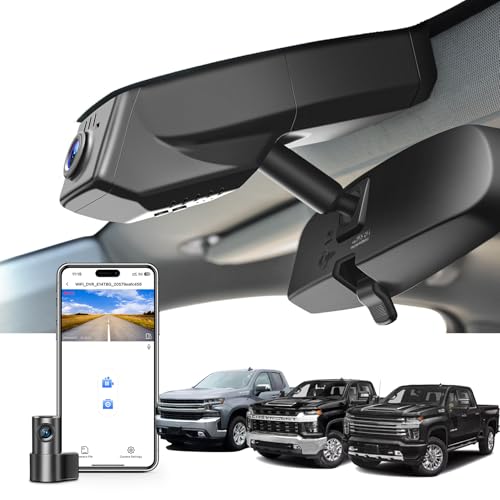 |
4K Dash Cam | Price on Amazon |
WT RST LTZ Trail Boss High ZR2 UHD 2160P Video
Mangoal’s Model C is an OEM-style front camera intended for the Silverado 1500 from 2022–2026 and Silverado 2500 HD or 3500 HD from 2024–2026. The listed trims include WT, LT, RST, Custom Trail Boss, LTZ, LT Trail Boss, High Country, and ZR2. It sits behind the rearview mirror, keeping the camera less conspicuous and avoiding a separate unit in the driver’s main sightline.
The camera records at 2160p and 30 frames per second, with an f/1.8 lens and an IMX335 sensor. Those details may help preserve useful road and vehicle detail across varying light, while the built-in Wi-Fi and app allow phone-based live viewing and video transfer. GPS is included, as is a 64GB memory card, so the basic package has the key pieces for ordinary driving capture.
Its main catch is fitment. Mangoal warns that the camera must match the truck’s sensor-cover style; a similar model year or trim name alone is not enough to confirm a match. The listing also says this version does not accept a separately added rear camera. It is not intended for the Silverado EV.
Best for: owners of a supported newer Silverado who want a discreet, front-only camera and are willing to verify the cover before ordering. Power can come through the included auto-dimming mirror adapter or OBD adapter, depending on the truck and chosen setup.
Pros
- 4K front recording, Wi-Fi, GPS, and a 64GB card are included.
- Vehicle-specific housing is intended to sit behind the mirror.
- Two power-adapter options are supplied.
Cons
- Exact sensor-cover compatibility is important.
- Not compatible with Silverado EV or an added rear camera.
My Opinion
This is a strong fit-first choice for a supported Silverado, especially if a tidy installation matters more than rear coverage. Confirm the housing against your actual truck before purchase; the stated model range cannot replace that check.
64GB Card No Wiring Hidden Design Loop Recording
This front-only 4K camera takes a different approach to fitment: it is specified for Silverado 1500 models from 2022–2026 and Silverado 2500 HD or 3500 HD models from 2024–2026, but it requires an auto-dimming rearview mirror. That mirror connection supplies power, allowing a hidden installation without rewiring. Buyers whose truck lacks the required mirror should not assume the included setup will work for them.
At 2160p and 30 frames per second, the camera records forward-facing footage, and its f/1.6 lens and low-light processing are intended to help in night conditions. Wi-Fi and the FUVYMYT app provide live preview and phone downloads. The included 64GB card gets the camera started, and the system supports cards up to 256GB, giving owners room to expand storage if they need longer retention.
Loop recording overwrites older unlocked files as the card fills. A G-sensor can lock footage when it detects a sudden collision, helping keep an important clip from being erased during normal looping. For parked-vehicle monitoring, the listing calls for an optional harness sold separately. That adds a purchase and installation step, and parking operation should not be assumed from the included mirror connection alone.
Best for: a newer Silverado owner with the required auto-dimming mirror who wants simple front coverage and a hidden look. If your truck’s mirror or sensor area differs, use the product images and compatibility details to confirm fit before ordering.
Pros
- 4K front video and app-based access.
- 64GB card included, with support up to 256GB.
- Loop recording and collision-triggered file locking.
Cons
- Requires an auto-dimming rearview mirror.
- Parking-monitor harness is sold separately.
- Does not provide rear-camera coverage.
My Opinion
The straightforward mirror-powered setup makes this a sensible alternative when its specific mirror requirement is met. It is less suitable for buyers who need rear footage or expect parking monitoring to work without an additional harness.
WT RST LTZ Trail Boss High ZR2 UHD 2160P Video
This Mangoal Model C package adds a rear camera to the Silverado-specific front unit. It is listed for Silverado 1500 models from 2022–2026 and Silverado 2500 HD or 3500 HD models from 2024–2026, across trims such as WT, RST, LTZ, Trail Boss, High Country, and ZR2. Like the single-camera Model C, it is not listed as compatible with Silverado EV, and the sensor-cover match needs careful confirmation.
The front camera records up to 4K while the rear camera records at 1080p. Their stated 150-degree and 140-degree viewing angles, respectively, are intended to capture more than the immediate area directly in front of or behind the truck. Rear footage can add useful context in a collision or other road incident, though it requires routing a cable to the back of the cab and choosing an appropriate mounting position.
A 128GB card, GPS module, rear camera, rear cable, Wi-Fi, and app are included. The larger supplied card gives more initial capacity than the 64GB single-camera package, while phone connectivity offers a way to view and transfer footage. The listing describes both auto-dimming mirror and OBD power methods: use the mirror adapter if the truck supports it, or consider the OBD option where it does not.
Best for: newer Silverado owners who value front-and-rear recording and can handle a more involved installation. The extra coverage is useful only if the cable can be routed neatly and the correct camera housing is selected for the truck.
Pros
- Front 4K and rear 1080p recording.
- 128GB card, GPS, and both power-adapter options are included.
- Wi-Fi and an app support viewing and transferring video.
Cons
- Sensor-cover fit must be verified.
- Rear-camera cable adds installation work.
- Not listed as compatible with Silverado EV.
My Opinion
This is the more capable Mangoal choice if recording behind the truck matters. The additional camera and accessories justify choosing it over a front-only model only when you are comfortable planning the rear cable route and confirming Model C fitment.
OEM Style 2160P UHD Video Wifi APP Loop Recording G-Sensor
The supplied listing identifies this Fitcamx unit as used and specifies the HD2-4925 housing for Silverado models from 2022–2026 with an eight-vent cover. It is also stated to fit Silverado EV vehicle styles. Fitcamx asks buyers to check the vehicle year, cover vent pattern, and mirror setup before ordering; the “eight vents” detail is a key fitment check rather than a minor trim preference.
The front camera records up to 2160p at 30 frames per second. Its f/1.6 lens and WDR exposure balancing are intended to help retain visible detail in changing light. The camera is designed to sit in the factory-style cover, and it begins recording when the vehicle starts. Built-in Wi-Fi and the app allow users to view or manage clips without keeping the phone connected all the time.
There are two important ownership considerations. First, the listing explicitly says no SD card is packed with this used camera, so plan to obtain a compatible card separately and confirm the seller’s exact package contents. Second, power depends on the truck: a compatible auto-dimming mirror may provide a plug-in connection, while a truck without one may require a fuse-box or OBD power route. The stated operating-temperature range is -20°C to 85°C.
Best for: a Silverado owner whose cover has the specified eight vents and who is comfortable checking the condition and contents of a used electronic product. If you prefer a new unit with a memory card included, one of the Mangoal packages may be a simpler starting point.
Pros
- 4K recording with app and Wi-Fi access.
- Factory-style housing avoids a separate windshield-mounted camera.
- Fitment information includes the eight-vent cover and Silverado EV.
Cons
- Used listing; condition and included accessories require confirmation.
- No SD card is included.
- Power setup may require OBD or fuse-box connection.
My Opinion
The discreet form and clear cover-specific fit information are appealing, but the used status and missing card deserve extra attention. I would treat condition, accessories, and power compatibility as purchase checks, not assumptions.
4K Dash Cam
This Model B dual-camera kit targets an older Silverado group: Silverado 1500 models from 2019–2021, Silverado 1500 Limited 2022, and HD models from 2020–2023. The listed trims include Work Truck, Custom, LT, RST, LTZ, Trail Boss, and High Country. Importantly, Mangoal notes that Model A and Model B cover the same model years but use different sensor covers, so year alone does not establish compatibility.
Front recording is listed at 4K, with a 1080p rear camera and stated viewing angles of 150 degrees in front and 140 degrees behind. This gives drivers more context than a front-only camera, but fitting the rear unit means routing its cable through the cabin. Wi-Fi and the app support live viewing and transferring clips, while a GPS module and 128GB card are included in the package.
Power deserves particular attention. The kit includes an auto-dimming adapter and an OBD adapter, but the supplied information says the truck must have a compatible 10-pin square auto-dimming mirror plug to use that mirror connection. Without it, power must come from OBD or the fuse box. Parking monitoring also requires an OBD or fuse-box adapter, so buyers should check the required accessory and installation method rather than expect the included mirror adapter to provide parked recording.
Best for: owners of the listed older Silverado years who want dual-camera coverage and are prepared to compare the sensor-cover photos. It is not the right fit for newer Model C vehicles simply because the trim name looks familiar.
Pros
- Front 4K and rear 1080p cameras.
- 128GB card, GPS, Wi-Fi, and app are included.
- OBD and mirror power adapters are supplied.
Cons
- Model A and Model B sensor covers differ despite overlapping years.
- Parking monitoring requires a suitable power adapter.
- Rear cable routing adds installation work.
My Opinion
This kit makes sense for the earlier Silverado range when its Model B cover is the correct match. Its combination of front-and-rear capture and included storage is useful, but careful year, cover, and power checks are non-negotiable.
How I Selected These Best Dash Cams for Chevy Silverado
I prioritized products whose supplied details name Silverado years or body styles, then compared what a buyer can actually verify: front or rear recording, resolution, app access, included storage, power connections, and fitment warnings. I included both current-generation and earlier-model options because a dash cam that fits one Silverado cover may not fit another.
The data supplied for these products did not include ratings or customer-customer-feedback volume, so I did not use popularity scores or present user sentiment as established evidence. Instead, I weighed the specificity of the fit instructions and the clarity of the package and power requirements. Brand variety was limited among the Silverado-specific choices, so the selection reflects the available fit-focused options rather than an artificial mix of brands.
For a custom-fit camera, the shape of the sensor cover and the mirror connector can matter as much as the truck’s model year. Confirm both before buying.
“4K” does not tell the whole story: a rear camera, included storage, power method, and return or support terms can change how convenient the setup is to own.
How to Choose the Best Dash Cam for Chevy Silverado
Start with compatibility, then decide how much of the road you need recorded. A front-only unit is simpler to install; a dual-camera kit adds rear context but requires more planning. Compare the actual package and power requirements rather than relying on a broad “fits Silverado” description.
- Match the camera housing to your Silverado’s model year and sensor-cover design.
- Check for the required auto-dimming mirror plug or plan another power route.
- Choose front-only or front-and-rear coverage based on your needs.
- Confirm whether a memory card and GPS module are included.
- Check whether parking monitoring needs an additional harness.
Confirm the generation and cover
Silverado model years overlap across different camera housings. Mangoal’s Model B and Model A, for example, are described for some of the same years but have different sensor covers. Model C is listed for newer model years, while Fitcamx specifies an eight-vent cover. Compare the product’s fitment images with the cover behind your own mirror, and contact the seller with a clear photo if the distinction is uncertain.
Pick the coverage you will use
A front-only camera records what happens ahead and generally keeps installation simpler. A rear unit can provide added context when another vehicle approaches from behind, but it adds a camera and cable run. Consider whether you can route that cable safely and neatly before choosing dual coverage.
Plan power and parked recording
Some models use an auto-dimming mirror connection, while others list OBD or fuse-box options. These connections are not interchangeable assumptions: check your actual plug and the product’s instructions. Parking monitoring may require a separate harness, and a basic driving-power connection does not automatically mean the camera will record while parked.
Think about card capacity and access
Loop recording manages a full card by replacing older footage, while a G-sensor may lock collision-related files. Capacity influences how much footage can remain available before overwriting, but locked files can also take up space. Check the supplied card size, the camera’s stated maximum, and the process for downloading important clips.
Check Fitment Before Ordering
Before checkout, write down your Silverado’s model year, series, and trim, then inspect the mirror area in daylight. Look for the sensor-cover shape and vent pattern, and determine whether the mirror has auto-dimming capability. If a listing asks you to compare a particular product image, use that image rather than relying on a trim-level name.
When the fit remains unclear, send the seller a photo of the original cover and ask which exact model applies. Save the answer and confirm that the order is for that housing. This small step is particularly valuable for custom-fit cameras, since a unit can be well specified yet still fail to attach or connect to the wrong cover.
Plan the Installation Before Starting
Read the instructions and identify the intended power source before removing trim or routing cable. A mirror adapter can make a compatible installation straightforward, while an OBD or fuse-box route calls for different cable placement. Do not force a connector that does not match your truck’s plug.
For a dual-camera system, map the rear cable path before mounting either camera. Keep the wire tidy and away from areas where it could interfere with controls, airbags, or normal vehicle operation. If you are unsure about safe trim removal or fuse-box work, consider getting help from someone qualified rather than improvising.
Set Up the Camera and Save Important Clips
After installation, follow the product instructions to connect the app, set the camera’s date and time if needed, and check the live view before driving. Make sure the lens has a clear view through the windshield and that the rear camera points toward the road rather than a nearby interior surface.
Learn how to locate, lock, and transfer a file before you need evidence. Wi-Fi access can make phone downloads convenient, but retaining a copy on another device is sensible when footage matters. Once a clip is important, do not assume it will remain protected indefinitely; confirm its status and copy it off the card.
Use Parking Monitoring Carefully
Parking monitoring is not necessarily included just because a camera supports it. The FUVYMYT option calls for an optional harness, and Mangoal’s older Model B details also specify an OBD or fuse-box adapter for parking use. Check the exact accessory and connection instructions for the selected camera.
Before leaving the system active, understand how its power method works and what the manufacturer says about operation. Avoid treating a dash cam as a substitute for a secure parking location or as a guarantee that every incident will be captured. Confirm that the camera is recording as intended and guide its saved files periodically.
Maintain the Camera and Memory Card
Keep the lens and the glass in front of it clean, using a soft cloth and an appropriate glass-cleaning method. Dust or smears can reduce visibility, and a camera shifted during cleaning may no longer point where intended. After cleaning or adjusting the housing, check the app’s live view.
Check the memory card periodically for recording errors and confirm that recent footage is present. Back up important files and follow the camera’s instructions for formatting or replacing a card. For the used Fitcamx listing, remember that no SD card is included; choose a compatible card rather than assuming one came with the camera.
Common Silverado Dash Cam Mistakes to Avoid
Most avoidable problems come from assuming that model year, trim, power, and accessories are universal. Take a moment to verify each before installation.
- Ordering by year alone: Compare the sensor-cover design and vent pattern, especially for Model A/Model B and Model C options.
- Assuming the mirror plug is present: Check for the specified auto-dimming mirror connection before choosing a mirror-powered model.
- Expecting a rear camera to be added later: The single-camera Mangoal package says its board does not support adding a rear camera separately.
- Assuming parking mode is ready out of the box: Check for a separately required harness or adapter.
- Forgetting storage: The used Fitcamx listing has no SD card, and other kits have different included capacities.
- Leaving key footage only on the camera: Transfer important clips before loop recording can overwrite older files.
FAQS About Best Dash Cam for Chevy Silverado
How do I know which dash cam fits my Chevy Silverado?
Check the exact model year, truck series, sensor-cover shape, and vent pattern specified for the camera. Also confirm the mirror connector and any stated trim or EV exclusions. If the product images do not settle the question, send the seller a photo of the cover before ordering.
Do Silverado dash cams need an auto-dimming mirror?
It depends on the model. The FUVYMYT front camera requires an auto-dimming mirror, while the supplied Mangoal options list mirror and OBD power methods. Fitcamx describes fuse-box or OBD power for vehicles without the required mirror connection. Verify the exact product instructions and your truck’s plug.
Should I choose a front-only or dual-channel camera?
Choose front-only for a simpler installation focused on the road ahead. A dual-channel kit adds rear footage and may provide more context, but it requires a second camera and a cable route through the cabin. Select based on the coverage you need and the installation you can manage.
Does a Silverado dash cam include a memory card?
Not always. The Mangoal Model C front-only package lists a 64GB card, its dual-camera Model C and Model B packages list 128GB cards, and the FUVYMYT package includes 64GB. The used Fitcamx listing specifically says no SD card is included, so check the package details.
Can these cameras record while my Silverado is parked?
Some support parking monitoring with an additional power harness or adapter. The FUVYMYT listing names an optional harness, and the Mangoal Model B information calls for an OBD or fuse-box adapter. Check what is required for your chosen model rather than assuming the standard driving connection provides parked recording.
Final Thoughts
The best dash cam for Chevy Silverado is the one that matches your truck’s cover and power setup, not simply the one with the biggest resolution number. My top choices are the Mangoal Model C 4K front dash cam for a discreet, newer-truck fit; the FUVYMYT 4K front dash cam for compatible auto-dimming mirrors; and the Mangoal Model C 4K front-and-rear kit for broader coverage. Verify fitment, accessories, and power before ordering.