
Below, I compare all five options, explain what their features mean in everyday driving, and cover setup, storage, parking mode, and common ownership mistakes. I also clarify what these car cameras can—and cannot—do for someone looking for a camera to use while cycling.
My first choice is 32GB Card Included Mini Dashcam Screen-Free APP Control 160 Wide. Its included memory card makes setup simpler, while a hardwire kit is still needed for parking mode.
My second choice is 4K Full HD 3 Channel Dash Camera. Choosing the best dash cam for cyclists depends first on where you plan to use it: these options are automotive dash cams for documenting a drive around cyclists, not cameras made to mount on a bicycle. If you want footage from your own bike ride, look for a purpose-built action camera instead; if you drive and want a record of nearby traffic, these models offer different combinations of front, rear, and cabin coverage.
My third choice is STARVIS 2 Sensor Free 128GB Card 4K Upscaled Front FHD. The front image is upscaled from 2.5K rather than captured at native 4K, an important distinction when comparing resolution claims.
32GB Card Included Mini Dashcam Screen-Free APP Control 160 Wide

Below, I compare these options, explain the strengths and trade-offs of each one, and cover the buying factors plus practical setup, use, compatibility, maintenance, longevity, safety, troubleshooting, storage, and common mistakes that matter before choosing.
5 Best Dash Cam for Cyclists Comparison
I selected these options for their relevance to documenting vehicle trips around cyclists, their practical recording and storage details, and the ways their coverage differs. Customer-feedback evidence was not supplied, so the comparison relies on the available product information rather than user ratings or hands-on testing; brand diversity was considered where the data made it possible.
| # | Image | Product | Price on Amazon |
|---|---|---|---|
| 1 | |
32GB Card Included Mini Dashcam Screen-Free APP Control 160 Wide | Price on Amazon |
| 2 |  |
4K Full HD 3 Channel Dash Camera | Price on Amazon |
| 3 |  |
STARVIS 2 Sensor Free 128GB Card 4K Upscaled Front FHD | Price on Amazon |
| 4 |  |
GPS Tracking HDR Night Vision 24H Parking Mode Voice Control | Price on Amazon |
| 5 | 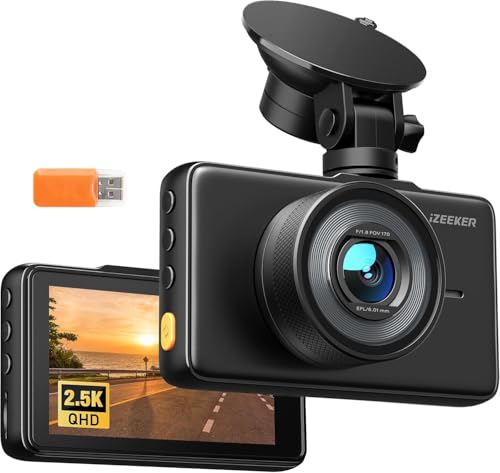 |
1440P QHD Car Camera | Price on Amazon |
32GB Card Included Mini Dashcam Screen-Free APP Control 160 Wide
The galphi is a compact, front-facing car camera with a 160-degree lens and 4K recording. For a driver who wants a record of what happens ahead—including interactions with people cycling in the vehicle’s path—front coverage is the most directly useful perspective. The screen-free design also avoids adding another display to the windshield area, though it means checking settings and footage through the app rather than on the camera.
Its 5GHz Wi-Fi connection is intended to make phone playback and downloads quicker than a 2.4GHz connection. That can be helpful when you need to save a clip after a close pass or collision, but the phone connection is a transfer method, not a substitute for routinely checking that recording is working. The F/1.6 aperture and WDR are intended to help manage low-light scenes and mixed brightness; as with any dash cam, actual detail can still vary with weather, glare, motion, and the position of the camera.
The supplied data says the camera includes a 32GB card and supports cards up to 256GB. It also describes loop recording, which overwrites older files when storage fills, and a G-sensor that locks footage after a detected shake or collision. For 24-hour parking monitoring, a Type-C hardwire kit is required and is not included. The parking mode records time-lapse footage at a reduced frame rate, so it is not equivalent to full-rate driving video.
Pros
- 4K front recording with a 160-degree field of view.
- 32GB memory card included; supports up to 256GB.
- Screen-free design and 5GHz Wi-Fi app access.
Cons
- Records the front view only.
- Parking mode requires a separate Type-C hardwire kit.
- 32GB may be limiting for drivers who want longer retained footage.
My Opinion
This is the strongest simple front-camera pick in the group, especially for a driver who values a small profile and app-based access. Confirm the card capacity you need and budget for separate hardwiring if parked recording matters; this is a car camera, not a bicycle-mounted unit.
4K Full HD 3 Channel Dash Camera
Rather than focusing only on the windshield view, this three-channel system records the front, interior, and rear of the car. The front camera records at 4K with a 170-degree view, while the cabin and rear cameras record at 1080p. That setup can provide useful context if an incident involves a cyclist near the front or back of the vehicle, and the cabin view may be valuable for rideshare or family driving. It does not provide a dedicated exterior side view, so “three-channel” should not be mistaken for complete coverage in every direction.
The interior camera has infrared enhancements for night recording, while the cameras also use WDR and F/2.0 apertures. These details are intended to help in dim conditions, but a camera’s night capability does not guarantee that every plate or fast-moving detail will be legible. The wide-angle front view captures more of the scene, though objects farther away may appear smaller than in a narrower view.
A 32GB card is included, and loop recording automatically replaces older recordings as space runs out. The G-sensor locks footage around a detected collision—the supplied description says it protects the first five seconds before and ten seconds after the event. The rear camera connects to the front unit by cable, so installation takes more effort than setting up a single front camera. Parking mode also requires a separately purchased hardwire kit and records at a lower frame rate.
Pros
- Front, cabin, and rear recording from one system.
- Includes a 32GB card and supports loop recording.
- App access for viewing, downloading, and settings.
Cons
- Rear-camera wiring must be routed through the vehicle.
- Parking mode requires a separate hardwire kit.
- Cabin and rear channels record at 1080p, not 4K.
My Opinion
This is a sensible choice for drivers who value multiple viewpoints more than the simplest installation. Before buying, consider whether you can route and secure the rear-camera cable neatly, and remember that a cabin camera is not an exterior side camera.
STARVIS 2 Sensor Free 128GB Card 4K Upscaled Front FHD
The ROVE R2-4K Dual records the road ahead and behind, with a front camera that captures at 2.5K and upscales the image to 4K for playback. The rear camera records at 1080p. That front-resolution distinction matters: the “4K” output is not native 4K capture, so buyers comparing sensor-level detail should weigh that against cameras that record native 4K. Dual coverage can still be useful for documenting traffic around a car, including events that happen behind it.
A Sony STARVIS 2 IMX675 sensor F1 5 front aperture HDR and a separate F1 8 rear aperture are intended to improve low-light capture Night performance is particularly relevant on dark commutes but no sensor can guarantee readable details in every situation The 3-inch IPS screen provides an on-device way to check framing and playback while built-in GPS can stamp speed route and location information onto recordings Some drivers may prefer that context others may choose to consider whether they want location.
The package includes a 128GB card, and the camera supports cards up to 1TB. Its 5.8GHz Wi-Fi is listed with downloads up to 20MB/s through the app, and the GPS Player for PC or Mac can display recorded trip information. Three parking options are described: one-frame-per-second time-lapse, motion detection, and collision detection. Each requires a separate hardwire kit. Setup accessories include cables, mounts, clips, a trim tool, and a cleaning wipe; the included power cable and a compliant 5V USB source are specified for operation.
Pros
- Front-and-rear recording with GPS data and a 3-inch screen.
- 128GB card included; supports up to 1TB.
- Multiple parking-mode options and a supercapacitor.
Cons
- Front footage is upscaled from 2.5K, not natively captured at 4K.
- Parking mode requires a separate hardwire kit.
- GPS data may not suit drivers who prefer location-free footage.
My Opinion
The ROVE is a feature-rich fit for drivers who want GPS context, a screen, and substantial included storage. Its clearest trade-off is the upscaled front resolution; compare that honestly with native-resolution options, and plan for professional or careful cable installation if you are not comfortable routing the rear lead.
GPS Tracking HDR Night Vision 24H Parking Mode Voice Control
The 70mai A810 Lite combines 4K front recording with a 1080p rear camera. Its compact, credit-card-sized form is intended to sit discreetly behind the rearview mirror, which may help keep the windshield area clear. For someone driving through busy cycling routes, the forward view is the primary record of events ahead, while the rear camera adds context if another vehicle approaches from behind.
Night recording is supported by an F1.55 aperture and HDR, which are intended to balance bright headlights with darker areas. Built-in GPS uses GPS, GLONASS, and BDS to record route, speed, and location data. Voice control offers hands-free operation, and the supercapacitor is specified instead of a battery, with heat resistance and stable operation given as advantages. These features may appeal to drivers who leave a vehicle in varying temperatures or want location details attached to a clip.
The app uses Wi-Fi 6 at 5GHz for transferring video, with downloads listed up to 25MB/s. The product also supports optional 4G LTE remote access, live view, vehicle tracking, and alerts, but that capability requires the UP05 4G hardwire kit. Parking mode is also not a plug-in-only feature: the listed UP03, UP05, or UP06 hardwire kits are required. Since no included memory card is stated in the supplied information, check the package details and card requirements before relying on it for a trip.
Pros
- 4K front and 1080p rear recording.
- GPS, voice control, HDR, and a compact profile.
- Optional LTE remote access and fast Wi-Fi 6 transfers.
Cons
- LTE and parking functions require separately purchased hardwire equipment.
- No included memory card is specified in the supplied details.
- Remote access depends on an optional kit and associated setup.
My Opinion
This is a strong option for drivers drawn to GPS, voice controls, and optional remote access, but those extras involve added equipment. Verify the card and hardwire-kit requirements before purchase, and decide whether remote monitoring is worth the additional setup for your parking situation.
1440P QHD Car Camera
The iZEEKER is a front-only car camera recording at 1440p QHD and 30 frames per second, with a 170-degree lens. It offers less pixel resolution than the 4K models above, but it may be a practical fit for someone who wants a straightforward forward-facing record rather than front-and-rear coverage. A 3-inch IPS display and physical buttons make it possible to operate and check footage without first connecting a phone to Wi-Fi.
Its F1.8 aperture and WDR are intended to balance dark areas and bright light, including headlight glare. The camera uses a suction-cup mount and is described as easy to install. A detachable car charger can connect through the cigarette-lighter adapter or a USB port, and the camera itself uses Type-C power. Check that the chosen USB source provides suitable power before relying on it, since a USB-shaped port alone does not confirm compatibility.
This model does not include an SD card. It supports microSD cards from 16GB to 128GB, so purchasing and installing a compatible card is part of initial setup. Loop recording overwrites older unprotected files, while the G-sensor and a manual lock button can protect important clips. Its parking mode offers impact-triggered recording and time-lapse, but requires a separate hardware kit. The supplied product details state a two-year warranty and support; keep purchase and support information available in case assistance is needed.
Pros
- 1440p QHD recording and a 170-degree field of view.
- On-device 3-inch display and physical controls.
- Detachable charger and two-year support stated in the product details.
Cons
- Memory card is not included.
- Records the front view only.
- Parking mode requires a separate hardware kit.
My Opinion
The iZEEKER is a straightforward choice for drivers who prefer a screen and buttons over app-first control. Its main ownership detail is easy to overlook: buy a supported 16GB–128GB microSD card before installation, and add hardwiring only if parked recording is a priority.
How I Selected These Best Dash Cams for Cyclist-Aware Driving
These five options were selected from the supplied product information for their usefulness as car-mounted cameras when driving around cyclists. I compared recording direction and resolution, storage, app or screen access, parking-mode requirements, and setup details. The information did not include ratings, customer comments, or independent footage samples, so I have not treated unverified image-quality claims as proven results.
The ranking favors an accessible front-facing setup first, then broader channel coverage and more specialized feature sets. It is not a ranking of bicycle cameras: none of the supplied products is described as a wearable or bike-mounted camera, and none is stated to be weatherproof for bicycle use.
Choose a camera based on the view you need from your vehicle, not on the word “4K” alone. Native capture, upscaled output, included storage, and the need for extra wiring all affect real-world usefulness.
If you need evidence from your own bicycle ride, choose a purpose-built action camera with appropriate mounting and weather protection instead of adapting a windshield dash cam.
How to Choose the Best Dash Cam for Cyclists
For drivers concerned about interactions with cyclists, prioritize a dependable forward view and a setup you will actually maintain. Decide whether you also need rear or cabin recording, then compare storage and installation needs before paying extra for connected features.
- Match the camera to the job: These products document a vehicle trip; they are not bicycle cameras.
- Check the recording view: Front-only is simpler, while rear or cabin channels add context but also add hardware and wiring.
- Read resolution details carefully: Native 4K and footage upscaled to 4K are not the same capture specification.
- Plan storage: Confirm whether a card is included, its capacity, and the maximum supported size.
- Price the whole setup: Parking mode and LTE access may require separate hardwire kits.
Prioritize the view you need
A front camera records the road ahead and is the most direct view for documenting a driver’s interaction with a cyclist in front of the vehicle. A rear camera can capture what happens behind the car; a cabin camera records inside, not the outside lane beside the car. None of these configurations should be assumed to cover every side or blind spot.
Compare useful image detail, not just labels
Resolution is one factor in whether a clip is useful, but lens angle, lighting, distance, weather, and movement also matter. The ROVE’s front image is captured at 2.5K and upscaled to 4K, while the galphi and 70mai listings specify 4K front recording. The iZEEKER records at 1440p. Consider what matters most to you and avoid assuming a headline resolution guarantees readable plates in all conditions.
Balance convenience with evidence needs
An on-device screen, as on the ROVE and iZEEKER, gives you a local way to check framing and recordings. App-based systems can make downloading and changing settings convenient, but connecting to a camera’s Wi-Fi can take time. GPS stamps can add trip context, though they also attach location and speed information to a file. Choose the combination you are comfortable managing and sharing.
Budget for cards and wiring
Included storage differs substantially. The galphi and three-channel model list 32GB cards, the ROVE includes 128GB, and the iZEEKER explicitly comes without a card. The supplied 70mai details do not state that a card is included. Parking modes on these products require additional hardwire equipment; do not assume a standard charger enables continuous parked recording.
Dash Cam Setup: A Beginner-Friendly Checklist
Good setup is about a stable view, reliable power, and wiring that does not interfere with driving. Follow the product instructions for your specific model, since mount styles and cable layouts differ.
- Choose a windshield position that does not obstruct your view or interfere with vehicle sensors.
- Clean and dry the mounting area before attaching the camera.
- Frame enough of the road to capture context without aiming mostly at the sky or dashboard.
- Route cables securely and keep them clear of pedals, airbags, and moving parts.
- For rear-camera systems, test the front and rear views before hiding the cable along trim.
After powering the camera, confirm it starts recording and check a short clip. Set the date, time, and any desired GPS or audio options before regular use. If you are unsure about routing wiring near airbags or trim, seek qualified installation assistance rather than forcing panels or cables into place.
Memory Cards, Loop Recording, and Protecting Important Clips
Loop recording is useful because it allows a camera to continue recording after the card fills, but it does so by replacing older footage. G-sensor locking can protect detected events, and some models also provide a manual lock control. Neither method should be treated as a substitute for saving a clip you need as soon as it is practical and safe.
Use a card capacity supported by the camera. The supplied product information recommends Class 10, U3, and V30 or higher for extended storage with the galphi; the other listings give their own limits or included-card details. Check the actual camera instructions for card formatting and replacement guidance. A larger card can hold more footage, but it does not make files permanent when loop recording is active.
Using Parking Mode Without Guesswork
Parking mode can capture events while a vehicle is unattended, but these products require separate hardwire equipment for that function. Depending on the model, recording may use time-lapse, motion detection, or collision detection. Time-lapse uses a reduced frame rate, so it may show less detail about fast movement than ordinary driving footage.
Before enabling parked recording, confirm the exact compatible hardwire kit, installation instructions, and any low-voltage protection details for your model. The 70mai listing describes low-voltage protection and names compatible kit models; the other products also require separate hardware. If you do not need unattended recording, a standard power connection may be the simpler setup.
How to Save and Share Dash Cam Footage
If an incident occurs, prioritize safety and follow local requirements before handling the camera or phone. When it is safe, use the camera’s app, screen, or card to locate and preserve the relevant file. Because loop recording can overwrite older footage, copy important clips to another device or storage location rather than leaving them only on the camera card.
Check a clip before sharing it. GPS-enabled footage can include speed, route, and location information, and cabin footage may show passengers. Keep an unedited original when the footage may be needed as documentation, and be thoughtful about privacy when posting video publicly.
Keeping a Dash Cam Reliable
Make a brief recording check part of routine vehicle care. Confirm the camera powers on, the lens is clean, and the card is seated. Periodically check that important files are not being locked so frequently that they prevent normal loop recording. Follow the manufacturer’s instructions for formatting or replacing a card rather than deleting files at random.
Wipe the lens gently with a clean, soft material when dust or smears appear, and inspect mounts and cables for looseness or damage. The ROVE package includes a cleaning wipe and specifies thermal protection, but all cameras still need appropriate placement and unobstructed airflow. Avoid pulling on rear-camera cables or allowing wiring to hang where it can distract the driver.
Common Dash Cam Mistakes to Avoid
Many avoidable problems come from assuming a feature works automatically or that a camera covers more than it does. A quick setup check can prevent missing footage and unnecessary purchases.
- Buying a car dash cam for bicycle mounting: These products are not specified as bike cameras or as suitable for exposed, wet riding.
- Assuming every 4K label means native 4K capture: The ROVE front channel is explicitly upscaled from 2.5K.
- Forgetting the memory card: The iZEEKER does not include one, and the supplied 70mai details do not confirm one.
- Expecting parking mode from a regular charger: The listed parking functions require separate hardwire equipment.
- Leaving the camera untested: Check framing, power, date and time, and playback before depending on a recording.
- Relying only on automatic event locks: Save important footage promptly when it is safe to do so.
FAQS About Best Dash Cam for Cyclists
Are these dash cams made to attach to a bicycle?
No. The supplied products are car dash cams intended for vehicle installation. The information does not establish that they are weatherproof, suitable for bicycle vibration, or compatible with bike mounts.
Which option records the most views around cyclists?
The three-channel camera records the front, cabin, and rear. That adds more perspectives than a front-only camera, but the cabin channel is not an exterior side view and does not provide complete coverage around the vehicle.
Is native 4K important for recording cyclists from a car?
It can be one useful consideration, but it is not a guarantee of readable detail. Distance, movement, lighting, lens angle, and weather also affect footage. Note that the ROVE front channel captures at 2.5K and upscales to 4K.
Do these dash cams record while the car is parked?
The product information describes parking modes for all five, but each requires separately purchased hardwire equipment. Check the exact compatible kit and setup instructions for the model you choose.
Which of these models includes a memory card?
The galphi and three-channel camera list 32GB cards, and the ROVE includes a 128GB card. The iZEEKER does not include a card. The supplied 70mai information does not specify an included card, so confirm the package details before purchase.
Can I use dash cam footage to document a close pass while driving?
A forward-facing car camera can record the road ahead, and some models add rear or cabin footage. Whether a clip clearly captures an event depends on camera placement, conditions, and distance; save important files promptly and handle or share them responsibly.
Final Thoughts
The best dash cam for cyclists in this comparison is best understood as a car camera for drivers sharing the road with cyclists—not a camera for recording from a bicycle. For a compact front view, choose the galphi Mini 4K Dash Cam; for front, cabin, and rear coverage, consider the Three-Channel 4K Front, Cabin, and Rear Dash Cam; and for GPS, a 128GB card, and front-and-rear recording, the ROVE R2-4K Dual is a compelling third choice. Confirm card and hardwire needs before choosing.