
Choosing the best dash cam for rental cars means balancing useful incident footage with easy installation and a clean return-day removal. A camera that needs permanent wiring or leaves marks behind may be less practical than one you can set up and take down without altering the vehicle.
My first choice is 1440P QHD Car Camera. Its 1440p video, 170-degree view, and physical controls make it a practical fit for renters who want a simple setup.
My second choice is 4K+1080P 3 FHD Car Camera 5ghz Wifi and App Control. The 4K+1080P 3 FHD Car Camera 5ghz Wifi and App Control is my alternative for drivers who want broad coverage from four cameras. It ranks second because it records front, rear, and both sides, though the extra cameras and wiring take more effort to arrange in a rental.
My third choice is GPS Tracking HDR Night Vision 24H Parking Mode Voice Control. Its 4K front and 1080p rear recording are compelling, but its remote-access and parking features require separately purchased hardware.
Below, I compare five options, explain what their coverage and power requirements mean in a rental, and offer practical guidance on mounting, storage, setup, and removing the camera without leaving a mess.
5 Best Dash Cam for Rental Cars Comparison
I selected these cameras for their relevance to rental use, the usefulness of the supplied specifications, and the practical trade-offs of their mounting, power, and coverage options. Customer-feedback data was not provided, so the rankings rely on product details rather than ratings or popularity; I also considered brand variety where the supplied options allowed it.
| # | Image | Product | Price on Amazon |
|---|---|---|---|
| 1 | 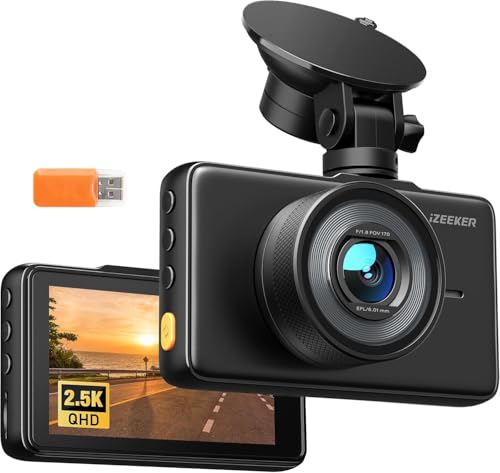 |
1440P QHD Car Camera | Price on Amazon |
| 2 |  |
4K+1080P 3 FHD Car Camera 5ghz Wifi and App Control | Price on Amazon |
| 3 |  |
GPS Tracking HDR Night Vision 24H Parking Mode Voice Control | Price on Amazon |
| 4 |  |
STARVIS 2K 5.8G Wifi-6 Up to 20MB/S App 24/7 Parking | Price on Amazon |
| 5 |  |
4K Full HD 3 Channel Dash Camera | Price on Amazon |
1440P QHD Car Camera
The iZEEKER stands out for renters who want a front-facing camera without a complicated multi-camera installation. Its 1440p QHD resolution records more detail than standard 1080p footage, while the 170-degree field of view helps include adjacent lanes and more of an intersection. That combination can be useful when an incident happens outside the center of the windshield view, although no wide-angle camera can capture every detail at every distance.
A 3-inch IPS screen and physical buttons make it possible to check settings and view saved clips directly on the device, without pairing a phone or relying on Wi-Fi. The included suction-cup mount is especially relevant for a rental: it can be attached and removed without the adhesive mounting approach used by some cameras. The compact setup is also easier to transfer between vehicles than a system with several cameras.
Loop recording overwrites the oldest unprotected footage when the card fills, and the G-sensor can lock a clip after a sudden vibration or collision. That helps preserve an incident file, but it is still sensible to manually lock important footage and copy it elsewhere promptly. A microSD card is not included; the camera supports 16GB to 128GB cards, so renters need to supply one before recording.
Parking monitoring and time-lapse recording require a separately purchased hardware kit. For a short rental, the standard cigarette-lighter adapter or a compatible USB power source is likely the simpler arrangement. The camera has a Type-C power input and a detachable charger, and the product data specifies a two-year warranty and support.
Pros
- 1440p recording, a 170-degree lens, and a 3-inch display.
- Suction-cup mounting and physical controls suit temporary use.
- Supports microSD cards from 16GB to 128GB.
Cons
- Memory card is not included.
- Parking monitoring requires a separate hardware kit.
- Records from the front camera rather than multiple directions.
My Opinion
This is the most practical starting point for a renter who wants a removable front camera and can provide a compatible memory card. Its ordinary driving setup is simpler than the more elaborate multi-view options below.
4K+1080P 3 FHD Car Camera 5ghz Wifi and App Control
For drivers who want more than a forward view XYGCACO s four-channel camera records the front rear left and right sides at the same time The front camera records in 4K while the three adjustable additional lenses record in 1080p That broad coverage can help document activity around the vehicle which may appeal to rideshare drivers or anyone carrying passengers but it also means positioning several lenses carefully.
The 3-inch IPS screen lets you see the camera’s view on the device, and a supplied 64GB card means there is no separate memory-card purchase needed to get started. Loop recording makes room by overwriting older footage, while the G-sensor locks clips after sudden movement or a collision. Because locked files take up space, checking and transferring important clips is still worthwhile.
For file access, dual-band 5GHz Wi-Fi and the Viidure app support viewing and downloading footage to an iOS or Android phone. GPS is listed as a feature, allowing location information to be associated with recorded driving data. These functions can be useful when you need to find and share a specific clip, but app pairing and camera settings add steps compared with a basic camera that uses on-device playback.
The suction-cup windshield mount is removable, while the rear-camera cable needs to be routed through the cabin. The package includes a pry tool for tucking wiring, but renters should avoid forcing trim or disturbing vehicle panels. Parking monitoring requires a separate hardwire kit, so the supplied car-power setup is the more straightforward choice for temporary use. The product data specifies an 18-month guarantee.
Pros
- Four simultaneous views, with 4K front and three 1080p cameras.
- Includes a 64GB memory card.
- Wi-Fi app access and GPS are listed.
Cons
- Multiple cameras and a rear cable take more setup effort.
- Parking monitoring requires a separate hardwire kit.
- App access depends on pairing a phone and camera.
My Opinion
Choose this model when coverage around the cabin matters more than a quick, minimal installation. Its supplied memory card and four views are useful, but a front-only camera is easier to move between rental vehicles.
GPS Tracking HDR Night Vision 24H Parking Mode Voice Control
The 70mai A810 Lite is a strong fit for renters who want detailed forward footage and a second view behind the vehicle It records 4K from the front and 1080p from the rear with wide-angle lenses intended to reduce blind spots HDR a large F1 55 aperture and night-vision processing are specified to help balance dim areas and bright headlights actual footage will still depend on conditions such as glare weather and.
Its 5GHz Wi-Fi 6 connection and app support allow a driver to preview, download, and share clips on a phone rather than removing the memory card. Built-in GPS records route, speed, and location information for playback, and voice control allows hands-free commands. These capabilities may make file handling easier during a trip, though they mean more features and settings to learn than a screen-and-button-only camera.
Parking options include impact-triggered recording and time-lapse recording, with low-voltage protection described in the supplied data. However, parking mode needs a separately purchased UP03, UP05, or UP06 hardwire kit. The optional 4G LTE remote access and vehicle tracking require the UP05 kit. Those add-ons make more sense for a vehicle the user controls long term than for most short-term rentals.
The camera is described as compact enough to sit discreetly behind a rearview mirror, and it uses a supercapacitor rather than a conventional battery. For a rental, plan to use the standard power arrangement for driving and avoid fuse connections unless the rental company expressly allows them. The product data lists an 18-month warranty and optional installation support in New York and California for a fee.
Pros
- 4K front and 1080p rear recording.
- Wi-Fi 6 app access, GPS, and voice control.
- Supercapacitor design and compact form.
Cons
- Parking mode requires a separate hardwire kit.
- 4G LTE remote access also requires an optional kit.
- More app and feature setup than a basic camera.
My Opinion
This is a capable choice for a renter who will use the rear camera and smartphone tools, especially on a longer trip. If you only need basic forward footage, its optional connected features may be more than you need.
STARVIS 2K 5.8G Wifi-6 Up to 20MB/S App 24/7 Parking
IIWEY’s N6 records four directions at once: front, rear, and both sides. It uses STARVIS 2K resolution, with listed viewing angles of 170 degrees at the front and rear and 150 degrees at the sides. Adjustable side cameras and infrared night vision can help capture activity around the cabin and vehicle, which may be useful for rideshare or fleet use. For an ordinary rental trip, that much coverage can be helpful, but it also creates more equipment and cables to position neatly.
A 128GB card is included, and loop recording overwrites older files as storage fills. The G-sensor can lock important footage after a collision or sudden braking. Built-in GPS records speed and route for playback through the app or a PC viewer. Wi-Fi 6 supports app preview and downloads, and the device also supports 2.4GHz Wi-Fi. The supplied information says Wi-Fi can be enabled by long-pressing the left button and automatically turns off after about five minutes.
This camera does not have a built-in battery and must be connected to vehicle power while in use Its included car charger is suitable for normal driving use continuous parking surveillance requires a separately sold IIWEY hardwire kit The listed parking options include impact.
Before using it, remove the protective film from the lens; the supplied instructions warn that leaving it on can affect image quality and cause red markings in footage. The rear camera also needs correct installation and configuration, and reversing guidelines can be disabled in settings if they are not needed. Product data lists 12 months of customer support.
Pros
- Four-camera coverage and included 128GB card.
- GPS and Wi-Fi 6 app access are included.
- Parking modes offer impact detection and time-lapse options.
Cons
- Requires continuous vehicle power during use.
- Parking surveillance needs a separate hardwire kit.
- Four cameras require more careful positioning than a front-only unit.
My Opinion
The N6 makes the most sense when four-direction coverage and the included card justify a more involved setup. For a rental, treat the hardwire kit as optional and use the included charger unless the vehicle owner approves another arrangement.
4K Full HD 3 Channel Dash Camera
This three-channel camera records the road ahead the cabin and the area behind the vehicle Its front camera is specified at 4K with a 170-degree view the interior camera records in 1080p with a 150-degree view and the rear camera records in 1080p with a 160-degree view That mix can suit a renter who wants to.
The camera uses an F/2.0 aperture, six-layer optics, WDR, and four infrared-light enhancements for night recording. Those are intended to support visibility in varied lighting, including inside a dim cabin, but they cannot guarantee that every plate or detail will be legible in all conditions. The supplied 32GB memory card supports loop recording, which overwrites older files once storage fills. Its G-sensor locks footage covering the first five seconds and last ten seconds of a detected collision, according to the product details.
A dedicated free app connects over the camera’s Wi-Fi and supports live viewing, downloads, and settings changes on iOS or Android. This can be convenient when you need to save a clip to your phone, but remember to confirm that the camera is recording and that the selected file has actually transferred before returning the rental.
Installation is described as plug-and-play: the front unit mounts near the center of the windshield and connects to power, while a cable runs to the rear camera. Parking mode records at a low frame rate after the engine is off, but requires an additional hardwiring kit that is not included. For temporary use, the supplied information supports treating the camera as a driving-only setup unless hardwiring is explicitly permitted.
Pros
- Front, cabin, and rear views in one system.
- Includes a 32GB card and app access.
- G-sensor locks a clip around a detected collision.
Cons
- Parking mode requires a separate hardwiring kit.
- Rear camera wiring adds installation work.
- Brand name and warranty details were not supplied.
My Opinion
This is worth considering when interior footage is as important as the road view. Since the available product details do not identify a brand or warranty, confirm the seller’s support and return terms before buying.
How I Selected These Dash Cams for Rental Cars
I prioritized cameras that could serve a real driving-recording purpose while accounting for the temporary nature of a rental. That means considering more than resolution: mounting style, number of cameras, included storage, power needs, and whether useful functions depend on extra hardware all affect how practical a setup will be.
The supplied product information gives specifications and package details but no ratings or customer-feedback evidence. I therefore did not use popularity, durability claims, or assumed owner satisfaction to rank the options. The ordering favors an accessible removable setup first, then broader or more connected systems for readers with specific coverage needs.
For most short rentals, easy mounting and simple power matter as much as video resolution. A feature that requires fuse access may be a poor fit even if it sounds useful on paper.
I also treated parking mode carefully. Several cameras list it, but the supplied data says it requires a separately purchased hardwire kit. That distinction matters: a camera’s ability to record while parked does not mean the function is ready to use with the included accessories.
How to Choose the Best Dash Cam for Rental Cars
Start by deciding what you need to document, then choose the simplest camera that covers that need. A front-facing model is easier to move and power than a four-channel system, while cabin or rear cameras can be valuable for rideshare work or trips where additional angles matter.
- Check rental rules: Confirm that a windshield-mounted camera and its power cable are allowed.
- Match coverage to your use: Choose front-only, front-and-rear, cabin, or all-around coverage deliberately.
- Plan power before buying: Prefer a removable charger setup over hardwiring for a temporary vehicle.
- Check included storage: Some models include a card; the iZEEKER does not.
- Consider file access: A screen, app, or both can change how easily you retrieve a clip.
Choose the right camera layout
A forward-facing camera is usually the least complicated option for a rental. It has fewer lenses to place and generally avoids routing a cable through the cabin. A rear camera can document events behind the vehicle, but its cable has to reach the back. Interior and side cameras offer more viewpoints, but they occupy more space and may need adjustment when the rental’s cabin layout differs from your own car.
Balance resolution with useful coverage
Higher resolution can preserve more image detail, but it does not guarantee that a distant plate will be readable or that an incident will be captured from the best angle. A wide field of view can include more of the scene, while multi-camera coverage captures directions a front lens cannot see. Think about the situations you want to document rather than selecting solely by the largest resolution number.
Know what parking mode requires
In the supplied product details, parking surveillance depends on a separate hardwire kit for each model that lists the function. That means added equipment and a connection to the vehicle’s electrical system. Unless the rental company allows this and the installation can be done without altering the car, consider parking mode a feature for a personally owned vehicle rather than a must-have for a short rental.
Account for memory and app access
Check whether a card is included, what capacity the camera supports, and how you will save a clip before loop recording overwrites it. App-based transfer is useful when you want a file on your phone, but pairing and downloads take time. On-device screens and controls can be simpler when you only need to confirm recording or find an event file.
Rental-Car Compatibility and Permission
A removable camera does not automatically mean every installation is permitted. Rental terms and vehicle-owner preferences vary, so check the agreement or ask the rental provider before attaching equipment. Keep the camera and cable clear of the driver’s direct view, and do not cover vehicle sensors, warning labels, or controls.
Check the available power outlet before the trip. The iZEEKER lists a cigarette-lighter adapter and USB connection options; other included power arrangements should be confirmed from the package contents before departure. A rental may have a different outlet location or a USB port that is not suitable for powering a camera, so do not assume every vehicle behaves the same way.
For rideshare use, also consider whether an interior camera could record passengers. Explain the camera’s presence and follow applicable platform rules and local requirements. The product specifications do not establish legal permission to record, so check the rules relevant to your location and use.
Temporary Mounting and Power Setup
Before attaching a suction cup, choose a stable area of glass that does not obstruct your view. Clean and dry the mounting spot, then position the camera so the road is framed without placing the device in the driver’s sightline. Avoid attaching it to textured surfaces or controls unless the product instructions explicitly support that location.
Use the included removable power connection for ordinary driving where available. Route the cable so it does not hang across the windshield, interfere with steering, or cross an airbag deployment area. If you cannot tuck the cable safely without prying trim or moving vehicle panels, leave it exposed only if it can be secured clear of the driver and controls; otherwise, reconsider the setup.
Take a moment to check the view from the driver’s seat and confirm that the camera powers on with the vehicle. On a rental, a basic setup that can be removed cleanly is generally preferable to a permanent-looking installation.
Memory Cards, Loop Recording, and Saving Footage
Loop recording is convenient because it keeps the camera recording when the card fills, but it also means older unprotected clips are overwritten. The iZEEKER supports a 16GB to 128GB microSD card, which is not included. The XYGCACO package includes 64GB, the IIWEY includes 128GB, and the three-channel camera includes 32GB. The supplied information does not specify a card for the 70mai, so check the package details before travel.
After a collision or other important event, use the camera’s emergency-lock function or button if it is safe to do so. G-sensors can lock footage after a detected impact or sudden movement, but they should not be treated as a substitute for confirming that the clip is protected. Transfer the file to a phone or another secure location as soon as practical.
Before a trip, verify that the camera recognizes the card and is recording. The product data does not provide a universal recommendation for card formatting intervals or card life, so follow the specific device instructions rather than assuming one schedule applies to every model.
Using Wi-Fi, GPS, and Camera Apps
App connections can make it easier to find and share footage without removing a card. The XYGCACO uses the Viidure app, while the 70mai, IIWEY, and three-channel camera list app access. Follow the specific camera’s pairing instructions and confirm that your phone is connected to the camera rather than relying on a connection name from memory.
For an important clip, download it to your phone and make sure the transfer completes before leaving the vehicle. GPS information can add route or location context on models that support it, but it is not a replacement for clear video or a careful written account of an incident. Voice control, where provided, can be convenient, but configure the camera while parked rather than experimenting with settings while driving.
Removing and Storing a Dash Cam at Rental Return
Allow the device to power down, then remove the camera and mount gently. Avoid pulling on the power cable or forcing a suction cup against the glass. Disconnect any removable cables without tugging vehicle trim, and check that no accessory or memory card has been left behind.
Wipe away fingerprints or light residue using a method suitable for the vehicle’s glass and the camera’s materials. Do not scrape the windshield with a hard object or use a cleaner that may damage a screen or lens. Pack the camera, mount, charger, and card together so they are ready for the next vehicle.
Before handing back the keys, take a quick look at the windshield, outlet area, and cable route. Returning the vehicle with the cabin as you found it helps avoid disputes about accessories or installation marks.
Maintenance and Troubleshooting During a Trip
Keep the lens clean and unobstructed, and check that the camera remains securely mounted after a bumpy drive or a change in temperature. If the image appears hazy, inspect the lens for dust or protective film. IIWEY specifically instructs users to remove its lens film before use because it can affect the recording.
If recording stops, check whether the camera has power, whether the memory card is seated, and whether the device displays an error. If an app will not connect, try the camera’s stated Wi-Fi procedure and use the on-device screen or controls where available. Avoid troubleshooting while driving; pull over safely first.
Do not assume a locked clip will remain protected indefinitely or that a camera will continue recording after power is disconnected. Confirm the event file and save it elsewhere before relying on it later.
Common Rental Dash Cam Mistakes to Avoid
Most avoidable problems come from treating a rental like a personally owned car or assuming a listed feature is ready without extra equipment. A careful setup is usually quicker than repairing a poor mount or discovering that an important clip was overwritten.
- Hardwiring without permission: Parking mode requires a separate kit on the models described here. Do not connect to a fuse panel unless the rental provider permits it.
- Blocking the driver’s view: Position the camera and cable so they do not obstruct visibility or interfere with vehicle controls.
- Forgetting a memory card: The iZEEKER does not include one, and the supplied details do not specify a card for the 70mai.
- Assuming looped footage is permanent: Save important clips before the camera overwrites older unprotected files.
- Forcing cables into trim: Do not pry panels or route wires through areas you cannot identify as safe.
- Leaving without checking the footage: Confirm the camera recorded and transfer any needed files before returning the car.
FAQS About Best Dash Cam for Rental Cars
Can I use a dash cam in a rental car?
Often a removable camera can be used without permanent installation, but rental policies vary. Check the agreement or ask the provider, and avoid hardwiring or altering the vehicle unless explicitly allowed.
What type of mount is practical for a rental?
A removable suction-cup mount, such as the one supplied with the iZEEKER, can be convenient because it does not require a permanent adhesive attachment. Place it where it will not block the driver’s view and remove it carefully at return.
Do these dash cams need to be hardwired?
The supplied product details describe included or standard power connections for ordinary driving. Hardwiring is required for the listed parking-surveillance functions, so it is not necessary for a basic driving-only setup, but check each camera’s package and instructions.
Which option is simplest for a short rental?
The iZEEKER is the most straightforward choice in this selection for a front-facing setup: it uses a suction-cup mount and physical controls. It does require a separate compatible microSD card.
Do I need a memory card before the trip?
Yes, unless the camera package includes one. The iZEEKER does not include a card and supports 16GB to 128GB. The XYGCACO, IIWEY, and three-channel model list included cards; the supplied 70mai details do not specify one.
Can I use parking mode in a rental?
The cameras that list parking mode require a separate hardwire kit for that function. Because hardwiring connects to the vehicle’s electrical system, confirm permission first; for many short rentals, driving-only recording is the more practical option.
Final Thoughts
The best dash cam for rental cars is the one that records the views you need without making the vehicle difficult to return in its original condition. For a simple removable setup, I recommend the iZEEKER 2.5K Dash Cam; for four-direction coverage, the XYGCACO 4-Channel 360° Dash Cam is the alternative. The 70mai A810 Lite 4K Front-and-Rear Dash Cam is my third pick for drivers who value app access, GPS, and high-resolution front footage.