
Choosing the best dash cam for seniors often comes down to more than video resolution. A straightforward setup, dependable recording, and footage that is easy to retrieve can matter just as much as advanced features.
My first choice is 32GB Card Included Mini Dashcam Screen-Free APP Control 160 Wide. Its included memory card also means it can be ready to record without an extra storage purchase.
My second choice is STARVIS 2 Sensor Free 128GB Card 4K Upscaled Front FHD. The included large-capacity card, GPS, and voice guidance add useful everyday convenience.
My third choice is 4K+1080P 3 FHD Car Camera 5ghz Wifi and App Control. Its screen and included card can make setup more approachable, though positioning several cameras takes extra care.
32GB Card Included Mini Dashcam Screen-Free APP Control 160 Wide

Below, I compare five options, explain the differences that matter in daily use, and offer practical guidance on choosing, installing, and maintaining a dash cam with confidence.
5 Best Dash Cam for Seniors Comparison
I selected these options for their relevance to everyday driving, useful recording and setup details, and the practical trade-offs shown in the available product information. Customer-feedback evidence was not provided, so I have not used ratings or customer-feedback volume to rank them; brand diversity was considered where the supplied information made it possible.
| # | Image | Product | Price on Amazon |
|---|---|---|---|
| 1 | |
32GB Card Included Mini Dashcam Screen-Free APP Control 160 Wide | Price on Amazon |
| 2 |  |
STARVIS 2 Sensor Free 128GB Card 4K Upscaled Front FHD | Price on Amazon |
| 3 |  |
4K+1080P 3 FHD Car Camera 5ghz Wifi and App Control | Price on Amazon |
| 4 |  |
4K Dual Dash Cam Front and Rear Free 64GB Card | Price on Amazon |
| 5 | 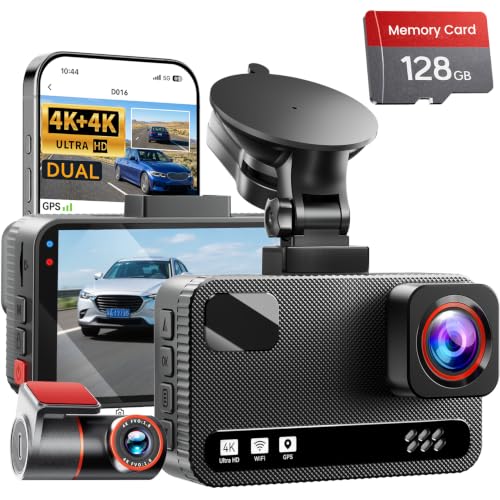 |
4K+4K Dual Dash Cam Front and Rear Free 128GB Card | Price on Amazon |
32GB Card Included Mini Dashcam Screen-Free APP Control 160 Wide
The galphi is a compact front-facing camera for drivers who would rather not have another screen in their line of sight. It records in 4K with a 160-degree viewing angle, while its small form factor is intended to keep the installation unobtrusive. That combination makes it a sensible pick for someone who wants the camera recording quietly in the background rather than displaying information during a drive.
There is no built-in screen, so setup and video access depend on the companion app. Its 5GHz Wi-Fi is specified for downloads up to 8MB per second, which can make transferring a clip to a phone less of a wait than slower connections. The app-based approach is convenient if the driver already uses a smartphone comfortably, but it may be less appealing to someone who prefers buttons and an on-device display.
A 32GB card is included, and loop recording overwrites older footage as storage fills. The G-sensor can lock footage after a sudden impact so it is less likely to be overwritten. For parking monitoring, the camera needs a separately purchased Type-C hardwire kit; without that installation, buyers should not expect the listed 24-hour parking mode to work. The camera supports cards up to 256GB, with Class 10, U3, and V30-or-higher recommended for expanded storage.
Pros
- Compact, screen-free design and 4K front recording.
- Includes a 32GB memory card and supports up to 256GB.
- G-sensor event locking and app-based video access.
Cons
- No built-in screen for checking footage or settings.
- Parking mode requires a separately purchased hardwire kit.
- Phone app use may be a hurdle for some drivers.
My Opinion
This is my leading choice for a driver who values a discreet installation and is comfortable using a phone to retrieve footage. Before buying, consider whether a screen-free camera fits your preferences and whether you want to arrange hardwiring for parked-car monitoring.
STARVIS 2 Sensor Free 128GB Card 4K Upscaled Front FHD
The ROVE R2-4K Dual records the road ahead and behind, making it a strong alternative for drivers who want more than front-facing evidence. Its front video begins at 2.5K and is upscaled to 4K, while the rear camera records at 1080p. That distinction matters: the front recording is not native 4K, and the rear camera has a different resolution. Still, two angles can help document an incident that a front camera alone might miss.
A 3-inch IPS screen gives the driver a way to see menus and check the camera without relying solely on an app. Voice guidance can provide audible prompts, while built-in GPS records route, location, and speed information on video. Its STARVIS 2 sensor, wide front aperture, and HDR are intended to improve low-light capture, useful for drivers who regularly travel at dusk, at night, or through tunnels.
The package includes a 128GB card and the listed installation accessories, including a rear-camera cable, clips, and trim tool. Wi-Fi supports phone access, with downloads specified up to 20MB per second. Parking mode offers time-lapse, motion-detection, and collision-detection options, but requires a separate hardwire kit. The camera supports cards up to 1TB, though using a larger card means buying one separately and checking that it meets the device’s requirements.
Pros
- Front and rear recording, 3-inch display, and GPS.
- Includes a 128GB card and useful installation accessories.
- Voice guidance and three parking-mode options.
Cons
- Front 4K is upscaled from 2.5K; rear recording is 1080p.
- Parking mode requires a separate hardwire kit.
- Two-camera wiring takes more installation effort than a front-only unit.
My Opinion
This is a well-rounded pick for someone who wants a screen, rear coverage, and GPS details in one setup. Its included accessories are helpful, but buyers should plan for routing the rear cable and arranging a hardwire kit if parked-car monitoring is important.
4K+1080P 3 FHD Car Camera 5ghz Wifi and App Control
For drivers who want to capture more than the road ahead and behind, the XYGCACO uses four channels to record the front, rear, left, and right sides of the vehicle. Its front camera records at 4K, while three adjustable cameras record at 1080p. A 3-inch IPS screen makes the multiple views easier to check on the device, although the extra coverage comes with more camera positioning and cable management than a basic dash cam.
The camera includes a 64GB card, loop recording, and a G-sensor that locks footage after a detected jolt or collision. Its app connects through 5GHz Wi-Fi, and GPS can help associate a recording with a route or location. For drivers who find it reassuring to see more of the vehicle’s surroundings captured, those features may be worth the additional setup time.
Night recording uses WDR, an F1.6 aperture, and eight infrared lights. The product information says the front sensor monitors objects within roughly 3–4 meters in parking mode and can start a one-minute recording; the parking feature requires a separately purchased hardwire kit. As with any multi-camera installation, check that the lenses have clear views and that none of the cameras or wires block the driver’s sightlines or interfere with vehicle controls.
Pros
- Four-channel coverage for front, rear, left, and right views.
- Includes a 64GB card, a 3-inch screen, and GPS.
- Adjustable cameras and night-recording features.
Cons
- More cameras and cables mean a more involved installation.
- Only the front camera records at 4K; the other three are 1080p.
- Parking mode requires a separate hardwire kit.
My Opinion
The XYGCACO suits a driver who puts all-around coverage ahead of simplicity. Its display and included card are practical, but anyone who wants a quick, minimal installation may be better served by a single-camera model.
4K Dual Dash Cam Front and Rear Free 64GB Card
The supplied product information does not identify a brand, so this model is best distinguished by its stated capabilities: 4K front recording and 1440p rear recording. Its front lens has a 170-degree viewing angle and its rear lens a 150-degree angle, offering two useful perspectives for drivers who want more context than a front-only camera can provide. A 3-inch IPS screen and voice guidance also offer ways to interact with the camera without depending entirely on a phone.
For lower-light driving, the camera uses a large f/1.5 aperture and WDR. Built-in GPS can record location and speed information, while the 5.8GHz Wi-Fi connection supports phone access and downloads specified up to 20MB per second. These features may help when finding and saving a particular clip, though using the app still requires a compatible smartphone and some familiarity with connecting devices over Wi-Fi.
A 64GB card is included, but the product information notes that approximately 40GB remains available for video because some storage is reserved for system use. Loop recording overwrites older files as the card fills, while the collision sensor can lock event footage. Time-lapse parking recording is available with a separately purchased hardwire kit. Buyers should confirm that a hardwire installation is appropriate for their vehicle before relying on parking mode.
Pros
- 4K front and 1440p rear recording with wide-angle lenses.
- Built-in GPS, a 3-inch screen, and voice guidance.
- Includes a 64GB card and supports cards up to 1TB.
Cons
- Brand name is not identified in the supplied product information.
- About 40GB of the included card is available for video.
- Parking mode requires a separate hardwire kit.
My Opinion
This option offers useful front-and-rear resolution and an on-device screen, but the missing brand information is a real point to weigh when comparing support and ownership expectations. Check the seller’s current details and compatibility information before purchase, especially if you plan to hardwire it.
4K+4K Dual Dash Cam Front and Rear Free 128GB Card
This product is also listed without a brand name in the supplied information. Its defining feature is 4K recording from both the front and rear cameras, with wide viewing angles of 170 degrees in front and 160 degrees at the rear. That makes it a relevant choice for someone who wants matching high-resolution recording at both ends of the vehicle rather than a sharper front feed paired with a lower-resolution rear camera.
A 3-inch IPS screen provides an on-device way to navigate or check the system, and the camera also offers GPS, voice guidance, emergency video locking, and app access over dual-band Wi-Fi. Downloads are specified at up to 20MB per second. These functions can make it easier to locate, save, or share footage, but the app and GPS details may not be necessary for a driver who primarily wants automatic recording.
The included 128GB card provides more starting capacity than the 64GB cards supplied with some alternatives. A collision sensor can trigger a one-minute locked clip during a parking event, while time-lapse parking mode supports longer monitoring. That feature requires a separate hardwiring kit. The product information also describes materials intended to tolerate a wide temperature range, but does not provide exact operating limits, so it is sensible to check current specifications if the vehicle experiences extreme heat or cold.
Pros
- 4K recording from both front and rear cameras.
- Includes a 128GB card, GPS, and a 3-inch screen.
- App access, voice guidance, and event locking.
Cons
- Brand name is not identified in the supplied product information.
- Parking mode requires a separate hardwiring kit.
- More advanced features may be unnecessary for someone seeking a basic camera.
My Opinion
This is a capable-looking option on paper for a buyer who prioritizes high-resolution front and rear footage. I would confirm the seller’s support and vehicle compatibility details before choosing it, since its brand is not identified in the supplied information.
How I Selected These Best Dash Cams for Seniors
I compared the five products using details that could influence everyday ownership: whether a camera records one or multiple directions, whether it has a screen, what storage is included, how footage can be accessed, and whether parking mode needs extra hardware. I also considered how much setup each option may involve, since a camera that is difficult to install or operate may not be the best fit for every driver.
Available product information included no customer ratings or feedback counts. I therefore did not treat popularity, satisfaction, or reliability as established facts, and I did not claim to test these cameras myself. Where the supplied details did not name a brand, I have made that limitation clear rather than guessing.
For many drivers, the best starting point is the camera they can set up, leave recording, and access when needed. A screen and simple local controls may matter more than extra channels or the highest listed resolution.
What influenced the order
The galphi ranked first for its compact screen-free design, included card, and straightforward front-camera role. The ROVE came next for combining front and rear recording with a screen, GPS, voice guidance, and an included 128GB card. XYGCACO ranked third for its broad four-channel coverage, which is useful but more involved to position and wire. The final two options offer strong dual-camera specifications, but the supplied information does not identify their brands.
Resolution numbers do not tell the whole story: one product’s “4K” front feed is explicitly upscaled from 2.5K, while other models list native 4K recording. Compare the stated recording resolution for each camera before deciding.
How to Choose the Best Dash Cam for Seniors
Start with the driving situation and the features the driver will actually use. A simple front camera can be less complicated than a multi-camera system, while a screen, voice prompts, or rear coverage may be worth the added setup for someone who wants them.
- Choose a display or screen-free design based on how the driver prefers to check settings.
- Look at each camera’s actual front and rear resolution, not just a headline resolution.
- Confirm whether a memory card is included and how much usable storage it offers.
- Budget for a compatible hardwire kit if parked-car monitoring is a priority.
- Consider who will install the camera and help retrieve footage if needed.
Choose the coverage that fits the car
A front-only camera has fewer parts and usually means less wiring. Front-and-rear systems add a second view, while a four-channel setup can record the sides too. More coverage may be useful, but it also means more camera placement decisions and cables. Ask whether someone can assist with installation if routing wires is likely to be difficult.
Consider the screen and controls
A built-in screen can make it easier to see a menu or confirm that a camera is recording. A screen-free model may be less distracting and more discreet, but it shifts setup and clip access to a phone app. If the driver does not like connecting devices or navigating apps, prioritize clear on-device controls or arrange a family member’s help with setup.
Understand resolution and low-light claims
Check the specified resolution for every camera in a multi-channel system. A product may list a 4K front feed while recording at a lower resolution from the rear or sides; one option here describes its front video as upscaled. Aperture and WDR or HDR are intended to help with changing light, but no camera guarantees that every license plate will be readable in every condition.
Plan for storage and parking use
Loop recording helps a camera keep recording by replacing older files, while an event sensor can protect selected clips from routine overwriting. Check the included card’s capacity and whether the product lists a maximum supported size. Parking monitoring is a separate consideration: the models here require a hardwire kit for that feature, so factor in the extra purchase and installation before choosing.
Setup Tips for a First Dash Cam
Begin with the camera’s instructions and identify the power connection, memory-card slot, and mounting location before sticking anything to the windshield. If a trusted family member or installer is helping, ask them to show the driver how to confirm that recording has started and how to retrieve one sample clip.
Position the camera carefully
Mount the front camera where it has a clear view of the road without obstructing the driver’s view. Clean the glass at the mounting point and check that the lens is level and aimed appropriately. For a rear or side camera, confirm the view before securing its cable or final mount.
Keep wiring tidy and safe
Use the included clips or trim tool only as directed, and keep cords away from pedals, airbags, and moving parts. If the installation requires removing trim, routing a rear cable, or connecting a hardwire kit, ask a qualified installer for help if unsure. Do not improvise a vehicle electrical connection.
First-Day Checks and Routine Use
After installation, turn on the vehicle and verify that the camera powers up and records. Make a short test recording, then check that the image is properly aimed and that sound or voice prompts behave as expected. For a phone-connected model, practice opening the app and saving a clip before an incident makes the process urgent.
Learn which indicator or menu confirms recording, and identify how event footage is locked. If the camera has GPS or speed stamping, check the settings and decide whether those details should appear on saved video. A simple written reminder stored with the vehicle documents can help a driver or family member remember the basic steps.
Memory Card Compatibility and Clip Storage
Use a card type and capacity supported by the particular camera. The galphi information recommends Class 10, U3, and V30 or higher for an expanded card; other models state different maximum capacities. A card that physically fits is not automatically a suitable choice, so check the device’s requirements before buying a replacement.
Remember that a card’s printed capacity is not necessarily all available for recordings. One model reserves part of its included 64GB card for system operations, leaving approximately 40GB for video. Because loop recording replaces old clips, save important footage to a phone or computer promptly and verify that the saved file opens.
Using an App Without Making Driving More Complicated
Connect to the camera and adjust settings while parked, not while driving. Many dash cams use their own Wi-Fi connection to communicate with a phone, so the phone may temporarily use that network instead of the home or mobile internet connection. Follow the camera’s app instructions and avoid changing settings on the road.
If the driver would rather not use an app, choose a model with a screen and straightforward controls, or ask a trusted helper to manage downloads. App-based access can be convenient, but it should not become a requirement for routine driving. The camera should be mounted and recording before the trip begins.
Parking Mode: What to Know Before Installation
Parking mode is not necessarily active just because it appears in a feature list. The models in this comparison require a separately purchased hardwire kit for parked-car monitoring. Confirm the correct kit and installation instructions for the selected camera, and consider professional installation if the connection involves the vehicle fuse box or other electrical work.
Parking features also differ: some systems use time-lapse recording, while others detect motion or a collision. Read the camera’s instructions to understand how it starts recording and protects an event clip. If you do not need monitoring while parked, ordinary vehicle-powered recording may be a simpler setup.
Maintenance and Troubleshooting Basics
Keep the camera lens and the area of windshield in front of it clean using a soft, appropriate cloth. Check periodically that the mount remains secure, the camera still points toward the road, and cables have not come loose. After cleaning the windshield or moving the mount, confirm the image again.
If recording stops, check that the camera receives power and that the memory card is seated correctly. Guide the device’s instructions for card formatting and error messages rather than deleting files at random. If a card is damaged or the camera cannot record reliably, replace it with a compatible card and verify operation with a short test clip.
Common Dash Cam Mistakes to Avoid
A few preventable errors can make a camera less useful when footage is needed. Keep setup simple, confirm the camera is recording, and take time to learn how to preserve an important clip.
- Do not assume parking mode works without the required hardwire kit.
- Do not place the camera or cables where they obstruct sightlines or controls.
- Do not assume every camera in a multi-channel system records at the same resolution.
- Do not rely on a G-sensor to lock every useful event; save important footage yourself.
- Do not wait until an emergency to learn the app, screen, or clip-download process.
FAQS About Best Dash Cam for Seniors
What should seniors look for in a dash cam?
Prioritize ease of setup, clear controls, dependable automatic recording, and a convenient way to retrieve footage. A screen, voice guidance, or family help with the app may be useful depending on the driver’s preferences.
Is a screen-free dash cam a good choice for seniors?
It can suit someone who wants a compact, unobtrusive camera and is comfortable using a phone app. A driver who prefers to check settings directly on the device may find a model with a built-in screen easier.
Do these dash cams record while the car is parked?
The listed parking modes require a separately purchased hardwire kit. Check the particular model’s instructions and arrange suitable installation before relying on parked-car monitoring.
Is front-and-rear recording worth it for an older driver?
It can provide footage from behind the vehicle as well as ahead, but it adds a camera and wiring to install. A front-only model may be a better fit for someone who values simplicity over broader coverage.
Can a dash cam automatically save footage after a collision?
Several models list a G-sensor or collision sensor that can lock an event clip. The camera’s instructions explain how the feature works; important footage should still be saved separately as soon as practical.
Does a dash cam need a smartphone?
Not always. Some models rely on an app for video access, while those with a screen also offer on-device menus. Check the control and playback method before buying if the driver prefers not to use a smartphone.
Final Thoughts
The best dash cam for seniors is the one that matches the driver’s comfort with setup and controls. I’d start with the galphi 4K Front Dash Cam for a discreet, simple front-camera approach, choose the ROVE R2-4K Dual Dash Cam for screen-based front-and-rear recording, or consider the XYGCACO 4-Channel 360° Dash Cam when broad coverage is the priority.