
Choosing the best dash cam means balancing image quality, camera coverage, installation difficulty, storage, parking protection, and the way you actually drive. A simple front-facing camera may be enough for commuting, while rideshare drivers, families, and owners who park outdoors may benefit from front, rear, cabin, or side coverage.
My first choice is REDTIGER F7NP 4K Dual Dash Cam Front and Rear. Its included memory card and 24/7 parking options make it a well-rounded starting point for everyday drivers.
My second choice is ROVE R2-4K Dual Dash Cam Front and Rear. It uses an upscaled 4K front image rather than native 4K, but its GPS data, 5.8GHz Wi-Fi, installation accessories, and parking choices create a convenient ownership experience.
My third choice is IIWEY N5 4-Channel Dash Cam. Its broad view is useful for rideshare work and passenger monitoring, although it requires the original cigarette-lighter charger and does not include GPS.
This guide compares all 10 options by camera coverage, resolution, night performance, connectivity, storage, parking protection, and ownership requirements. It also explains how to choose the right configuration, install it cleanly, manage memory cards, avoid common mistakes, and decide which features matter most for your vehicle.
10 Best Dash Cam Comparison
I selected these products for their direct relevance to dash camera shopping, the usefulness of their supplied specifications, the practical differences between front-only, dual, three-channel, and four-channel systems, and available customer-feedback evidence. The list also includes several established brands alongside newer choices so that buyers can compare convenience, coverage, and feature depth rather than focusing on one style of camera.
| # | Image | Product | Price on Amazon |
|---|---|---|---|
| 1 |  |
REDTIGER F7NP 4K Dual Dash Cam Front and Rear | Price on Amazon |
| 2 |  |
ROVE R2-4K Dual Dash Cam Front and Rear | Price on Amazon |
| 3 | 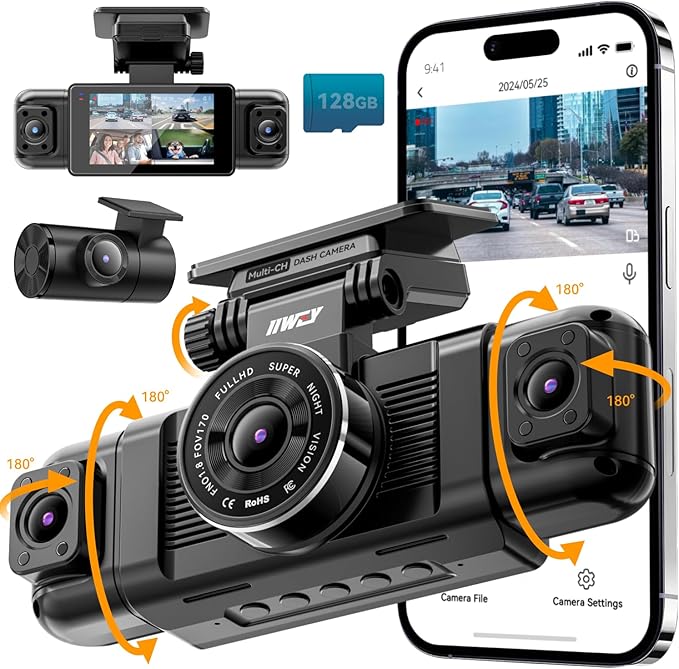 |
IIWEY N5 4-Channel Dash Cam | Price on Amazon |
| 4 |  |
VIOFO A229 Plus Dual Dash Cam Front and Rear | Price on Amazon |
| 5 |  |
ZMOPO View 4-Channel Dash Cam | Price on Amazon |
| 6 |  |
Garmin Dash Cam Mini 3 Ultracompact 1080p HD Dash Cam | Price on Amazon |
| 7 |  |
VANTRUE N4 Pro S 4K 3-Channel Dash Cam | Price on Amazon |
| 8 |  |
BOTSLAB G980H 4-Channel 360-Degree Dash Cam | Price on Amazon |
| 9 |  |
Aputeta 4K+4K Dual Dash Cam Front and Rear | Price on Amazon |
| 10 |  |
TERUNSOUl 4K+4K Dual Dash Cam Front and Rear | Price on Amazon |
REDTIGER F7NP 4K Dual Dash Cam Front and Rear
The REDTIGER F7NP puts its strongest emphasis on detailed road coverage. The front camera records in 4K while the rear camera records in 1080P, giving drivers a sharper forward view and useful evidence behind the vehicle. Its 170-degree front lens and 140-degree rear lens help include adjacent traffic without requiring several separate cameras.
For difficult lighting, the combination of a Sony STARVIS 2 sensor, an F1.5 aperture, a six-layer optical lens, WDR, and HDR should help balance bright headlights, dark roads, and uneven exposure. That makes this model a sensible match for commuters who drive after sunset or travel through areas where license plates and road signs may be difficult to capture. Built-in GPS adds route, speed, and location data to the recorded footage.
The integrated 5.8GHz Wi-Fi connection is especially useful when a clip needs to move quickly to a phone. The included memory card also lowers the number of purchases needed before installation. Loop recording overwrites older unlocked files, while the G-sensor protects important event clips. Time-lapse and impact-based parking modes provide two approaches to monitoring a parked vehicle.
Pros
- 4K front and 1080P rear recording with STARVIS 2 imaging.
- Fast 5.8GHz Wi-Fi, GPS data, and an included memory card.
- Supercapacitor construction offers better heat tolerance than a conventional battery design.
- 18-month guarantee and support are supplied.
Cons
- The rear camera is limited to 1080P rather than matching the front resolution.
- Parking protection may require careful installation and appropriate vehicle power planning.
- The manufacturer advises using original or officially recommended cables and accessories.
My Opinion
This is the strongest all-around pick for a driver who wants dual-camera coverage, high front detail, phone connectivity, and useful parking functions in one package. Follow the installation instructions closely, use the supplied accessories, and confirm that the included card is seated correctly before relying on the camera for important trips.
ROVE R2-4K Dual Dash Cam Front and Rear
The ROVE R2-4K Dual is a feature-rich front-and-rear system, but its “4K” front output deserves a close explanation. The front camera records at 2.5K and intelligently upscales that image to 2160P for playback, so buyers should not confuse it with a native 4K sensor. Even so, the underlying QHD capture can provide a detailed view of normal traffic, while the rear camera records in 1080P.
A Sony STARVIS 2 IMX675 sensor, F1.5 front aperture, F1.8 rear aperture, and HDR are aimed at improving low-light footage. In everyday use, those specifications matter most for drivers who want clearer details around signs, vehicles, and possible incidents after dark. The 3-inch IPS screen makes initial positioning and menu changes easier than on a camera that depends entirely on a phone.
ROVE adds built-in GPS for route, speed, and location stamps, plus a computer player for examining that information later. The 5.8GHz and 2.4GHz Wi-Fi support gives phone owners a quick way to transfer clips. The included 128GB card, trim tool, cable clips, mounts, cleaning wipe, and dual USB charger make the box unusually complete for first-time installation.
Parking protection is flexible, with time-lapse, motion detection, and collision detection options. However, the 24-hour parking modes require a hardwire kit that is not included. That extra installation step is important for anyone expecting monitoring while the ignition is off.
Pros
- Detailed 2.5K capture that is upscaled for 4K playback.
- 1080P rear camera, GPS, HDR, and fast dual-band Wi-Fi.
- Free 128GB card and a generous installation accessory package.
- Three parking-mode choices are available with the required hardwire kit.
Cons
- The front image is upscaled rather than native 4K.
- The hardwire kit for parking mode is sold separately.
- Dual-camera wiring requires time to route cleanly through the vehicle.
My Opinion
ROVE is a strong second choice for buyers who value a complete package and easy access to footage more than native 4K capture. It suits a new owner who wants the card, tools, display, GPS, and phone connection included, but the parking setup should be budgeted and planned separately.
IIWEY N5 4-Channel Dash Cam
The IIWEY N5 takes a different approach from most dual-camera systems by recording four directions front rear sides and the interior Depending on the selected mode the front channel can record at 2 5K while the other three record at 1080P or all four can operate at 1080P This broad coverage is useful for rideshare drivers families and.
Its 3-inch IPS display allows the driver to check framing without immediately opening an app. A 128GB microSD card is already installed, and the camera supports cards up to 256GB. Loop recording begins when the engine starts and replaces the oldest unprotected files when storage becomes full. A G-sensor locks clips after a sudden impact so an incident is less likely to disappear through normal recording.
Built-in Wi-Fi connects to the iiwey or viidure app on Android and iOS devices. The connection requires a long press of the left-arrow button, and Wi-Fi switches off after more than five minutes without an app connection to help manage heat. There is no GPS, so footage will not contain route, speed, or location information.
Setup has two especially important limitations. The N5 must use the original cigarette-lighter charger rather than a generic USB or USB-C power source, and the rear camera must be wired to the front unit. Its supercapacitor also means it needs continuous external power while operating. The optional 24-hour parking modes require a separately sold hardwire kit.
Pros
- Four-channel coverage includes front, rear, left, right, and interior views.
- 2.5K front option plus three 1080P channels.
- Included 128GB card with support for up to 256GB.
- Wi-Fi app control and impact-locked event files.
Cons
- No GPS function is included.
- The original cigarette-lighter charger is required.
- Four-camera wiring is more involved than a front-only or dual setup.
- The parking-mode hardwire kit is sold separately.
My Opinion
This is the better fit for maximum interior and side visibility rather than route data or the simplest installation. Confirm that the supplied charger can remain connected, plan the rear-camera cable path before mounting anything, and choose this model only if its four-view coverage solves a real need.
VIOFO A229 Plus Dual Dash Cam Front and Rear
The VIOFO A229 Plus focuses on balanced image quality from both ends of the vehicle. It uses two Sony STARVIS 2 IMX675 sensors and records front and rear footage at 1440P, creating a more evenly matched dual-camera system than models that pair a high-resolution front camera with a basic rear unit. For drivers who frequently need evidence from behind as well as ahead, that consistency is valuable.
Dual-channel HDR is intended to preserve details in fast-moving scenes and challenging contrast. The supplied specifications also point to improved light sensitivity and reduced motion blur compared with older STARVIS technology. Those advantages matter most during night driving, changing weather, and situations where headlights or bright skies make ordinary footage difficult to interpret.
The A229 Plus includes hands-free voice control with 12 commands. A driver can use spoken commands to lock a clip, take a photo, switch Wi-Fi on, or show a particular camera without reaching toward the screen. Notifications for settings changes and memory-card errors can also make routine ownership easier. Its quad-mode GPS records time, speed, and location using GPS, BEIDOU, GALILEO, and GLONASS positioning systems.
Fast 5GHz Wi-Fi supports phone transfers, while three parking options provide more flexibility: buffered event detection, time-lapse recording, and low-bitrate recording. Buyers should still plan the power connection needed for parking monitoring and verify that the memory card is suitable for sustained recording, since high-resolution dual-channel footage can use storage quickly.
Pros
- Matching 1440P front and rear recording.
- Dual STARVIS 2 sensors and HDR for difficult lighting.
- Voice commands, error notifications, GPS, and 5GHz Wi-Fi.
- Three parking-mode approaches, including buffered event detection.
Cons
- It does not include the broad four-channel coverage of some competitors.
- High-resolution dual recording makes dependable memory-card selection important.
- Parking functions require appropriate continuous power planning.
My Opinion
The A229 Plus is a thoughtful choice for buyers who prefer genuine, evenly matched front-and-rear detail over headline resolution. Its voice control and positioning data add convenience, while the three parking modes give experienced owners room to choose a recording style that fits their vehicle and power setup.
ZMOPO View 4-Channel Dash Cam
The ZMOPO View is built for drivers who want a four-camera perspective without relying on a separate interior camera alone Four 1080P channels capture the front rear left and right sides at the same time and adjustable front cameras can be positioned to emphasize the road or the cabin That arrangement is particularly appealing for rideshare work passenger transport and vehicles that spend.
Night visibility comes from infrared lights and WDR processing. The infrared lighting is useful for the interior, while WDR helps manage the difference between bright and dark areas in the outside view. Since each channel is Full HD rather than a higher-resolution 2K or 4K feed, the main advantage is comprehensive coverage rather than maximum detail in a distant license plate.
Time-lapse recording compresses long monitoring periods to reduce memory use. Parking mode requires an optional ACC hardwire kit, and the included 128GB card supports a convenient start. Loop recording deletes the oldest unlocked material when the card fills, while incident locking helps preserve footage associated with a collision.
One unusual buying detail is the GPS arrangement. The camera supports GPS information, but the GPS logger must be purchased separately. Without that accessory, buyers should not expect speed, route, and location data in the same way as a system with built-in GPS. The 5GHz Wi-Fi connection supports app transfers, and a 24-month product assistance period adds useful support for setup questions.
Pros
- Four simultaneous 1080P views covering front, rear, left, and right.
- Adjustable camera positioning can support interior monitoring.
- Infrared lighting, WDR, Wi-Fi, loop recording, and a 128GB card.
- 24-month product assistance period is supplied.
Cons
- The GPS logger is sold separately rather than built in.
- All channels record at 1080P, not 2K or 4K.
- Parking monitoring requires an optional ACC hardwire kit.
My Opinion
This model makes sense when coverage around the sides and inside the vehicle matters more than high-resolution forward detail. Factor in the separate GPS logger and hardwire kit if those functions are important, and mount the adjustable cameras carefully so the extra angles capture useful areas instead of dashboard or seatback space.
Garmin Dash Cam Mini 3 Ultracompact 1080p HD Dash Cam
The Garmin Dash Cam Mini 3 is the compact choice in this group. Its key-sized body can sit discreetly on the windshield, which is helpful for drivers who dislike large screens or bulky equipment in their line of sight. It records 1080P HD video through a 140-degree lens and automatically saves footage connected with detected incidents.
Garmin’s Clarity polarizer is intended to reduce windshield glare. That can make ordinary daylight footage easier to see, especially when the dashboard reflects onto the glass. The resolution is lower than the 2K and 4K options listed above, so this camera is better suited to buyers who prioritize discretion and simple forward recording over the greatest possible distant detail.
Voice control lets users save video or start and stop audio recording using supported English, German, French, Spanish, Italian, and Swedish commands. The Garmin Drive app provides access to saved clips, while the online Vault can store important video and simplify viewing or sharing. The convenience comes with conditions: higher-end Vault features require a paid subscription and an active Wi-Fi connection.
Parking Guard can notify a phone when an event is detected but it also requires a paid Vault subscription constant power active Wi-Fi and the compatible smartphone app Those requirements make the Mini 3 most attractive to owners who already value Garmin s connected ecosystem and can provide dependable parked-vehicle power Buyers should also check.
Pros
- Extremely small design that is easy to keep discreet.
- 1080P video, 140-degree field of view, and glare-reducing polarizer.
- Voice commands and Garmin Drive app support.
- Optional cloud features can simplify remote access and sharing.
Cons
- 1080P resolution is less detailed than the higher-resolution alternatives.
- Vault and Parking Guard functions require a paid subscription and additional connectivity conditions.
- Some jurisdictions may regulate or prohibit use of the device.
My Opinion
The Mini 3 is the sensible pick for a discreet, front-facing camera rather than a full vehicle-surveillance system. It is especially appealing if small size and Garmin app integration matter more than rear coverage, but buyers should understand the recurring-subscription and Wi-Fi requirements before choosing connected parking features.
VANTRUE N4 Pro S 4K 3-Channel Dash Cam
The VANTRUE N4 Pro S brings three-channel coverage to drivers who want a high-detail front view a rear view and an interior view It records at 4K front 1080P cabin and 2 5K rear at 30 frames per second The wide-angle combination covers the road passenger area and traffic behind the vehicle making it a strong.
The rear camera rotates 360 degrees, so it can be aimed toward traffic behind the vehicle or repositioned to monitor the trunk area. Owners can also switch to a front-and-rear mode that uses 4K and 2.5K recording while reducing heat by 30 percent and saving power compared with triple recording. That flexibility is useful when cabin coverage is not needed for every trip.
Triple STARVIS 2 sensors and HDR are paired with the company’s PlatePix technology for difficult nighttime and backlit scenes. The supplied information claims improved license-plate accuracy, but results will still depend on speed, distance, weather, windshield condition, and lighting. Built-in GPS, 5GHz Wi-Fi, voice control, and buffered parking capture add practical convenience.
All three cameras remain active in parking mode, with motion and impact events saved from 10 seconds before the event. The camera supports cards up to 1TB, but no card is included. VANTRUE recommends an industrial-grade U3 microSD card, so buyers should avoid treating a low-cost general-purpose card as an equivalent substitute.
Pros
- 4K front, 2.5K rear, and 1080P cabin recording.
- Rotating rear camera and a front-and-rear mode for lower heat and power use.
- Triple STARVIS 2 sensors, HDR, GPS, Wi-Fi, and voice control.
- Buffered parking footage includes 10 seconds before an event.
Cons
- No microSD card is included.
- Three-channel recording can create greater storage and power demands.
- Maximum coverage requires more installation work than a dual camera.
- A suitable industrial-grade U3 card should be purchased separately.
My Opinion
This is the most compelling option for rideshare and cabin-monitoring use when high-resolution front footage is still important. Buy the recommended type of memory card before installation, and consider the front-and-rear mode for trips where interior recording is unnecessary and lower heat or power use is preferable.
BOTSLAB G980H 4-Channel 360-Degree Dash Cam
The BOTSLAB G980H records four channels simultaneously using a 170-degree front camera two 120-degree side cameras and a 150-degree rear camera That arrangement is aimed at minimizing blind spots around the vehicle making it attractive to drivers who want more than front and rear evidence The supplied description refers to 3K recording and emphasizes nighttime license-plate visibility while the wide combination of angles provides the main.
A 3.18-inch touchscreen makes setup and playback more approachable for beginners. The four-way split-screen view lets the owner see all camera angles together, and voice commands can start recording or take photos without reaching toward the display. A built-in GPS module stores speed, location, and route information, with DVplayer software available for route playback on a computer.
Parking protection has three choices: time-lapse recording, a sentry mode that responds to movement within five meters, and collision detection that locks an event. These functions require a hardwire kit. An eight-second pre-recording function also preserves footage before a detected collision or abnormal vibration, which can provide more context than an event clip that begins only at impact.
The package includes a 128GB card, and 5.8GHz Wi-Fi is intended to speed phone transfers. Static-cling mounts can simplify repositioning and avoid adhesive residue. Because four simultaneous feeds create more cable, screen, and storage considerations, installation should begin with a clear plan for each camera’s viewing angle and the route of every cable.
Pros
- Four-channel coverage with front, rear, and two side cameras.
- Touchscreen, voice control, GPS, Wi-Fi, and a 128GB card.
- Three parking modes and eight-second pre-event protection.
- Static-cling mounts can reduce adhesive residue during installation.
Cons
- The hardwire kit required for parking modes is sold separately.
- Four-camera installation takes more planning than a dual system.
- Multi-channel recording can fill storage faster than front-only recording.
My Opinion
BOTSLAB is a practical choice when side coverage, a built-in screen, and broad control options are high priorities. It suits owners who are willing to spend extra time on cable routing and parking power, while the included card and static-cling mounting approach make the initial setup less intimidating.
Aputeta 4K+4K Dual Dash Cam Front and Rear
Aputeta’s main selling point is matching 4K recording from both the front and rear cameras. The front lens covers 170 degrees and the rear lens covers 160 degrees, giving the system broad dual-direction coverage without dropping the rear channel to 1080P. For buyers who frequently need detailed footage behind the vehicle, that balance is more important than a high-resolution front camera alone.
The front F1.5 aperture, five-element optical lens, starlight-level sensor, and WDR processing are aimed at maintaining clearer contrast in poor lighting. These features can help with night driving and bright-to-dark transitions, although no camera can guarantee readable plates when a vehicle is too far away, moving quickly, or obscured by glare, rain, or a dirty windshield.
Built-in dual-band Wi-Fi allows phone users to preview, download, and manage clips through the app at stated speeds of up to 20MB per second. GPS positioning adds speed and location information to the footage. A 128GB card is included, and loop recording automatically replaces older material while the G-sensor locks important collision clips.
Time-lapse parking monitoring and collision-triggered recording are available when the camera receives the necessary parked-vehicle power. The hardwiring accessory is required and sold separately, so buyers should not assume that the included card and cameras alone provide 24-hour protection. A stated 18-month coverage period and 24/7 support may be reassuring, particularly because the customer-feedback volume is smaller than that of several higher-ranked choices.
Pros
- True 4K recording from both front and rear cameras.
- Wide 170-degree and 160-degree viewing angles.
- Large-aperture night hardware, WDR, GPS, and fast Wi-Fi.
- Included 128GB card and 18-month coverage.
Cons
- Parking protection requires a separately sold hardwire kit.
- Four-channel systems provide more side and interior coverage.
- The available customer-feedback volume is relatively small compared with several competitors.
My Opinion
Aputeta is worth considering when equal 4K front-and-rear resolution is the deciding factor. Its feature set is appealing on paper, but buyers should keep expectations realistic about nighttime plate capture and should confirm the separate power accessory before planning to use parking monitoring.
TERUNSOUl 4K+4K Dual Dash Cam Front and Rear
The TERUNSOUl dual camera also records true 4K from both the front and rear, pairing a 170-degree front view with a rear camera using an F1.8 aperture. That makes it a strong alternative for drivers who want detailed evidence in both directions rather than a sharper front view and a lower-resolution rear view.
The front F1.5 aperture and AProX HD Night Vision system are intended to gather more light in dark conditions. In practical terms, that can help produce brighter footage on night roads, but drivers should still keep the windshield clean and mount the camera where reflections do not obscure the image. The camera also records GPS speed and location data for added context.
Wireless management is another focus. Wi-Fi 6 uses 5.8GHz and 2.4GHz bands, and the app supports stated transfer speeds of up to 20MB per second. OTA firmware updates can make it easier to keep the camera current. The included 128GB card supports immediate use, while storage expansion up to 512GB gives owners more room for high-resolution dual-channel clips.
Loop recording replaces older unlocked footage and the G-sensor protects important events Time-lapse and collision-detection parking modes are available but a hardwire kit is required and sold separately The stated three-year guarantee is longer than the coverage listed for several other products here although the relatively small customer-feedback sample means buyers may want to pay close attention.
Pros
- True 4K front and rear recording with wide viewing angles.
- Wi-Fi 6, app control, GPS, and OTA firmware updates.
- Free 128GB card with support for up to 512GB.
- Three-year guarantee and 24/7 customer support are supplied.
Cons
- The hardwire kit for parking mode is sold separately.
- Four-channel alternatives offer more side and interior coverage.
- Customer-feedback volume is limited compared with the higher-ranked models.
My Opinion
This is an appealing option for buyers who want matching 4K detail, large storage flexibility, and a long stated guarantee. It deserves consideration as a value-oriented alternative, but install the power system carefully and treat the smaller amount of customer feedback as a reason to verify compatibility before committing.
How I Selected These Best Dash Cam Options
The best dash cam for one driver may be the wrong choice for another, so I ranked these products by practical use rather than by resolution alone. I considered front and rear detail, total camera coverage, low-light hardware, GPS, phone connectivity, parking protection, included storage, power requirements, warranty or support information, and limitations that could affect ownership.
Customer-feedback volume and average ratings also helped provide context where available. Products with thousands of customer responses offer a broader ownership signal than products with only a few hundred, but popularity does not automatically make a camera suitable for every vehicle. A four-channel system may be more useful than a highly rated dual camera for a rideshare driver, while a compact 1080P model may be the better answer for someone who wants a discreet installation.
Resolution is only one part of footage quality. A camera also needs sensible lens coverage, useful night hardware, dependable storage, and a mounting position that keeps the image clear.
For the best dash cam match, start with the event you want to document. Rear-end impacts, rideshare disputes, side collisions, vandalism while parked, and long road trips each favor a different combination of cameras and parking features.
Parking mode should be treated as a complete power-and-storage system, not as a feature that works independently of the vehicle’s electrical setup.
How to Choose a Dash Cam
The best dash cam purchase begins with coverage and ownership requirements, then moves to image quality and extra features. Decide how many directions need recording, whether GPS matters, how much installation work is acceptable, and whether the vehicle can supply power while parked.
- Choose front and rear coverage when incidents behind the vehicle matter as much as those ahead.
- Choose three or four channels for rideshare, family, side-impact, or interior-monitoring needs.
- Prioritize a suitable memory card, supercapacitor design, and heat planning for dependable long-term use.
- Confirm whether parking mode needs a separately sold hardwire kit.
- Compare native resolution, not just marketing labels such as “upscaled 4K.”
Decide How Much Coverage You Need
A front camera is the simplest installation and can document traffic, lane changes, road signs, and incidents ahead. Adding a rear camera creates a much more complete record when another driver follows too closely or causes a rear impact. Three-channel systems add the cabin, while four-channel models can show side activity and provide a wider picture around the vehicle.
More cameras bring trade-offs. Extra cables take longer to route, multiple feeds consume storage more quickly, and a larger camera assembly may be more noticeable. Rideshare drivers and owners who regularly transport passengers may benefit from that additional coverage, while a daily commuter may prefer a smaller dual system.
Understand Resolution and Image Sensors
Higher resolution can preserve more detail when a vehicle or sign is not close to the lens, but resolution alone does not guarantee a useful clip. Lens quality, aperture, HDR, WDR, sensor performance, motion, and lighting all affect what appears in the image. A native 4K camera and a 2.5K image upscaled to 4K should be treated as different products.
STARVIS 2 sensors appear in several of the stronger low-light options here. They are particularly relevant to night drivers, but buyers should still avoid placing the camera behind tinted or heavily reflective glass and should keep the windshield area clean.
Choose GPS Only If You Will Use the Data
GPS can place speed, time, route, and location information alongside the video. That may help explain where an event occurred or how a trip progressed. It can also add information that some drivers would rather not share, so consider privacy and local requirements before leaving GPS data enabled.
Check whether GPS is built in or requires an accessory. The ZMOPO View, for example, requires a separately purchased GPS logger, while several other models include positioning hardware in the main unit.
Compare Wi-Fi, Apps, and Computer Access
Wi-Fi is useful when a phone needs a clip quickly, especially when removing the memory card would be inconvenient. Fast 5GHz connections generally make large files easier to transfer than older 2.4GHz connections, but the actual experience also depends on the phone, app, distance, and file size.
Before an important trip, pair the camera with the app, learn where saved clips are stored, and practice downloading a short file. A system that is technically capable of fast transfers is less useful if the owner has never completed the connection process.
Evaluate Parking Mode Carefully
Parking modes vary from low-frame-rate time-lapse to motion detection, impact detection, low-bitrate recording, and buffered event capture. Time-lapse can monitor a long period while conserving storage, while buffered event recording can preserve footage from before an impact. The best choice depends on whether the priority is continuous context, storage efficiency, or event evidence.
Most parking features require constant power. A hardwire kit may be needed, and installation should account for battery protection, cable routing, and the vehicle’s electrical system. Never assume that a camera will continue monitoring after the engine is turned off simply because parking mode appears in the menu.
Dash Cam Setup for a Clean Installation
Good installation affects footage quality as much as many camera specifications. Before attaching anything, sit in the driver’s seat, identify the best viewing area, and make sure the camera does not block forward visibility or interfere with safety equipment.
Mount the front camera high enough to see the road but low enough to avoid excessive sky. The lens should point straight ahead rather than toward the dashboard. A level horizon makes footage easier to interpret and reduces the chance that the camera records too much hood or too little road.
For a rear camera, route the cable along the roof lining or trim where it will not hang near the mirror, pedals, airbags, or moving hatch components. Use the supplied clips or appropriate trim tools rather than forcing a cable behind a panel. Four-channel systems need a cable plan for every side and interior camera before any permanent mounting begins.
Clean the glass with the supplied wipe or a suitable glass cleaner, then allow it to dry fully. Adhesive mounts need a clean, dry surface, while static-cling mounts should be pressed flat without trapped dust or bubbles. After installation, record a short drive and inspect the image from each camera before hiding excess cable.
Power Connection Checks
Use the original power cable when the product instructions require it. The IIWEY N5 specifically requires its original cigarette-lighter charger and cannot be powered through a generic USB or USB-C cable. Other cameras may accept different power arrangements, but an adapter that physically fits is not automatically electrically suitable.
If parking mode is important, install the compatible hardwire kit according to its instructions or use a qualified installer. Keep the cable clear of airbags and verify that the camera shuts down or changes mode as expected when the ignition is turned off.
Memory Cards, Loop Recording, and File Management
Dash cameras write and replace files continuously, so the memory card is a working component rather than a one-time accessory. High-resolution dual, triple, and four-channel systems create more data than a basic front camera, making a dependable card especially important.
Use the card type and capacity recommended for the specific camera. VANTRUE advises an industrial-grade U3 microSD card for the N4 Pro S, while other models include cards or list maximum capacities. Do not assume that the largest card available will be supported simply because it fits physically.
Format the card in the camera when the instructions recommend doing so. Formatting removes stored files, so save important clips to a phone or computer first. A regular file-management routine can prevent a full card, corrupted folder, or confusing collection of locked clips from becoming a problem after an incident.
How Loop Recording Works
Loop recording divides driving footage into short segments. When the card becomes full, the camera normally overwrites the oldest unlocked segments. Clips protected by the G-sensor or manually locked should remain, but too many locked files can eventually consume available space.
After a collision or unusual event, stop when safe, lock the relevant file, and copy it to another device. Do not rely on a memory card remaining untouched forever, especially if the camera continues recording after the event.
Using Night Vision and Managing Glare
Night footage depends on more than a “night vision” label. STARVIS 2 sensors, large apertures, HDR, WDR, infrared lighting, and polarizing lenses each address different problems. A wide dynamic range can help with bright headlights and dark surroundings, while a larger aperture can allow more light to reach the sensor.
Keep the windshield clean inside and out. Dust, fingerprints, haze, and streaks scatter headlights across the image and can make even a capable sensor appear weak. Check that the lens is not aimed through a heavily tinted strip or an area with a strong dashboard reflection.
Do not expect every camera to capture a readable license plate in every nighttime situation. Speed, distance, angle, glare, rain, and the other vehicle’s lighting all matter. A camera can still provide useful evidence about vehicle position, traffic movement, and the sequence of events even when tiny plate text is unclear.
Parking Mode and Hardwire Planning
Parking protection is useful for vehicles left in public lots, apartment garages, driveways, and busy streets, but it requires more planning than ordinary driving recording. Time-lapse mode saves space by recording at a low frame rate, while motion or collision modes may record only when activity is detected.
Buffered systems have an advantage when an event begins before the impact sensor triggers. The VIOFO A229 Plus and VANTRUE N4 Pro S provide examples of buffered or pre-event protection, while other products use time-lapse, motion, or impact-based choices. Read the specific mode description so you know whether the camera is continuously capturing, waiting for movement, or saving only a short event clip.
A hardwire kit is frequently sold separately. Installation should include a suitable fuse connection, a low-voltage protection plan, and a cable route that does not interfere with vehicle safety systems. If the vehicle is under warranty or the owner is unfamiliar with fuse locations, professional installation may be preferable, although no professional service is required by the product data.
How to Make a Dash Cam Last Longer
Heat is one of the main ownership concerns because a windshield-mounted device can sit in direct sun for long periods. Supercapacitor-based models are intended to tolerate heat better than designs that rely on a lithium battery, but heat resistance does not eliminate the need for sensible placement and ventilation.
Remove unnecessary accessories from the windshield area, keep the camera out of direct obstruction, and avoid leaving it covered by objects that trap heat. Do not expose the unit to moisture unless the product specifically supports that environment. When a camera repeatedly shuts down, restarts, or reports card errors, investigate the power cable, card, and temperature before assuming the camera is permanently damaged.
Update firmware only through the supplied instructions and use the correct app or file method. The TERUNSOUl model supports OTA updates, while other cameras may use a different process. Keep a copy of important footage before updating or formatting a card.
Common Dash Cam Mistakes to Avoid
Many ownership problems come from setup shortcuts rather than a lack of features. A camera with excellent specifications can still produce weak evidence if it is pointed incorrectly, powered by an unsuitable cable, or left with a full memory card.
- Do not hide the lens behind a dirty or hazy section of windshield.
- Do not use a generic power cable when the instructions require the original charger.
- Do not assume “4K” means native 4K without checking how the image is captured.
- Do not enable parking mode without confirming the required hardwire or constant-power setup.
- Do not wait until after an incident to learn how to save a clip through the app.
- Do not let locked files fill the card and prevent normal loop recording.
- Do not route cables across airbags, pedals, mirrors, or moving hatch sections.
- Do not ignore local rules concerning recording, audio, windshield placement, or privacy.
Before relying on any camera, perform a short test drive, inspect every viewing angle, confirm the date and time, and transfer one saved clip to your phone or computer.
Dash Cam Troubleshooting for First-Time Owners
The Camera Will Not Turn On
Check the vehicle outlet, fuse, power cable, and connection at the camera. If the model requires a particular charger, substitute cables may not work even if the connector fits. For supercapacitor systems, remember that the camera still needs an external power source during operation.
The Memory Card Shows an Error
Turn off the camera before removing the card, then inspect the card for damage and confirm that its capacity and speed meet the product requirements. Back up any important files before formatting. If errors return after formatting, replacing the card with a suitable high-endurance or industrial-grade option may be necessary.
The App Will Not Connect
Turn on the camera’s Wi-Fi function using the required button or voice command, then connect the phone to the camera’s Wi-Fi network before opening the app. Some systems disable Wi-Fi after several minutes without a connection. Keep the phone near the camera and close other connections that may automatically switch the phone back to cellular data.
The Footage Looks Washed Out or Too Dark
Clean both sides of the windshield near the lens and check the camera angle. Reflections from the dashboard, a tinted windshield strip, direct headlights, and incorrect exposure settings can affect the image. A short daytime and nighttime test can reveal whether the problem comes from placement or from the recording environment.
Dash Cam Privacy and Legal Considerations
Recording rules differ by location, particularly for cabin audio, passenger footage, windshield placement, and sharing clips that identify other people. The Garmin product information specifically notes that some jurisdictions regulate or prohibit use of the device. Check the rules that apply where the vehicle is driven and parked.
Tell passengers when interior recording is active if local law or workplace policy requires notice. Store clips securely, avoid sharing unrelated personal footage, and remove files that are no longer needed. GPS stamps can provide useful context, but they also attach location and speed information to a video, so consider whether that data should remain in a shared copy.
FAQS About Best Dash Cam
What is the best dash cam for front and rear recording?
The REDTIGER F7NP is the strongest overall choice in this selection because it combines 4K front recording, 1080P rear recording, STARVIS 2 imaging, GPS, fast Wi-Fi, an included card, and parking options. The ROVE R2-4K is a strong alternative for buyers who want a large included card and a complete installation package, while the VIOFO A229 Plus suits drivers who prefer matching 1440P front and rear capture.
What is the best dash cam for rideshare drivers?
A three- or four-channel model is generally better suited to rideshare work because it can record the road, rear traffic, and cabin activity. The IIWEY N5 provides front, rear, side, and interior coverage, while the VANTRUE N4 Pro S combines 4K front, 2.5K rear, and 1080P cabin recording. The BOTSLAB and ZMOPO options add broad side coverage as well.
Do all dash cams include GPS?
No. The IIWEY N5 does not include GPS, and the ZMOPO View requires a separately purchased GPS logger. Other products in this selection, including the REDTIGER, ROVE, VIOFO, Garmin-connected system, VANTRUE, BOTSLAB, Aputeta, and TERUNSOUl models, list GPS or location-related functionality in their supplied data.
Does a dash cam need a hardwire kit for parking mode?
Many parking modes require continuous power after the ignition is off, so a hardwire kit is commonly needed. Several products here explicitly state that the kit is sold separately. Check the individual camera instructions and the vehicle’s electrical requirements before assuming parking protection will operate from the standard cigarette-lighter connection.
Is native 4K better than upscaled 4K in a dash cam?
Native 4K captures more image information at the sensor, while upscaled 4K enlarges a lower-resolution source for playback. The ROVE R2-4K uses a 2.5K front capture that is upscaled to 4K, whereas several other options list true 4K recording. Image quality also depends on the sensor, lens, exposure, motion, and lighting.
How large should a dash cam memory card be?
The correct size depends on the camera’s supported capacity and the number of channels being recorded. A 128GB card is included with several models here, while some support larger capacities such as 256GB, 512GB, or 1TB. Always follow the camera’s stated compatibility and use a card intended for continuous video recording.
Are supercapacitor dash cams better for hot vehicles?
A supercapacitor design can offer improved heat tolerance and a longer service life than a conventional lithium-battery design, according to the supplied product information. It does not mean the camera can be exposed to unlimited heat or operate without external power. Proper mounting, ventilation, and the correct charger remain important.
Final Thoughts
The REDTIGER F7NP is my top choice for the best dash cam because it balances detailed front footage, rear coverage, night-focused hardware, GPS, Wi-Fi, storage, and parking functions. The ROVE R2-4K is the best alternative for a complete dual-camera package with a 128GB card and helpful setup accessories, while the IIWEY N5 is the better third choice for buyers who need four-direction and interior coverage. Choose according to the camera angles, power setup, storage needs, and privacy requirements that fit your vehicle.