Choosing the best full system car scanner is harder than choosing a basic check-engine-code reader. The useful differences are access to ABS, airbag, transmission, body, and other modules, plus whether the tool can perform active tests, service resets, and vehicle-specific functions without adding unexpected fees.
My first choice is the ANCEL DS500BT Bidirectional Scan Tool because it combines broad system coverage, more than 3,000 supported active tests, wireless operation, and more than 28 service functions. Its live-data graphs, recording, reports, CAN FD support, and compatible FCA SGW access make it particularly appealing to serious DIY owners and small repair operations.
The FOXWELL NT726 OBD2 Scanner Diagnostic Tool is my second choice because it offers a strong balance of all-system scanning and guided maintenance functions. It covers more than 22 systems, supports a large range of actuation tests, and adds a 5.5-inch touchscreen, Wi-Fi printing, a protective case, and 32GB of storage.
My third choice is the FOXWELL Car Scanner NT604 Elite OBD2 Scanner ABS SRS Transmission, a simpler and more affordable option for drivers who mainly need dependable access to the engine, ABS, SRS, and transmission modules. It works out of the box, supports more than 60 vehicle brands, includes AutoVIN and lifetime updates, and avoids charging for extra software, although it does not perform service resets or active tests.
This comparison explains what each scanner can actually do, where each one stops, and which type of owner is most likely to benefit. The buying guide also covers compatibility, bidirectional control, reset functions, updates, first-time setup, safe use, storage, common mistakes, and the questions that matter before ordering.
.amz-product-card:hover{transform:translateY(-3px)!important;box-shadow:0 10px 26px rgba(20,70,110,.12)!important;border-color:#bdd7ea!important;}
Best Full System Car Scanner
I selected these products for their relevance to full-system vehicle diagnostics, the practical depth of their supported functions, and the clarity of their stated compatibility limits. Customer-feedback evidence was also considered where available, along with brand diversity so the comparison would not depend on one manufacturer’s approach or interface.
| # | Image | Product | Price on Amazon |
|---|---|---|---|
| 1 |  |
ANCEL DS500BT Bidirectional Scan Tool | Check Price |
| 2 |  |
FOXWELL NT726 OBD2 Scanner Diagnostic Tool | Check Price |
| 3 |  |
FOXWELL Car Scanner NT604 Elite OBD2 Scanner ABS SRS Transmission | Check Price |
| 4 | 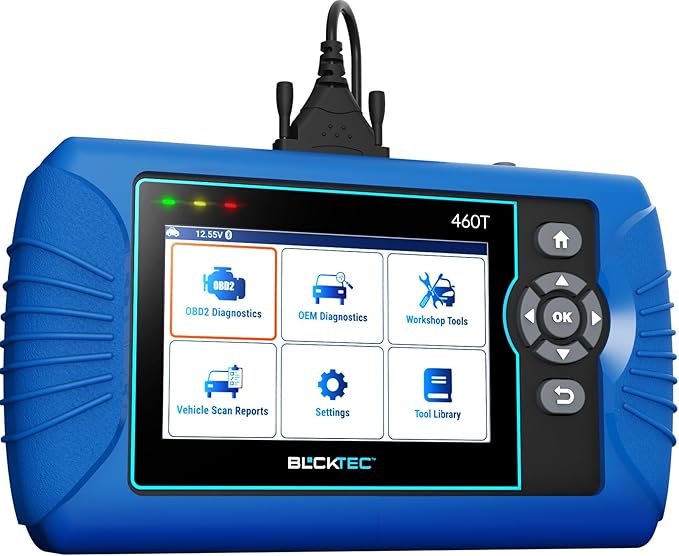 |
BLCKTEC 460T OBD2 Scanner Car Code Reader Engine ABS SRS Transmission Diagnostic | Check Price |
| 5 |  |
thinkcar Thinkscan 689 Wired OBD2 Diagnostic Scanner | Check Price |
ANCEL DS500BT Bidirectional Scan Tool
The ANCEL DS500BT stands out by treating a scanner as more than a code display. Its bidirectional capability can command supported components and show how they respond, which is useful when a fault could come from a wiring issue, a sensor, a control module, or the component itself. More than 3,000 active tests are listed, although the exact choices depend on the vehicle and system.
Coverage extends beyond the engine to areas such as transmission, ABS, SRS, body control, TPMS, steering, and HVAC. The tool can read and clear codes, show ECU information, and display built-in code definitions. Live-data graphs, recording, replay, and screenshots add value when a problem appears intermittently rather than while the vehicle is sitting still.
For maintenance work, the DS500BT lists more than 28 service and relearn functions, including ABS bleeding, injector coding, crankshaft and gearbox relearns, DPF regeneration, battery reset, steering-angle calibration, and throttle relearn. The wireless VCI is convenient when moving between the cabin and engine bay, while AutoVIN and the rear stand reduce setup friction. Lifetime free updates are another strong ownership advantage.
Pros
- More than 3,000 supported bidirectional active tests.
- Broad system coverage and more than 28 service functions.
- Wireless VCI, live-data recording, reports, and screenshots.
- CAN FD and compatible FCA SGW support.
- Lifetime updates without an annual update fee.
Cons
- Active tests and service functions vary by vehicle.
- FCA SGW access may require a separate AutoAuth account and fee.
- It is not intended for 24-volt heavy-duty trucks.
My Opinion
The DS500BT is the strongest all-around pick for buyers who want to diagnose more deeply and keep the tool useful as their vehicles change. Confirming vehicle coverage and specific functions before purchase is important, but its wireless design, reporting tools, and broad testing capability give it an unusually complete feature set.
FOXWELL NT726 OBD2 Scanner Diagnostic Tool
The FOXWELL NT726 is aimed at owners who want professional-style diagnostic access without moving immediately to a much more specialized platform. It can scan more than 22 vehicle systems and perform a wide range of actuation tests, including commands involving ABS, windows, injectors, and coolant-related systems. That makes it more useful than a reader that only reports stored fault codes.
Its 12 maintenance functions cover common jobs such as ABS bleeding, oil and electronic parking-brake resets, steering-angle calibration, DPF regeneration, TPMS reset, injector coding, throttle matching, battery registration, transmission adaptation, suspension reset, and window or door control. These functions can save a trip to a shop when the vehicle supports them, but they should not be treated as universal guarantees.
The NT726 also handles standard OBD2 tasks, I/M readiness checks, live data, and built-in DTC lookup. AutoVIN is intended to speed vehicle identification, while support for more than 100 brands and over 10,000 models gives it broad stated coverage. A 5.5-inch touchscreen, glove-friendly operation, Wi-Fi printing, 32GB memory, PC export, and a hardshell case make it a practical choice for organized home garages.
Pros
- All-system diagnostics for more than 22 systems.
- Bidirectional testing and 12 maintenance functions.
- CAN FD and FCA AutoAuth readiness.
- Touchscreen, case, storage, and Wi-Fi printing.
- Lifetime update support is included.
Cons
- Capabilities still depend on the specific vehicle and module.
- FCA vehicles may need a 12+8 adapter and AutoAuth access.
- The long feature list may be more than a basic owner needs.
My Opinion
The NT726 is a convincing alternative to the ANCEL for buyers who value a large display, straightforward maintenance menus, and a portable package. Its lower customer-feedback volume than some established products means I would be especially careful to verify the exact year, model, and desired reset function before ordering.
FOXWELL Car Scanner NT604 Elite OBD2 Scanner ABS SRS Transmission
The NT604 Elite takes a more focused approach. Instead of trying to provide a large menu of resets and active controls, it concentrates on the engine, ABS, SRS, and transmission. That narrower scope can be exactly right for a vehicle owner who wants to investigate warning lights in safety-critical modules without paying for capabilities that may never be used.
It supports standard OBD2 functions, live data, freeze-frame information, and I/M readiness checks. AutoVIN can retrieve the vehicle identification information rather than requiring manual entry, and stated coverage spans more than 60 brands across American, Asian, and European vehicles. The out-of-box design and built-in code information are helpful for beginners who want explanations alongside fault codes.
The main limitation is important: this is not a service-function tool. It does not support oil resets, battery registration, ABS bleeding, throttle-body relearn, or ABS relearn according to the supplied information. It also should not be mistaken for a complete repair solution; it identifies diagnostic information and helps narrow possibilities, but mechanical inspection may still be necessary. A solid protective case and lifetime updates improve long-term ownership.
Pros
- Focused access to engine, ABS, SRS, and transmission modules.
- AutoVIN, live data, freeze-frame data, and I/M readiness.
- Works out of the box with no extra software fee stated.
- Supports more than 60 vehicle brands.
- Includes a solid protective case and lifetime updates.
Cons
- No oil reset, battery registration, ABS bleeding, or throttle relearn.
- No stated bidirectional active-testing capability.
- Compatibility remains vehicle-dependent.
My Opinion
The NT604 Elite is the sensible budget-minded choice when the goal is module diagnosis rather than maintenance programming. Buy it for dependable coverage of the four named systems, not because its “Elite” name suggests the broader reset and control functions found on the higher-ranked tools.
BLCKTEC 460T OBD2 Scanner Car Code Reader Engine ABS SRS Transmission Diagnostic
The BLCKTEC 460T offers a practical bridge between a code reader and a more capable workshop scanner. It supports all 10 OBD2 modes and can scan the engine, transmission, ABS, SRS, and other available systems. AutoScan and AutoReLink are intended to scan vehicle ECUs and reconnect to them with minimal button pressing, which may appeal to someone who wants a faster first look at a warning light.
Its service menu covers 12 or more common jobs, including oil maintenance, ABS bleeding, electronic parking-brake reset, steering-angle recalibration, DPF functions, throttle-body relearn, battery initialization, TPMS relearn, transmission reset, and fluid-change reset. These are useful capabilities for routine ownership, but the vehicle must support the particular procedure and the operator still needs to follow the correct mechanical steps.
Live OBD2 and OEM data, freeze-frame information, detailed DTC information, and the AutoVIN function help turn a code into a more useful diagnostic starting point. Pairing the scanner with the RepairSolutions2 app adds a verified-fix database, parts guidance, maintenance schedules, technical service bulletins, warranty information, and recall data. That extra ecosystem is helpful, though it also adds a phone-app dependency.
Pros
- All-system scanning with 12 or more reset and service functions.
- AutoVIN, AutoScan, AutoReLink, and freeze-frame data.
- RepairSolutions2 can add repair and maintenance information.
- Free lifetime updates are stated.
- Compatible with OBD2 vehicles sold and registered in the USA and Canada from 1996 onward.
Cons
- Full function availability varies by vehicle.
- The scanner and app are limited to the USA and Canada.
- App-based guidance may not suit buyers seeking a completely standalone tool.
My Opinion
The 460T is a strong regional choice for North American home mechanics who want reset functions and repair information in one workflow. Its compatibility restriction is decisive, so buyers outside the USA and Canada should choose another option rather than assume the OBD2 connector makes it universally usable.
thinkcar Thinkscan 689 Wired OBD2 Diagnostic Scanner
The ThinkScan 689 is the most ambitious option in this group on paper. It combines full-system diagnosis with 34 or more reset functions, bidirectional control, advanced ECU coding, CAN FD and DoIP protocols, and support for more than 140 car brands. Its 4GB of RAM and 64GB of storage also suggest a platform built to hold substantial diagnostic software and vehicle data.
Full-system access covers areas such as the engine computer, transmission, ABS, airbag, steering-angle sensor, DPF, EVAP, TPMS, battery, electronic parking brake, fuel system, lighting, and air conditioning. The active-test list includes examples such as lighting control, fuel injector checks, rearview-mirror control, and coolant-pump testing. Advanced coding may support adaptive resets, replacement-component matching, and selected vehicle customization, but these functions are particularly dependent on make, model, module, and software support.
The 34 service functions include oil, EPB, battery, SAS, ABS, injector, transmission, clutch, ECU, and turbo-related procedures. A wired connection is less flexible than the wireless approach of the ANCEL, but it avoids maintaining a separate wireless VCI. Online support is available through in-app chat and customer service. The smaller customer-feedback sample makes compatibility confirmation especially important before purchase.
Pros
- 34 or more lifetime-free reset functions.
- Bidirectional control with more than 3,000 active tests.
- Advanced ECU coding and full-system diagnosis.
- Supports CAN FD, DoIP, more than 140 brands, and 28 languages.
- Large 64GB storage capacity and online support.
Cons
- Wired operation limits movement around the vehicle.
- Advanced coding and active tests are not universal.
- Its smaller stated customer-feedback sample warrants careful compatibility checking.
My Opinion
The ThinkScan 689 is attractive for an experienced DIY owner who specifically needs coding and a large service-function library. It is not automatically the best choice for a beginner, because advanced controls can have meaningful consequences when used on the wrong module or without following vehicle-specific procedures.
How I Selected These Full-System Diagnostic Tools
The central question was not which scanner lists the most impressive number. I looked for the best full system car scanner candidates that provide meaningful access beyond the engine module, then compared bidirectional control, live data, service functions, update policies, regional limits, and ease-of-ownership details. The supplied customer-feedback counts and ratings provided additional context, but they were not treated as proof that every function works on every vehicle.
Rank position reflects the usefulness of the total package for a broad US audience. The ANCEL leads because it combines extensive active testing, wide system access, wireless convenience, reports, and more than 28 service functions. FOXWELL’s NT726 follows with strong coverage, 12 resets, a touchscreen, and a case. The NT604 earns a place because many drivers need dependable ABS, SRS, transmission, and engine diagnostics without paying for advanced maintenance functions.
“Full system” means the scanner can access multiple available control modules; it does not mean every vehicle exposes every module or that every listed function works on every model year.
The BLCKTEC earns consideration for its North American compatibility and RepairSolutions2 connection. The ThinkScan 689 brings the largest stated reset and coding package, but the buyer must be comfortable with vehicle-specific procedures and confirm support in advance. This approach keeps the comparison useful for both basic warning-light diagnosis and more involved DIY maintenance.
Compatibility checking is part of the purchase, not an optional step after delivery. A scanner can be excellent overall and still lack the one reset or coding function needed for a particular car.
How to Choose the Right Full-System Scanner
Start with the jobs you actually expect to perform. A driver who only wants to identify ABS or airbag faults needs a different tool from a home mechanic who wants to bleed ABS systems, register batteries, code injectors, or command individual components. The best full system car scanner for one garage may be excessive or insufficient for another.
- Match the scanner to your vehicle’s make, model year, market, and network protocols.
- Confirm individual service functions rather than trusting a general “all systems” claim.
- Choose bidirectional control only if you understand the component tests you intend to run.
- Check whether updates are free for life and whether any security gateway access adds fees.
- Consider wired versus wireless operation, display size, storage, reports, and portability.
System coverage and diagnostic depth
Basic OBD2 normally centers on emissions-related powertrain information. Full-system tools go further by communicating with modules such as ABS, SRS, transmission, body control, steering, HVAC, and TPMS when the vehicle permits it. Before buying, identify the warning lights and modules that matter most to you. A focused four-system tool can be a better value than a broad scanner if those are the only areas you need.
Bidirectional control and active tests
A normal scan listens to information stored or reported by the vehicle. Bidirectional control sends a command back to a supported component, such as activating an injector, pump, window, light, or fan. This can help separate a failed component from a wiring or control problem, but it is not a magic automatic diagnosis. Active tests can move parts, change operating states, or trigger procedures, so the vehicle-specific instructions and safety conditions should be followed carefully.
Reset functions and coding
Reset menus cover different levels of work. An oil reminder reset is relatively routine, while ABS bleeding, injector coding, battery registration, DPF regeneration, transmission adaptation, and ECU coding may require correct parts, battery voltage, fluid condition, or mechanical preparation. Do not select a scanner simply because it lists 12, 28, or 34 functions. Confirm that the exact function is supported on the exact vehicle.
Updates, security gateways, and regional limits
Lifetime updates can protect the usefulness of a scanner as new vehicle software appears, but they do not eliminate compatibility limits. FCA security gateway access may require AutoAuth, a separate account, a fee, or an adapter. BLCKTEC’s tool and its companion app are stated to be limited to the USA and Canada. These details matter more than a generic claim of universal coverage.
Compatibility Checks to Complete Before Ordering
Write down the vehicle identification number, model year, engine, transmission, and market. Then check the manufacturer’s compatibility resource for the modules and functions you need. “Supports my brand” is not the same as “performs ABS bleeding on my model,” and a newer vehicle may use CAN FD, a security gateway, or another protocol that changes the setup requirements.
Pay attention to adapters. Some Chrysler, Dodge, Jeep, and Ram vehicles may require a 12+8 adapter for gateway access, while AutoAuth may involve a third-party account and fee. Also check whether the tool supports 12-volt passenger vehicles only; the ANCEL information specifically excludes 24-volt heavy-duty trucks.
Keep a screenshot or written copy of the compatibility result before ordering. It gives you a clear reference if the tool arrives with a different menu structure than expected and helps prevent assuming that a missing function indicates a hardware fault.
First-Time Setup and Safe Use
Begin with a healthy vehicle battery and park safely before connecting a scanner. Turn off unnecessary electrical loads, locate the OBD2 port, and connect the interface firmly. If using a wireless VCI, pair it according to the scanner’s instructions before starting an active test. AutoVIN can save time, but verify that the displayed vehicle information is correct before entering a service procedure.
A sensible first scan
- Record existing warning lights and the vehicle’s symptoms before clearing anything.
- Run a complete system scan when available and save the initial report.
- Read stored, pending, and manufacturer-specific information before erasing codes.
- Check freeze-frame and live data to understand the conditions surrounding a fault.
- Research the code and inspect wiring, connectors, fluid levels, and related components.
- Use an active test only when you understand what the command should do.
Do not clear codes simply to make a warning light disappear. Erasing information can remove useful diagnostic evidence and may reset emissions monitors, leaving the vehicle not ready for an inspection. A scanner identifies information; it does not replace a wiring inspection, mechanical measurement, or a repair manual.
Using Live Data More Effectively
Live data becomes more useful when viewed as a pattern rather than a single number. Compare related values, look for readings that change in response to throttle or load, and use graphing when a fault appears intermittently. Recording and replay functions on the ANCEL can help preserve an event that is difficult to observe while driving.
Freeze-frame data shows the conditions present when a fault was recorded, such as engine speed or temperature. It is not necessarily the condition that exists now. Before replacing a part, compare the code, the freeze-frame circumstances, live data, and a physical inspection. This reduces the risk of replacing an expensive sensor when the real problem is a damaged connector or poor ground.
Storage, Maintenance, and Ownership Tips
Keep the scanner, cable or VCI, adapters, and documentation together in the supplied case when possible. The FOXWELL NT726 and NT604 include protective cases, while the handheld design of each tool still benefits from protection against dust, oil, moisture, and drops. Do not leave a scanner connected indefinitely unless its instructions specifically allow it.
Install updates while the tool has stable power and a dependable internet connection. Avoid interrupting an update, and keep enough storage available for diagnostic software. If the scanner uses a phone app, keep the app and phone operating system current as well. Save reports to a computer or another safe location when they contain information you may need later.
Wipe the screen and connector with appropriate dry or lightly damp materials rather than spraying cleaner directly onto the tool. Inspect cables for cuts, bent pins, or loose strain relief. A clean connector and a stable connection prevent many apparent communication problems.
Common Mistakes to Avoid
Most scanner frustration comes from mismatched expectations rather than a defective device. Buyers often confuse code reading with repair diagnosis, assume brand coverage guarantees every function, or perform a reset before recording the original information.
- Do not assume every listed active test works on every vehicle.
- Do not clear codes before saving the scan, freeze-frame data, and symptoms.
- Do not perform coding, relearns, or DPF procedures with a weak battery.
- Do not use a vehicle-specific adapter or security-gateway service without checking the required account or fee.
- Do not treat a code as proof that the named component is defective.
- Do not use a passenger-vehicle scanner on unsupported 24-volt heavy-duty equipment.
When a scanner reports “function unavailable,” first check vehicle support, software version, connection quality, and required adapters before assuming the tool has failed.
FAQ About Full-System Car Scanners
What does a full-system car scanner access?
It can access more than the engine and emissions system when supported by the vehicle. Common additional modules include ABS, SRS or airbags, transmission, body control, steering, TPMS, HVAC, and battery systems. The actual list varies by make, model, year, and equipment.
Is bidirectional control necessary for home mechanics?
Not always. It is valuable when you want to command a component and observe its response, especially for intermittent electrical or actuator problems. If your goal is only to read warning-light codes, a simpler scanner may be sufficient.
Can these scanners reset every service light?
No. Service functions are vehicle-specific. A tool may list oil, battery, EPB, ABS, DPF, throttle, or transmission functions while supporting only some of them on a particular vehicle. Check the manufacturer’s coverage information before purchase.
Will a full-system scanner work on any OBD2 vehicle?
It may connect to many OBD2 vehicles, but connection is not the same as complete module or service coverage. Regional restrictions, security gateways, communication protocols, model year, and required adapters can all affect the result.
Does reading an ABS or airbag code tell me what part to replace?
No. A code identifies a detected condition or circuit and gives you a starting point. Testing wiring, connectors, power, grounds, sensor signals, and mechanical components may still be necessary before choosing a repair.
Why would a scanner need AutoAuth?
Some newer FCA vehicles protect certain diagnostic functions behind a security gateway. AutoAuth can provide authorized access when supported, but it may require a separate account, fee, adapter, or other setup step. Requirements should be confirmed before ordering.
Final Thoughts
The ANCEL DS500BT is my top recommendation for the broadest combination of active testing, system coverage, service functions, wireless convenience, and reporting. The FOXWELL NT726 is the best alternative for buyers who want a large touchscreen and a strong 12-function maintenance package, while the FOXWELL NT604 Elite is the sensible focused choice for engine, ABS, SRS, and transmission diagnosis. For the best full system car scanner decision, verify the exact vehicle functions first, then choose the tool whose capabilities match the work you genuinely plan to perform.