Troubleshooting an illuminated check engine light on a vehicle that has been on the road for ten to twenty years can quickly become an exercise in frustration. Many scan tools struggle with earlier communication standards, leaving backyard mechanics guessing whether an issue stems from a faulty sensor, a loose gas cap, or an aging wiring harness. Finding the best obd2 scanner for older cars requires picking an instrument that balances backward protocol compatibility with responsive diagnostics, clear fault definitions, and reliable hardware that will not lose connection midway through a scan.
My first choice is MOTOPOWER MP69033 Car OBD2 Scanner Code Reader Engine Fault Scanner. It ranks first because it delivers an uncomplicated, direct diagnostic experience across all major early protocols without requiring smartphone pairing, external batteries, or complicated software setups. It gives owners of aging sedans and trucks immediate access to generic trouble codes, freeze frame snapshots, and real-time engine metrics right out of the box.
My second choice is ANCEL AD410 Enhanced OBD2 Scanner Vehicle Code Reader. It takes the runner-up position by pairing broad pre-CAN and early CAN vehicle support with a massive internal database of over 42,000 fault code definitions. That extra reference depth helps older car owners diagnose obscure emissions quirks and verify inspection readiness before heading to the testing station.
My third choice is FOXWELL NT301 OBD2 Scanner Live Data Professional Mechanic OBDII Diagnostic. It earns third place due to its advanced sensor analysis capabilities, featuring dedicated hotkeys for emissions status alongside live data graphing for aging oxygen sensors and fuel trims. This focus makes it an invaluable diagnostic tool when you need to pin down elusive driveability problems on a high-mileage engine.
Throughout this evaluation and guide, I break down the top scan tools currently available for vehicles built between 1996 and the late 2000s. You will learn how these devices handle legacy communication protocols, what features matter most for keeping an aging daily driver on the road, how to avoid common scanning mistakes, and how to pick the right diagnostic companion for your garage.
Best Obd2 Scanner for Older Cars
To identify the best tools for diagnosing older vehicles, I evaluated each model based on its hardware reliability, native protocol support for early communication standards, clarity of displayed fault definitions, and overall value for everyday drivers. I prioritized devices that simplify troubleshooting high-mileage vehicles without forcing owners into expensive recurring subscriptions or fragile wireless connections.
| # | Image | Product | Price on Amazon |
|---|---|---|---|
| 1 |  |
MOTOPOWER MP69033 Car OBD2 Scanner Code Reader Engine Fault Scanner | Check Price |
| 2 |  |
ANCEL AD410 Enhanced OBD2 Scanner Vehicle Code Reader | Check Price |
| 3 |  |
FOXWELL NT301 OBD2 Scanner Live Data Professional Mechanic OBDII Diagnostic | Check Price |
| 4 |  |
thinkcar Thinkscan Plus S7 ABS | Check Price |
| 5 | 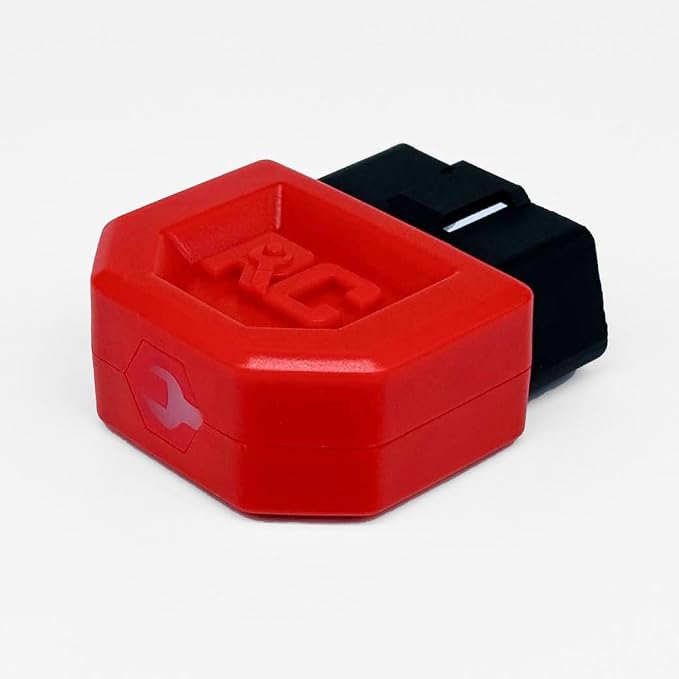 |
RC REPAIR CLUB Repair Club Pro OBD II Scan Tool | Check Price |
MOTOPOWER MP69033 Car OBD2 Scanner Code Reader Engine Fault Scanner
The MOTOPOWER MP69033 is an accessible, straightforward handheld device built to eliminate the mystery behind a glowing dashboard warning. Because it operates completely on power drawn through the 16-pin diagnostic link connector, you never have to worry about dead internal batteries when you leave it sitting in your glove box for months at a time. The physical design features a 2.5-foot heavy-gauge cable that provides ample slack to sit comfortably in the driver’s seat while monitoring live engine data.
Navigating the interface is handled via six tactile rubber buttons that respond reliably even if you are wearing work gloves. The 2.8-inch backlit screen offers manual contrast adjustment, ensuring clear visibility under bright afternoon sun or inside a dim garage. It supports nine distinct communication protocols, ensuring reliable handshakes with domestic models built from 1996 onward, as well as European and Asian imports that adopted OBD-II standards shortly thereafter.
Beyond reading and wiping powertrain trouble codes, this tool allows you to examine freeze frame snapshots, which capture exact operating conditions—such as engine speed, calculated load, and coolant temperature—at the precise moment a fault was triggered. You can also monitor vehicle speed and view real-time data streams to confirm that replacement sensors are transmitting plausible signals back to the vehicle’s engine control module.
Pros
- Operates entirely via port power with no batteries needed
- Broad compatibility across nine early and modern protocols
- Dedicated physical hotkeys for rapid VIN and DTC lookups
- Clear 2.8-inch screen with adjustable contrast settings
Cons
- Cannot read supplementary safety systems like ABS or airbags
- Does not reset oil maintenance or service interval lights
My Opinion
The MOTOPOWER MP69033 is an exceptional entry-level handheld for owners of older vehicles who need dependable check engine light diagnosis without unnecessary software hurdles or battery management hassles.
ANCEL AD410 Enhanced OBD2 Scanner Vehicle Code Reader
The ANCEL AD410 steps up diagnostic capabilities by addressing one of the most frustrating aspects of working on an aging vehicle: vague, unexplained fault codes. Equipped with an internal reference library containing more than 42,000 diagnostic trouble code definitions, this tool displays detailed explanations directly on its 2.4-inch color screen. This completely eliminates the need to constantly look up obscure powertrain codes on your phone while working under the hood.
This handheld unit handles all primary OBD-II functions, making it a reliable partner when preparing an older car for state emissions inspections. The integrated I/M readiness test quickly checks whether vital emissions monitors—such as the catalytic converter, evaporative system, and heated oxygen sensors—have completed their internal self-tests after a battery disconnect or recent repair. It also performs component testing for the evaporative emissions control system and reads live oxygen sensor voltages.
Real-time data monitoring is another strong suit of the AD410. Users can observe critical live metrics including short-term and long-term fuel trims, coolant temperature, intake air temperature, and calculated engine load. For older vehicles prone to unmetered vacuum leaks or sluggish thermal management, tracking these data streams helps verify the underlying mechanical fault before you invest in unnecessary replacement parts.
Pros
- Massive onboard database with over 42,000 code definitions
- Full color display that clearly organizes live sensor streams
- Comprehensive emissions readiness and component test modes
- Free lifetime firmware updates via computer connection
Cons
- The 2.4-inch display is slightly smaller than some competitors
- Lacks bi-directional actuation controls for advanced testing
My Opinion
With its expansive code definition database and strong emissions readiness features, the ANCEL AD410 is an ideal diagnostic tool for DIYers who want to fix their older vehicles accurately without carrying a separate repair manual.
FOXWELL NT301 OBD2 Scanner Live Data Professional Mechanic OBDII Diagnostic
The FOXWELL NT301 is engineered for drivers and home mechanics who require deeper analytical insight into their vehicle’s engine management system. Built around a rugged, shop-friendly casing, it features a bright 2.8-inch color display and a straightforward button layout. A standout attribute of this tool is its dedicated one-click I/M readiness key, supported by integrated red, yellow, and green LED indicator lights alongside an audible beeper to instantly confirm emissions compliance status.
Where this scanner truly excels with older powertrains is its live sensor graphing functionality. High-mileage engines frequently suffer from intermittent misfires, deteriorating catalytic converters, or sticky throttle bodies that do not always produce an immediate hard fault code. By plotting real-time data points such as fuel trims, engine RPM, and oxygen sensor output curves side by side, the NT301 makes it easy to visually identify erratic sensor behavior and signal dropouts.
The device supports all universal OBD-II communication languages, including legacy J1850 PWM, J1850 VPW, ISO9141, and KWP2000 protocols alongside modern controller area networks. It functions smoothly on passenger cars, light-duty trucks, and 12-volt OBD-II diesels. Its protective rubber housing provides impact resistance during greasy garage jobs, while free lifetime software updates keep the internal diagnostic logic reliable over the long haul.
Pros
- Live graphical data plotting makes tracking intermittent glitches easy
- Patented one-click LED indicators provide rapid emissions status
- Extensive protocol support covering older 12V domestic and import platforms
- Sturdy exterior casing designed to withstand garage drops
Cons
- Navigation menus have a slight learning curve for total novices
- Does not scan transmission, body, or chassis control modules
My Opinion
The FOXWELL NT301 offers the best live data graphing capabilities in its price bracket, making it an indispensable asset for diagnosing intermittent running issues on aging gasoline engines.
thinkcar Thinkscan Plus S7 ABS
The THINKCAR ThinkScan Plus S7 represents a significant jump in diagnostic power, moving beyond standard powertrain codes into deep vehicle system analysis. High-mileage vehicles inevitably develop issues outside the engine bay, such as anti-lock brake module errors, supplemental restraint system warnings, or automatic transmission slipping. This tablet-style tool scans seven primary electronic systems: the engine, transmission, ABS, airbags, body control module, air conditioning, and the instrument cluster.
Running on an Android operating system backed by a quad-core processor and 32GB of internal storage, the S7 pairs a responsive 5-inch touchscreen with physical navigation buttons. Diagnostic connection is handled via an included OBD-II cable, while onboard Wi-Fi allows for direct software updates without needing a PC. It supports 94 distinct car brand software packages, providing factory-level module communication across early domestic, European, and Asian vehicles.
Additionally, the device lets owners configure five specialized maintenance reset services from a broader menu of 28 options, including throttle body relearn, steering angle calibration, oil light resets, and electronic parking brake servicing. While it requires an initial Wi-Fi setup to download vehicle software packages, the depth of access it grants into older vehicle electronics matches equipment traditionally reserved for professional auto shops.
Pros
- Deep diagnostic access across seven primary vehicle computers
- Generous 5-inch color touchscreen with responsive Android interface
- Enables five customizable service resets like throttle and brake routines
- Direct Wi-Fi updates eliminate the need for computer-based patching
Cons
- Higher cost compared to basic standalone powertrain code readers
- Requires time for initial software downloads and setup via Wi-Fi
My Opinion
If you maintain an older car plagued by mysterious ABS, transmission, or airbag lights, the THINKCAR ThinkScan Plus S7 delivers professional-grade multi-system troubleshooting that standard engine readers simply cannot match.
RC REPAIR CLUB Repair Club Pro OBD II Scan Tool
The Repair Club Pro OBD II Scan Tool takes a modern, untethered approach to older vehicle troubleshooting by combining a compact wireless plug-in adapter with an intuitive mobile application. Designed for both iOS and Android smartphones, this device plugs directly into the vehicle’s diagnostic port and syncs via Bluetooth, allowing you to walk around the vehicle or inspect engine components under the hood while viewing live diagnostic readings on your phone screen.
Unlike basic wireless dongles that only read surface-level engine fault codes, the Repair Club Pro provides comprehensive scanning across multiple electronic modules, including ABS, SRS airbags, and tire pressure monitoring systems on compatible platforms. It operates without recurring monthly subscriptions, giving owners long-term diagnostic access without hidden ownership costs. The companion app goes beyond listing codes by offering verified repair suggestions based on real-world technician data.
A unique highlight of this diagnostic platform is the integrated live chat functionality, which connects vehicle owners with professional repair assistants to help decipher complex or multi-layered trouble codes. Compatibility extends across domestic and import gas-powered vehicles produced from 1996 onward. Its diminutive size makes it easy to leave tucked neatly beneath the dashboard without interfering with your legs while driving.
Pros
- Cable-free Bluetooth operation utilizing your smartphone’s display
- Reads advanced systems including ABS, airbags, and TPMS
- Zero recurring subscription or hidden app renewal fees
- Integrated technical chat assistant provides repair guidance
Cons
- Completely reliant on having a charged smartphone with Bluetooth enabled
- Older vehicle owners who dislike mobile apps may prefer a dedicated handheld
My Opinion
The Repair Club Pro is a feature-rich, modern wireless option for drivers who want deep multi-system scanning and technician-backed repair advice directly on their smartphone without paying monthly subscription fees.
How We Selected the Top Scanners for Older Vehicles
Selecting diagnostics tools specifically tailored for older vehicles requires a very different approach than evaluating gear for showroom-fresh models. Older cars, particularly those produced between the introduction of the standard in 1996 and the widespread adoption of modern high-speed controller area network (CAN) systems around 2008, possess unique technological quirks. To compile our recommendations, I closely analyzed technical hardware architectures, verified protocol coverage, synthesized real-world user experiences across classic automotive forums, and evaluated manufacturer documentation without conducting direct physical lab testing.
Our evaluation process began by dissecting legacy protocol communication standards. Many modern, ultra-cheap scanning accessories trim production expenses by cutting hardware components required to read early protocols such as SAE J1850 PWM (commonly used by older Ford platforms), SAE J1850 VPW (standard across classic General Motors platforms), and ISO 9141-2 or ISO 14230-4 KWP (prevalent in older Asian and European imports). I discarded any device that demonstrated inconsistent legacy transceiver hardware, regardless of how well it performed on newer CAN-bus models.
Furthermore, I evaluated power stability requirements. Older cars frequently have tired alternators, aged wiring harnesses, or weak batteries that cause voltage fluctuations across the diagnostic link connector. I prioritized tools that incorporate robust electrical shielding, tolerant operating voltage ranges, and internal memory buffers that prevent data loss when an older engine stumbles during a live running scan. Brand reputation for firmware updates and customer service responsiveness regarding legacy vehicle bug patches also factored heavily into our evaluation process.
Buying Guide: Choosing the Best OBD2 Scanner for Older Cars
Navigating the market for a diagnostic tool to service an aging car or truck requires understanding the subtle technological shift that occurred across the automotive industry over the past two decades. A scanner that effortlessly reads a brand-new crossover might completely fail to link with a 1998 sedan. Use the following criteria to ensure you invest in a tool that will reliably speak your older car’s specific dialect.
Setting Up Your Scanner on an Older Vehicle
Preparing to scan an older car requires extra attention compared to newer models. Years of road grime, cabin dust, and interior moisture can compromise the physical interface, while older battery systems demand special consideration before initializing a diagnostic scan.
First, locate the 16-pin Diagnostic Link Connector (DLC). By law, this connector must reside within several feet of the steering column, typically beneath the dashboard trim, under the steering column shroud, or behind an ash tray or fuse cover panel. On older cars, these plastic brackets can become brittle. When locating the port, use a flashlight to inspect the plastic housing for stress fractures and ensure none of the metal female pins have backed out of the rear of the connector.
Before connecting the scan tool, verify the vehicle’s electrical health. Older vehicles possess less fault-tolerant electronics. Ensure the car battery has a resting charge of at least 12.4 volts. If the battery is undercharged, the control modules may fail to boot fully into their diagnostic communication modes, or the voltage drop when turning the ignition key could cause the scanner to reboot unexpectedly, interrupting data acquisition.
With the vehicle’s ignition completely switched off, align the trapezoidal shape of your scanner’s connector with the DLC and press firmly and evenly until the locking tab engages. Avoid rocking the connector side-to-side, as this can widen the female terminal pins on an older vehicle, creating permanent intermittent connection problems. Once secured, switch the ignition key to the “ON” or “RUN” position without cranking the engine, allowing the scanner to negotiate its initial handshake protocol with the engine computer.
Effective Diagnostic Strategies for Intermittent Faults
One of the primary frustrations of maintaining an older vehicle is diagnosing intermittent issues that do not trigger an immediate, continuous diagnostic trouble code. Older control units have higher fault thresholds and slower processing cycles than modern cars, meaning an issue can persist for days or weeks before illuminating the dashboard light.
To effectively catch intermittent issues, familiarize yourself with pending codes versus stored codes. A stored code represents a hard fault that has occurred across multiple drive cycles, successfully commanding the malfunction indicator lamp (MIL) to illuminate. A pending code, however, represents a failure detected during the current or most recent drive cycle that has not yet recurred enough times to trigger a full alert. Checking pending codes on an older vehicle after a road test often reveals the early stages of a failing component, such as an ignition coil breaking down under heat, long before the light trips.
Another powerful strategy is using live data graphing to inspect sensor behavior dynamically. Digital meters displaying moving numbers often refresh too slowly to reveal micro-dropouts. By configuring your scanner to display an analog line graph for parameters like the Throttle Position Sensor (TPS) or Mass Airflow Sensor (MAF), you can spot abnormal voltage dropouts or spikes while smoothly depressing the accelerator pedal with the engine off. A sudden jagged downward spike on a throttle graph immediately points to a worn carbon trace inside the sensor housing, even if the vehicle computer was too slow to flag it as a permanent failure.
Understanding Fuel Trims to Diagnose Aged Vacuum and Fuel Systems
On older cars, mechanical wear frequently presents as mysterious drivability symptoms: rough idling, hesitation, or poor fuel economy. Rather than throwing replacement parts at the problem, your scanner’s live fuel trim data provides an inside look at how the computer compensates for mechanical aging.
Fuel trim is expressed as a percentage. Zero percent represents baseline factory fueling. A positive number indicates the engine computer is adding fuel to balance an overabundance of unmetered air (a lean condition), while a negative number indicates the computer is subtracting fuel because too much fuel or insufficient air is present (a rich condition). Normal combined trims (Short-Term plus Long-Term) should sit between -10% and +10% on an aging platform.
You can use fuel trims to locate tricky vacuum leaks—a rampant problem on older cars plagued by hardened rubber vacuum hoses and dried intake manifold gaskets. Monitor short-term and long-term fuel trim at idle; if the trims show a high positive value (such as +18% to +25%), hold the engine speed at 2,500 RPM in neutral. If the fuel trims drop significantly closer to zero at higher RPM, you are dealing with a vacuum leak, because the volume of unmetered air entering through a small crack becomes negligible compared to the total air volume drawn through the throttle body at speed. If the fuel trims remain high at 2,500 RPM, the problem is more likely a fuel delivery issue, such as a clogged fuel filter or tired fuel pump, rather than a vacuum leak.
I/M Readiness Monitors: Preparing Older Cars for Emissions Testing
Taking an older car through state emissions inspection can be stressful. Many owners assume that simply clearing a Check Engine light right before pulling into the testing bay will guarantee a passing grade. In reality, clearing codes on any vehicle resets its internal Inspection/Maintenance (I/M) readiness monitors, which will result in an immediate inspection rejection.
Readiness monitors are automated software routines run by the vehicle’s engine computer to verify that individual emission control subsystems are functioning correctly. These subsystems include:
- Catalytic Converter efficiency
- Evaporative Emission System (EVAP)
- Oxygen Sensor operation and heater circuits
- Secondary Air Injection
- Exhaust Gas Recirculation (EGR)
Older vehicles require specific, often rigid “drive cycles” to set these monitors to “Ready” or “Complete.” For instance, an older car’s EVAP monitor might only execute when the fuel tank is between one-quarter and three-quarters full, during ambient temperatures between 40°F and 90°F, and after an overnight cold soak followed by steady highway cruising. By using your scanner’s dedicated I/M Readiness screen, you can verify that all required monitors show as completed before making an unnecessary trip to the emissions station. Depending on your local jurisdiction, older vehicles (particularly pre-2001 models) may be legally permitted to pass testing with one or two monitors showing “Not Ready,” which your scanner can help you confirm in advance.
Troubleshooting Common Connection and Linking Errors
Encountering a “Linking Error” or “Unable to Establish Communication” message is remarkably common when working with older vehicles. Because these cars have endured decades of service, hardware wear outside the scan tool is frequently the culprit. Follow this sequential troubleshooting checklist to pinpoint the issue:
- Check the Cigarette Lighter Fuse: In many 1990s and early 2000s domestic vehicles, Pin 16 of the OBD2 diagnostic connector—which provides constant 12-volt battery power to power up the scan tool—is wired directly into the same electrical circuit as the interior cigarette lighter or accessory 12V socket. If a previous owner dropped a coin into the lighter socket or an old phone charger blew the fuse, your scan tool will not power on at all. Always check this fuse first.
- Inspect Port Pin Tension: Diagnostic pins can suffer from metal fatigue. Take a small dental pick or specialized terminal tool and inspect the individual female leaf springs inside each pin slot of the car’s connector. If pins 4, 5 (Grounds), 16 (Power), or the specific protocol pins (such as Pin 2 for Ford J1850 or Pin 7 for ISO K-line) are spread too wide, the scanner’s male pins will fail to make solid contact. Gently adjusting the tension inward often resolves communication failures instantly.
- Verify Ignition Switch Continuity: Older ignition switch cylinders can develop loose internal contacts. Sometimes, turning the key to “RUN” powers the instrument cluster, but fails to send the necessary “wake up” voltage signal to the PCM diagnostic circuit. Try wiggling the ignition key gently within the cylinder while the scanner attempts communication to see if the link establishes.
- Look for Aftermarket Audio Interference: On many late-1990s and early-2000s European imports (particularly Volkswagen and Audi models), an improperly wired aftermarket stereo can accidentally bridge the diagnostic K-Line directly to 12-volt battery power. This notorious “K-Line issue” will block all diagnostic communication and can potentially damage older, unshielded diagnostic scanners. A simple multimeter test between Pin 7 and Pin 4 of the DLC should show no more than normal low logic voltage before plugging in your tool.
Cleaning, Care, and Storage of Diagnostic Hardware
To ensure your scan tool delivers decades of dependable service across multiple older project cars, proper care and environmental storage are essential. The physical environments where older cars are repaired—drafty garages, unpaved driveways, and damp sheds—pose hazards to sensitive digital electronics.
Always inspect the OBD2 cable and connector pins after each use. Automotive fluids like motor oil, power steering fluid, and brake cleaner degrade the flexible PVC jackets of diagnostic cables over time, causing them to turn brittle and split. Wipe down the cable assembly with a mild dish soap solution on a microfiber towel; never use harsh solvents or brake cleaner to clean diagnostic plastic or cables. If dielectric grease or dirt accumulates inside the scanner’s male connector pins, spray them clean with a quick-drying electronic contact cleaner and let them air dry completely before storage.
Store your diagnostic scanner inside a rigid, foam-lined protective case or a sealed weather-tight plastic toolbox. Never leave a diagnostic scanner stored long-term inside the glove compartment, trunk, or passenger cabin of an older vehicle. Extreme interior temperature swings—from freezing winter nights to sweltering summer afternoons—cause condensation to form inside the scanner’s casing. This moisture corrodes internal circuit traces, degrades LCD screens, and degrades internal backup batteries or electrolytic capacitors.
Common Mistakes When Scanning Older Vehicles
Using a modern diagnostic approach on an older vehicle frequently leads to misdiagnoses, wasted time, and unnecessary parts replacement. Be mindful of these common operational missteps:
- Clearing Codes Before Recording Details: When working on an older car, never hit the “Clear DTCs” button until you have written down or photographed every stored code, pending code, and all accompanying freeze frame data. Older systems can take days or weeks of driving to reproduce the exact conditions needed to reset an intermittent code. Clearing data prematurely deprives you of vital diagnostic clues.
- Replacing Oxygen Sensors for Mixture Codes: When an older vehicle logs a P0171 (System Too Lean, Bank 1) code, novice DIYers often assume the oxygen sensor is defective and install a new one. The oxygen sensor is simply reporting reality: an excess of unmetered oxygen in the exhaust. The true fault on an older platform is usually an unmetered vacuum leak, a torn PCV boot, a dry-rotted intake elbow, or low fuel pressure from an aging fuel pump.
- Assuming All Subsystems Speak OBD2: Remembering that standard OBD2 mandates powertrain monitoring only is crucial. If your classic 1999 SUV has a flashing overdrive light or an active ABS warning, relying on a basic $20 code reader will leave you empty-handed. Do not assume the absence of a powertrain code means the vehicle’s other systems are fault-free.
- Leaving Wireless Dongles Plugged In: Unlike modern vehicles that put diagnostic bus lines and auxiliary power to sleep within minutes of locking the doors, many older cars supply constant, unswitched battery power to Pin 16 indefinitely. Leaving an inexpensive Bluetooth adapter plugged into an older vehicle can silently draw anywhere from 20 to 150 milliamps around the clock, fully discharging a battery if the car sits parked for a week.
FAQS About Best Obd2 Scanner for Older Cars
Will any modern OBD2 scanner work on a 1996 or 1997 vehicle?
Not necessarily. While all vehicles sold in the United States from model year 1996 onward feature the standardized 16-pin diagnostic port, very early production models rely on legacy communication protocols such as J1850 PWM, J1850 VPW, or ISO 9141-2. Many cheap, modern scanners cut manufacturing costs by omitting the internal transceivers required to communicate across these older, non-CAN-bus networks. Always verify that a scanner explicitly lists support for all five original OBD2 protocols before purchasing it for a 1996–2000 vehicle.
Why does my scan tool say “Linking Error” when connected to my older car?
Linking errors on older vehicles are usually caused by physical power or pin issues rather than a broken engine computer. The most common cause is a blown cigarette lighter or auxiliary power fuse, which routinely powers Pin 16 of the diagnostic connector on older domestic cars. Other common causes include loose female pin terminals inside the car’s diagnostic connector, corrosion on ground pins 4 and 5, low vehicle battery voltage, or aftermarket radio installations that interfere with the vehicle’s diagnostic wiring line.
Can an OBD2 scanner read codes on a 1995 or older car?
No, standard OBD2 scanners cannot communicate with 1995 or older vehicles. Pre-1996 vehicles utilize proprietary manufacturer-specific systems broadly referred to as OBD1. These older systems featured unique, non-standardized connector shapes, varied pin configurations, and radically different data languages depending on whether the car was built by Ford, General Motors, Toyota, or another manufacturer. To scan a 1995 or older vehicle, you need a specialized OBD1 code reader or a comprehensive diagnostic system equipped with vintage adapter plugs.
Can an OBD2 scanner tell me why my ABS or Airbag light is on in an older car?
A basic generic OBD2 code reader cannot read ABS or Airbag (SRS) warning lights on an older vehicle. The federal OBD2 standard only mandated that manufacturers report emissions-related powertrain malfunctions. On older platforms, safety and chassis systems like ABS and SRS communicated across separate proprietary manufacturer data lines. To read these codes, you must invest in an enhanced diagnostic scanner that explicitly features multi-system coverage for your car’s specific make and year.
Why does live data respond so slowly when scanning an older vehicle?
Live sensor data updates much slower on older vehicles due to the mechanical bandwidth limits of legacy protocols. Early vehicle networks transmit data at speeds as low as 10.4 kbps—thousands of times slower than modern CAN-bus architectures. When your scanner asks the older engine computer to monitor twenty different live sensor streams simultaneously, the processing pipeline bottlenecks. To improve update speed, use your scanner’s custom data list feature to display only two or three critical sensors at a time.
Is it safe to leave a wireless OBD2 scanner plugged into an older car permanently?
It is generally not recommended to leave a wireless OBD2 adapter permanently connected to an older vehicle. Modern cars actively manage power shutoff to diagnostic modules after the vehicle is locked, but older platforms often provide uninterrupted, direct 12-volt battery power to Pin 16 of the diagnostic connector. Unless your wireless adapter incorporates a proven physical power switch or an automatic ultra-low-power sleep circuit, it can drain an older or infrequently driven vehicle’s battery over several days.
Conclusion
Maintaining and troubleshooting an older car does not have to turn into an expensive game of trial-and-error parts replacement. By choosing a diagnostic scanner with guaranteed support for legacy communication protocols, robust pin hardware, and clear freeze frame capabilities, you bridge the technical gap between decades-old engine management computers and modern troubleshooting methods. Look for a unit that fits your specific mechanical goals—whether that means monitoring raw sensor data to track down an elusive vacuum leak, ensuring your emissions monitors are fully prepared for state testing, or decoding proprietary safety systems. With the right diagnostic tool plugged into your dash, keeping your classic commuter or weekend project running smoothly and reliably becomes straightforward, predictable, and rewarding.