Finding the best scan tool for chrysler vehicles is not simply a matter of choosing the scanner with the largest screen or the longest feature list. Chrysler, Dodge, and Jeep owners may need anything from a basic check-engine-code reader to a tool that can access ABS, airbag, transmission, body, and battery systems.
My first choice is FOXWELL NT510 Elite Chrysler Jeep Dodge All-System Bidirectional Scan Tool. Its Wi-Fi updates, expanded 32GB storage, AutoVIN, live-data recording, ABS bleeding, TPMS functions, and battery registration make it a strong fit for owners who want more than engine-code access.
My second choice is ANCEL AD310 Classic Enhanced Universal OBD II Scanner Car Engine Fault Code. It supports major OBDII protocols, has a compact wired design, and is especially practical for a driver who wants a dependable glove-box code reader rather than advanced module access.
My third choice is Innova 5610 OBD2 Bidirectional Scan Tool. Its support for English, Spanish, and French and its RepairSolutions2 connection may also help beginners understand what a code means before starting a repair.
This guide compares five different approaches, from a basic engine reader to full-system FCA-capable equipment. You will learn what each scanner can access, which functions matter for Chrysler ownership, where compatibility limitations apply, and how to choose, set up, use, maintain, and store a scan tool safely.
Best Scan Tool for Chrysler
I selected these products according to their Chrysler, Dodge, and Jeep relevance, diagnostic depth, practical service functions, ease of use, and available customer-feedback evidence. I also included brand and capability diversity so the list covers occasional code checking, home-garage repairs, and more advanced diagnostics without claiming hands-on testing.
| # | Image | Product | Price on Amazon |
|---|---|---|---|
| 1 |  |
FOXWELL NT510 Elite Chrysler Jeep Dodge All-System Bidirectional Scan Tool | Check Price |
| 2 |  |
ANCEL AD310 Classic Enhanced Universal OBD II Scanner Car Engine Fault Code | Check Price |
| 3 |  |
Innova 5610 OBD2 Bidirectional Scan Tool | Check Price |
| 4 |  |
TOPDON AD900 Lite 8-Inch Bidirectional OBD2 Scanner | Check Price |
| 5 | 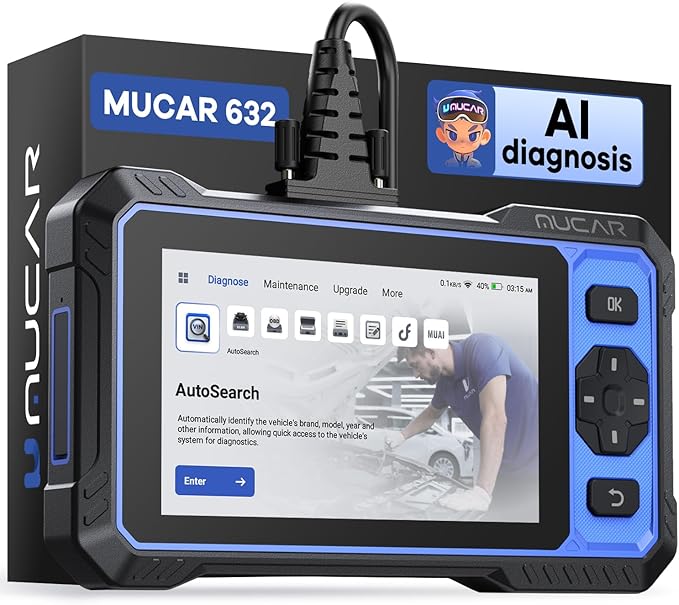 |
mucar 632 Elite AI-Assisted Bidirectional Scan Tool | Check Price |
FOXWELL NT510 Elite Chrysler Jeep Dodge All-System Bidirectional Scan Tool
The FOXWELL NT510 Elite earns the top position because it is purposefully aligned with Chrysler, Dodge, and Jeep vehicles while still handling standard OBDII functions for other brands. It can read and clear trouble codes, display live data, show freeze-frame information, check I/M readiness, and perform the familiar emission-system tests. That gives a Chrysler owner a useful everyday diagnostic base instead of a tool limited to one warning lamp.
Its larger advantage is access beyond the engine computer. On supported vehicles, the scanner can communicate with systems such as ABS, SRS, transmission, steering-angle, TPMS, electronic parking brake, battery, HVAC, and other available modules. Bidirectional testing lets the user command components such as fuel pumps, cooling fans, EVAP functions, windows, or door locks, which can reduce guesswork when a part may be faulty.
The built-in maintenance functions are equally important for home repairs. Battery registration, oil reset, ABS activation or bleeding, throttle adjustment, brake deactivation, and other reset procedures can help after replacing or servicing related components. Wi-Fi updates replace the older PC-based update process, while the move from 8GB to 32GB storage is intended to reduce lag and freezing. However, special all-system functions are specifically for Chrysler, Dodge, and Jeep, and adding another vehicle brand may cost an additional $60–$80.
Pros
- Strong Chrysler, Dodge, and Jeep system coverage.
- Bidirectional tests and more than 30 listed service-reset functions.
- Wi-Fi updating and expanded 32GB storage.
- AutoVIN, graphing, recording, replay, and printing for live data.
Cons
- Advanced all-system features are not universal across every brand.
- Other-brand software may require an additional purchase.
- Coverage and special functions can vary by vehicle year and equipment.
My Opinion
This is the strongest overall pick for a Chrysler-group owner who expects to diagnose several modules and perform maintenance procedures at home. Confirm the exact year and function coverage before buying, especially if ABS, battery registration, or a particular bidirectional test is the main reason for the purchase.
ANCEL AD310 Classic Enhanced Universal OBD II Scanner Car Engine Fault Code
The ANCEL AD310 takes a much simpler route. It is a compact, wired OBDII reader intended primarily for emission-related engine faults, so it is best viewed as a fast way to investigate a check-engine light rather than a full Chrysler service scanner. It can read and clear compatible trouble codes, show live data, and help check whether a repair has restored the vehicle’s readiness status.
For a beginner, that narrow focus can be an advantage. There is no need to navigate a large touchscreen platform or learn active tests before getting a basic answer. The 2.5-foot cable provides useful reach around the driver’s seat, and the compact 12-ounce design is easy to keep in a vehicle, toolbox, or backpack. Its thick insulated cable is also practical for occasional garage use where equipment may be moved around frequently.
The AD310 supports common OBDII protocols, including KWP2000, J1850 VPW, ISO9141, J1850 PWM, and CAN. The stated compatibility covers many 1996-and-newer US vehicles, along with 2000-and-newer European and Asian vehicles, but the diagnostic scope remains limited. It cannot access non-emission engine faults through unsupported systems, and it does not provide ABS, SRS, transmission, or other enhanced-module diagnosis. An OBDI vehicle cannot be made compatible simply by adding an adapter.
Pros
- Simple operation for check-engine and emission-related codes.
- Supports major OBDII communication protocols.
- Compact, lightweight, and easy to carry.
- Wired design does not depend on a separate phone app or wireless connection.
Cons
- Limited to OBDII and emission-related diagnosis.
- Cannot read ABS, SRS, transmission, or other enhanced modules.
- Not suitable for vehicles using an OBDI interface.
My Opinion
The AD310 is the sensible low-complexity choice for a Chrysler owner who mainly wants to understand and clear an engine-related warning after completing a repair. It should not be chosen when the goal is to diagnose an ABS light, airbag light, transmission issue, battery-registration requirement, or body-control fault.
Innova 5610 OBD2 Bidirectional Scan Tool
The Innova 5610 sits between a basic code reader and a workshop-oriented diagnostic platform. Its enhanced data stream can display information from the engine, ABS, SRS, transmission, and other supported systems, giving the user more context than a generic engine scanner. Seeing live values such as sensor readings or wheel-speed information can help separate an electrical or sensor problem from a mechanical symptom.
Bidirectional control adds another level of usefulness. The tool can send commands for supported functions, including switching a fuel pump on or off or retracting an electronic parking brake. These commands are valuable during troubleshooting because they can show whether a component responds when directly commanded. The special reset functions also support dealership-level relearn procedures on vehicles where the relevant coverage is available.
Usability is one of the 5610’s notable strengths. It supports English, Spanish, and French, includes free updates without subscription fees, and connects with the RepairSolutions2 app for code information and repair guidance. The stated vehicle range covers most 1996–2023 OBD2 vehicles, with 2024 coverage noted as coming soon in the supplied information. Still, features vary by make, model, and year, so Innova’s coverage checker is important before purchase.
Pros
- Enhanced live data for several important vehicle systems.
- Bidirectional controls for supported components and functions.
- Special reset and relearn capability on covered vehicles.
- Free updates, multilingual operation, and ASE-certified support.
Cons
- Not every function applies to every Chrysler vehicle.
- Exact coverage should be verified before purchase.
- Its broader capability may be unnecessary for someone needing only engine codes.
My Opinion
The Innova 5610 is a good middle-ground choice for someone who wants to grow beyond basic code reading without immediately choosing the most specialized platform. It is particularly appealing when live data, active tests, reset procedures, and guided code information matter, but the buyer should check the specific Chrysler year and module coverage first.
TOPDON AD900 Lite 8-Inch Bidirectional OBD2 Scanner
The TOPDON AD900 Lite focuses on a larger, more tablet-like diagnostic experience. Its 8-inch touchscreen, Android 11 operating system, faster processor, 10,000mAh battery, and Bluetooth 5.0 vehicle communication can make it easier to view multiple data values and work around a vehicle without a cable stretched across the cabin. The wireless range is listed at up to 33 feet, while wired VCI cables remain available when preferred.
For Chrysler, Dodge, Jeep, and Fiat vehicles from 2010–2014, the DTC repair-guide function can provide fault-code definitions and repair direction. That date range is an important qualification: the broader scanner may support many vehicles, but this particular repair-guide function is not automatically universal. Buyers should separate advertised platform coverage from the functions available on their own vehicle.
The AD900 Lite offers full-system diagnostics on supported vehicles, including engine, transmission, airbag, ABS, ESP, TPMS, gateway, steering, radio, and air conditioning modules. Active tests can help check components such as injectors, coolant pumps, windows, wipers, lights, and mirrors. Eight listed reset services cover oil, throttle, electronic parking brake, steering angle, DPF, ABS bleeding, battery, and airbag tasks. The package also lists battery testing, 12 languages, a one-year warranty, and lifetime free upgrades.
Pros
- Large 8-inch screen and wireless Bluetooth diagnosis.
- Full-system scanning and active testing on supported vehicles.
- Useful reset coverage, including ABS bleeding and battery functions.
- Large battery and lifetime free upgrade policy as supplied.
Cons
- Some Chrysler repair-guide coverage is specifically listed for 2010–2014.
- Actual active tests and resets depend on vehicle coverage.
- Its larger tablet format may be excessive for occasional code reading.
My Opinion
This is a compelling choice for a home garage or small workshop that values a big display, wireless operation, and active testing. Before ordering, verify the exact service functions for the Chrysler vehicle in question rather than assuming every listed reset works across all model years.
mucar 632 Elite AI-Assisted Bidirectional Scan Tool
The MUCAR 632 Elite brings a broad feature set to FCA-focused ownership, including AutoAuth support for FCA Security Gateway-equipped vehicles and CAN FD support. That matters because newer vehicles may restrict access to certain modules unless the diagnostic tool can work through the appropriate security process. The supplied information states that it can diagnose 2018-and-newer FCA SGW-equipped cars, although vehicle-specific coverage should still be confirmed.
Its AI-assisted DTC function is intended to make fault codes easier to interpret by offering possible causes and repair suggestions. This can be helpful for a beginner who sees a code but does not know which system to inspect first. The scanner also handles engine, ABS, SRS, and transmission codes and can graph live data such as engine temperature and wheel speed.
There are more than 15 listed reset and service functions, including oil, TPMS, electronic parking brake, battery matching, steering angle, ABS bleeding, airbag, throttle, injector coding, gear learning, and anti-theft or key matching. A 6.2-inch touchscreen, Android 8.1, 32GB storage, expandable TF-card support, AutoVIN, and one-click Wi-Fi updates add convenience. Its lifetime free updates avoid recurring update fees, but advanced procedures such as key matching or injector coding require careful vehicle-specific confirmation.
Pros
- Supports FCA AutoAuth and CAN FD according to the supplied data.
- AI-assisted code analysis and repair suggestions.
- More than 15 listed reset and service procedures.
- Lifetime free updates, AutoVIN, and expandable storage.
Cons
- AI suggestions should support diagnosis, not replace service information.
- Advanced coding and resets vary by vehicle and module.
- Its broad capabilities may take time for a beginner to learn.
My Opinion
The MUCAR 632 Elite deserves consideration from owners of newer FCA vehicles who want security-gateway compatibility, CAN FD support, and a wide service menu without subscription charges. It is more scanner than many occasional users need, but its update policy and modern FCA support improve its long-term appeal.
How I Selected These Chrysler Scan Tools
The selection emphasizes practical coverage rather than a single maximum specification. A tool ranked highly because it combines Chrysler-group relevance with access to useful systems and service procedures, while a simpler reader remains on the list because many owners only need an affordable way to investigate an engine warning. Customer-feedback volume and ratings were considered as supporting signals where supplied, not as substitutes for checking vehicle compatibility.
I also separated universal OBDII access from manufacturer-enhanced functions. Standard OBDII can be enough for emission-related engine codes, but it does not automatically provide ABS, SRS, transmission, body, TPMS, or battery-registration access. That distinction is central when choosing the best scan tool for chrysler ownership needs.
Do not buy a scanner solely because the product title says “all system.” Confirm the exact Chrysler, Dodge, or Jeep year, engine, module, and service function you need.
Brand diversity matters here because the products serve different owners. FOXWELL and MUCAR lean toward Chrysler-group depth, ANCEL emphasizes straightforward engine-code access, Innova balances advanced functions with guidance, and TOPDON offers a large-screen wireless platform. This gives buyers a clearer choice based on actual use rather than an arbitrary feature count.
A scanner’s ability to read a code does not prove that it can identify the failed part. Use live data, active tests, wiring information, and proper mechanical checks before replacing components.
How to Choose the Best Scan Tool for Chrysler
Start with the warning lights and repairs you expect to handle. If the goal is only to read a check-engine light, a basic OBDII reader may be sufficient. If the vehicle has ABS, airbag, transmission, TPMS, battery, or electronic parking-brake concerns, choose a tool with confirmed enhanced-module access and the relevant reset or active-test function.
- Match the vehicle: Check the exact year, model, engine, and trim before purchase.
- Match the system: Confirm ABS, SRS, transmission, body, or TPMS access rather than assuming it.
- Match the repair: Look for battery registration, ABS bleeding, throttle adaptation, or other needed services.
- Check update terms: Free lifetime updates and paid software expansion affect long-term ownership cost.
- Choose suitable complexity: A simple reader may be better than an advanced scanner that will rarely be used.
Basic OBDII Versus Enhanced Chrysler Access
OBDII is primarily the communication standard used for emission-related engine diagnostics. A compatible reader can usually retrieve a powertrain code, clear it after a repair, show some live data, and report readiness monitors. That is useful, but it is not the same as accessing every computer in the vehicle.
Enhanced access may include ABS, restraint, transmission, steering, HVAC, TPMS, body, and gateway modules. It may also permit active tests or service resets. For Chrysler-group vehicles, the scanner may need brand-specific software or security-gateway support, especially on newer models. This is why a cheap reader can be perfectly appropriate for one owner and completely inadequate for another.
Bidirectional Testing and Reset Functions
Bidirectional control allows the scanner to send a command to a vehicle module instead of merely listening for stored information. A fuel-pump command, cooling-fan command, window operation, or electronic-brake retraction can help determine whether the control side and the component respond.
Active tests must be used carefully. A command may operate a moving part, energize a hot component, or change brake or throttle behavior. Follow the vehicle’s service procedure, keep people clear of moving parts, and never treat a successful command as proof that the entire circuit is healthy.
Updates, Subscriptions, and Software Coverage
Update policies can make a significant ownership difference. FOXWELL lists Wi-Fi updates, TOPDON lists lifetime free upgrades, and MUCAR lists lifetime free updates with ongoing coverage and feature changes. Innova also lists free updates without subscription fees. These policies are useful, but “free updates” does not eliminate the need to verify whether a particular function has been added for a particular vehicle.
Some scanners allow another vehicle brand to be added for a fee, while others focus more heavily on a broad global database. If you own several brands, calculate the likely software cost before choosing a brand-specific tool.
Check Chrysler Compatibility Before Buying
Compatibility is more specific than the word Chrysler suggests. A 2012 Chrysler sedan, a 2018 Jeep SUV, and a newer Dodge truck may use different modules, security arrangements, and service procedures. Even two vehicles from the same year can differ by engine, transmission, trim, or installed options.
What to Confirm
- Vehicle year, model, engine, and transmission.
- Whether the scanner reads the warning system that is actually illuminated.
- Whether the desired reset or relearn is supported.
- Whether FCA Security Gateway or CAN FD support is needed.
- Whether updates are required before the scanner recognizes the vehicle.
Use the manufacturer’s coverage checker when one is available, especially for the Innova 5610 and the advanced platforms. Keep a written note of the exact task you need, such as “register replacement battery” or “retract electronic parking brake,” and search that task against the vehicle rather than relying on a general product description.
How to Set Up a Chrysler Scan Tool
Begin with the vehicle parked safely, the transmission in Park or Neutral, and the parking brake applied when appropriate. Turn off unnecessary electrical accessories. Read the scanner’s instructions before connecting it, particularly if it includes bidirectional tests, coding, or battery-related functions.
- Inspect the diagnostic connector for dirt, bent pins, or damage.
- Connect the scanner or VCI securely without forcing the plug.
- Turn the ignition to the position specified by the tool.
- Allow AutoVIN to identify the vehicle, then confirm the displayed details.
- Install available software updates using a stable Wi-Fi connection.
- Run a full vehicle scan before clearing any codes.
- Save or photograph the original codes and freeze-frame data.
Do not clear codes immediately just to turn off a warning light. Clearing them can remove useful diagnostic information and reset readiness monitors. If the tool offers a report, recording, or data-printing function, save the initial results before beginning repairs.
How to Use Live Data Effectively
Live data is most useful when it answers a specific question. Watching every available parameter at once can overwhelm a beginner. Instead, select a small group related to the fault, such as coolant temperature and fuel-trim values for an engine concern or individual wheel-speed readings for an ABS concern.
Practical Live-Data Habits
- Compare readings with the vehicle cold and at operating temperature when appropriate.
- Look for values that disagree with the other sensors or with obvious operating conditions.
- Record data during the symptom instead of relying only on a parked reading.
- Use freeze-frame information to understand what was happening when the code set.
- Do not condemn a sensor without checking its wiring, power, ground, and connector.
Graphing can make an intermittent signal easier to notice, while recording and replaying data can help you examine an event after a test drive. The FOXWELL NT510 Elite specifically lists graph, record, replay, and print functions, but the same diagnostic principle applies to any scanner that provides comparable data tools.
Using Reset and Service Functions Safely
Reset functions are not interchangeable. An oil reset may simply update a maintenance reminder, while battery registration tells the vehicle that a replacement battery has been installed. ABS bleeding can involve hydraulic equipment and a precise sequence. Electronic parking-brake retraction must be completed before brake work and returned to its normal state afterward.
Read the on-screen instructions fully and keep a stable battery voltage during long diagnostic sessions. If a tool asks for a charger or maintainer, follow that guidance. Low voltage during a programming, relearn, or coding procedure can create additional faults or interrupt communication.
Some listed procedures, including injector coding, key matching, and throttle adaptation, can affect vehicle operation. Use the correct replacement part and vehicle information, and keep the original values or codes available whenever the procedure allows it. A scan tool should not be used to bypass security controls or perform a procedure without authorization.
Common Mistakes Chrysler Scanner Buyers Make
Most scanner problems come from mismatched expectations rather than defective hardware. Buyers often see “full system” and assume every module and service function works on every vehicle. Owners can also create confusion by clearing codes before recording them or by replacing a component based on one code alone.
- Buying by connector alone: An OBD port does not guarantee advanced module coverage.
- Ignoring the model year: A function available on one Chrysler generation may not be supported on another.
- Confusing a code with a diagnosis: A code identifies a detected condition, not always the failed component.
- Skipping battery support: Long sessions and active tests can drain a weak vehicle battery.
- Running tests casually: Bidirectional commands can move parts, activate pumps, or change brake components.
- Clearing before saving: Lost freeze-frame and stored-code information can make troubleshooting harder.
Record every code, module name, freeze-frame detail, and symptom before clearing anything. That small step often preserves the most useful evidence.
Keeping a Scan Tool Reliable
Protect the scanner from moisture, excessive heat, and impact. A wired reader should be unplugged by gripping the connector rather than pulling the cable. For wireless systems, store the VCI where it will not be crushed in a toolbox or left connected to a vehicle unnecessarily.
Keep software current when the vehicle is parked safely and the internet connection is stable. Do not interrupt an update by powering down the scanner or disconnecting its VCI. After updating, confirm that the tool still recognizes the vehicle and that the required brand software remains installed.
Clean the display and housing with a soft, lightly dampened cloth according to the manufacturer’s instructions. Avoid spraying liquid directly onto the device or connector. Store it in a dry case, protect the cable from sharp bends, and periodically inspect the plug for damaged pins or looseness.
Troubleshooting Scanner Connection Problems
If the scanner will not communicate, start with simple checks. Confirm that the ignition is in the correct position, the connector is fully seated, and the vehicle battery has adequate voltage. Some vehicles require the engine to remain off during the initial scan, while others may need the ignition cycled after identification.
Connection Checklist
- Check the vehicle’s diagnostic-port power and fuses.
- Disconnect other accessories that may interfere with the port.
- Restart the scanner and repeat AutoVIN or manual vehicle selection.
- Update the scanner before assuming the vehicle is unsupported.
- Try a wired connection if a Bluetooth link is unstable.
- Contact brand support when the exact vehicle and error message are available.
A failed connection does not always mean the scanner lacks coverage. Low voltage, a damaged port, an aftermarket accessory, an incorrect ignition position, or a security-gateway requirement may be responsible. Avoid repeatedly cycling commands when the tool is not communicating normally.
FAQS About Best Scan Tool for Chrysler
What is the best scan tool for Chrysler vehicles?
The FOXWELL NT510 Elite is the strongest overall pick in this comparison because it combines Chrysler, Dodge, and Jeep coverage with all-system diagnostics, bidirectional tests, and many maintenance resets. The right choice still depends on the vehicle year and the exact function needed.
Can a basic OBD2 scanner read Chrysler ABS codes?
Usually not. The ANCEL AD310, for example, is intended for emission-related engine diagnosis and does not access ABS, SRS, transmission, or other enhanced modules. ABS access requires a scanner with confirmed manufacturer-level coverage.
Can these scanners register a Chrysler battery?
Several of the advanced products list battery-related functions. FOXWELL lists battery registration, TOPDON lists battery resets and testing, and MUCAR lists battery matching. Verify the exact vehicle coverage before relying on the function.
Do Chrysler scan tools work with Dodge and Jeep vehicles?
Many Chrysler-focused scanners also support Dodge and Jeep because they share FCA-related vehicle coverage, but functions can vary by model, year, module, and trim. Confirm the vehicle in the manufacturer’s coverage information.
Is bidirectional control necessary for a home Chrysler owner?
It is not necessary for simple check-engine-code reading, but it can help test supported components and perform certain service procedures. Choose it when you expect to diagnose ABS, fuel-pump, cooling-fan, electronic-brake, or similar systems.
Do newer Chrysler vehicles need AutoAuth or CAN FD support?
Some newer FCA vehicles use security-gateway technology or newer communication protocols. The MUCAR 632 Elite specifically lists AutoAuth FCA and CAN FD support, but exact access still depends on the vehicle and current software coverage.
Final Thoughts
The best scan tool for chrysler owners depends on diagnostic ambition. Choose the FOXWELL NT510 Elite for the strongest Chrysler-group balance, the ANCEL AD310 for simple engine-code work, or the Innova 5610 for a capable middle ground with live data, active tests, and guidance. TOPDON and MUCAR are worthwhile advanced alternatives when a large wireless platform, FCA gateway support, modern protocols, or extensive service functions are priorities.