Choosing the best wifi obd2 scanner is less about finding the most impressive-looking adapter and more about matching the scanner to your vehicle, phone, and diagnostic goals. A good choice should connect reliably, explain check-engine information clearly, and support the functions you actually need.
My first choice is the Foseal OBD2 Scanner Wifi Car Code Reader because it combines broad compatibility, live vehicle information, and support for both generic and manufacturer-specific trouble codes. It works with several popular iOS and Android apps, although some app features may require a separate purchase.
My second choice is the MOCATEC Wifi ELM327 OBD2 Adapter Scanner, a practical alternative for DIY owners who want code reading, freeze-frame data, readiness checks, and live sensor information. Its main limitation is that it is WiFi-only, does not support FORScan, and is not intended for motorcycles.
My third choice is the ULTRAOBD Wifi ELM327 OBD2 Adapter Scanner Reader. It is compact and broadly compatible with WiFi-enabled apps, but Ford, Lincoln, Mercury, and Mazda programming is outside its stated capabilities.
The guide below compares all five options, explains the most important compatibility and app considerations, and covers setup, safe use, maintenance, and common buying mistakes. The goal is to help a beginner select a scanner that provides useful information without promising functions the hardware cannot deliver.
.amz-product-card:hover{transform:translateY(-3px)!important;box-shadow:0 10px 26px rgba(20,70,110,.12)!important;border-color:#bdd7ea!important;}
Best Wifi Obd2 Scanner
I selected these products based on their relevance to WiFi-based OBD2 diagnostics, the practical functions described in the supplied product information, vehicle and phone compatibility, and available customer-feedback evidence. I also included different brands and one highly established wired alternative so buyers can compare wireless convenience with a larger customer track record and a simpler plug-in experience.
| # | Image | Product | Price on Amazon |
|---|---|---|---|
| 1 |  |
Foseal OBD2 Scanner Wifi Car Code Reader | Check Price |
| 2 |  |
MOCATEC Wifi ELM327 OBD2 Adapter Scanner | Check Price |
| 3 | 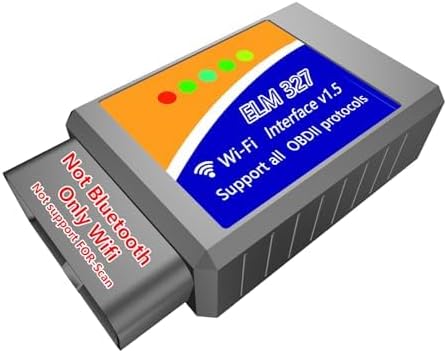 |
ULTRAOBD Wifi ELM327 OBD2 Adapter Scanner Reader | Check Price |
| 4 |  |
Generic Enhanced OBD2 Wifi Scanner | Check Price |
| 5 |  |
ANCEL AD310 Classic Enhanced Universal OBD II Scanner | Check Price |
Foseal OBD2 Scanner Wifi Car Code Reader
The Foseal is a strong all-around option for drivers who want more than a basic code number. It can read generic and manufacturer-specific diagnostic trouble codes, clear the check-engine light after a repair, and display live information such as engine RPM, coolant temperature, calculated load, and fuel-system status. That makes it useful for deciding whether a warning deserves immediate attention or further diagnosis.
Its WiFi connection works with a range of third-party apps. Foseal recommends OBD Fusion and inCarDoc for iOS, while Android users can consider Torque, DashCommand, Auto Doctor, and OBD Car Doctor. This flexibility is helpful because app interfaces and available data can vary considerably, but buyers should remember that some third-party applications charge for full functionality. The adapter may also need about 10 seconds to establish its WiFi connection.
Compatibility is broad for most 1996-and-newer vehicles sold in the United States, and it supports major protocols including CAN, KWP2000, ISO9141-2, J1850 VPW, and J1850 PWM. However, the stated exclusions are important: it is not for 24-volt vehicles, trucks, semi-trailers, dump trucks, tractors, hybrids, electric vehicles, or other commercial vehicles. The amount of information available also depends on the vehicle manufacturer and model year.
Pros
- Reads generic and manufacturer-specific codes.
- Supports live sensor data and several common protocols.
- Works with multiple iOS and Android applications.
- Broad fit for many 1996-and-newer US-market vehicles.
Cons
- Does not support hybrids, electric vehicles, or listed commercial vehicles.
- Some app features may require payment.
- WiFi setup can take several seconds.
My Opinion
Foseal earns the top position because it offers a useful balance of compatibility, live data, and code support. It is best for a typical car owner who wants flexible phone-based diagnostics, provided the vehicle is within the stated limits.
MOCATEC Wifi ELM327 OBD2 Adapter Scanner
The MOCATEC WiFi ELM327 adapter focuses on practical home diagnostics rather than advanced service programming. It can scan, explain, and clear fault codes, turn off the check-engine lamp after a repair, and read freeze-frame information. It also provides inspection-oriented functions such as emissions readiness, EVAP, and oxygen-sensor checks, which can be useful before a scheduled smog test.
Live data gives the owner a way to watch more vehicle information than the dashboard normally shows. That can include sensor readings and operating information that help put a warning light into context. For someone with limited mechanical knowledge, using a phone or tablet is less intimidating than connecting a laptop, and the adapter is intended for straightforward DIY maintenance at home or on the road.
The device supports iPhone and Android phones and tablets, along with apps that accept a WiFi connection. Torque is recommended for Android, while Car Scanner is suggested for iPhone. The critical connection detail is that this is WiFi, not Bluetooth. It supports 12-volt vehicles from 1996 onward, but it is not for motorcycles and does not support FORScan. Buyers who specifically need Ford-oriented FORScan functions should look elsewhere.
Because the adapter can be used while checking a developing warning, it may help a driver decide whether to stop immediately or arrange further diagnosis. Still, a code reader does not determine the complete mechanical cause by itself, so a serious warning should not be ignored simply because the vehicle continues moving.
Pros
- Reads and clears codes, freeze-frame data, and readiness information.
- Supports EVAP and oxygen-sensor checks.
- Works with iOS and Android WiFi apps.
- Suitable for many 12-volt vehicles from 1996 onward.
Cons
- WiFi-only; it is not a Bluetooth adapter.
- Does not support FORScan.
- Not intended for motorcycles.
My Opinion
MOCATEC is a sensible second choice for owners who want a broad set of basic emissions and live-data functions at home. Its fit is less convincing for buyers seeking motorcycle support, Bluetooth, or Ford-specific FORScan use.
ULTRAOBD Wifi ELM327 OBD2 Adapter Scanner Reader
ULTRAOBD offers a compact phone-based approach to reading vehicle information. Setup involves installing a compatible app, plugging the adapter into the vehicle’s OBD port, and selecting the adapter through the phone’s WiFi settings or app connection menu. That keeps the equipment simple for drivers who do not want a dedicated screen or a computer in the garage.
The adapter works with iPhone and Android phones and tablets and supports apps that accept WiFi connections. Torque is suggested for Android, while Car Scanner and OBD Mate are suggested for iPhone. The wider app choice is useful when one application does not display the desired data, though users should still confirm that their preferred app supports the specific functions they expect.
Vehicle coverage is listed as all 12-volt petrol and diesel vehicles, with an important programming restriction. ULTRAOBD cannot be used to program Ford, Lincoln, Mercury, and Mazda cars. It also does not support motorcycles, FORScan, or Bluetooth. Those limitations do not prevent ordinary code reading on many compatible vehicles, but they matter to buyers shopping for brand-specific service work rather than general diagnostics.
Like the other WiFi ELM327 adapters here, ULTRAOBD can help when a check-engine lamp appears during a trip by showing diagnostic information on a phone. The practical benefit is quick access to basic data, not a guarantee that the app will identify the failed part. Owners should use the displayed code as a starting point for diagnosis and avoid clearing a warning before recording the code and freeze-frame information.
Pros
- Compact setup with phone or tablet support.
- Compatible with many WiFi-based iOS and Android apps.
- Supports 12-volt petrol and diesel vehicles.
- Useful for basic mobile code checking.
Cons
- WiFi-only and not Bluetooth-compatible.
- Does not support FORScan or motorcycles.
- Cannot program Ford, Lincoln, Mercury, or Mazda vehicles.
My Opinion
ULTRAOBD is a reasonable third choice for general phone-based diagnostics when its vehicle restrictions are acceptable. It suits drivers who value a small adapter and app flexibility more than brand-specific programming capability.
Generic Enhanced OBD2 Wifi Scanner
This Generic WiFi scanner stands out for its emphasis on enhanced functions and a supplied Mini ODBII app for Apple and Android devices. It can read and erase trouble codes, show more than 3,000 generic code definitions, and display live readings such as engine speed, coolant temperature, vehicle speed, fuel trim, and intake manifold pressure. For a beginner, seeing a plain-language definition alongside a code can make the first diagnostic step easier.
The scanner also includes battery-voltage readings, freeze-frame information, readiness monitoring, and performance tests covering areas such as acceleration, braking, and distance. Those functions may be useful for tracking general vehicle behavior, although they should not be confused with a complete inspection or a professional mechanical diagnosis.
Compatibility is listed for most 1996-and-newer OBDII cars, including many gas and diesel vehicles from brands such as BMW, Audi, Volkswagen, GM, Chrysler, Ford, Honda, Toyota, Mazda, and Nissan. The stated exclusions include 24-volt diesel vehicles, new-energy vehicles, and hybrids. The product supports all nine OBDII protocols, which helps explain its broad conventional-vehicle coverage.
A 24-month manufacturer warranty against defects adds useful ownership reassurance, particularly because this product has fewer customer-feedback entries than the leading options in this list. Buyers should still confirm that their vehicle is a standard 12-volt OBDII model and that the Mini ODBII app is available for their current phone before ordering.
Pros
- Includes code definitions and a wide range of live data.
- Offers readiness, freeze-frame, voltage, and performance information.
- Supports all nine listed OBDII protocols.
- Includes a 24-month manufacturer warranty against defects.
Cons
- Not for 24-volt diesel vehicles or hybrids.
- Limited customer-feedback volume compared with the leading choices.
- App availability and features should be confirmed before purchase.
My Opinion
This scanner is appealing when built-in code definitions and performance-oriented information matter most. Its lower position reflects the smaller customer-feedback base and the need to verify both vehicle and app compatibility carefully.
ANCEL AD310 Classic Enhanced Universal OBD II Scanner
The ANCEL AD310 is the only wired, dedicated-screen scanner in this group, so it takes a different approach from the WiFi adapters. Instead of depending on a phone, wireless settings, or a third-party application, it connects through its 2.5-foot cable and provides a direct way to read and clear emission-related trouble codes. That simplicity can be valuable when a phone is unavailable or when a buyer wants a tool that stays in the glove box.
Its stated compatibility covers 1996 US-based vehicles, 2000 European and Asian vehicles, light trucks, SUVs, and newer OBD2 models. The scanner supports major protocols including KWP2000, J1850 VPW, ISO9141, J1850 PWM, and CAN. A sturdy, flexible cable and compact body make it suitable for carrying between home and the garage, while the dedicated controls avoid the learning curve of choosing and configuring an app.
There are important boundaries. The AD310 only supports emission-related issues through an OBDII interface. It cannot diagnose non-emission engine faults, OBDI vehicles, or systems such as ABS, SRS, or transmission control when those require separate diagnostic access. An adapter cannot turn an OBDI vehicle into a supported OBDII vehicle.
With a 4.6 rating from 66,813 customer submissions in the supplied data, it also has the strongest feedback history here. That does not make it a WiFi scanner, but it makes the AD310 a worthwhile comparison for shoppers who may value proven simplicity over wireless convenience.
Pros
- Dedicated scanner does not require a phone or app.
- Supports major OBDII protocols and broad vehicle coverage.
- Compact design with a thick, flexible 2.5-foot cable.
- Large customer-feedback base and strong stated rating.
Cons
- It is wired, not WiFi-enabled.
- Limited to emission-related OBDII diagnosis.
- Does not cover OBDI, ABS, SRS, or many other non-engine systems.
My Opinion
The AD310 is the best alternative for buyers who are willing to give up wireless phone access for a simple, self-contained code reader. It should not be selected by anyone who specifically needs WiFi, advanced module diagnosis, or non-emission system coverage.
How I Selected These Wifi Diagnostic Tools
The ranking weighs more than star ratings. I looked at whether each product supports the central needs of phone-based OBD2 scanning: connection type, app compatibility, vehicle coverage, code functions, live data, and useful emissions information. I also considered how clearly the supplied data describes exclusions, because compatibility warnings are just as important as advertised capabilities.
Foseal leads because it combines generic and manufacturer-specific code support with live data and several app choices. MOCATEC and ULTRAOBD follow closely as practical ELM327 choices, but both have clear restrictions involving FORScan, motorcycles, or brand-specific programming. The Generic scanner adds a longer feature list and a stated warranty, while ANCEL provides a high-feedback wired alternative for shoppers who decide that wireless access is not essential.
Selection takeaway: A WiFi adapter is only useful when the vehicle, phone, app, and connection method all work together. A scanner with fewer functions but clearer compatibility can be a better purchase than one with a longer feature list.
Customer-feedback volume was also considered where supplied, but it was not treated as a substitute for technical fit. The ANCEL has substantially more customer submissions, while the Generic scanner has far fewer. That difference helps describe confidence in ownership history, but it does not make a wired scanner suitable for someone who specifically wants wireless phone access.
Important limitation: OBD2 code readers generally report information from supported systems; they do not automatically identify the failed component or replace a full mechanical diagnosis.
How to Choose a Wifi OBD2 Code Reader
Start with the vehicle, not the app. Confirm that the car uses a 12-volt OBDII system, falls within the scanner’s model-year range, and is not a listed hybrid, electric, commercial, motorcycle, or 24-volt exception. Then decide whether you need simple code clearing, live data, readiness checks, or brand-specific programming.
- Confirm vehicle coverage: Check model year, fuel type, voltage, and excluded vehicle categories.
- Match the connection: WiFi adapters require a phone or tablet and do not behave like Bluetooth devices.
- Check app support: Make sure your preferred iOS or Android application accepts WiFi adapters.
- Define the diagnostic goal: Basic emission codes, live data, and readiness tests are different from ABS, SRS, transmission, or programming functions.
- Read the limitations: Restrictions such as no FORScan or no motorcycle support can determine whether an adapter is suitable.
Vehicle and protocol compatibility
Most products in this comparison target conventional 1996-and-newer OBDII vehicles, but that phrase does not mean every vehicle is covered in the same way. The Foseal, for example, excludes several vehicle categories, while the MOCATEC and ULTRAOBD products emphasize 12-volt vehicles and specifically exclude motorcycles. Always compare the exact product limits with the vehicle’s owner information or diagnostic-port specifications.
App choice and phone behavior
WiFi scanning depends on a connection between the phone and the adapter. A phone may temporarily use the adapter’s WiFi network instead of normal internet access, and some apps may ask for permissions before displaying data. The supplied recommendations vary by platform: Torque is commonly suggested for Android, while Car Scanner, OBD Fusion, inCarDoc, or OBD Mate may be relevant on iPhone. App names alone do not guarantee that every function is free or supported.
Basic code reading versus advanced diagnosis
A scanner can show a diagnostic trouble code, freeze-frame data, readiness status, and live sensor values without being able to access every vehicle module. If the goal is airbag, anti-lock braking, transmission, body control, or manufacturer programming work, verify that the product explicitly supports that system. None of the WiFi options here should be assumed to provide those advanced functions simply because they connect to an OBD port.
How to Set Up a Wifi Scanner
Most setup problems come from skipping the order of operations. Install the app first, park safely, and keep the vehicle stationary while making the initial connection. The adapter should be firmly seated in the diagnostic port before the phone attempts to communicate with it.
- Confirm the vehicle is compatible and locate its OBDII port.
- Install a compatible app from the appropriate app store.
- Turn the vehicle ignition to the position that powers the diagnostic systems; follow the scanner’s instructions for whether the engine should be running.
- Plug in the adapter and wait for its indicator or connection process.
- Open the phone’s WiFi settings or the app’s connection menu and select the adapter.
- Return to the app, select the vehicle if requested, and allow it to identify available data.
- Record any trouble code and freeze-frame details before clearing a warning.
Foseal specifically notes that the WiFi connection may take about 10 seconds to establish. If the app cannot connect, close other diagnostic apps, verify that the phone is connected to the adapter’s WiFi network, and check whether mobile-data settings are interfering. A different compatible app may also solve an app-specific problem.
Using Live Data Safely
Live data can help explain when a warning occurs, but it should be used responsibly. Set up the app before driving, keep the phone mounted where it does not obstruct visibility, and avoid interacting with menus in motion. If the check-engine lamp flashes, the vehicle runs dangerously, or another serious warning appears, stop safely rather than trying to diagnose while driving.
Useful readings may include engine RPM, coolant temperature, fuel-system status, vehicle speed, fuel trim, intake-manifold pressure, calculated load, and battery voltage. A single unusual number is not automatically proof of a failed part. Compare the reading with the vehicle’s symptoms and, when necessary, seek qualified diagnosis before replacing components.
How to Maintain and Store the Adapter
Wireless adapters are small, so they are easy to misplace or leave plugged in unnecessarily. Remove the device when it is not needed, especially if the vehicle will sit for an extended period. Store it in a dry place where the connector will not be bent or contaminated with dust.
- Do not force the adapter into the diagnostic port.
- Keep the connector clean and dry.
- Close the app before removing the adapter.
- Do not use a 12-volt adapter on a vehicle listed as 24-volt.
- Keep the scanner away from pedals and other moving controls.
- Record codes before clearing them so useful diagnostic evidence is not lost.
Common Mistakes to Avoid
Many disappointing purchases result from expecting a basic OBD2 reader to perform functions it was never intended to provide. Wireless connection does not automatically mean full vehicle access, and clearing a warning does not repair the condition that caused it.
- Buying a WiFi adapter when the preferred app requires Bluetooth.
- Assuming all 1996-and-newer vehicles have identical data access.
- Using an adapter on a hybrid, electric, motorcycle, commercial, or 24-volt vehicle without confirmation.
- Expecting ELM327 hardware to support FORScan when the listing specifically excludes it.
- Clearing codes before writing them down or saving freeze-frame information.
- Continuing to drive normally after a severe symptom because the scanner displayed only one code.
- Assuming a generic code definition identifies the exact failed component.
Do not treat “code cleared” as “problem fixed.” Clear a code only after recording the information and addressing the underlying condition.
FAQ
Do WiFi OBD2 scanners work with both iPhone and Android?
Many of the adapters in this comparison support both iPhone and Android phones or tablets, but the app must also support WiFi connections. Check the recommended app and its device requirements before buying.
Is a WiFi OBD2 adapter the same as a Bluetooth adapter?
No. WiFi and Bluetooth are different connection methods. The MOCATEC and ULTRAOBD products specifically state that they are WiFi-only and do not support Bluetooth.
Can these scanners clear the check-engine light?
The Foseal, MOCATEC, Generic, and other listed code-reading products describe code-clearing or check-engine-light reset functions. The underlying problem should be diagnosed and repaired first, and codes should be recorded before clearing.
Will a WiFi OBD2 scanner diagnose ABS or airbag problems?
Not necessarily. Basic OBD2 scanners generally focus on emission-related engine information. ABS, SRS, transmission, and other module access must be explicitly supported, and the products here should not be assumed to provide it.
Can these adapters be used with hybrid or electric vehicles?
Do not assume so. Foseal explicitly excludes hybrids and electric vehicles, and the Generic scanner excludes new-energy vehicles and hybrids. Check the exact vehicle compatibility information before purchase.
Which option is best if I do not want to use a phone?
The ANCEL AD310 is the better fit because it is a wired, dedicated scanner with its own controls and display approach. It is not WiFi-based and remains limited to supported OBDII emission-related diagnosis.
Final Thoughts
The best wifi obd2 scanner for most conventional car owners is the Foseal OBD2 Scanner WiFi Car Code Reader, thanks to its broad app support, live data, and generic and manufacturer-specific code capability. The MOCATEC WiFi ELM327 OBD2 Adapter Scanner is a strong second choice for DIY emissions and readiness checks, while the ULTRAOBD WiFi ELM327 OBD2 Adapter Scanner Reader is a practical third option for compatible iOS and Android users. Confirm vehicle limits and app requirements before ordering, and consider the ANCEL AD310 if a simple wired scanner suits you better.