
Comparing real specifications and practical trade-offs makes the decision easier before you buy.
My first choice is COOAU Dual Dash Cam 2.5K+1080P Front-and-Inside Camera. Its infrared interior camera can help document passenger interactions after dark, while GPS can attach route and speed information to recordings.
My second choice is Car Camera 1080P Front-and-Inside Dash Cam. Delivery drivers spend long hours on the road, make frequent stops, and may carry passengers or valuable packages, so choosing the best dash cam for delivery drivers means balancing useful coverage with simple, dependable operation. The right camera should capture the road clearly, preserve important footage, and fit the way you actually work.
My third choice is 1080P Night Vision 150 140 Wide-Angle Lens Dashcam Parking Mode. The Car Camera Camara Para Carro Black 1080P Super Night Vision is my alternative for drivers who want straightforward front-and-cabin recording without app pairing. It records both views in 1080P, and its G-sensor can lock impact footage so it is less likely to be overwritten.
Below, I compare these options, explain the strengths and trade-offs of each one, and cover the buying factors plus practical setup, use, compatibility, maintenance, longevity, safety, troubleshooting, storage, and common mistakes that matter before choosing.
5 Best Dash Cam for Delivery Drivers Comparison
I selected these options for delivery-relevant coverage, useful evidence-protection features, practical controls, and the details provided for each product. Customer ratings and customer-feedback volume were not supplied, so the comparison focuses on stated specifications and trade-offs, with brand diversity considered where practical.
| # | Image | Product | Price on Amazon |
|---|---|---|---|
| 1 |  |
COOAU Dual Dash Cam 2.5K+1080P Front-and-Inside Camera | Price on Amazon |
| 2 |  |
Car Camera 1080P Front-and-Inside Dash Cam | Price on Amazon |
| 3 | 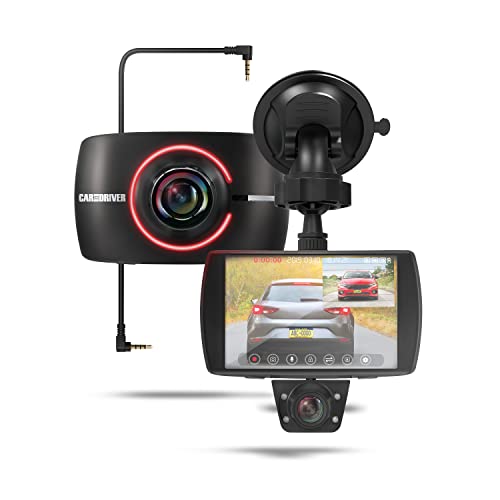 |
1080P Night Vision 150 140 Wide-Angle Lens Dashcam Parking Mode | Price on Amazon |
| 4 |  |
STARVIS 2 AI Driver Monitoring System 3 Touch Screen Night | Price on Amazon |
| 5 |  |
Garmin Dash Cam 46 1080P Compact Camera | Price on Amazon |
COOAU Dual Dash Cam 2.5K+1080P Front-and-Inside Camera
The COOAU pairs a 2.5K front camera with a 1080P cabin camera, making it a strong fit for delivery drivers who want more than a view of the road. The front lens has a 170-degree field of view, while the interior camera covers 150 degrees and can document activity inside the vehicle. That second angle is especially useful for rideshare work, but it may also help a driver document an interaction or disturbance in the cabin.
Low-light coverage is a particular strength. Four infrared lights and an F1.8 aperture support night recording inside the car, and the front camera uses WDR to balance bright and dark areas. The small 1.5-inch display keeps the unit compact, while built-in GPS can add speed, route, and location information to recordings. Wi-Fi and the COOAUDash app allow compatible Android and iOS phones to view and transfer clips without removing the card.
There are a few practical details to plan for. A microSD card is not included, and the camera supports Class 10 or faster cards up to 256GB. Parking monitoring requires a separately purchased hardwire kit. Also, a phone connected to the camera through its app cannot use Android Auto or CarPlay at the same time, so drivers who rely on those services may prefer to transfer clips while parked and disconnected.
Pros
- 2.5K front and 1080P cabin recording with wide viewing angles.
- Built-in GPS and app-based Wi-Fi access.
- Infrared cabin recording for low-light conditions.
- Supercapacitor and stated operating range of -4°F to 158°F.
Cons
- MicroSD card and parking-mode hardwire kit are sold separately.
- Using the camera app connection conflicts with Android Auto or CarPlay.
My Opinion
This is the most balanced choice here for drivers who need both road and cabin evidence, especially when night shifts or location details matter. Its main ownership trade-off is planning for the memory card and deciding whether the app connection fits your phone-and-navigation routine.
Car Camera 1080P Front-and-Inside Dash Cam
This front-and-inside camera keeps the core setup uncomplicated: it records both views in 1080P, mounts to the windshield, and powers from the car charger. The front lens has a 170-degree view and the cabin camera rotates, which lets a driver adjust the interior angle for the vehicle layout. For delivery work, that flexibility can be useful when the main concern is documenting the road and the area inside the vehicle without setting up a phone app.
Its G-sensor detects sudden impacts and locks the current file in a protected folder, helping keep collision footage from being erased during loop recording. The listing also describes seamless looping to reduce gaps between files. Night vision is offered for both views, which may help when routes stretch into evening hours, though the supplied details do not state a video resolution beyond 1080P or provide sample footage for judging fine details in difficult lighting.
Setup is intended to be plug-and-play: mount the unit, connect its car charger, and recording begins without Bluetooth pairing or an app. That simplicity comes with a power limitation—the camera has no built-in battery and must remain connected to the charger to operate. A TF card is not included; the listing states support up to 64GB. Parking monitoring also needs a separately purchased hardwire kit, so standard charger power alone should not be assumed to provide parked surveillance.
Pros
- Records front and cabin views simultaneously in 1080P.
- Rotatable cabin camera and wide front coverage.
- Impact detection locks footage against loop overwrite.
- No app or Bluetooth pairing is needed for basic operation.
Cons
- Requires a car charger for power and has no built-in battery.
- TF card and parking-mode hardwire kit are not included.
- Card support is listed up to 64GB.
My Opinion
Choose this option if a simple, app-free setup matters more than GPS, a higher-resolution front view, or advanced connectivity. Before relying on it for a full shift, confirm that the charger connection and card capacity suit your vehicle and recording routine.
1080P Night Vision 150 140 Wide-Angle Lens Dashcam Parking Mode
The Car and Driver system records in 1080P through a 150-degree front camera and a 140-degree second camera. That second unit can face the rear window or be positioned to watch the cabin, so it suits drivers who want to choose their coverage based on how the vehicle is used. It can also be used as a backseat baby monitor with the included headrest strap, although that feature may be more relevant to personal driving than delivery shifts.
A 3-inch OLED touchscreen provides a larger on-camera control surface than the compact displays on some alternatives. The setup also offers lane-departure and forward-collision alerts, plus night vision using an F1.8 lens and four infrared LEDs. These alerts can be useful reminders, but they should not replace attentive driving or be treated as a guarantee that every hazard will be detected.
Its main limitation for work use is that the supplied information does not specify built-in GPS, Wi-Fi, card capacity, or the storage card included in the package. Parking-mode detection is listed, and collision footage can be locked, but confirm the power requirements and any needed accessories before counting on around-the-clock monitoring. Drivers should also decide where to place the second camera before installation: rear-window coverage and cabin coverage serve different purposes, and one position may not provide both effectively.
Pros
- Two 1080P views with front and second-camera placement flexibility.
- 3-inch OLED touchscreen for adjustments and controls.
- Night vision, lane-departure alerts, and forward-collision alerts.
- Second camera can also serve as a backseat monitor.
Cons
- Supplied details do not specify Wi-Fi, GPS, or memory-card capacity.
- Second-camera position requires choosing between cabin and rear coverage.
- Safety alerts may not work in every driving condition.
My Opinion
This is a practical pick for drivers who want a screen and configurable second-camera placement. It is less compelling for anyone who considers GPS or phone-based clip transfer essential, since those capabilities are not specified in the supplied product information.
STARVIS 2 AI Driver Monitoring System 3 Touch Screen Night
The HUPEJOS V8 MAX is the most coverage-focused option in this group. Its front camera records 4K, while left, right, and rear cameras record 1080P, creating a four-channel view intended to reduce blind spots around the vehicle. For delivery drivers in dense urban areas, at busy intersections, or in crowded parking lots, additional angles may help explain what happened when a single forward view leaves important context out.
It also includes an AI driver-monitoring system that can detect signs such as fatigue, yawning, distraction, or phone use above a set speed; the system can be turned off. Voice commands, physical buttons, and a 3-inch touchscreen offer several ways to control the camera, while built-in GPS and 5G Wi-Fi support route information and phone access. A 64GB card is included, giving buyers a starting point for recording rather than requiring an immediate separate card purchase.
This broad feature set brings more setup and ownership considerations than a simple windshield camera. The 24-hour parking functions require a separately purchased hardwire kit, and the four-camera layout needs careful positioning and cable routing. The supplied details do not state a maximum supported card capacity, so check compatibility before buying additional storage. Drivers should also consider whether they want driver-monitoring alerts in a work vehicle and guide local privacy requirements before recording cabin or exterior views.
Pros
- 4K front recording with simultaneous 1080P left, right, and rear views.
- AI driver-monitoring features, GPS, and 5G Wi-Fi.
- Voice commands, touchscreen, and physical controls.
- Includes a 64GB card and has a stated 18-month warranty.
Cons
- Parking monitoring requires a separately sold hardwire kit.
- Four cameras mean more installation and cable-routing work.
- Maximum supported card capacity is not stated in the supplied details.
My Opinion
This is the strongest fit for drivers who prioritize comprehensive multi-angle evidence and are comfortable with a more involved installation. If you only need a forward view, or want the quickest possible setup between shifts, its extra cameras and monitoring features may be more than you need.
Garmin Dash Cam 46 1080P Compact Camera
The Garmin Dash Cam 46 takes a more discreet approach, recording 1080P footage through a 140-degree field of view. Its compact form and 2-inch LCD screen may appeal to drivers who want a familiar forward-facing camera without adding a large display to the windshield. Automatic incident detection saves video when an event occurs, while voice control can save a clip or picture and manage audio recording in supported languages.
Garmin’s Drive app can connect with up to four compatible cameras through its auto-sync feature, which could be useful for someone building a multi-camera setup over time. Driver alerts include forward-collision and lane-departure warnings, along with “go” alerts; red-light and speed-camera location alerts are available only in some areas. As with other driver alerts, conditions can affect whether a warning works, so these features should be considered supplementary.
This is a renewed unit, so buyers should check the seller’s condition and return details rather than assume it is new. The included components are a low-profile magnetic mount, vehicle power cables, dual USB power adapter, and documentation. An 8GB or faster Class 10 microSD card is required but not included. The listing also cautions that some jurisdictions regulate or prohibit use of the device, so drivers should check local rules before installing it, particularly if they plan to use its alerts or record in areas with privacy restrictions.
Pros
- Compact 1080P camera with a 140-degree field of view.
- Automatic incident saving and voice control.
- Can sync with up to four cameras through the Garmin Drive app.
- Includes a magnetic mount, power cables, and dual USB adapter.
Cons
- Renewed product; condition and seller terms should be checked.
- MicroSD card is required but not included.
- Some alerts may be impaired by conditions or unavailable in certain areas.
My Opinion
The Garmin is a sensible compact choice for a driver who wants a simple forward view and voice-operated clip saving. It is not the best match for someone who needs cabin footage out of the box, and the renewed status makes checking the purchase terms especially important.
How I Selected These Dash Cams for Delivery Drivers
I compared the cameras by the problems they can help document during a delivery shift: road incidents, activity inside the vehicle, parking impacts, and events that happen in low light. I also considered how easy it may be to save or retrieve footage, whether the camera needs separate accessories, and how much installation complexity its coverage adds.
The ranking reflects the usefulness and breadth of the stated features, not firsthand testing or a claim that one camera will suit every vehicle. Supplied data did not include customer ratings or customer-feedback volume, so I could not use those as evidence; where product details are incomplete, I call that out rather than assuming a capability.
For many delivery drivers, useful coverage and dependable evidence protection matter more than a long list of optional alerts. Check what is included—and what must be purchased separately—before comparing the cameras.
Coverage and evidence protection
A forward camera records the road ahead, while a cabin or additional rear-facing camera can add context that a single lens misses. Impact detection and protected event files can reduce the chance that an important clip disappears during loop recording. Those functions are valuable only if the camera is positioned correctly and the card is working as intended.
Usability and ownership details
I also considered displays, app access, voice controls, GPS, power requirements, and included storage. These details affect everyday use: an easy way to retrieve a clip can save time after an incident, while a missing card or hardwire kit can add cost and setup work. Warranty information is mentioned only where supplied.
How to Choose the Best Dash Cam for Delivery Drivers
Start by deciding what you need the camera to show. Drivers who work alone may prioritize road coverage and simple incident locking, while drivers carrying passengers or working in busy areas may value cabin or multi-angle recording. Then check power, storage, and installation requirements against your vehicle and shift length.
- Choose the right views: Front-only, front-and-cabin, and four-channel cameras solve different evidence needs.
- Check night capability: Consider whether you need useful road footage, cabin footage, or both after dark.
- Plan storage: Confirm the required card type, maximum capacity, and whether a card is included.
- Understand parked recording: Parking mode may need a separate hardwire kit.
- Consider daily workflow: App access, voice controls, screen size, and phone compatibility can affect convenience.
Decide whether cabin footage is useful
Cabin recording can provide context about passenger interactions, but it may not be necessary for every delivery route. If your work is primarily transporting goods, a forward-facing camera may cover your main concern. If your vehicle is also used for rideshare work or you want to document activity inside, check that the interior camera’s viewing angle and low-light performance fit the cabin layout.
Match resolution and viewing angle to your priorities
A higher stated resolution can provide more image detail, but the camera’s angle and placement also matter. Wide views capture more surrounding lanes, while a camera pointed too high, too low, or through an obstructed area may miss useful details. Think of resolution as one part of the evidence picture, not a guarantee that every plate or sign will be readable in every condition.
Compare power and parking requirements
Most dash cams need power while driving, and some parking features require a hardwire connection. A standard charger-powered camera may stop monitoring when the vehicle is off. Before paying for a parking-mode feature, confirm exactly what accessory is needed and whether installation is appropriate for your vehicle; a hardwire kit is not included with several cameras in this roundup.
Make the controls fit your routine
A touchscreen can make settings easier to reach while parked, but drivers should not be changing settings while moving. Voice controls may help save a clip without reaching for the unit, while app-based access can simplify downloading footage. Check phone compatibility and any conflicts with navigation or in-car systems before relying on an app as your only way to retrieve evidence.
Set Up a Dash Cam Before Your First Delivery Shift
Plan the installation when the vehicle is parked and you have time to check the view. Follow the product’s mounting instructions, keep the camera within a useful windshield position, and avoid blocking the driver’s view. A camera that is easy to reach is not necessarily best placed if it obstructs visibility.
Test the image and framing
After mounting, record a short clip and check it on the camera or a compatible phone or computer. Make sure the road fills the intended part of the frame, the windshield area is clear, and the cabin camera—if included—points where you want it. Adjust before starting work rather than discovering a poor angle after an incident.
Check power and automatic recording
Start the vehicle and confirm that the camera turns on and records. If the model uses a charger, make sure the cable stays connected and does not interfere with controls or pedals. For parking monitoring, install only a compatible hardwire kit and confirm that the mode is enabled; a parking feature listed in the product description does not necessarily operate from a basic charger alone.
Memory Cards, Loop Recording, and Clip Protection
Dash cams typically use loop recording so older, unprotected footage can be replaced as storage fills. This is convenient for continuous use, but it makes correct card selection and event protection important. Check each camera’s stated card type and capacity limit before purchasing; the models here range from support up to 64GB to support up to 256GB, while some supplied details do not specify a maximum.
When an incident happens, use the camera’s event-lock button or voice command if available, then confirm that the clip is protected. G-sensor locking can help automatically preserve footage after an impact, but it is still wise to retrieve important files as soon as it is safe. Keep a separate copy of critical footage so it does not depend on a single card or device.
Use a suitable card and check it regularly
Follow the manufacturer’s stated card requirements, including speed class where specified. A card that is too small for your usage may cycle through footage quickly, and an incompatible card may cause recording problems. Periodically check that the camera recognizes the card and that recent files are present. Do not wait until you need evidence to find out that recording stopped.
Using a Dash Cam Safely During Work
Set up the camera before driving, and avoid handling the screen or phone while the vehicle is moving. If you need to save or download a clip, pull over somewhere safe first. Voice control can reduce the need to reach toward the camera, but it does not remove the need to pay attention to traffic.
Consider who may be captured in the cabin and how recordings are stored or shared. A cabin camera can record passengers, coworkers, or personal belongings, so use it responsibly and check applicable privacy rules. For delivery drivers, a simple routine—save only the footage needed, secure the phone or card, and avoid posting identifiable clips—can reduce unnecessary exposure.
Parking Mode: What to Check Before Relying on It
Parking mode can help document a collision or disturbance while the vehicle is unattended, but it depends on more than a menu setting. Some cameras require a hardwire kit, and certain modes use impact sensing, motion detection, radar, or time-lapse recording. Confirm which feature your chosen camera actually supports and what powers it after the ignition is off.
Think about where you park and how long the vehicle stays there. A delivery vehicle that makes frequent short stops has different needs from one left overnight on a street. Follow the product’s installation guidance, check that the camera enters the intended mode when the vehicle is off, and verify the saved clip after a safe test. Do not assume that parking mode provides continuous, uninterrupted surveillance unless the product details say so.
Dash Cam Care and Troubleshooting Tips
Keep the lens and windshield area clean, since dust, fingerprints, glare, or debris can reduce image usefulness. Use a soft, clean cloth and avoid harsh cleaners that could damage the lens or nearby surfaces. Check that suction or adhesive mounts remain secure, especially after major temperature changes or windshield cleaning.
If recording stops or clips are missing
First check power, card recognition, and whether the camera is actually set to record when the vehicle starts. Guide the card’s compatibility and capacity limits, then follow the manufacturer’s instructions for formatting or replacing it. If a particular clip is important, stop relying on the camera until you confirm that new recordings are being saved correctly.
Keep the setup tidy
Inspect cables and connectors now and then, especially if the camera is frequently removed or adjusted. Route cords so they do not snag or obstruct the driver. For multi-camera systems, label or remember which cable serves each camera, making troubleshooting easier if one view disappears.
Common Dash Cam Mistakes to Avoid
A camera can only help if it is installed, powered, and recording correctly. A few simple checks can prevent avoidable problems during a busy work schedule.
- Assuming a memory card or hardwire kit is included when the product data says it is sold separately.
- Mounting the camera before checking how the view looks in an actual recording.
- Relying on a parked-monitoring feature without confirming its power requirements.
- Leaving important clips on a looping card instead of saving a separate copy.
- Expecting driver alerts or night vision to work perfectly in every condition.
- Ignoring local rules about camera placement, recording, and privacy.
Before relying on a dash cam for work, verify that it is recording, confirm that the card is recognized, and learn how to lock a clip while parked.
FAQS About Best Dash Cam for Delivery Drivers
Is a front-and-inside dash cam useful for delivery drivers?
It can be useful when documenting activity inside the vehicle matters, especially for drivers who also transport passengers. Drivers who only need road evidence may prefer a simpler forward-facing camera. Consider the camera’s cabin angle, night capability, and any privacy requirements before choosing interior recording.
Do delivery drivers need a dash cam with GPS?
GPS can attach route, location, or speed information to recordings, which may add context to an incident. It is not essential for every driver, and the supplied details should specify whether GPS is built in. The COOAU and HUPEJOS models in this roundup list built-in GPS.
Can a dash cam record while my delivery vehicle is parked?
Some models offer parking monitoring, but it may require a separately purchased hardwire kit. Confirm the camera’s power requirements and the specific parking features before relying on it. A standard car charger may not keep the camera operating after the ignition is off.
What memory card should I buy for a delivery dash cam?
Use a card that meets the camera’s stated type, speed, and capacity requirements. Some products in this roundup specify Class 10 or faster cards, while others list different capacity limits or do not provide a maximum in the supplied information. Check the exact model instructions before buying, and make sure the camera recognizes the card.
Should I choose a multi-camera dash cam for delivery work?
Choose multiple views if you need to document more than the road ahead, such as cabin activity or events beside and behind the vehicle. A multi-camera system can add setup work and cable routing, so a simpler camera may be a better fit if forward evidence is your main priority.
Can dash cam driver alerts replace paying attention to the road?
No. Lane-departure and collision alerts are supplementary features, and the supplied product information notes that some alerts can be affected by conditions. Drivers should remain attentive and treat warnings as aids rather than guarantees.
Final Thoughts
The best dash cam for delivery drivers depends on the coverage and setup you need. The COOAU Dual Dash Cam 2.5K+1080P is my leading all-around pick for front-and-cabin recording with GPS, while the Car Camera 1080P Front-and-Inside Dash Cam is a straightforward alternative. For flexible second-camera placement and a touchscreen, consider the Car and Driver Dual Dash Cam; choose according to your route, vehicle, and evidence priorities.