
Taxi drivers need a dash cam that can document the road and, when needed, what happens inside the car. The best dash cam for taxi drivers depends on how many camera angles you need, how well the system handles low light, and whether you can manage its storage and power requirements.
My first choice is Affver 5-Channel 4K Dash Cam. It pairs a 4K front view with four 1080P views, infrared cabin lighting, GPS, and a 128GB card, making it the most comprehensive pick here.
My second choice is 4K Dash Cam Front and Interior 4K HDR Dash Camera. My alternative is 4K Dash Cam Front and Interior 4K HDR Dash Camera, which ranks second for drivers who want detailed front footage without the complexity of a five-camera system. Its 4K HDR front camera, 1080P cabin view, GPS, Wi-Fi 6, and included 64GB card make it a capable two-view option.
My third choice is COOAU 2.5K Front-and-Interior Dual Dash Cam. Its infrared interior camera and app-based file access support everyday rideshare use, though the memory card and parking-mode hardwire kit are separate purchases.
Below, I compare all five options and explain who each suits best. The buying guide also covers camera views, storage, installation, parking mode, privacy, and practical setup decisions for taxi work.
5 Best Dash Cam for Taxi Drivers Comparison
I selected these options for their relevance to taxi and rideshare driving, the usefulness of their supplied specifications, and the balance of road and cabin coverage. Customer ratings and customer-feedback volume were not provided, so I have not used them to rank the products; brand variety was practical within the available choices.
| # | Image | Product | Price on Amazon |
|---|---|---|---|
| 1 |  |
Affver 5-Channel 4K Dash Cam | Price on Amazon |
| 2 |  |
4K Dash Cam Front and Interior 4K HDR Dash Camera | Price on Amazon |
| 3 |  |
COOAU 2.5K Front-and-Interior Dual Dash Cam | Price on Amazon |
| 4 |  |
1080P Dash Camera | Price on Amazon |
| 5 | 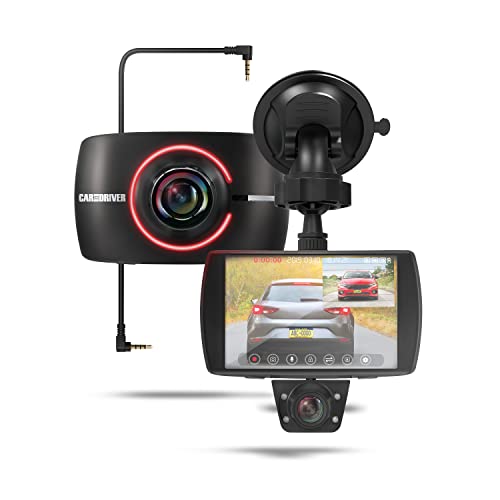 |
1080P Night Vision 150 140 Wide-Angle Lens Dashcam Parking Mode | Price on Amazon |
Affver 5-Channel 4K Dash Cam
For a driver who wants more than front-and-cabin coverage, Affver’s five-channel system records the front, rear, left, right, and interior views at the same time. The front camera records in 4K, while the other four record in 1080P. That broad coverage can help document side approaches, rear impacts, and activity inside the vehicle, although a dash cam cannot guarantee that a particular clip will settle a claim.
The infrared cabin lights are useful when picking up passengers at night or working in dim areas. Built-in GPS adds speed, route, and timestamp information to footage, which can help establish where and when an event occurred. The included 128GB card means there is storage to start with, and the camera supports cards up to 512GB. For ongoing taxi use, the supplied guidance recommends a high-endurance, heat-resistant card rated Class 10, U3, V30 or higher.
Wi-Fi 6 supports wireless file access through the app, and the listing specifies 5.8GHz transfer. The small 1.5-inch screen is better suited to basic checks than prolonged viewing, so expect to use a phone or computer to inspect important footage. Parking surveillance requires Affver’s hardwire kit, sold separately, and installation of five cameras may take more time than setting up a dual camera.
Pros
- Five simultaneous views, including left and right sides.
- 4K front video, infrared cabin lighting, and built-in GPS.
- Includes a 128GB card and supports up to 512GB.
Cons
- Parking mode requires a separate hardwire kit.
- Five-camera installation involves more placement and cable routing.
- Only a 1.5-inch screen is provided.
My Opinion
This is the strongest fit for taxi drivers who value broad coverage over a quick, minimal installation. Before buying, confirm that you can route and position all five cameras in your vehicle, and budget for the hardwire kit if you want parked-vehicle monitoring.
4K Dash Cam Front and Interior 4K HDR Dash Camera
70mai takes a simpler approach than the five-channel Affver: it records a high-resolution front view and a separate cabin view. The front camera captures 4K HDR video, while the interior camera records in 1080P. Its F1.55 front aperture is intended to let in more light, and the supplied imaging features aim to retain detail in mixed or low-light conditions. That combination is a good match for drivers who need a clear road view but do not need side cameras.
For taxi shifts that continue after dark, the listed Night Owl Vision and MaiColor Vivid+ processing are intended to improve low-light clarity and color. The cabin camera also gives a view of passenger activity. As with any interior-facing camera, placement should provide a useful view without becoming a distraction or unnecessarily capturing more than needed.
Built-in GPS records speed and location data, while Wi-Fi 6 and voice control support app access and hands-free operation. The included 64GB card is ready for initial use, and the camera supports cards up to 512GB. Loop recording overwrites older files, so important clips should be saved elsewhere before they are lost. The listing describes 24-hour time-lapse parking surveillance, but check the required power setup and any additional accessories before relying on it when the car is off. The unit and included card are covered by an 18-month warranty according to the supplied product details.
Pros
- 4K HDR front recording with a 1080P cabin view.
- Built-in GPS, Wi-Fi 6, voice control, and an included 64GB card.
- Time-lapse parking surveillance is listed as a feature.
Cons
- Does not provide left- and right-side camera views.
- Parking-mode power requirements should be confirmed before purchase.
- The included card is smaller than the capacity supported.
My Opinion
This is a sensible second choice for drivers who want a detailed front view and cabin recording in a two-camera setup. Its core combination is strong, but clarify the parking-power arrangement and decide whether 64GB is enough for your shift length before putting it into regular service.
COOAU 2.5K Front-and-Interior Dual Dash Cam
COOAU records the road ahead in 2.5K at 30 frames per second and the cabin in 1080P. The listed viewing angles are 170 degrees for the front and 150 degrees for the interior, giving the driver a broad view of each area. This setup avoids the extra side-camera installation of a five-channel unit while still documenting both traffic and passenger activity.
The interior camera uses four infrared lights for night recording, and its IR lights can be switched off if you prefer not to use the black-and-white night mode. The front camera pairs an F1.8 lens with WDR to balance bright and dark areas. Those features may help when driving through uneven street lighting, though the actual clarity of a clip still depends on conditions, camera placement, and the event being recorded.
Built-in GPS can save route, location, and speed information, and the COOAUDash app supports viewing, downloading, and sharing video on Android and iOS. One practical limitation is that connecting a phone to the camera through the app prevents using Android Auto or CarPlay at the same time, according to the supplied details. The microSD card is not included; COOAU lists support for Class 10 or higher cards up to 256GB. Parking mode requires a separate hardwire kit. Its supercapacitor is specified for temperatures from -4°F to 158°F, and the listing states a two-year warranty and lifetime technical support.
Pros
- 2.5K front and 1080P cabin recording with wide listed angles.
- Built-in GPS, Wi-Fi, and adjustable infrared cabin lighting.
- Supercapacitor specified for a broad temperature range.
Cons
- MicroSD card and parking-mode hardwire kit are sold separately.
- App connection prevents simultaneous Android Auto or CarPlay use.
- Supports cards up to 256GB, less than some options here.
My Opinion
COOAU makes sense for drivers who want GPS and cabin night vision at a mid-level front resolution. Remember to add a compatible card to your setup, and consider whether app-based downloads fit your routine if you rely on Android Auto or CarPlay.
1080P Dash Camera
The Milerong X25 records front and cabin views in 1080P at 30 frames per second and comes with a 64GB card. Its listed viewing angles are 170 degrees in front and 140 degrees inside. A two-inch screen gives a little more room for on-device checks than the smallest screens in this group, although a screen preview is not a substitute for saving and inspecting an important file at full size.
Four infrared lights and an F1.8 aperture support cabin recording in low light, while WDR is intended to balance bright and dark areas. The interior view can switch between infrared night mode and normal color, according to the supplied instructions. There is no Wi-Fi, app, GPS, Bluetooth, or wireless file transfer, so retrieving footage means working directly with the memory card rather than using a phone connection. For drivers who prefer fewer app settings and do not need location data, that may be an acceptable trade-off.
Loop recording overwrites older unlocked files, while the G-sensor locks footage when it detects a shock or collision. The camera supports cards up to 64GB, so the included card already matches the stated maximum. Parking monitoring needs a separate hardwire kit; the described mode wakes the camera after a detected shock, records a 31-second clip, and then shuts down. For normal driving, it powers from the cigarette-lighter port and starts recording with the vehicle. The supplied setup advice recommends formatting the card before first use and using the original car charger.
Pros
- Includes a 64GB card and records front and cabin views.
- Infrared night vision, WDR, loop recording, and G-sensor.
- Simple local operation without app or wireless setup.
Cons
- No GPS, Wi-Fi, app, Bluetooth, or wireless file transfer.
- Card support is limited to 64GB.
- Parking monitoring requires a separate hardwire kit.
My Opinion
The X25 suits drivers who want a straightforward dual camera and do not mind handling footage from the card. Its lack of GPS and wireless access is a real limitation for fast incident sharing, so it is best for buyers who value basic operation over connected features.
1080P Night Vision 150 140 Wide-Angle Lens Dashcam Parking Mode
This Car and Driver system records 1080P front footage using a Sony sensor, with listed viewing angles of 150 degrees in front and 140 degrees for the second camera. The included 3-inch OLED touchscreen makes camera controls and settings easy to access from the unit. Its second camera is modular: it can be positioned to watch the rear window or used to view the cabin. That flexibility may appeal to drivers who want to change the camera’s role, but the listing does not describe five-direction coverage.
For taxi use, mounting the second camera inside can capture passenger activity, while placing it at the rear window provides a view behind the vehicle. The setup also supports a backseat-monitor role with a headrest strap, though taxi drivers will usually care more about how the camera’s placement serves their driving and documentation needs. An F1.8 lens, four infrared LEDs, and a six-glass lens support night vision.
The system includes lane-departure and forward-collision alerts, plus parking-mode detection that can record and lock a clip if the parked vehicle is hit. These alerts can add reminders, but they should not replace attention to the road. The supplied product details do not specify GPS, app access, card capacity, or the power accessories needed for parking mode, so confirm those points before purchase if they matter to your work. The 1080P resolution is also less detailed on paper than the 2.5K and 4K front-camera options above.
Pros
- 3-inch OLED touchscreen and configurable second camera.
- Front and second-camera views with infrared night vision.
- Lane-departure, forward-collision, and parking-mode alerts are listed.
Cons
- 1080P front resolution is lower than the top three options.
- GPS, app access, and card capacity are not specified in the supplied details.
- Confirm parking-mode power requirements and camera placement before buying.
My Opinion
This option is worth considering when a touchscreen and flexible second-camera placement are priorities. It is a less complete match for drivers who need clearly specified GPS, wireless access, or higher-resolution road footage, so check those requirements carefully before choosing it.
How I Selected These Best Dash Cams for Taxi Drivers
I prioritized the practical demands of paid passenger driving: recording the road, documenting the cabin when appropriate, and making important footage retrievable. The five options range from a five-channel system to simpler dual-camera setups, so the selection covers different needs rather than assuming every taxi driver wants the same amount of equipment.
Resolution, night-recording features, GPS, storage included in the box, app access, and parking-mode requirements all informed the comparison. I also considered the limits stated in the product details, such as separate hardwire kits, smaller storage limits, or the absence of GPS and wireless access. Those differences can matter as much as headline resolution during daily use.
Ratings and customer-feedback counts were not supplied for these products. I have therefore not treated popularity or satisfaction as established facts, and the rankings reflect the available specifications and taxi-use relevance rather than personal testing.
For taxi work, a camera that records the cabin may be more useful than a higher-resolution front camera alone when passenger interactions are part of the concern.
Check the full ownership setup before buying: a parking mode may depend on a separate hardwire kit, and a camera may require a larger or higher-endurance memory card than the one included.
How to Choose the Best Dash Cam for Taxi Drivers
Start with the situations you want footage to document. A front-and-interior camera is a practical baseline for many drivers, while a five-channel system adds side and rear views at the cost of more installation work. Then compare resolution, low-light support, storage, file access, and parked-vehicle power requirements as a complete system.
- Choose views for your actual risks: front and cabin coverage is simpler; extra cameras add angles but also wiring and placement decisions.
- Check night visibility: infrared cabin lighting can help record inside the car in low light.
- Plan storage: confirm the included card, maximum supported capacity, and whether the camera needs a high-endurance card.
- Decide how you will retrieve clips: Wi-Fi and an app can speed access, while a card-only model requires a direct transfer.
- Verify parking power: a parking feature may require a separately purchased hardwire kit.
How Many Camera Views Do You Need?
A front camera records traffic ahead, and a cabin camera adds context inside the vehicle. For passenger-facing work, that combination may answer the main question without requiring cameras on every side. Consider additional rear and side views if those angles are important for your vehicle or routes, but make sure the camera positions will not obstruct your view. More lenses are useful only if they can be mounted securely and record the areas you actually need.
Is 4K Necessary for Taxi Driving?
Higher resolution can preserve more image detail in suitable conditions, which may help when inspecting distant signs or other visual information. It does not guarantee that a license plate will be readable: distance, motion, glare, lens position, and lighting all matter. A 2.5K or 1080P camera can still provide useful context, particularly inside the cabin, so weigh resolution against the number of views and your budget for storage.
What Storage and App Features Matter?
Dash cams use loop recording to replace older, unlocked files as the card fills. A larger supported card can give you more time before older footage is overwritten, but capacity limits differ: the products here range from a 64GB maximum to support for up to 512GB. Check the camera’s stated card requirements rather than assuming any card will work. An app can make it easier to find and download a clip, but it may require connecting the phone to the camera, and the COOAU listing notes that this connection prevents simultaneous Android Auto or CarPlay use.
Do You Need GPS and Parking Mode?
GPS can add speed and location information to saved footage, which may provide useful context when looking back at a trip. It is not necessary for every driver, and it should not replace checking the actual video. Parking mode can monitor a parked vehicle, but the power arrangement matters: Affver, COOAU, and Milerong specify a separately sold hardwire kit for their parking functions. Confirm the required accessories and installation method for any model before depending on surveillance while the car is off.
How to Install and Set Up a Taxi Dash Cam
Plan the camera positions before attaching mounts. The front lens should show the road without obstructing the driver’s view, and an interior lens should cover the intended passenger area without pointing unnecessarily at unrelated parts of the cabin. A multi-camera system needs extra time for routing cables to side or rear positions.
Follow the supplied mounting and power instructions, and secure loose cables so they do not interfere with controls or pedals. With the Milerong X25, the listed setup instructions call for cleaning the windshield, locking the suction-cup mount firmly, formatting the card, and using the original car charger. Other models may use different mounts, so follow their own instructions rather than assuming the same fitting process applies.
After installation, make a short test recording and check the view from each camera. Confirm the date and time, loop recording, and desired cabin night mode. If any angle is blocked or the footage is difficult to see, adjust it before starting a shift.
How to Save Important Dash Cam Footage
Loop recording is convenient for routine use because it frees space automatically, but it also means an important unlocked file may eventually be overwritten. G-sensor locking can protect footage when a camera detects a collision or shock, but drivers should not rely on automatic detection alone. Once it is safe, stop the recording if needed and save the relevant clip to another device or location.
Use the app when supported, or transfer the memory card to a computer with a compatible reader. Keep the original file where possible, and note the date, time, and context while they are fresh. Avoid filling the card with unneeded locked clips; protected files may not be cleared by ordinary loop recording. The exact file-management process varies by camera, so consult its instructions before deleting or formatting anything.
Night Recording and Cabin Camera Placement
Cabin infrared lighting is useful because a passenger area may be much darker than the road outside. The Affver, COOAU, Milerong, and Car and Driver product details specify infrared lighting for interior recording. The Milerong instructions explain that its infrared setting turns the cabin view gray, while switching that function off returns the display to normal color. A monochrome night view may be a reasonable trade-off for visibility in low light.
At night, keep the lens clean and position it to limit reflections from glass or bright screens. Check both the day and night views after installation, because a position that works in sunlight may catch glare after dark. Make sure the cabin camera shows the area you intend to document without distracting the driver.
Parking Mode and Vehicle Battery Planning
Parking mode is not always ready to use straight out of the box. Several of the listed cameras require a separate hardwire kit, and an installation must provide suitable power while the engine is off. Affver’s supplied details describe low-voltage protection with its professional hardwire kit; the other products may have different arrangements, so confirm the exact kit and safeguards for the model you choose.
Consider whether you regularly leave the taxi unattended in places where monitoring is worthwhile. If you do not need parked-vehicle recording, a basic powered-on-when-driving setup may be simpler. If you do, verify compatibility and installation requirements before purchase rather than discovering that an extra component is needed after the camera arrives.
Taxi Camera Privacy and Evidence Handling
A cabin camera captures passengers as well as the driver. Before using one, check applicable local recording and privacy requirements, along with any taxi-company or rideshare-platform policies. Where appropriate, make passengers aware of recording in the manner required for your work. A camera’s presence does not itself establish that every recording practice is permitted.
Keep saved footage limited to legitimate purposes, and share it only with people who need it for an incident or other valid reason. Store clips securely and avoid posting passenger footage publicly. These habits help protect customer privacy while keeping relevant evidence available when needed.
Common Dash Cam Mistakes to Avoid
Many problems come from treating installation and file storage as one-time tasks. A quick check at the start can prevent a camera from recording the wrong view or leaving important footage inaccessible.
- Assuming a parking feature needs no extra power equipment: confirm whether a hardwire kit is required and sold separately.
- Buying an incompatible or unsuitable card: check the camera’s capacity limit and card guidance before ordering.
- Leaving the lens poorly positioned: test daytime and night views and make sure the mount does not block visibility.
- Trusting loop recording to preserve every incident: save important clips promptly, especially if the camera has not locked them.
- Relying on a camera instead of safe driving: alerts and footage are supplemental tools, not substitutes for attention.
- Ignoring privacy considerations: understand relevant rules and workplace policies before recording passengers.
FAQS About Best Dash Cam for Taxi Drivers
Is a front-and-interior dash cam enough for taxi driving?
It can be enough if your main priorities are documenting the road ahead and activity in the cabin. Choose a system with side or rear cameras if those extra views address a specific need, and consider the added installation work.
Which dash cam in this list records the most directions?
The Affver 5 Channel 4K Dash Cam Front Rear Inside Left records front, rear, left, right, and cabin views at the same time. Its five-camera setup is more involved than a dual-camera system.
Do taxi drivers need a dash cam with GPS?
GPS can add speed and route information to footage, which may help provide context for a trip. It is useful for drivers who want those details, but it is not essential to every setup and does not replace the video itself.
Can I use parking mode without a hardwire kit?
That depends on the model. Affver, COOAU, and Milerong specify a separate hardwire kit for their parking functions. Check the chosen camera’s power requirements before expecting it to record while the vehicle is off.
How much memory card capacity should a taxi dash cam have?
Capacity needs depend on how many cameras are recording, how long you drive between file transfers, and the camera’s card limit. These products support different maximum capacities, so follow the model’s instructions and save important files before loop recording replaces older footage.
Does a dash cam guarantee that an incident will be resolved in my favor?
No. Footage can provide useful information, but it cannot guarantee a particular insurance or legal outcome. Keep the original clip, preserve relevant context, and follow the instructions of the organization handling the incident.
Final Thoughts
The best dash cam for taxi drivers depends on the coverage and workflow you need. Affver 5-Channel 4K Dash Cam is my top choice for five-direction recording; 70mai 4K HDR Front-and-Interior Dash Cam is the alternative for a simpler high-resolution setup; and COOAU 2.5K Front-and-Interior Dual Dash Cam balances road and cabin coverage with GPS. Check storage, mounting, power, and privacy requirements before committing to any system.