
Comparing real specifications and practical trade-offs makes the decision easier before you buy.
My first choice is COOAU Dual Dash Cam 2.5K+1080P Front-and-Inside Dash Cam. Its infrared cabin lighting and compact display make it especially practical for drivers who work after dark and want to check clips on a phone.
My second choice is GPS Infrared Night Vision Parking Mode Loop Recording 256GB Support. It ranks second for adding side coverage to front and cabin recording, a useful distinction when documenting door-area incidents during pickups and drop-offs.
My third choice is Car Camera 1080P Front-and-Inside Dash Cam. Choosing the best dash cam for rideshare drivers means balancing clear road footage with a useful view of the passenger cabin. Storage, night visibility, app access, and the extra wiring needed for parking protection can matter just as much as headline resolution.
COOAU Dual Dash Cam 2.5K+1080P Front-and-Inside Dash Cam

Below, I compare these options, explain the strengths and trade-offs of each one, and cover the buying factors plus practical setup, use, compatibility, maintenance, longevity, safety, troubleshooting, storage, and common mistakes that matter before choosing.
5 Best Dash Cam for Rideshare Drivers Comparison
I selected these models for their relevance to rideshare use, including cabin visibility, road coverage, night recording, and practical access to footage. Customer ratings and feedback counts were not supplied, so I have not used them to rank the options; brand variety was considered where the available product data allowed.
| # | Image | Product | Price on Amazon |
|---|---|---|---|
| 1 | |
COOAU Dual Dash Cam 2.5K+1080P Front-and-Inside Dash Cam | Price on Amazon |
| 2 |  |
GPS Infrared Night Vision Parking Mode Loop Recording 256GB Support | Price on Amazon |
| 3 |  |
Car Camera 1080P Front-and-Inside Dash Cam | Price on Amazon |
| 4 |  |
WiFi 6 APP Access GPS and 64GB Card Commuting | Price on Amazon |
| 5 | 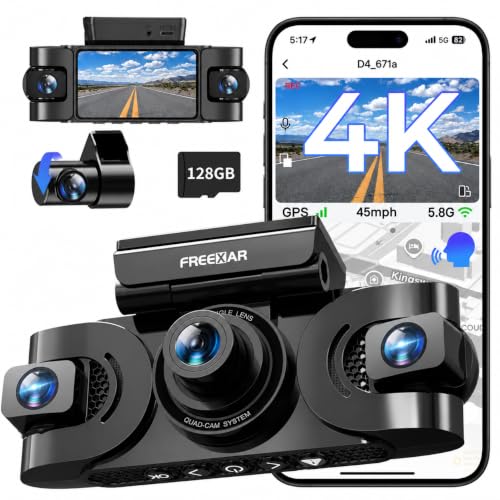 |
FREEXAR D4 4-Channel 4K 360° Dash Cam | Price on Amazon |
COOAU Dual Dash Cam 2.5K+1080P Front-and-Inside Dash Cam
COOAU’s dual-camera setup records the road ahead at up to 2560 × 1440 resolution and the passenger cabin at 1080p. The wide front view is intended to cover multiple lanes, while the interior camera’s 150-degree angle can document passenger interactions. For a driver who wants evidence from both sides of a ride, that combination is more useful than a front-only camera.
Night work is a particular strength on paper. Four infrared lights support cabin recording in low light, and the front camera combines an F1.8 lens with WDR to balance bright and dark areas. The infrared lights can be switched off if you prefer not to use monochrome night mode. As with any camera, a wide view helps capture context but can make small details farther away harder to distinguish.
Built-in GPS can attach speed, route, and location information to recordings, while Wi-Fi and the COOAUDash app let you view and download clips on an iOS or Android phone. One practical catch: connecting to the camera through its app prevents simultaneous Android Auto or CarPlay use. Parking monitoring also requires a separate hardwire kit, and a microSD card is not included.
Pros
- Records front and cabin views simultaneously, with higher resolution in front.
- Built-in GPS and Wi-Fi app access.
- Infrared cabin recording and a supercapacitor rated for a broad temperature range.
Cons
- Requires a separate hardwire kit for parking mode.
- MicroSD card must be purchased separately.
- Phone app connection conflicts with simultaneous Android Auto or CarPlay use.
My Opinion
This is my leading all-around pick for drivers who value a capable front view, cabin coverage, and built-in location data. Before buying, budget for a compatible Class 10 or faster card of up to 256GB and decide whether the extra parking-mode wiring is worthwhile for your routine.
GPS Infrared Night Vision Parking Mode Loop Recording 256GB Support
The S3 records the front, cabin, and side views at 1080p, using three 170-degree-angle lenses. That extra side perspective can help document activity near passenger doors and the curb—areas a front-and-cabin pair may not show as well. It makes the most sense for drivers who regularly handle busy pickups, rather than someone who only needs a basic forward-facing record.
Infrared LEDs support low-light recording inside the cabin and at the sides. This can help preserve context on evening rides, although the supplied information does not specify the recording resolution of each channel beyond 1080p or promise that every distant license plate will be legible. Treat the camera as a way to document events, not as a guarantee of perfect identification.
Wi-Fi, a mobile app, and GPS support viewing and managing footage on iOS or Android, with Rexing’s GPS Player providing speed, location, and route information. Loop recording overwrites the oldest files when the card fills, while the G-sensor locks collision footage against routine overwriting. The system supports storage up to 256GB, but the supplied details do not say a card is included.
Parking monitoring can start recording after motion or vibration, or use 24/7 time-lapse, but either approach requires a compatible smart or intelligent hardwire kit. A supercapacitor is intended to improve temperature resistance compared with relying on a conventional battery. Installation is described as windshield mounting, and the stated warranty is 18 months.
Pros
- Three-channel front, cabin, and side coverage.
- Infrared lights support low-light interior and side recording.
- GPS, Wi-Fi, loop recording, and support for cards up to 256GB.
Cons
- Parking monitoring requires a compatible hardwire kit.
- All three channels are specified at 1080p, rather than offering a higher-resolution front view.
- Card inclusion is not specified in the supplied details.
My Opinion
The S3 is the clearest fit here if side-door context is a priority. Its three viewpoints add useful coverage, but plan for the wiring and confirm the memory card and hardwire-kit requirements before installation.
Car Camera 1080P Front-and-Inside Dash Cam
This front-and-cabin camera records both views in 1080p. Its 170-degree front lens is intended to capture a broad section of the road, and the 150-degree interior camera rotates so you can point it toward the seating area you need to document. That adjustability is useful in vehicles where the cabin layout or camera mounting position makes a fixed view awkward.
The listed night-vision capability applies to both front and interior recording, while WDR is intended to manage contrasting light. These features are relevant for late pickups and dim streets, but the supplied product details do not give sensor measurements or guarantees about reading plates in every lighting condition. The G-sensor locks footage after a sudden impact, helping protect an important clip from routine loop overwriting.
Setup is deliberately simple: mount the camera and connect the car charger, without app installation or Bluetooth pairing. That may appeal to drivers who want a basic recording system and prefer not to manage clips through a phone app. The trade-off is less convenient wireless access to files than the Wi-Fi-equipped models in this list.
The camera supports cards up to 64GB, but a TF card is not included. Parking monitoring needs a separately purchased hardwire kit, and the unit must remain connected to a car charger to operate because it does not have a built-in battery. The supplied data states a one-year warranty, a one-month replacement period for the camera, and 24-month accessory replacement coverage.
Pros
- Rotatable cabin camera and wide front view.
- Simple charger-powered setup with no app pairing required.
- G-sensor protection and loop recording.
Cons
- Supports cards only up to 64GB; card is not included.
- No built-in battery; it needs a car-charger connection to run.
- Parking monitoring requires a separate hardwire kit.
My Opinion
This is a sensible basic option for drivers who value easy setup over wireless file management or higher storage capacity. Confirm that the 64GB limit suits your recording needs, and remember that parked-vehicle monitoring requires additional wiring.
WiFi 6 APP Access GPS and 64GB Card Commuting
Eivikga records front rear and cabin views at the same time making its layout different from the front-and-interior pairs above A rear-facing view can add context behind the vehicle while the cabin channel documents passenger activity The listing describes the system as 4K UHD however the supplied details do not clearly state the resolution of each individual channel so buyers who need a.
The camera includes a 64GB card, which means there is less immediate setup shopping than with models that specify no included storage. Its Wi-Fi 6 app access operates at 5.8GHz and is intended to speed up previewing, downloading, and sharing footage. That can be convenient when you need to retrieve a clip between shifts, though app transfer and phone compatibility are still worth checking with your own device.
Night-vision capability is aimed at dim rideshare conditions. The system also offers loop recording, G-sensor collision detection, and motion-triggered parking monitoring. The parking feature requires a hardwire kit, which is not described as included. For installation, the package lists a 16.4-foot cable and plug-and-play setup for most sedans and SUVs, but the listing specifically says it is not suitable for long trucks or RVs.
Because the rear camera and its cable need to reach the back of the vehicle, plan the route before mounting everything. The three-channel coverage could be worthwhile for drivers who want rear context as well as cabin recording, but the longer cable run and hardwire option make it less of a minimal-installation choice.
Pros
- Simultaneous front, rear, and cabin recording.
- Includes a 64GB card and a 16.4-foot cable.
- 5.8GHz Wi-Fi 6 app access and parking monitoring support.
Cons
- Hardwire kit is required for parking monitoring.
- Not specified as suitable for long trucks or RVs.
- Individual channel resolutions are not clearly detailed in the supplied data.
My Opinion
Eivikga is worth considering if rear visibility and an included memory card matter more than a very simple installation. Check vehicle fit and confirm the channel resolutions you need, then account for the separate hardwire kit if parked coverage is part of your plan.
FREEXAR D4 4-Channel 4K 360° Dash Cam
The FREEXAR D4 uses four adjustable cameras to record the front, rear, left, right, and cabin areas. That broader view may help capture side impacts, lane-change events, or parking-lot contact that a two-camera system could miss. The front channel records in 4K, while the other three channels record in 1080p, so the headline resolution does not apply equally to every viewpoint.
For drivers who often work at night, the system combines an F1.8 front lens, WDR, and eight infrared lights to support recording in poor lighting. GPS logging can attach speed, time, and location information to footage. A G-sensor, voice command, and one-press control provide three ways to protect an important clip, which may be helpful when reaching for a phone is not appropriate.
The free app connects over 5.8GHz Wi-Fi and can be used to view footage, adjust settings, or download files. A 128GB card is included, and loop recording overwrites older footage while locked clips are protected from routine overwriting. Four channels can produce a lot of video, however, so checking important files and managing storage should be part of regular ownership.
Parking protection offers impact detection and time-lapse recording, but both require a hardwire kit; the listed compatible kit is sold separately. The package is described as including what is needed for installation, but wiring must be routed so it does not interfere with airbag deployment. The supplied information also states a 24-month warranty and lifetime technical support.
Pros
- Four adjustable views, with 4K front recording and 1080p on the other three channels.
- Includes a 128GB card, GPS, and 5.8GHz Wi-Fi.
- Voice, button, and G-sensor options for locking footage.
Cons
- Parking modes require a separate hardwire kit.
- Only the front channel is specified as 4K.
- Four-channel footage can require more active file management.
My Opinion
The D4 is the broadest-coverage choice for drivers who want front, rear, side, and cabin footage in one system. Its four viewpoints and included card are appealing, but consider whether you need that coverage and are comfortable with a more involved cable and storage setup.
How I Selected These Best Dash Cams for Rideshare Drivers
I prioritized features that connect directly to rideshare work: recording the passenger area, capturing enough of the road to document an incident, and making important footage easier to preserve or retrieve. Night visibility, GPS, storage support, parking-mode requirements, and practical installation details also influenced the comparisons.
The five products differ in meaningful ways. Some record only front and cabin views, while others add side or rear coverage; their recording resolutions, included memory cards, and app options are not interchangeable. I treated those distinctions as buyer trade-offs rather than assuming that more channels or a larger resolution number automatically makes a better choice.
Rideshare usefulness depends on what the camera can show inside the vehicle as well as outside it. A high-resolution front channel does not replace a cabin view when the main concern is a passenger interaction.
The supplied information did not include customer ratings or customer-feedback volume, so I could not use that evidence responsibly. My ranking instead reflects the stated features, their relevance to rideshare use, and how clearly the product information explains limitations such as card support or hardwiring.
Before ordering, confirm the memory card, app, and parking-power requirements. Those practical details can affect the full setup as much as the camera itself.
How to Choose the Best Dash Cam for Rideshare Drivers
Start with the kinds of evidence you want to capture, then check how the camera gets power and where its files go. A straightforward two-view camera may be enough for many drivers; additional side or rear channels are useful only if they fit your vehicle and routine.
- Choose the views you need: Front and cabin recording covers road context and passenger activity; side or rear cameras add other angles.
- Compare resolution by channel: Check whether a resolution applies to every camera or only the front one.
- Plan for low light: Look for cabin night-vision support if you regularly drive after dark.
- Check storage before buying: Confirm whether a card is included, the supported capacity, and the card type or speed required.
- Decide on parked coverage: Most listed parking features require a separate hardwire kit, so include that in your setup plans.
Coverage: cabin, sides, and rear
A front camera shows what happened ahead, but it cannot document every passenger interaction. A cabin camera is important if you want a record of activity inside the vehicle. Side cameras may help with door-area incidents, while a rear view can show traffic behind you. More viewpoints usually mean more cameras and wiring to mount, so match the layout to your vehicle rather than buying the largest channel count by default.
Resolution and useful detail
Resolution is only one part of a recording. Lens angle, lighting, distance, and camera aim all affect what a clip can show. A wide lens captures more surroundings but spreads the image across a larger scene. When a listing gives different resolutions for different channels, compare the detail you care about—often front-road footage—rather than relying on a single headline number.
App access and GPS
Wi-Fi can make it easier to view or download a file without removing the memory card. Check whether the product uses a dedicated app and whether it works with your phone. Some app connections can affect other phone functions; for example, COOAU states that its camera app cannot be used at the same time as Android Auto or CarPlay. GPS can add route, speed, or location information to recordings, which may help provide context.
Power and parking mode
Driving recording and parked-vehicle monitoring are different power needs. A camera that records while the car is running may require a hardwire kit to detect a collision after the ignition is off. Confirm what kit is compatible, whether it is sold separately, and whether you are comfortable routing a cable or prefer professional installation.
Installing a Rideshare Dash Cam Safely
Before sticking a mount in place, sit in the driver’s seat and check your view through the windshield. The camera should capture the intended scene without creating an obstruction or distracting you. For multi-camera systems, identify where the cabin, side, or rear cameras need to point before hiding cables.
Plan the camera positions
Place the front camera where it can see the road without blocking your sightline. Aim the cabin camera toward the passenger area, and check its view from likely seating positions. If the interior lens rotates, adjust it before finalizing the mount. For a rear camera, measure the cable route first; the Eivikga listing specifies a 16.4-foot cable and says the system is not for long trucks or RVs.
Route wires with vehicle safety in mind
Keep cables tidy and away from controls, pedals, and places where they could snag. FREEXAR specifically cautions that its wiring must not interfere with airbag deployment. If you are unsure how to route a cable around airbags or trim, consult the vehicle instructions or a qualified installer rather than guessing.
Check the image before driving for work
Power the camera on and confirm that each channel records the intended area. Make a short test clip, then check whether the windshield view, cabin framing, date, and GPS information are as expected. A camera that is slightly mis-aimed can miss important context even if its specifications look suitable.
Memory Cards, Loop Recording, and File Protection
Dash cams record repeatedly, so storage is part of the everyday setup rather than a one-time accessory. Loop recording generally replaces older unlocked files when the card fills. A G-sensor or manual lock can preserve a clip, but locked files may still take up space and should be managed.
Match the card to the camera
Follow the specific camera’s card requirements. COOAU supports Class 10 or faster cards up to 256GB, while the 1080p Car Camera model supports up to 64GB and does not include a card. FREEXAR includes a 128GB card. Other product details may not say whether a card is in the box, so verify before relying on immediate recording.
Save important files promptly
If an incident occurs, use the camera’s lock control if it is safe to do so, then retrieve and back up the file as soon as practical. App downloads can be convenient, while a card reader is another option when app access is unavailable. Keep an original copy before editing or sharing a clip so you do not accidentally lose the source file.
Do not assume a locked file is a permanent archive. Learn how your model organizes protected clips, check remaining space periodically, and remove files only after confirming that anything important has been copied.
Using a Dash Cam During Rideshare Shifts
Make the camera part of your pre-shift routine. Check that it powers on, that the lenses are unobstructed, and that the recording indicator or screen shows it is working. A brief check is more useful than discovering after an incident that a cable came loose or a card is full.
Keep the cabin view consistent
Passengers, headrests, and objects left in the vehicle can affect what the interior camera sees. Keep the camera aimed at the area you intend to capture and avoid placing items where they block the lens. If you move the mount or change vehicles, confirm the framing again before accepting rides.
Retrieve footage calmly
Do not operate the app or handle the memory card while driving. Once parked safely, identify the approximate time of the event and save the relevant clip. GPS can add route or location context when available, but use the recorded video and associated information as a record to check—not as a substitute for your own incident documentation.
Rideshare platforms and local rules can have their own requirements around recording and passenger notification. Check the rules that apply to your location and service, and use clear, appropriate communication about in-vehicle recording.
Parking Mode: What to Confirm Before You Depend on It
Parking mode is not automatically available just because it appears in a product description. The cameras in this roundup that offer parked monitoring require a hardwire kit for that function. Some systems can react to an impact or motion; others also offer time-lapse recording. These modes differ in how they capture activity and use storage.
Check the kit and recording mode
Confirm the exact kit compatibility before purchasing. COOAU and FREEXAR each identify a separate kit, while other listings describe a compatible smart or intelligent hardwire kit without establishing that it is included. Ask whether the option you choose supports the parking behavior you want, such as impact-triggered clips or time-lapse recording.
Do not mistake parking mode for guaranteed coverage
Parking monitoring can help document certain events, but no camera can guarantee that every movement or impact will be captured. A camera’s view may be blocked, its power may be interrupted, or an event may happen outside its detection settings. Confirm operation after installation and avoid relying on it as the vehicle’s only security measure.
Privacy and Passenger-Facing Recording
A cabin camera records inside the vehicle, which can include passengers and conversations. Requirements for recording and notification vary by location and situation, so check applicable laws, rideshare platform rules, and any employer policies that apply to you. A dash cam’s recording capability does not decide whether a particular use is permitted.
Where appropriate, use a clear notice that recording is in progress. Keep footage secure, limit access to people who need it, and avoid sharing identifiable clips casually. If footage is needed for a safety or insurance matter, preserve the relevant original and follow the appropriate reporting process.
Also consider how app access works on your phone. Wi-Fi connection, file downloads, and account settings can expose recordings if a device is shared or left unlocked. Use basic phone security and remove saved clips from shared devices when they are no longer needed.
Common Rideshare Dash Cam Mistakes to Avoid
A capable camera can still disappoint if the setup is mismatched to the car or the owner’s routine. Check the details that affect daily use before mounting it permanently.
- Assuming every camera has the headline resolution: FREEXAR specifies 4K for the front view and 1080p for its other three channels. Check resolution per channel.
- Forgetting the memory card: Several models do not specify an included card, and capacity limits differ. Buy a compatible card before the first shift.
- Expecting parking mode to work from the normal charger: The listed parking functions require a hardwire kit. Verify compatibility and installation needs.
- Mounting before checking the view: Test both road and cabin framing so the camera is not aimed at the wrong area or obstructed.
- Ignoring cable and vehicle fit: Rear-camera wiring may not suit a long vehicle, and cables must not interfere with airbags or driving controls.
- Leaving locked clips unchecked indefinitely: Protected footage can use storage space. Save important files and guide card capacity regularly.
- Using the phone while driving: Guide or download footage only when safely parked.
FAQS About Best Dash Cam for Rideshare Drivers
Do rideshare drivers need a camera that records inside the car?
A cabin camera can document passenger-area activity that a front-facing camera cannot show. Whether you need one depends on your priorities and the rules that apply to recording in your location and through your rideshare service.
Is a two-channel or three-channel dash cam better for rideshare?
A two-channel front-and-cabin system covers the road ahead and passenger area. A three-channel system can add a side or rear view, depending on its layout. Choose the additional angle that addresses a real blind spot in your driving routine.
Can a dash cam record while the car is parked?
Some models offer parking monitoring, but the products here require a separate hardwire kit for that feature. Check the compatible kit and the specific recording modes before purchase.
Do these rideshare dash cams include memory cards?
Not all of them. FREEXAR includes a 128GB card, and Eivikga lists a 64GB card. COOAU and the 1080p Car Camera model state that a card is not included; confirm the package details for other models before ordering.
Does a higher-resolution front camera guarantee readable license plates?
No. Resolution can help preserve detail, but distance, lighting, motion, lens angle, and camera aim also affect what a clip shows. Treat resolution as one factor rather than a guarantee of plate readability.
Can I get dash cam footage on my phone?
Several picks include Wi-Fi and an app for viewing or downloading recordings. Check app compatibility and any limits on using the camera’s Wi-Fi connection alongside other phone features. The 1080p Car Camera model does not require an app for its basic setup.
Final Thoughts
The best dash cam for rideshare drivers depends on the coverage and setup you’ll actually use. COOAU Dual Dash Cam 2.5K+1080P is my first choice for its front-and-cabin recording, GPS, and app access; RexingUSA S3 is the stronger alternative for side views; and Car Camera 1080P Front-and-Inside Dash Cam is a straightforward option for drivers who prefer simple, app-free setup. Compare card and hardwire needs before choosing.