
Below, I compare five dash cams and explain their trade-offs, then cover how to choose, install, and maintain one. You’ll also find practical guidance on privacy, storage, parking mode, and common setup mistakes.
My first choice is COOAU Dual Dash Cam 2.5K+1080P Front-and-Inside Camera. Its compact screen and interior infrared lights make it a versatile option for families who want to see both the road and the passenger area.
My second choice is Car Camera 1080P Front-and-Inside Dash Cam. Choosing the best dash cam for teen drivers means balancing useful evidence with a setup your teen can use consistently. The right camera may document a collision or risky situation, but coverage, power requirements, storage, and cabin privacy all affect whether it fits your family.
My third choice is 1080P Night Vision 150 140 Wide-Angle Lens Dashcam Parking Mode. My alternative is the Car Camera Camara Para Carro Black 1080P Super Night Vision, which earns second place for its straightforward plug-in setup and dual front-and-cabin views. It records in 1080P, locks impact footage, and avoids app pairing, although its parking mode needs a separately purchased hardwire kit.
Below, I compare these options, explain the strengths and trade-offs of each one, and cover the buying factors plus practical setup, use, compatibility, maintenance, longevity, safety, troubleshooting, storage, and common mistakes that matter before choosing.
5 Best Dash Cam for Teen Drivers Comparison
I selected these options for their relevance to teen-driver needs, including front or cabin coverage, impact protection, night visibility, and useful setup or monitoring features. The supplied product information did not include customer ratings or feedback, so the comparison focuses on documented specifications and practical trade-offs; I also considered product variety where possible.
| # | Image | Product | Price on Amazon |
|---|---|---|---|
| 1 |  |
COOAU Dual Dash Cam 2.5K+1080P Front-and-Inside Camera | Price on Amazon |
| 2 |  |
Car Camera 1080P Front-and-Inside Dash Cam | Price on Amazon |
| 3 | 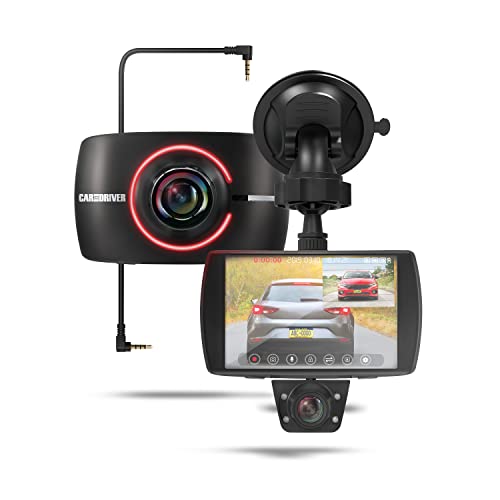 |
1080P Night Vision 150 140 Wide-Angle Lens Dashcam Parking Mode | Price on Amazon |
| 4 |  |
2K Car Security Camera Remote Live Vie 2K Front 1080P | Price on Amazon |
| 5 |  |
WiFi Night Vision 24/7 Parking Mode | Price on Amazon |
COOAU Dual Dash Cam 2.5K+1080P Front-and-Inside Camera
The COOAU records the road ahead at up to 2.5K resolution and the cabin at 1080P, giving families two perspectives in one camera system. Its 170-degree front view and 150-degree interior view can capture more of the scene than a narrow forward-only camera. The inside camera’s infrared lights are particularly useful when a teen drives after dark, though interior footage is not a substitute for attentive driving or a conversation about passenger privacy.
Built-in GPS can add route, location, and speed information to saved video. That extra context may help a parent understand where and when an event occurred, but it also makes clear family rules important: agree on who can access recordings and how they will be used. Wi-Fi and the COOAUDash app allow video access on Android and iOS without removing the memory card. One practical limitation is that connecting the phone to the camera prevents simultaneous use of Android Auto or CarPlay.
A 1.5-inch display keeps the unit compact, while the included mounting options support windshield installation with suction or adhesive. A microSD card is not included; the camera supports Class 10 or faster cards up to 256GB. Parking monitoring requires a separate hardwire kit, so buyers should account for that before expecting protection while the car is off.
Pros
- 2.5K front and 1080P cabin recording.
- Built-in GPS and app-based video access.
- Interior infrared lights and support for cards up to 256GB.
Cons
- Memory card and parking-mode hardwire kit are sold separately.
- Phone connection conflicts with Android Auto or CarPlay use.
My Opinion
This is my strongest all-around pick for families who want front-and-cabin evidence plus route context. Check the app and hardwire requirements before buying, and set expectations around when cabin video may be viewed.
Car Camera 1080P Front-and-Inside Dash Cam
This black front-and-inside camera keeps its setup simple: mount it on the windshield, connect the car charger, and it is intended to begin recording without an app download or Bluetooth pairing. That can suit a teen or parent who wants basic recording rather than phone-based controls. Its front camera covers 170 degrees, while the rotatable cabin camera covers 150 degrees, providing a view of the road and occupants at the same time.
Both channels record in 1080P. The listed night-vision capability is intended to keep road and cabin footage useful in low light, and a built-in G-sensor locks a file after a sudden impact so it is less likely to be overwritten. Loop recording replaces older unlocked clips when storage fills. The product information says its file-slicing approach avoids gaps between files, but families should still check recordings periodically rather than assume every incident will be captured perfectly.
There are a few purchase details to plan for. A TF card is not included, and support is listed for cards up to 64GB. The camera has no built-in battery, so it must remain connected to the car charger to operate. Parking monitoring after the engine is off requires a separately purchased hardwire kit. Its stated warranty coverage includes a one-year warranty and 24-month replacement coverage for accessories, with a one-month free replacement period for the camera.
Pros
- Simple charger-powered setup with no app pairing required.
- Rotatable cabin camera and impact-triggered file locking.
- Front and cabin views record simultaneously.
Cons
- Memory card is not included and capacity support is limited to 64GB.
- Parking mode needs a separate hardwire kit.
- It cannot operate without a power connection.
My Opinion
This is a sensible alternative for families who value uncomplicated operation over app features or higher front-camera resolution. Confirm the card and hardwire-kit requirements before installation.
1080P Night Vision 150 140 Wide-Angle Lens Dashcam Parking Mode
Car and Driver’s dual-camera system records in 1080P and uses a 150-degree front view and 140-degree second-camera view. The secondary unit can be mounted to watch through the rear window or turned toward the cabin. That flexibility makes it a useful match for families deciding whether outside rear coverage or an interior view matters more. It can also function as a backseat baby monitor when paired with the listed headrest strap.
A three-inch OLED touchscreen offers on-device control, which may be more convenient than relying on a phone to change settings. The camera also lists lane-departure warnings and forward-collision alerts. These are reminders rather than a replacement for safe driving: a teen should not treat an alert as proof that the system will identify every hazard, or adjust the camera while moving.
For darker trips, the 6-glass lens, F1.8 aperture, and four infrared LEDs are intended to improve low-light visibility. A G-sensor can lock footage after an impact, and parking-mode detection can record if the parked vehicle is hit. The supplied details do not specify a required parking-power accessory, maximum card capacity, or warranty terms, so check the current package and instructions for those details before purchase. Also decide where to place the second camera before routing its cable; rear-window and cabin installations serve different purposes.
Pros
- Second camera can face the rear window or cabin.
- Three-inch OLED touchscreen and listed driving alerts.
- Night-visibility features and impact-triggered file locking.
Cons
- Both camera views are 1080P.
- Supplied details do not state card capacity or warranty terms.
- Safety alerts should not be treated as autonomous driving protection.
My Opinion
This option stands out for adaptable camera placement and an onboard screen. It suits families who want to choose between cabin and rear-window coverage, provided they confirm storage and power details before committing.
2K Car Security Camera Remote Live Vie 2K Front 1080P
This 4G LTE camera combines a 2K front view with 1080P cabin recording. Its adjustable 155-degree front camera and 180-degree interior camera cover different angles, and infrared night vision is intended to make the cabin more visible in low light. For a family that wants to check a parked car or receive alerts about a teen driver’s vehicle, its cellular connection and app-based GPS location offer more remote access than a typical Wi-Fi dash cam.
That convenience comes with ongoing conditions. The device is listed for U.S. use and includes a seven-day unlimited LTE trial and a 30-day cloud-storage trial. Continuing remote live view, alerts, GPS location, two-way audio, and cloud access requires a paid LTE subscription after the trial. Service depends on cellular coverage where the vehicle is located, and the camera does not connect to Wi-Fi. A family should guide both the subscription and privacy implications before relying on remote features.
For power, the included OBD-II cable avoids fuse-box hardwiring and supports low-power parking standby. Radar motion detection and the G-sensor can wake the camera to record an event, while local microSD recording provides an alternative to cloud storage for compatible cards. Privacy Mode can disable the cabin camera when interior recording is not wanted. The supplied information does not specify a card capacity limit, so verify compatibility before purchasing a card.
Pros
- 2K front and 1080P interior recording with infrared cabin vision.
- Included OBD-II power cable and remote GPS location.
- Privacy Mode can disable interior recording.
Cons
- Ongoing subscription is required for continued cellular and cloud features.
- U.S. use only; remote access depends on cellular coverage.
- Does not connect to Wi-Fi.
My Opinion
This is the choice for parents who specifically want remote access and parked-vehicle alerts, not for buyers seeking a subscription-free camera. Confirm network availability, ongoing costs, and the family’s monitoring boundaries first.
WiFi Night Vision 24/7 Parking Mode
The FREEXAR D4 uses four adjustable cameras to record front, rear, side, and cabin views at the same time. Its front channel records in 4K, while the other three channels record in 1080P. That broad coverage can help document activity around a vehicle as well as passenger interactions, making it a strong fit for a family that wants more than a forward-facing view. Its infrared cabin camera is intended to improve visibility when the interior is dark.
GPS logging can attach speed, time, and location information to driving records. For protecting an important clip, the camera offers G-sensor locking, voice control, and a one-press lock option. These are useful ways to preserve footage, but a driver should use voice commands or the button only when doing so will not distract from driving. The free app connects over 5.8GHz Wi-Fi and supports viewing, settings changes, and downloads; this is a local camera connection, not a cellular remote-monitoring service.
A 128GB memory card is included, and loop recording overwrites older unlocked footage when the card fills. Parking protection has two approaches: impact detection and time-lapse recording. The listed 24/7 parking mode requires a separately sold ACC hardwire kit, so budget and installation plans should include that accessory. The product information also cautions that camera placement and wiring must not interfere with airbag deployment. It comes with a 24-month warranty and lifetime technical support.
Pros
- Four simultaneous views, with 4K front and 1080P on the other channels.
- Includes a 128GB card and offers several clip-lock methods.
- GPS logging, app access, and infrared cabin recording.
Cons
- 24/7 parking mode requires a separate ACC hardwire kit.
- Wi-Fi app access is not the same as remote cellular viewing.
- Four camera views and wiring require careful placement.
My Opinion
The D4 offers the broadest listed coverage in this group, with the trade-off of more cameras and installation planning. It is a compelling option for families prioritizing multiple angles and included storage.
How I Selected These Dash Cams for Teen Drivers
I prioritized details that can change a family’s day-to-day experience: whether a camera records the cabin as well as the road, how it preserves collision footage, what it needs for power and storage, and whether it adds GPS or remote access. I also considered the practical difference between a simple charger-powered unit and cameras that need an app, subscription, or additional hardware.
The supplied research did not include customer ratings or customer-feedback evidence. I have not treated a feature list as proof of real-world performance, and I have not assumed that a camera can capture every plate, prevent a collision, or replace good driving habits. Product positions reflect the available specifications and how directly each option addresses common family needs.
For many families, a dependable front view and clearly understood file-locking behavior are more useful than a long list of connected features.
Rank order also reflects the balance of coverage and ownership complexity. The COOAU combines dual recording, GPS, and app access; the simpler 1080P model prioritizes plug-in operation; the Car and Driver camera offers placement flexibility; the LTE model adds remote services with a subscription; and the FREEXAR provides four-channel coverage with more involved installation.
How to Choose the Best Dash Cam for Teen Drivers
Start with what your family wants the camera to document. A forward camera can record road events; cabin recording adds a view of occupants, while a rear-facing camera may help show what happened behind the vehicle. The more views and connected features you add, the more important it becomes to plan wiring, storage, privacy, and ongoing costs.
- Choose coverage deliberately: Decide whether road-only, cabin, rear, or multi-angle recording matches your needs.
- Check power requirements: Confirm whether the camera uses a charger, OBD-II cable, or separately purchased hardwire kit.
- Plan for storage: Check whether a card is included, its supported capacity, and how locked clips are protected.
- Compare access features: Distinguish local Wi-Fi downloads from remote LTE viewing and check for subscription fees.
- Discuss privacy: Set expectations about cabin recording, who can access footage, and when it will be evaluated.
Decide Which Camera Views Matter
A front camera is the basic choice for documenting the road ahead. A cabin camera records passengers and interior activity, which can be useful for context but raises privacy questions. A rear camera can show events behind the vehicle, although its usefulness depends on placement and view through the rear glass. Four-channel systems offer broad coverage but require more careful cable routing and camera positioning.
Understand Resolution and Night Footage
Higher resolution can preserve more image detail, but it does not guarantee that every license plate will be readable. Distance, motion, glare, weather, windshield condition, and lighting all matter. Look at each channel’s resolution separately: a multi-camera system may record its front view at a higher resolution than the cabin or rear views. Infrared cabin lighting can help with interior visibility in darkness, but it does not brighten the road outside.
Compare Power and Parking Protection
Most basic operation depends on a power connection. Parking mode may need a hardwire kit or an OBD-II cable, and some models enter a low-power state before waking on motion or impact. Read the exact requirements for the camera you choose. Do not assume that a “24-hour” or “24/7” label means parking coverage works without extra hardware or that every event will trigger a recording.
Check App, GPS, and Subscription Needs
Wi-Fi often connects a phone directly to a camera to view or download files nearby. It does not necessarily provide access when you are away from the car. Cellular LTE may provide remote viewing or alerts, but it depends on coverage and can require a paid plan after a trial. GPS can add location and speed information to footage, so consider whether that extra context is useful and agree on how the information will be handled.
Set Up a Teen Driver’s Dash Cam Carefully
Plan the installation while the vehicle is parked. Choose a position that gives the front camera a clear view without blocking the driver’s sightline. If the system has a cabin or rear camera, check that its angle captures the intended area rather than a headrest, trim panel, or bright reflection.
Route cables so they do not hang near the steering wheel, pedals, or areas where airbags deploy. The FREEXAR product information specifically warns against interference with airbag deployment; that is a sensible concern for any camera installation. If a cable must be routed behind trim or connected to a fuse box, use the manufacturer’s instructions or seek qualified installation help rather than guessing.
After mounting, turn the car on and confirm that each camera records. Guide a short clip from each view, check the date and time, and make sure the lens is not obscured. Test phone pairing while parked, if applicable. A quick setup check can reveal a loose mount or incorrect camera angle before the camera is needed.
Choose and Manage Memory Cards
Check the camera’s own card requirements before buying storage. The COOAU supports Class 10 or faster microSD cards up to 256GB, while the simple 1080P model supports up to 64GB and does not include a card. The FREEXAR includes a 128GB card. Other supplied product details do not specify a maximum, so confirm compatibility rather than assuming a large card will work.
Loop recording generally replaces older unlocked video when storage fills. Impact protection can lock selected clips, but too many protected files may reduce space available for normal recording. Periodically check the card and save important footage elsewhere. If a camera reports an error or stops recording, inspect its manual for the recommended formatting process and use a compatible card.
Set Family Rules for Cabin Recording
A cabin camera can provide useful context, but recording teens and passengers involves trust as well as technology. Explain what the camera records, whether audio is enabled, who can watch footage, and when clips will be checked. Let passengers know about the camera when appropriate, and consider whether a model’s privacy control—such as the LTE camera’s Privacy Mode—fits your family’s needs.
GPS and remote viewing deserve the same clarity. If a camera records route and speed details or sends location alerts, agree on the purpose of those features before installing it. Using a camera mainly as a tool for discussion and accountability is different from checking it constantly. Clear boundaries can make the device feel more like safety equipment and less like a surprise surveillance system.
Use Dash Cam Footage Effectively
If an incident occurs, focus first on safety and any required emergency steps. When it is safe to do so, use the camera’s event-lock feature or voice control if the model supports it. Avoid operating a screen or handling a memory card while driving. An impact sensor may lock an event automatically, but manually protecting a clip can provide another option when the car is stationary.
When you need a file, download or copy the relevant footage promptly and keep the original where possible. Note the date, time, and circumstances, and avoid editing the only copy. A camera file may help explain an event, but it does not by itself determine fault or guarantee that an insurer or other party will interpret the footage in a particular way.
Keep the Camera Clean and Working
Dust, fingerprints, and windshield glare can reduce image clarity. Clean the lens gently with a soft, clean cloth, and keep the area in front of the camera clear. If the view looks hazy, check for windshield residue or a mount that has shifted before assuming the camera is faulty. Recheck the angle after removing or adjusting the mount.
Make a simple recurring check of the recording indicator, date and time, storage status, and a recent clip. Look for cables that have loosened or moved into the driver’s way. If you use parking mode, check its power connection and settings as well. A camera that is powered but not saving video is not providing useful documentation.
Common Dash Cam Mistakes to Avoid
A good camera can still disappoint if the setup does not match how the family expects to use it. Avoid these preventable problems:
- Assuming parking mode works out of the box: Some models require a separately purchased hardwire kit; check before installation.
- Buying an incompatible card: Verify card type, speed, and capacity limits for the exact camera.
- Expecting Wi-Fi to work remotely: Direct phone-to-camera Wi-Fi is different from LTE access away from the vehicle.
- Ignoring locked-file storage: Protected clips may not be overwritten, so clear or back up files thoughtfully.
- Mounting in an unsafe location: Keep the driver’s view clear and wiring away from airbags and controls.
- Leaving privacy expectations unstated: Discuss cabin footage and location data before recording begins.
Do a parked-car recording check after installation—and repeat it after changing the card, mount, power connection, or camera settings.
FAQS About Best Dash Cam for Teen Drivers
Is a front-and-cabin dash cam better for a teen driver?
It depends on what you want to document. A front camera records the road ahead, while cabin coverage can add context about occupants. Families should weigh that added view against privacy concerns and explain who can access the footage.
Does a dash cam let parents watch a teen’s car remotely?
Not necessarily. A Wi-Fi camera may connect to a phone when the user is near the device, but remote viewing generally requires cellular connectivity and an active service. The LTE model listed here requires a paid subscription after its trial for continued remote features, and coverage depends on the vehicle’s location.
Do teen-driver dash cams record when the car is parked?
Some provide parking monitoring, but requirements differ. The COOAU and FREEXAR need separately purchased hardwire kits for the listed parking modes, while the LTE camera includes an OBD-II power cable. Check each model’s instructions and power requirements before relying on parked recording.
Will a dash cam always capture a readable license plate?
No. Resolution is only one factor. Distance, vehicle speed, darkness, glare, weather, and camera angle can affect detail, so no listed resolution guarantees that a plate will be legible in every clip.
How much memory does a dash cam need?
It depends on the camera’s supported capacity, number of channels, and how much footage you want to keep. Check the model’s card limit and whether a card is included. Loop recording can overwrite older unlocked clips, so save important video before it is replaced.
Should parents tell a teen that the cabin camera is recording?
Yes, it is a good idea to make expectations clear before using an interior camera. Discuss what is recorded, who can access clips, and when footage may be viewed. Also consider informing passengers where appropriate.
Final Thoughts
The best dash cam for teen drivers depends on whether your priority is straightforward recording, cabin visibility, remote access, or broader coverage. My top three are the COOAU Dual Dash Cam 2.5K+1080P for its balanced dual views and GPS, the Car Camera 1080P Front-and-Inside Dash Cam for simple operation, and the Car and Driver Dual-View 1080P Dash Cam for flexible camera placement and an OLED screen. Compare their power, storage, and privacy needs before choosing.