Choosing the best mercedes scan tool is not as simple as finding the cheapest code reader. Mercedes-Benz vehicles can store faults in the engine, transmission, airbag, ABS, suspension, and body modules, so the right tool depends on how deeply you want to diagnose and maintain the car.
My first choice is FOXWELL NT510 Elite Bi-Directional Scan Tool. Auto VIN, live data graphs, a bright color display, 32GB of memory, and Wi-Fi updates make it a strong fit for owners who want more than basic check-engine-light diagnosis.
My second choice is FOXWELL NT710 Mercedes-Benz Diagnostic Scanner. Its bidirectional controls, air-suspension calibration, ABS bleeding, battery registration, and lifetime Wi-Fi updates make it especially useful for serious DIY maintenance.
My third choice is ANCEL AD310 Classic Enhanced Universal OBD II Scanner. ANCEL AD310 Classic Enhanced Universal OBD II Scanner Car Engine earns my third-choice position for its simplicity, compact size, broad standard OBD II compatibility, and very large customer-feedback base. It is an economical way to read and clear engine-emissions codes, although it does not provide the Mercedes module coverage found in the higher-ranked tools.
This guide compares five options, explains what each one can and cannot do, and then covers compatibility, setup, active testing, maintenance functions, safe use, storage, and common buying mistakes. The goal is to help a beginner choose a scanner that matches the vehicle and the type of work planned.
Best Mercedes Scan Tool
I selected these products for their relevance to Mercedes-Benz diagnostics, the usefulness of their stated functions, compatibility information, and available customer-feedback evidence. I also included different levels of capability, from a basic universal code reader to Mercedes-focused full-system tools, so the comparison is useful for occasional owners and hands-on DIY users alike.
| # | Image | Product | Price on Amazon |
|---|---|---|---|
| 1 | 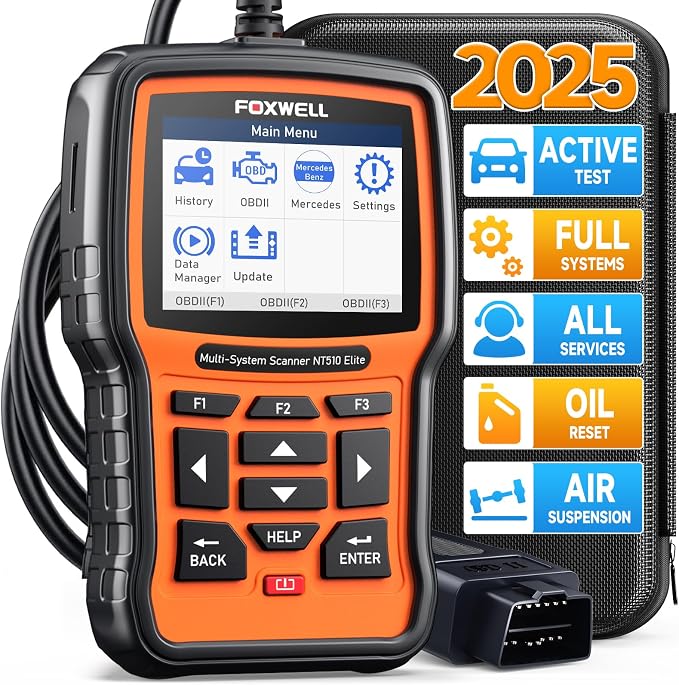 |
FOXWELL NT510 Elite Bi-Directional Scan Tool | Check Price |
| 2 |  |
FOXWELL NT710 Mercedes-Benz Diagnostic Scanner | Check Price |
| 3 |  |
ANCEL AD310 Classic Enhanced Universal OBD II Scanner | Check Price |
| 4 |  |
iCarsoft MB V3.0 Bidirectional Diagnostic Tool | Check Price |
| 5 |  |
OBDMATE OM807 Mercedes-Benz Full-System Diagnostic Scanner | Check Price |
FOXWELL NT510 Elite Bi-Directional Scan Tool
The NT510 Elite is the most balanced option in this group for a Mercedes owner who wants access beyond the powertrain. It can scan modules such as the engine, transmission, brakes, airbag system, suspension, electronic control units, instrument cluster, and body systems. That broader coverage matters when a warning light is not caused by an engine-emissions problem.
Its active-test capability is an important advantage. The scanner can command selected actuators and components, including items such as fuel-pump, throttle, window, mirror, and wiper functions, helping the user confirm whether a component responds. Live data, freeze-frame information, and dual PID graphing can also make intermittent problems easier to understand than a simple stored-code list.
More than 10 maintenance functions add everyday value. Depending on vehicle support, the tool can help with oil service, EPB work, ABS bleeding, suspension-level resets, steering-angle calibration, TPMS service, DPF regeneration, throttle adaptation, and crankshaft relearn. Auto VIN reduces manual menu selection, while the newer CPU, Linux operating system, 32GB memory, bright TFT display, and Wi-Fi updating should make routine operation more convenient.
Pros
- Full-system Mercedes-focused diagnostics with active tests.
- More than 10 maintenance and reset functions.
- Auto VIN, live graphs, freeze-frame data, and Wi-Fi updates.
- Also supports standard OBD II functions on many other vehicles.
Cons
- Some functions depend on the exact vehicle and installed modules.
- Its broad feature set may be more than a casual owner needs.
- The supplied listing does not specify that every function works on every Mercedes model.
My Opinion
This is the strongest overall pick for a Mercedes owner who wants diagnostic depth without moving to a much more specialized professional platform. Confirm the exact model, year, and desired service functions before purchase, especially if suspension, DPF, or advanced adaptation work is important.
FOXWELL NT710 Mercedes-Benz Diagnostic Scanner
The NT710 takes a Mercedes-specific approach and pairs it with a 4.3-inch touchscreen. It reads faults across systems such as ABS, airbags, TPMS, and transmission, while its built-in library of more than 10,000 code definitions can make unfamiliar faults easier for a beginner to interpret. Automatic VIN recognition helps load the appropriate vehicle menu without repeated manual selection.
Bidirectional control is its standout feature. Rather than only displaying a code, the tool can command selected components and observe their response. Cylinder deactivation can help investigate a suspected misfire, while tests for doors, windows, sunroofs, and other actuators can narrow down whether a problem is electrical, mechanical, or control-related.
For home maintenance, the NT710 supports common resets such as oil, brake-pad, and EPB service. It also lists battery registration and air-suspension calibration, which can be useful after replacing a battery or working on a height-control system. Those procedures should be approached carefully because an incorrect command or incomplete calibration can create additional problems. Full OBD II modes, emissions-readiness checks, live data, freeze frames, and Wi-Fi software updates round out the package.
Pros
- Mercedes-focused full-system scanning with touchscreen operation.
- Bidirectional actuator testing for more informed diagnosis.
- Supports battery registration and air-suspension calibration on applicable vehicles.
- Lifetime free updates delivered through Wi-Fi.
Cons
- Its 3.9-star customer rating is lower than the basic ANCEL option.
- Advanced procedures still require correct vehicle-specific instructions.
- Not every listed reset applies to every Mercedes model or equipment level.
My Opinion
The NT710 is a compelling second choice for owners who prioritize an easier touchscreen interface and Mercedes-only functionality. It makes the most sense for someone who expects to perform service resets and active tests, rather than simply turn off an occasional engine light.
ANCEL AD310 Classic Enhanced Universal OBD II Scanner
The AD310 is intentionally simple. It reads and clears engine-related emissions codes, displays live data, shows diagnostic information, and supports standard OBD II protocols including CAN, KWP2000, ISO9141, J1850 VPW, and J1850 PWM. For a Mercedes with a normal 16-pin OBD II connection, that can be enough to identify the general cause of a check-engine light before deciding whether professional diagnosis is needed.
Its compact body and thick 2.5-foot cable suit occasional use. At 12 ounces, it is easy to keep in a glove box, backpack, or garage drawer, and its plug-in design does not depend on a battery or wireless connection. The straightforward interface may appeal to first-time users who would rather see a code than navigate a large menu of advanced functions.
The limitation is fundamental: the AD310 only supports emission-related diagnosis through the OBD II interface. It cannot provide the full Mercedes access offered by the FOXWELL and iCarsoft tools, so it is not the right choice for ABS, SRS, transmission, suspension, or body-module troubleshooting. It also cannot diagnose an OBD I vehicle merely by adding an adapter.
Pros
- Very simple plug-in operation for engine and emissions faults.
- Supports common OBD II communication protocols.
- Compact, lightweight construction with a thick flexible cable.
- Large customer-feedback base and a 4.6-star rating in the supplied data.
Cons
- Cannot diagnose ABS, SRS, transmission, suspension, or other non-emissions modules.
- Requires a compatible OBD II vehicle connection.
- Lacks bidirectional control and advanced service resets.
My Opinion
This is the sensible budget-style choice for a buyer who only wants basic engine-code information. It should not be purchased as a substitute for a Mercedes-focused scanner when the vehicle has airbag, ABS, transmission, or suspension warnings.
iCarsoft MB V3.0 Bidirectional Diagnostic Tool
The iCarsoft MB V3.0 is aimed at owners who want a broad Mercedes-family service platform. The stated coverage includes most Mercedes-Benz, Sprinter, Maybach, and Smart vehicles from 1996 through 2025, with full-system access to areas such as engine, ABS, SRS, transmission control, suspension, electronic parking brake, steering, fuel-pump, and adaptive systems.
Its list of up to 39 service functions is the largest in this group. Depending on the vehicle, those functions may cover oil, steering-angle, EPB, throttle, DPF, TPMS, ABS, suspension, air conditioning, headlamp, battery, injector coding, transmission, AdBlue, clutch, and water-pump-related procedures. Bidirectional testing can command items such as an ABS motor pump, windows, sunroof, and EVAP components.
There are important compatibility qualifications. Pre-2003 Mercedes vehicles may use a 38-pin round diagnostic connector, including examples such as early W202, W210, W140, W208, R170, and R129 applications. A suitable connection arrangement may be necessary, and the tool warns that not every model has every ECU or supports every listed reset. Real-time recording, graph views, data guide, printing, multiple languages, a one-year warranty, and free updating add ownership convenience.
Pros
- Broad stated coverage for Mercedes, Sprinter, Smart, and Maybach vehicles.
- Up to 39 service functions and bidirectional controls.
- Records and graphs live data and supports data guide and printing.
- Includes multiple languages and a one-year warranty.
Cons
- Pre-2003 vehicles may require attention to the 38-pin diagnostic connector.
- Actual functions vary according to the vehicle’s ECUs and equipment.
- Its 3.7-star rating is the lowest among the five supplied products.
My Opinion
This is the most feature-heavy choice on paper, particularly for an owner with several Mercedes-family vehicles or a wide range of service needs. Compatibility checking is essential, and older vehicles deserve special attention before ordering.
OBDMATE OM807 Mercedes-Benz Full-System Diagnostic Scanner
The OM807 targets Mercedes vehicles from approximately 2000 through 2021 that use a 12-volt, 16-pin OBD II diagnostic connector. It goes beyond generic engine codes by scanning systems such as ABS, SRS, engine, and transmission, giving Mercedes owners more information than a basic universal reader.
Fifteen Mercedes-oriented reset functions provide a practical middle ground. Listed capabilities include oil, throttle adaptation, EPB, battery, ABS bleeding, transmission-control adaptation, steering-angle, TPMS, and EGR-related functions. These can potentially reduce the need for a service visit after routine work, but the exact procedure and supported module still depend on the specific vehicle.
The OM807 also works as a universal OBD II reader for compatible vehicles made after 1996. Full basic OBD II functions cover reading and clearing codes, turning off the engine light, and viewing live information. Automatic VIN recognition, fast scanning, a 2.8-inch color screen, lifetime free software updates through Wi-Fi or USB, a one-year warranty, and 24/7 after-sales support make it approachable for home use.
Pros
- Mercedes-focused full-system access for applicable 16-pin vehicles.
- Provides 15 useful reset and adaptation functions.
- Also supports standard OBD II functions across compatible makes.
- Offers Wi-Fi or USB updates, a one-year warranty, and 24/7 support.
Cons
- Stated Mercedes compatibility is concentrated on roughly 2000–2021 vehicles.
- It may not cover newer models or every Mercedes control module.
- The smaller 2.8-inch screen offers less viewing space than the FOXWELL NT710.
My Opinion
The OM807 is a practical option for a Mercedes owner who wants several common resets without paying for the broadest possible feature set. Verify the 16-pin connector, model year, and required service functions before relying on it for a specific repair.
How I Selected These Mercedes Diagnostic Tools
The ranking weighs diagnostic coverage first, because a scanner that only reads engine-emissions codes cannot serve the same buyer as one that reaches ABS, SRS, transmission, suspension, or body modules. I then considered active-test capability, service resets, compatibility details, update methods, interface features, and the clarity of each product’s stated limitations.
Customer feedback was used as supporting evidence rather than as the only deciding factor. The ANCEL has the largest supplied feedback base and the highest rating, but its narrow function set keeps it below the Mercedes-focused tools. FOXWELL ranks higher because its stated system coverage and active tests better match the needs implied by the search topic.
Compatibility matters more than a long feature list. A scanner may list dozens of resets, but the vehicle must have the relevant control module, connector, software support, and equipment for those functions to work.
Brand diversity also matters. Including ANCEL, iCarsoft, OBDMATE, and two FOXWELL choices shows how different products serve different ownership goals instead of assuming that one interface or price class fits every Mercedes driver.
Use a basic reader for initial engine-code information; choose full-system hardware when the warning involves brakes, airbags, suspension, transmission, or body electronics.
How to Choose a Mercedes Diagnostic Scanner
Start with the vehicle’s year, chassis, engine, connector, and the system that needs attention. Then decide whether you need information only, or whether you need to command components and perform service procedures. A scanner should be chosen by its supported functions for your exact car, not by the number of features printed on the box.
- Confirm the Mercedes model year and diagnostic connector.
- Choose full-system access for ABS, SRS, transmission, suspension, or body faults.
- Look for bidirectional control when actuator testing is important.
- Check whether desired resets apply to the vehicle’s specific modules.
- Consider display size, update method, warranty, and support.
Match Coverage to the Warning Light
A check-engine light often falls within standard OBD II coverage, making the AD310 useful for an initial scan. An airbag light, ABS warning, electronic parking-brake issue, or suspension fault usually calls for a tool with Mercedes-specific full-system access. Buying a universal reader for a module it cannot reach leads to wasted money and incomplete diagnosis.
Understand Bidirectional Control
Bidirectional control lets a scanner send selected commands to a vehicle component instead of merely reading stored information. This can help confirm whether a window, pump, throttle, cylinder, or other actuator responds. It is valuable for narrowing a fault, but it is not a guarantee that the scanner can safely command every component on every Mercedes.
Separate Code Reading from Repairs
A diagnostic code identifies a monitored condition, not always the failed part. For example, a sensor-related code may result from wiring, power supply, a connector, software, or the sensor itself. Use live data and freeze-frame information where available, inspect the related circuit, and avoid replacing expensive parts solely because a code description names them.
Compatibility Checks Before Ordering
Write down the exact model, production year, chassis designation if known, engine type, and the desired service. A Mercedes Sprinter, Smart, Maybach, and passenger car may share a brand but not identical module support. Product listings can describe broad coverage while still noting that certain functions depend on installed ECUs.
Older vehicles deserve special attention. The iCarsoft information specifically identifies many pre-2003 Mercedes vehicles with a 38-pin round diagnostic port. A scanner intended for a 16-pin OBD II connector may not connect directly, and an adapter does not automatically guarantee complete communication.
For newer vehicles, confirm software support rather than assuming that a recent model is included because the product page uses a broad year range. Updates can improve coverage, but they do not change the physical connector or add hardware that the vehicle does not have.
Setting Up a Scanner for the First Time
Park safely, switch off unnecessary electrical loads, and locate the diagnostic connector. Plug the tool in firmly before turning on the ignition. If the scanner uses a cable, keep the cable clear of pedals and steering components. For Wi-Fi-enabled tools, connect to a stable network before attempting software updates.
- Record existing warning lights and symptoms before clearing anything.
- Connect the scanner with the ignition off unless its instructions state otherwise.
- Turn the ignition to the required position and allow the tool to identify the VIN.
- Run a complete scan when the concern may involve more than the engine.
- Save codes, freeze-frame data, and live information before erasing faults.
- Update the software only with stable power and a reliable connection.
Do not erase codes immediately just to make the dashboard look normal. Clearing them can remove useful evidence and may reset readiness monitors. Save the information first, investigate the cause, and clear the code only after the repair or diagnostic step is complete.
Using Live Data and Freeze-Frame Information
Live data shows sensor and module information while the vehicle is operating or the ignition is on. Freeze-frame data preserves conditions from the moment a fault was stored, such as engine speed or temperature when supported. Together, these views can reveal whether a problem is constant, intermittent, temperature-related, or linked to a specific operating condition.
Beginners should avoid interpreting one number in isolation. Compare related readings and consider whether the engine is cold or warm, whether the vehicle is running, and whether the value changes when a component is commanded. A graph can make a sudden dropout easier to notice than a list of constantly changing numbers.
Using Active Tests Safely
Active tests can be useful, but they should be treated as controlled diagnostic procedures rather than casual experiments. A commanded fuel pump, window, sunroof, throttle, or ABS component may move or run immediately. Keep hands, tools, and clothing away from moving parts, and make sure the vehicle is in a safe condition before starting a test.
Battery voltage also matters. A weak battery can interrupt communication or cause modules to behave unpredictably during certain procedures. For resets, calibrations, and adaptations, follow the on-screen instructions exactly and do not disconnect the scanner halfway through a process.
Service Resets and Calibrations
Oil resets are generally straightforward when the oil and filter have actually been changed. EPB, ABS bleeding, battery registration, air-suspension calibration, throttle adaptation, injector coding, and transmission procedures deserve more caution because they may affect vehicle operation or require a specific mechanical condition.
Before starting, read the tool’s prompts and confirm that the repair associated with the reset is complete. A reset does not fix a mechanical defect. Registering a new battery, for example, does not repair a charging-system problem, while calibrating suspension height does not correct a leaking air spring.
Keeping Diagnostic Hardware Reliable
Store the scanner in a dry, clean place and avoid leaving it loose in the vehicle where it can be crushed or exposed to heat. Coil the cable loosely rather than bending it sharply near the connector. Wipe the display and housing with a soft, slightly damp cloth; keep liquids away from the diagnostic port and openings.
Install updates periodically, especially before working on a newer vehicle or attempting an advanced service. Keep a written note of the software version, vehicle details, codes, and completed repairs. That record can help identify recurring faults and gives a technician more useful information if the repair moves beyond DIY work.
Common Mistakes to Avoid
Most scanner problems come from choosing the wrong coverage or using a reset as if it were a repair. A careful process protects both the vehicle and the buyer’s budget.
- Do not assume “full OBD II” means access to ABS, SRS, suspension, or transmission modules.
- Do not buy without checking the connector on an older Mercedes.
- Do not clear codes before saving freeze-frame and diagnostic information.
- Do not perform an active test near moving components without securing the work area.
- Do not assume every listed reset works on every model, year, or equipment level.
- Do not interrupt a calibration, registration, or software update.
- Do not replace a part solely because its name appears in a fault description.
When a tool reports that a function is unsupported, treat that message as a compatibility limit—not as proof that the vehicle module is defective.
When a Basic Code Reader Is Enough
A simple reader can be appropriate when the only goal is checking an illuminated engine light, viewing standard emissions data, or checking readiness before an emissions inspection. The AD310 is particularly suited to that narrow use because it is compact, wired, and uncomplicated.
It becomes inadequate when the dashboard warning is related to airbags, brakes, steering, transmission, electronic parking brakes, or suspension. Those systems often require manufacturer-specific communication, so upgrading to a full-system tool is more practical than trying multiple adapters with a basic reader.
When to Seek Professional Help
Stop and seek qualified assistance when a procedure involves an unstable vehicle, brake hydraulics, high-voltage systems, active restraint components, or a fault that returns immediately after clearing. A scanner can provide valuable information without making a repair safe or appropriate for every home garage.
Professional help is also sensible when multiple modules report communication faults, the battery voltage is unstable, or the scan tool repeatedly loses connection. Those symptoms may indicate wiring, power, network, or module problems rather than a single replaceable sensor.
FAQS About Best Mercedes Scan Tool
What is the best scanner for full Mercedes system access?
The FOXWELL NT510 Elite is the strongest overall choice in this selection because it combines access to multiple vehicle systems, active tests, live data, and more than 10 maintenance functions. The FOXWELL NT710 and iCarsoft MB V3.0 are also strong choices when their specific functions match the vehicle.
Can the ANCEL AD310 read Mercedes ABS or airbag codes?
No. The supplied information limits the AD310 to emission-related diagnosis through the OBD II interface. It is not intended for ABS, SRS, transmission, suspension, or body-module faults.
Do Mercedes scan tools work on every Mercedes model?
No. Compatibility varies by model year, chassis, connector, control modules, and software coverage. Some older vehicles use a 38-pin round connector, while the OBDMATE OM807 is specified for 12-volt, 16-pin OBD II Mercedes vehicles from approximately 2000 through 2021.
Is bidirectional control necessary for a Mercedes owner?
It is not necessary for basic engine-code reading, but it is helpful for testing actuators and confirming component responses. It becomes more valuable when diagnosing intermittent electrical, body, fuel, throttle, window, sunroof, or ABS-related concerns.
Can a scan tool reset Mercedes service lights?
Several products here support oil, EPB, ABS, battery, steering-angle, TPMS, suspension, or other resets on applicable vehicles. The available procedure depends on the car’s equipment and control modules, so confirm support before purchase and follow the tool’s instructions carefully.
Should I clear a Mercedes fault code after scanning?
Save the code and any freeze-frame information first. Clear it only after investigating or correcting the problem. A cleared code may return if the underlying fault remains, and clearing it too early can remove useful diagnostic evidence.
Final Thoughts
The best mercedes scan tool depends on the depth of diagnosis required. For the broadest balance, choose the FOXWELL NT510 Elite Bi-Directional Scan Tool; for a touchscreen Mercedes-focused alternative, choose the FOXWELL NT710; and for simple engine-emissions checks, the ANCEL AD310 Classic Enhanced Universal OBD II Scanner is the practical third choice. Always verify the exact connector, model year, and service functions before ordering.